
Seleziona la lingua

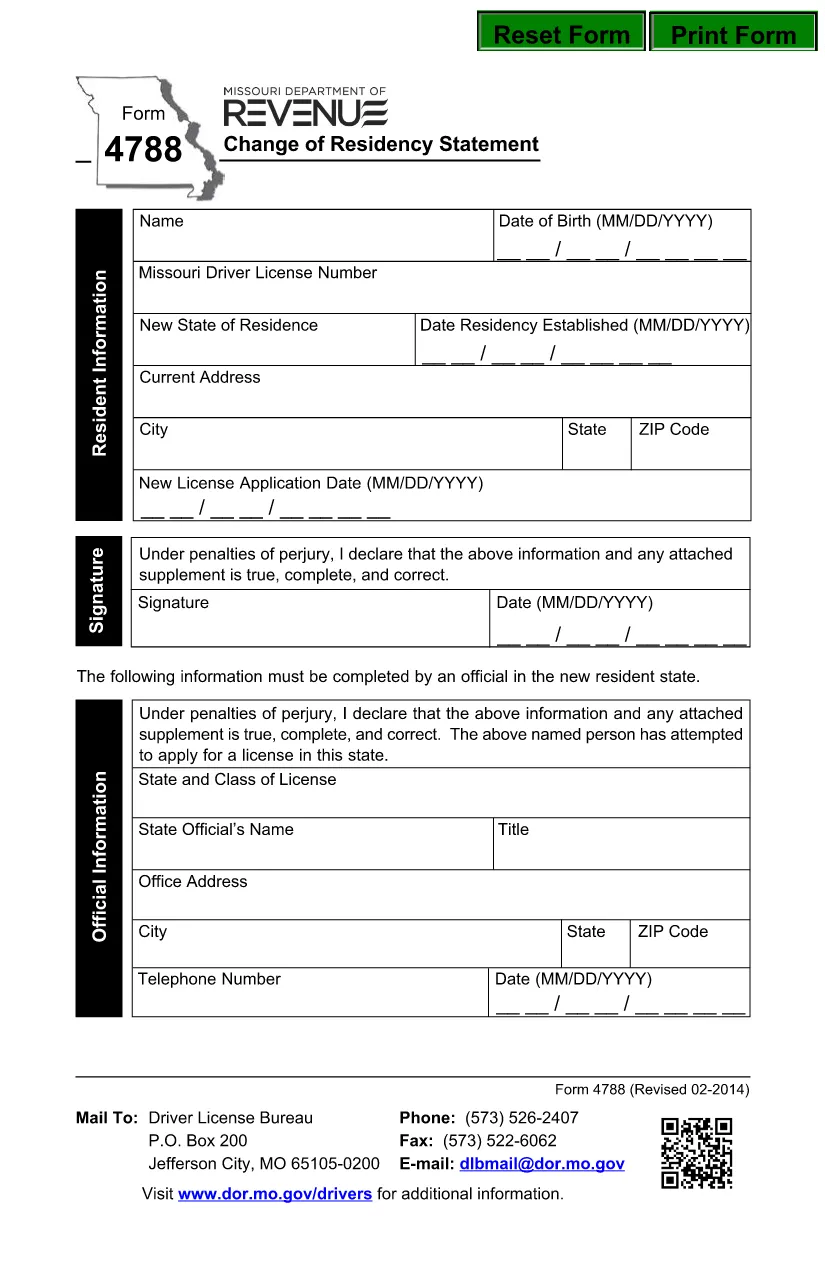
Form 4788 – Change of Residency Statement (Fillable PDF)

  1. Lingua Inglese
  2. Paese Stati Uniti d'America
  3. Attività Patente di guida
  4. Stato Missouri
Compila questo modulo
Form 4788 – Change of Residency Statement (Fillable PDF)

Form 4788, the Change of Residency Statement, is the official document required by the Missouri Department of Revenue when you move into or out of Missouri and need to update your tax residency status. The form must be signed under penalty of perjury, making accuracy essential.

What Is Form 4788?

This form serves as a declaration that you have changed your residency and provides the Department of Revenue with the information needed to adjust state tax withholdings, refunds, and future filings. It is a simple, one‑page PDF that can be completed electronically.

Who Must File Form 4788?

  • Individuals who have moved to Missouri from another state.
  • Missouri residents who have established a new primary residence outside the state.
  • Employees whose employer needs an updated residency status for state tax withholding.

How to Complete the Form Online

Instead of downloading the PDF and using a separate editor, simply click the "Fill out this form" button on this page. The Formize PDF Filler app will load instantly, allowing you to type directly into each field.

Common Mistakes to Avoid

  • Incorrect dates: Use the exact move‑in or move‑out date (MM/DD/YYYY).
  • Missing signature: The form is not valid without a handwritten or electronic signature.
  • Wrong address format: Include street, city, state, and ZIP code.
  • Leaving optional fields blank: Even if a field says "optional," fill it with "N/A" if it does not apply.

Download & Save Your Completed Form

After you finish, you can download the completed PDF, print it for your records, or submit it directly to the Missouri Department of Revenue via mail or their online portal.

Need help? Review the step‑by‑step guide below or check the FAQs for quick answers.

FAQ
  • Do I need to file Form 4788 if I only lived in Missouri for a few months?

    Yes. Any change in primary residence—whether you moved in or out—requires filing Form 4788 to update your state tax status.

  • Can I submit Form 4788 electronically?

    The Missouri Department of Revenue currently accepts mailed forms. However, you can fill it out online with Formize, save the PDF, and mail the printed copy.

  • What if I make a mistake after submitting?

    Contact the Missouri Department of Revenue immediately. You may need to submit a corrected Form 4788 with a new signature.

  • Is there a filing fee for Form 4788?

    No. Form 4788 is a free residency declaration; there are no processing fees.

  • How long does it take for the Department to process the change?

    Processing typically takes 2‑3 weeks after the mailed form is received, but you can check the status by contacting the Department of Revenue.

  • Can I use the same form for a business address change?

    Form 4788 is intended for individual residency changes. Businesses should use the appropriate Missouri business address change form.

  • Do I need to attach supporting documents?

    Usually a copy of a driver’s license, utility bill, or lease agreement proving the new address is recommended, though not mandatory.

  • What if I’m a non‑resident working in Missouri?

    You still need to file Form 4788 to inform the state of your residency status for accurate tax withholding.

COME

Come compilare Form 4788 gratuitamente, online in 5 semplici passaggi:

  1. 1
    Click the Fill Button
    Press the "Fill out this form" button on the page. The Formize PDF Filler app will open in a new window.
  2. 2
    Wait for the Filler to Load
    The app loads in seconds. You’ll see editable fields appear directly on the PDF.
  3. 3
    Enter Your Information
    Type your name, addresses, dates, and any other required details into each highlighted field.
  4. 4
    Add Your Signature
    Use the built‑in signature tool to sign electronically, or print later to sign by hand.
  5. 5
    Save or Submit
    Click "Download" to save a copy, or follow the instructions to email or mail the completed form to the Missouri Department of Revenue.
App Formize PDF Filler
DI

Moduli per la richiesta della patente di guida

Nella maggior parte dei paesi, è obbligatorio avere una patente di guida prima di mettersi in viaggio. Ottenere una patente di guida è un traguardo importante per chiunque voglia guidare un'auto.

Form 4788 è uno dei moduli di domanda di patente di guida che sono documenti utilizzati per raccogliere informazioni da persone che vogliono richiedere una patente di guida. Di solito contiene campi per il nome del richiedente, la data di nascita, il numero ID, le informazioni di contatto, nonché la cronologia e l'esperienza della patente di guida.

CARATTERISTICHE

Compilatore PDF

Il modo più semplice per compilare moduli PDF online

  • Compila rapidamente Form 4788
    Cerchi un modo per compilare rapidamente Form 4788 online? Con il nostro compilatore di moduli PDF gratuito online, saprai come modificare e compilare questo documento PDF in meno di un minuto.
  • Editor PDF online facile da usare
    Stufo di stampare file PDF in modo da poterli modificare, prima di riscansionarli e rispedirli? Modifica documenti PDF gratuitamente online. Utilizza il nostro editor PDF online per risparmiare tempo e carta.
  • Grandi strumenti, tutte le piattaforme
    Ti stai chiedendo come inserire Form 4788 su un Mac o forse come utilizzare un riempitivo PDF gratuito? I nostri strumenti PDF online funzionano su tutte le piattaforme.
  • Archiviazione sicura dei file
    I file "Form 4788" completati vengono archiviati in un database protetto gestito dall'hosting Amazon Cloud. Puoi eliminare i tuoi file dal nostro sistema in qualsiasi momento. In ogni caso, questi file vengono automaticamente cancellati dopo 24 ore.
  • Chatta con {parola chiave}
    Chatta con "Form 4788" su Chatize che è un assistente di lettura PDF gratuito. Fai domande e ottieni risposte da "Form 4788". Basta fare clic sul pulsante Chatta con il documento in alto.

Elimina sessione di riempimento

Eliminare la sessione di riempimento selezionata? In questo caso, i progressi nella compilazione del modulo andranno persi.

Elimina la sessione di modifica

Eliminare la sessione di editing selezionata? In questo caso, i tuoi progressi nella creazione e modifica del modulo andranno persi.