
Seleziona la lingua

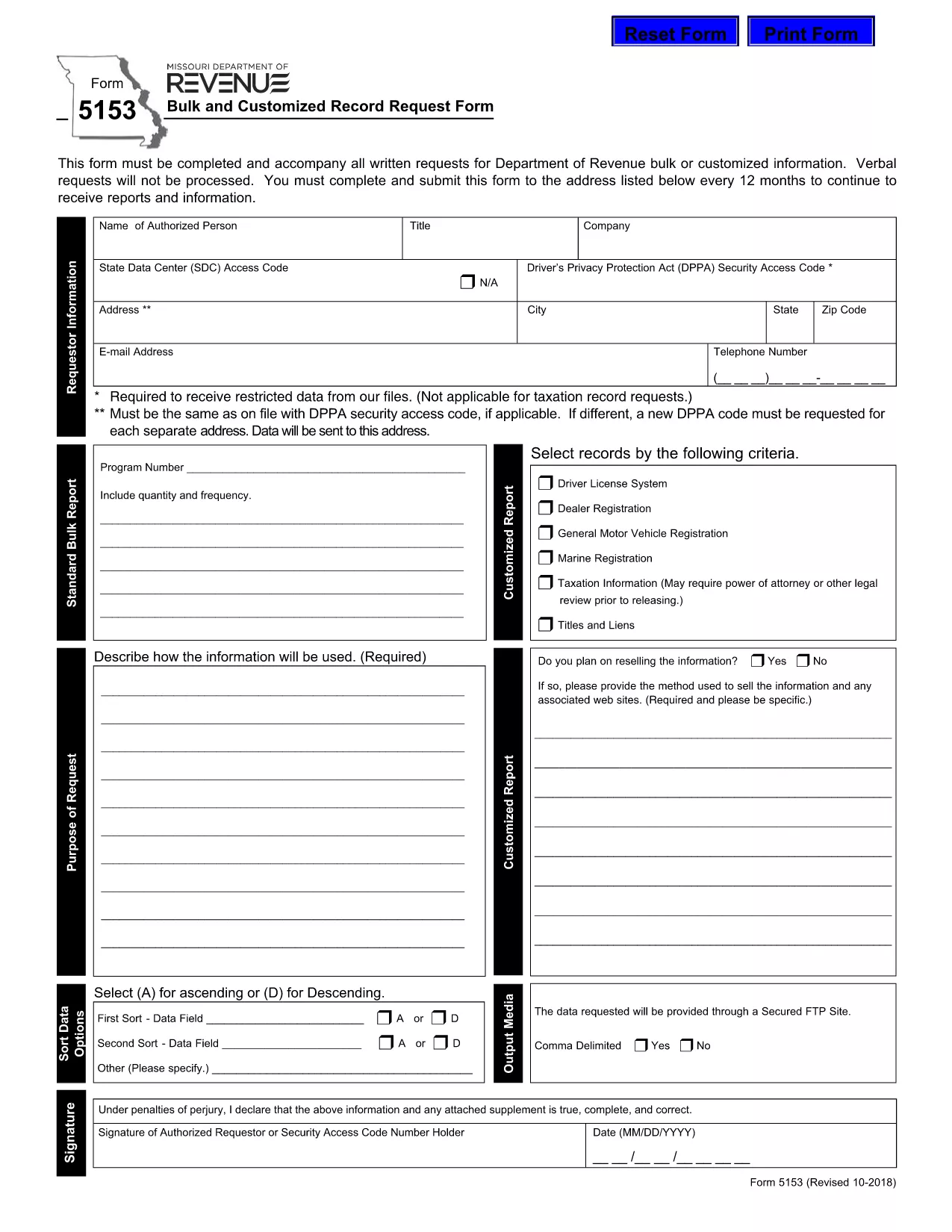
Form 5153 – Bulk and Customized Record Request

  1. Lingua Inglese
  2. Paese Stati Uniti d'America
  3. Attività Patente di guida
  4. Stato Missouri
Compila questo modulo
Form 5153 – Bulk and Customized Record Request

The Missouri Department of Revenue requires Form 5153 for any bulk or customized request for tax records. This form must accompany every written request; verbal requests are not processed.

What is Form 5153?

Form 5153, titled Bulk and Customized Record Request Form, authorizes the Department of Revenue to release large sets of tax data or specific customized information to the requester. It is used by businesses, researchers, and legal representatives who need extensive revenue data.

How to Fill Form 5153 Online

Instead of downloading and editing the PDF manually, simply click the “Fill out this form” button on this page. The Formize PDF Filler app will load the fillable version of Form 5153 directly in your browser.

  • Step 1: Click the blue “Fill out this form” button.
  • Step 2: Wait a few seconds while the Formize PDF Filler loads.
  • Step 3: Complete each field. The filler validates dates, numbers, and required entries in real time.
  • Step 4: When finished, click Save & Download to store a copy on your computer.
  • Step 5: Print the saved PDF, sign where required, and mail it to the address listed on the form.

Common Mistakes to Avoid

Even with an online filler, errors can cause delays. Keep these tips in mind:

  • Do not leave required fields blank – the filler will highlight them.
  • Use the exact legal name of the requesting entity.
  • Provide a complete, current mailing address.
  • Double‑check the date format (MM/DD/YYYY).
  • Ensure the signature line is signed after printing – electronic signatures are not accepted for this form.

Submission Guidelines

After printing and signing, mail the completed Form 5153 to the address shown on the last page of the PDF. Include any supporting documentation required for your specific request. Keep a copy of the signed form for your records.

Download the Fillable PDF

If you prefer the traditional method, you can download the original fillable PDF directly from the Missouri Department of Revenue:

Download Form 5153 (PDF)

FAQ
  • What is the purpose of Form 5153?

    Form 5153 is used to request bulk or customized tax records from the Missouri Department of Revenue.

  • Can I submit Form 5153 electronically?

    No. After completing the form online, you must print, sign, and mail it to the Department of Revenue.

  • How often can I submit Form 5153?

    You may submit the form once every 12 months for the same type of request.

  • Is there a fee for filing Form 5153?

    The form itself is free, but the Department may charge fees for processing large data requests.

  • What should I do if I make a mistake on the form?

    Print a new copy, correct the error, and submit the revised form. Do not send a corrected version of a previously mailed form.

  • Where do I mail the completed Form 5153?

    The mailing address is printed on the last page of the PDF. Verify the address on the form before sending.

  • Can I request records for multiple entities on one Form 5153?

    Each entity requires its own separate Form 5153 to ensure proper processing.

COME

Come compilare Form 5153 gratuitamente, online in 4 semplici passaggi:

  1. 1
    Open the Fillable Form
    Click the blue “Fill out this form” button on the page. The Formize PDF Filler loads the fillable version of Form 5153 directly in your browser.
  2. 2
    Complete the Fields
    Enter all required information. The filler validates entries in real time, highlighting any missing or incorrect data.
  3. 3
    Save and Download
    When all fields are completed, click “Save & Download” to store a copy on your computer.
  4. 4
    Print, Sign, and Mail
    Print the saved PDF, sign the required signature line, and mail the form to the address listed on the last page.
App Formize PDF Filler
DI

Moduli per la richiesta della patente di guida

Nella maggior parte dei paesi, è obbligatorio avere una patente di guida prima di mettersi in viaggio. Ottenere una patente di guida è un traguardo importante per chiunque voglia guidare un'auto.

Form 5153 è uno dei moduli di domanda di patente di guida che sono documenti utilizzati per raccogliere informazioni da persone che vogliono richiedere una patente di guida. Di solito contiene campi per il nome del richiedente, la data di nascita, il numero ID, le informazioni di contatto, nonché la cronologia e l'esperienza della patente di guida.

CARATTERISTICHE

Compilatore PDF

Il modo più semplice per compilare moduli PDF online

  • Compila rapidamente Form 5153
    Cerchi un modo per compilare rapidamente Form 5153 online? Con il nostro compilatore di moduli PDF gratuito online, saprai come modificare e compilare questo documento PDF in meno di un minuto.
  • Editor PDF online facile da usare
    Stufo di stampare file PDF in modo da poterli modificare, prima di riscansionarli e rispedirli? Modifica documenti PDF gratuitamente online. Utilizza il nostro editor PDF online per risparmiare tempo e carta.
  • Grandi strumenti, tutte le piattaforme
    Ti stai chiedendo come inserire Form 5153 su un Mac o forse come utilizzare un riempitivo PDF gratuito? I nostri strumenti PDF online funzionano su tutte le piattaforme.
  • Archiviazione sicura dei file
    I file "Form 5153" completati vengono archiviati in un database protetto gestito dall'hosting Amazon Cloud. Puoi eliminare i tuoi file dal nostro sistema in qualsiasi momento. In ogni caso, questi file vengono automaticamente cancellati dopo 24 ore.
  • Chatta con {parola chiave}
    Chatta con "Form 5153" su Chatize che è un assistente di lettura PDF gratuito. Fai domande e ottieni risposte da "Form 5153". Basta fare clic sul pulsante Chatta con il documento in alto.

Elimina sessione di riempimento

Eliminare la sessione di riempimento selezionata? In questo caso, i progressi nella compilazione del modulo andranno persi.

Elimina la sessione di modifica

Eliminare la sessione di editing selezionata? In questo caso, i tuoi progressi nella creazione e modifica del modulo andranno persi.