
Seleziona la lingua

SBTS-601 Personal History Form – Fillable PDF for NC Driver Training Schools

  1. Lingua Inglese
  2. Paese Stati Uniti d'America
  3. Attività Patente di guida
  4. Stato Carolina del Nord
Compila questo modulo
SBTS-601 Personal History Form – Fillable PDF for NC Driver Training Schools

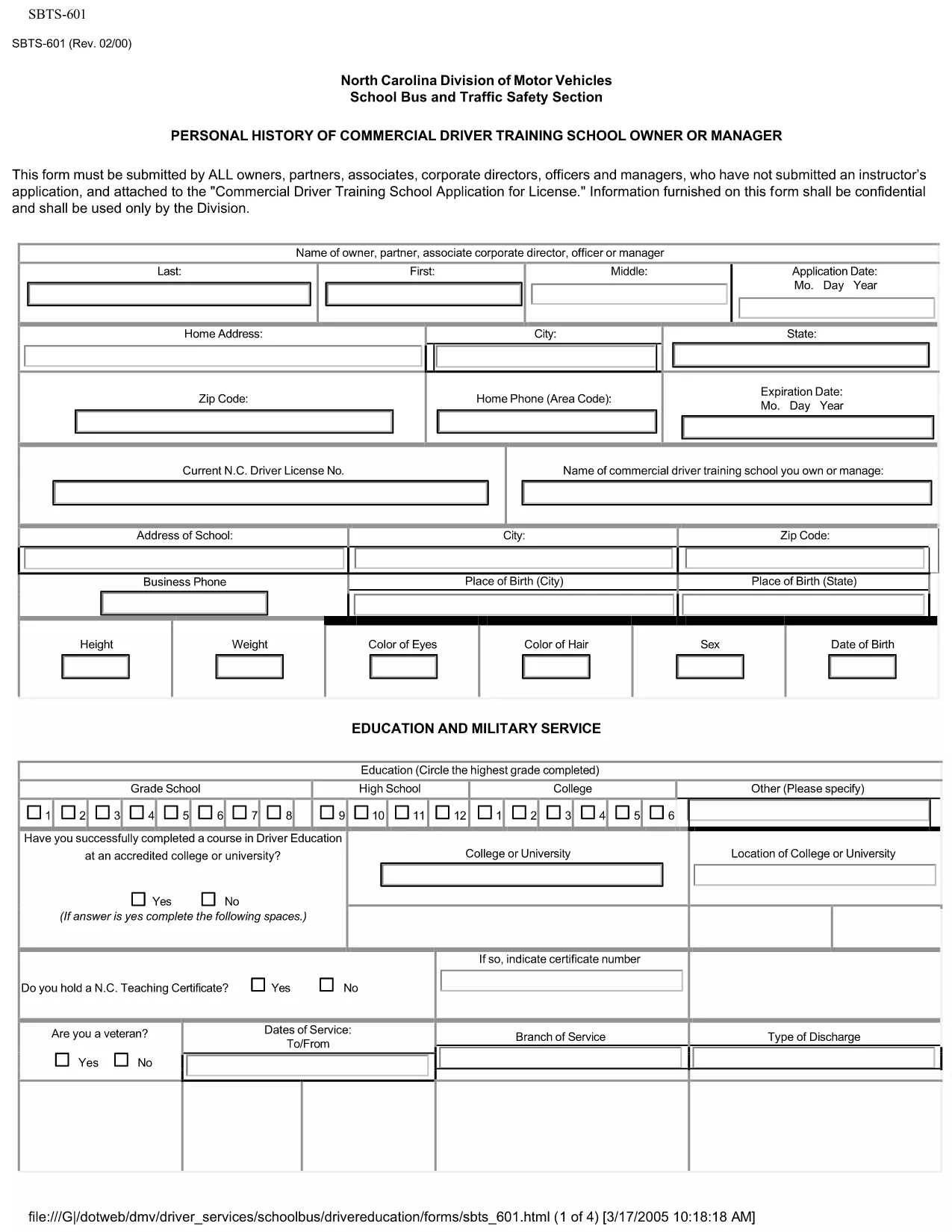
The SBTS‑601 Personal History form is required by the North Carolina Department of Transportation (NCDOT) for every owner, partner, corporate director, officer, or manager of a Commercial Driver Training School who has not previously submitted an instructor’s application. This confidential questionnaire helps the State evaluate the background of school leadership before issuing a training school license.

Our fillable PDF version lets you complete the form quickly, securely, and without printing. Simply click the "Fill out this form" button below and the Formize PDF Filler app will load the document ready for you to enter data.

What Is SBTS-601?

SBTS‑601 collects personal history details such as employment background, criminal record, driving violations, and financial information. The data is used solely for licensing decisions and is kept confidential by the NCDOT.

Who Must Complete This Form

  • Owners, partners, or shareholders of a commercial driver training school
  • Corporate officers, directors, and managers involved in school operations
  • Anyone who has not already submitted an instructor application (SBTS‑602)

How to Fill Out SBTS-601 Online

Follow the simple steps in the "How‑To" section below. The online filler saves your progress, validates required fields, and lets you download a completed PDF ready for submission.

Common Mistakes to Avoid

  • Leaving required fields blank – the filler will highlight missing information.
  • Providing outdated addresses or phone numbers – ensure all contact details are current.
  • Omitting prior convictions or driving violations – full disclosure is mandatory.
  • Submitting the form without the required supporting documents (e.g., driver’s license copy, background check).

Where to Submit the Completed Form

After you download the completed SBTS‑601 PDF, mail or hand‑deliver it to the NCDOT – School Bus and Traffic Safety Department at the address listed on the form. Include any required attachments and the applicable filing fee.

Need help? Review the FAQs below or contact the NCDOT Driver Services Division.

FAQ
  • Who is required to submit SBTS‑601?

    All owners, partners, corporate officers, directors, and managers of a commercial driver training school who have not already filed an instructor application must submit SBTS‑601.

  • Can I submit SBTS‑601 electronically?

    The NCDOT currently accepts only printed and signed PDFs. Use the fillable version to complete the form, then print and mail it.

  • What supporting documents are needed?

    Attach a copy of your driver’s license, a recent criminal background check, and any relevant financial statements as listed on the form.

  • How long does the approval process take?

    After the completed SBTS‑601 is received, the NCDOT typically reviews the application within 15‑20 business days, provided all required information is included.

  • Is the information on SBTS‑601 kept confidential?

    Yes. All data submitted on SBTS‑601 is confidential and used solely for licensing decisions by the NCDOT.

  • What if I make a mistake after submitting?

    Contact the NCDOT School Bus and Traffic Safety Department immediately. They may allow you to submit an amended form or additional documentation.

  • Is there a filing fee for SBTS‑601?

    A processing fee is required when you submit the complete application package. Refer to the form’s instructions for the current amount.

COME

Come compilare SBTS-601 gratuitamente, online in 4 semplici passaggi:

  1. 1
    Open the Fillable Form
    Click the "Fill out this form" button on the page. The Formize PDF Filler app will open the SBTS‑601 document directly in your browser.
  2. 2
    Enter Your Information
    Complete each section. Required fields are highlighted in red and will prevent you from saving until they are filled.
  3. 3
    Review & Validate
    Use the "Validate" button to check for missing or incorrectly formatted data. Correct any issues shown.
  4. 4
    Download the Completed PDF
    When all fields are complete, click "Download" to save the filled PDF. Print and submit it to the NCDOT as instructed on the form.
App Formize PDF Filler
DI

Moduli per la richiesta della patente di guida

SBTS-601 è uno dei moduli di patente di guida che sono documenti utilizzati per richiedere la patente di guida o per richiedere vari servizi relativi alle patenti di guida. Questi moduli sono generalmente forniti dal dipartimento o dall'agenzia responsabile del rilascio delle patenti di guida in una giurisdizione specifica, come il Dipartimento dei veicoli a motore (DMV) negli Stati Uniti.

I moduli comuni della patente di guida includono:

Richiesta patente di guida: questo modulo viene utilizzato per richiedere una nuova patente di guida o per rinnovare quella esistente. In genere richiede informazioni personali come nome, indirizzo, data di nascita e numero di previdenza sociale.

Documenti di identificazione: alcune giurisdizioni richiedono documenti di identificazione specifici per verificare l'identità e la residenza del richiedente. Questi possono includere moduli come certificato di nascita, passaporto o tessera di previdenza sociale.

Esame della vista: molte domande di patente di guida richiedono un modulo per l'esame della vista, in cui un medico o uno specialista oculista autorizzato certifica che il richiedente soddisfa i requisiti minimi di vista per la guida.

Moduli di formazione di guida: in alcuni casi, le persone potrebbero dover fornire la prova del completamento di un corso di formazione di guida, come un certificato di completamento della formazione di guida o un modulo firmato da un istruttore.

Valutazione medica: alcune condizioni mediche potrebbero richiedere la compilazione di moduli aggiuntivi da parte di un operatore sanitario. Questi moduli verificano l'idoneità fisica e mentale del richiedente alla guida.

Modulo di modifica dell'indirizzo: se il titolare della patente di guida si trasferisce a un nuovo indirizzo, potrebbe dover compilare un modulo di modifica dell'indirizzo per aggiornare le informazioni sulla patente di guida.

I moduli della patente di guida possono essere ottenuti presso l'ufficio DMV locale o scaricati dal loro sito web. È importante compilare e inviare attentamente i moduli richiesti insieme a tutti i documenti giustificativi per garantire un processo di richiesta o servizio senza intoppi.

CARATTERISTICHE

Compilatore PDF

Il modo più semplice per compilare moduli PDF online

  • Compila rapidamente SBTS-601
    Cerchi un modo per compilare rapidamente SBTS-601 online? Con il nostro compilatore di moduli PDF gratuito online, saprai come modificare e compilare questo documento PDF in meno di un minuto.
  • Editor PDF online facile da usare
    Stufo di stampare file PDF in modo da poterli modificare, prima di riscansionarli e rispedirli? Modifica documenti PDF gratuitamente online. Utilizza il nostro editor PDF online per risparmiare tempo e carta.
  • Grandi strumenti, tutte le piattaforme
    Ti stai chiedendo come inserire SBTS-601 su un Mac o forse come utilizzare un riempitivo PDF gratuito? I nostri strumenti PDF online funzionano su tutte le piattaforme.
  • Archiviazione sicura dei file
    I file "SBTS-601" completati vengono archiviati in un database protetto gestito dall'hosting Amazon Cloud. Puoi eliminare i tuoi file dal nostro sistema in qualsiasi momento. In ogni caso, questi file vengono automaticamente cancellati dopo 24 ore.
  • Chatta con {parola chiave}
    Chatta con "SBTS-601" su Chatize che è un assistente di lettura PDF gratuito. Fai domande e ottieni risposte da "SBTS-601". Basta fare clic sul pulsante Chatta con il documento in alto.

Elimina sessione di riempimento

Eliminare la sessione di riempimento selezionata? In questo caso, i progressi nella compilazione del modulo andranno persi.

Elimina la sessione di modifica

Eliminare la sessione di editing selezionata? In questo caso, i tuoi progressi nella creazione e modifica del modulo andranno persi.