
Seleziona la lingua

Virginia DL 569 Emergency Contact Application (Fillable PDF)

  1. Paese Stati Uniti d'America
  2. Lingua Inglese
  3. Attività Patente di guida
  4. Stato Virginia
Compila questo modulo
Virginia DL 569 Emergency Contact Application (Fillable PDF)

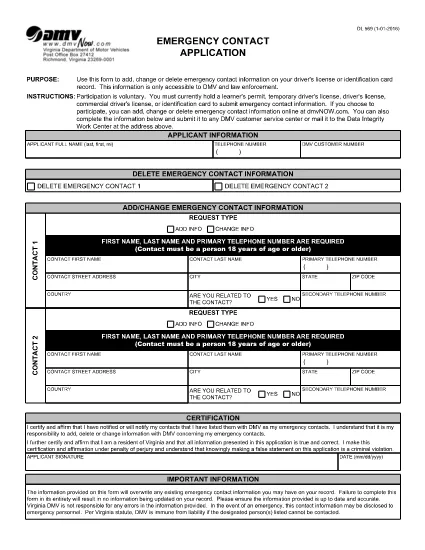
The DL 569 is the Virginia Department of Motor Vehicles (DMV) Emergency Contact Application. It lets you add, change, or delete emergency contact information linked to your driver’s license or state ID. Keeping this information up‑to‑date can help law enforcement and DMV staff reach your designated contacts quickly in an emergency.

What Is the DL 569 Form?

This form is a short, printable PDF that captures:

  • Primary and secondary emergency contacts
  • Relationship to you
  • Phone numbers and mailing address
  • Signature and date

Because it’s a fillable PDF, you can complete it directly in your browser without needing special software.

How to Fill Out the DL 569 Online

Instead of downloading the PDF and opening a separate editor, simply click the “Fill out this form” button on this page. The Formize PDF Filler will load instantly, allowing you to type, select, and sign the form online.

  1. Click Fill out this form below.
  2. The Formize PDF Filler app opens in a new tab.
  3. Enter each field carefully – the form will highlight required sections.
  4. Save your progress at any time with the Save button.
  5. When finished, click Submit to download the completed PDF.

Common Mistakes to Avoid

  • Leaving a required field blank – the filler will block submission.
  • Entering an incorrect phone format (use 10‑digit numbers without dashes).
  • Forgetting to sign and date the form.
  • Using a non‑Virginia address for a Virginia driver’s license.

Where to Submit Your Completed Form

After you download the completed PDF, you can:

  • Mail it to your local Virginia DMV office.
  • Drop it off in person at any DMV service center.
  • Upload it via the Virginia DMV online portal if you have an account.

Make sure to keep a copy for your records.

FAQ
  • Do I need Adobe Acrobat to fill out DL 569?

    No. The Formize PDF Filler works in any modern browser, so you can complete the form without installing additional software.

  • Can I edit the form after I download it?

    Yes, but you’ll need a PDF editor. To avoid extra steps, finish all edits in the online filler before downloading.

  • Is there a fee to submit the DL 569?

    No. The Emergency Contact Application is free to complete and submit.

  • How long does the DMV keep my emergency contact information?

    The DMV retains the information as long as your driver’s license or ID is active. Update the form whenever contacts change.

  • What if I make a mistake on the form?

    Simply reopen the fillable PDF, correct the error, and download a new version before submitting.

  • Can I submit the form electronically?

    Yes, if you have a Virginia DMV online account you can upload the completed PDF directly through the portal.

  • Do I need to provide both a primary and secondary contact?

    Providing a secondary contact is optional but recommended for added safety.

  • Is the DL 569 accepted for non‑Virginia licenses?

    The form is specific to Virginia driver’s licenses and state IDs only.

COME

Come compilare DL 569 gratuitamente, online in 5 semplici passaggi:

  1. 1
    Open the Fillable Form
    Click the "Fill out this form" button below. The Formize PDF Filler loads instantly in a new browser tab.
  2. 2
    Enter Your Information
    Type your emergency contacts, relationship, phone numbers, and address directly into the highlighted fields.
  3. 3
    Save and Review
    Use the Save button to keep a draft. Review each entry for accuracy before finalizing.
  4. 4
    Submit and Download
    When all fields are completed, click Submit to generate a finished PDF. Download and keep a copy for your records.
  5. 5
    Send to the DMV
    Mail, drop off, or upload the completed PDF to your nearest Virginia DMV office.
App Formize PDF Filler
DI

Moduli per la richiesta della patente di guida

Nella maggior parte dei paesi, è obbligatorio avere una patente di guida prima di mettersi in viaggio. Ottenere una patente di guida è un traguardo importante per chiunque voglia guidare un'auto.

DL 569 è uno dei moduli di domanda di patente di guida che sono documenti utilizzati per raccogliere informazioni da persone che vogliono richiedere una patente di guida. Di solito contiene campi per il nome del richiedente, la data di nascita, il numero ID, le informazioni di contatto, nonché la cronologia e l'esperienza della patente di guida.

CARATTERISTICHE

Compilatore PDF

Il modo più semplice per compilare moduli PDF online

  • Compila rapidamente DL 569
    Cerchi un modo per compilare rapidamente DL 569 online? Con il nostro compilatore di moduli PDF gratuito online, saprai come modificare e compilare questo documento PDF in meno di un minuto.
  • Editor PDF online facile da usare
    Stufo di stampare file PDF in modo da poterli modificare, prima di riscansionarli e rispedirli? Modifica documenti PDF gratuitamente online. Utilizza il nostro editor PDF online per risparmiare tempo e carta.
  • Grandi strumenti, tutte le piattaforme
    Ti stai chiedendo come inserire DL 569 su un Mac o forse come utilizzare un riempitivo PDF gratuito? I nostri strumenti PDF online funzionano su tutte le piattaforme.
  • Archiviazione sicura dei file
    I file "DL 569" completati vengono archiviati in un database protetto gestito dall'hosting Amazon Cloud. Puoi eliminare i tuoi file dal nostro sistema in qualsiasi momento. In ogni caso, questi file vengono automaticamente cancellati dopo 24 ore.
  • Chatta con {parola chiave}
    Chatta con "DL 569" su Chatize che è un assistente di lettura PDF gratuito. Fai domande e ottieni risposte da "DL 569". Basta fare clic sul pulsante Chatta con il documento in alto.

Elimina sessione di riempimento

Eliminare la sessione di riempimento selezionata? In questo caso, i progressi nella compilazione del modulo andranno persi.

Elimina la sessione di modifica

Eliminare la sessione di editing selezionata? In questo caso, i tuoi progressi nella creazione e modifica del modulo andranno persi.