
Seleziona la lingua

Wisconsin Identification Card Application (Form MV3004) – Fillable PDF

  1. Lingua Inglese
  2. Paese Stati Uniti d'America
  3. Attività Patente di guida
  4. Stato Wisconsin
Compila questo modulo
Wisconsin Identification Card Application (Form MV3004) – Fillable PDF

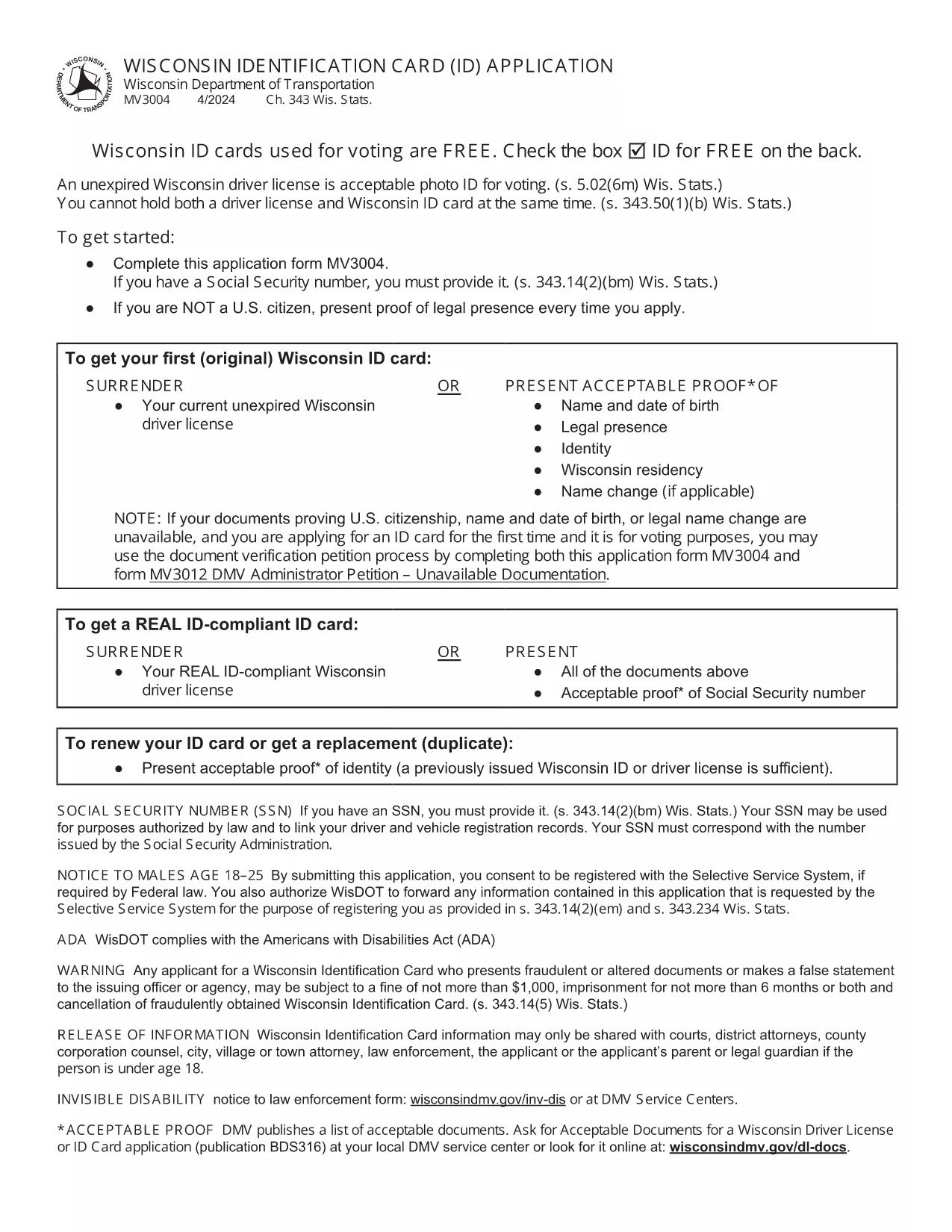
Form MV3004 is the official Wisconsin Identification Card (ID) application issued by the Wisconsin Department of Transportation (DOT). Whether you need an ID for voting, travel, or everyday identification, this fillable PDF lets you complete the entire request from the comfort of your home.

What Is Form MV3004?

The MV3004 form collects personal details, proof‑of‑citizenship documents, and a photo consent statement. It is required for first‑time applicants, name changes, or renewals when a new photo is needed.

How to Complete the MV3004 Online

Instead of downloading and editing the PDF manually, simply click the "Fill out this form" button on this page. The Formize PDF Filler app will load directly in your browser, allowing you to type, select, and sign without any extra software.

  • Step 1: Click the button and wait for the Formize PDF Filler to appear.
  • Step 2: Enter your name, address, date of birth, and other required information.
  • Step 3: Upload scanned copies of your citizenship and name‑change documents.
  • Step 4: Review the completed form for accuracy.
  • Step 5: Submit the form electronically or print it for mailing.

Common Mistakes to Avoid

  • Leaving any required field blank – the online filler will highlight missing data.
  • Uploading blurry or non‑PDF supporting documents – use clear, high‑resolution scans.
  • Signing with a stylus that does not create a vector signature – use the built‑in signature tool.
  • Mismatching the name on your ID with the name on supporting documents – ensure exact spelling.

Where to Submit Your Completed Form

After you finish, you have two options:

  • Electronic submission: Save the completed PDF and email it to your local DMV office (check the Wisconsin DOT contact page for the correct address).
  • Mail submission: Print the form, attach your original documents or certified copies, and mail everything to the address listed on the form.

Processing typically takes 7‑10 business days. Keep a copy of the submitted PDF for your records.

FAQ
  • Who needs to fill out Form MV3004?

    Anyone applying for a Wisconsin state identification card for the first time, changing their legal name, or needing a new photo on an existing ID.

  • Can I submit the form online?

    Yes. After completing the fillable PDF, you can email the file to your local DMV office. Check the Wisconsin DOT website for the correct email address.

  • What documents must I attach?

    Proof of U.S. citizenship (e.g., birth certificate or passport), a legal name‑change document if applicable, and a recent head‑shot photo if a new picture is required.

  • How long does processing take?

    Standard processing is 7‑10 business days after the DMV receives a complete application and supporting documents.

  • Is there a fee for the Wisconsin ID card?

    Yes. As of 2026, the fee is $30 for a standard ID card. Check the latest fee schedule on the Wisconsin DOT website.

  • What if I make a mistake on the form?

    If you notice an error after submission, contact your local DMV office immediately. In most cases, you can submit a corrected form without paying an additional fee.

  • Do I need a notarized signature?

    No. The electronic signature created in the Formize PDF Filler is accepted for the MV3004 application.

  • Can I use a mobile device to fill out MV3004?

    Yes. The Formize PDF Filler works on modern smartphones and tablets, but a larger screen makes it easier to review scanned documents.

COME

Come compilare MV3004 gratuitamente, online in 5 semplici passaggi:

  1. 1
    Open the Fillable Form
    Click the "Fill out this form" button on the page. The Formize PDF Filler loads instantly in your browser.
  2. 2
    Enter Your Information
    Type your personal details into each field. Use the dropdown menus for state, gender, and document types.
  3. 3
    Upload Supporting Documents
    Attach clear PDF or JPEG scans of your citizenship proof, name‑change documents, and a recent photo if required.
  4. 4
    Review and Sign
    Double‑check every entry, then use the built‑in signature tool to add your electronic signature.
  5. 5
    Submit or Print
    Save the completed PDF. You can either email it directly to your local DMV office or print it for postal submission.
App Formize PDF Filler
DI

Moduli per la richiesta della patente di guida

Nella maggior parte dei paesi, è obbligatorio avere una patente di guida prima di mettersi in viaggio. Ottenere una patente di guida è un traguardo importante per chiunque voglia guidare un'auto.

MV3004 è uno dei moduli di domanda di patente di guida che sono documenti utilizzati per raccogliere informazioni da persone che vogliono richiedere una patente di guida. Di solito contiene campi per il nome del richiedente, la data di nascita, il numero ID, le informazioni di contatto, nonché la cronologia e l'esperienza della patente di guida.

CARATTERISTICHE

Compilatore PDF

Il modo più semplice per compilare moduli PDF online

  • Compila rapidamente MV3004
    Cerchi un modo per compilare rapidamente MV3004 online? Con il nostro compilatore di moduli PDF gratuito online, saprai come modificare e compilare questo documento PDF in meno di un minuto.
  • Editor PDF online facile da usare
    Stufo di stampare file PDF in modo da poterli modificare, prima di riscansionarli e rispedirli? Modifica documenti PDF gratuitamente online. Utilizza il nostro editor PDF online per risparmiare tempo e carta.
  • Grandi strumenti, tutte le piattaforme
    Ti stai chiedendo come inserire MV3004 su un Mac o forse come utilizzare un riempitivo PDF gratuito? I nostri strumenti PDF online funzionano su tutte le piattaforme.
  • Archiviazione sicura dei file
    I file "MV3004" completati vengono archiviati in un database protetto gestito dall'hosting Amazon Cloud. Puoi eliminare i tuoi file dal nostro sistema in qualsiasi momento. In ogni caso, questi file vengono automaticamente cancellati dopo 24 ore.
  • Chatta con {parola chiave}
    Chatta con "MV3004" su Chatize che è un assistente di lettura PDF gratuito. Fai domande e ottieni risposte da "MV3004". Basta fare clic sul pulsante Chatta con il documento in alto.

Elimina sessione di riempimento

Eliminare la sessione di riempimento selezionata? In questo caso, i progressi nella compilazione del modulo andranno persi.

Elimina la sessione di modifica

Eliminare la sessione di editing selezionata? In questo caso, i tuoi progressi nella creazione e modifica del modulo andranno persi.