
Seleziona la lingua

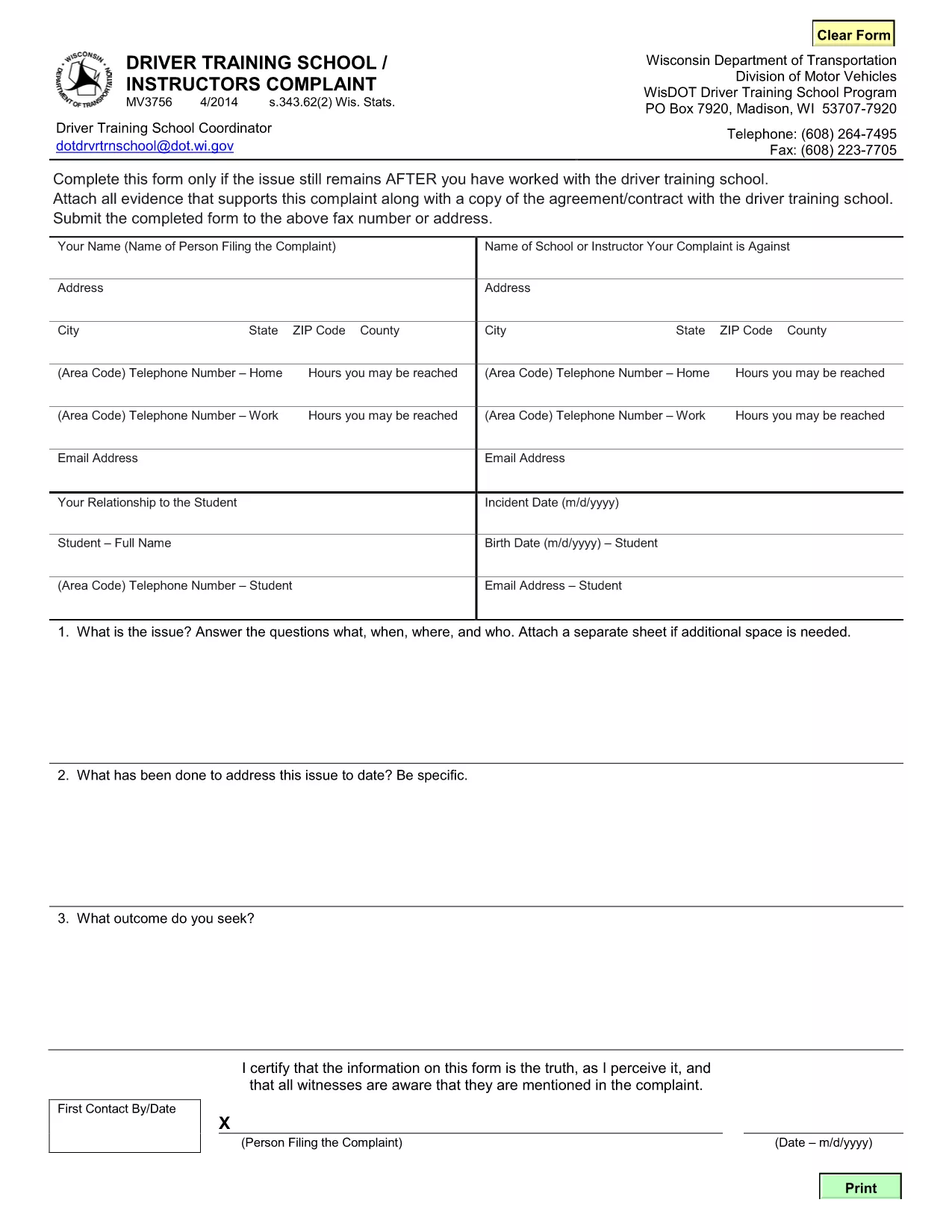
MV3756 Driver Training School & Instructor Complaint Form

  1. Lingua Inglese
  2. Paese Stati Uniti d'America
  3. Attività Patente di guida
  4. Stato Wisconsin
Compila questo modulo
MV3756 Driver Training School & Instructor Complaint Form

The MV3756 is the official Wisconsin Department of Transportation (WisDOT) complaint form used to report issues with driver training schools or instructors. Whether you experienced inadequate instruction, contract violations, or safety concerns, this fillable PDF lets you submit a detailed complaint quickly.

Formize hosts a secure, browser‑based PDF filler so you never need to download, print, or scan the document. Just click the button, fill the fields, and submit the completed form directly to WisDOT.

Below you’ll find step‑by‑step instructions, common pitfalls to watch out for, and answers to the most frequently asked questions about the MV3756 form.

FAQ
  • What type of issues can I report with MV3756?

    The form covers any misconduct by a driver‑training school or instructor, including contract breaches, unsafe training practices, or failure to provide promised services.

  • Do I need a Wisconsin address to use this form?

    No. The MV3756 can be submitted by anyone who has taken a driver‑training course in Wisconsin, regardless of where you currently reside.

  • Can I submit the form without attachments?

    While attachments are optional, providing copies of agreements, receipts, or photos greatly strengthens your complaint and speeds up processing.

  • How long does it take for WisDOT to respond?

    WisDOT typically acknowledges receipt within 5‑7 business days and may request additional information before taking action.

  • Is there a fee to file an MV3756 complaint?

    No. Filing the MV3756 form is completely free.

  • What if I make a mistake after submitting?

    Contact the WisDOT Complaint Unit directly (phone or email) and reference your submission ID. They can guide you on amending the complaint.

  • Can I save my progress and finish later?

    Yes. The Formize PDF filler allows you to save a draft locally on your device and reload it when you’re ready to finish.

  • Is my personal information secure?

    Formize uses SSL encryption, and the PDF is stored only for the duration of the session. No data is retained after you submit the form.

COME

Come compilare MV3756 gratuitamente, online in 5 semplici passaggi:

  1. 1
    Open the Fillable Form
    Click the **Fill out this form** button on the page. Formize will load the MV3756 PDF directly in your browser.
  2. 2
    Enter Your Information
    Complete each required field—your name, contact details, school name, and a clear description of the issue.
  3. 3
    Attach Supporting Documents
    Use the attachment fields to upload copies of contracts, receipts, or any evidence that supports your complaint.
  4. 4
    Review & Sign
    Double‑check all entries for accuracy, then add your electronic signature using the built‑in signing tool.
  5. 5
    Submit the Form
    Press **Submit**. The completed MV3756 will be securely sent to the Wisconsin DOT’s complaint processing center.
App Formize PDF Filler
DI

Moduli per la richiesta della patente di guida

Nella maggior parte dei paesi, è obbligatorio avere una patente di guida prima di mettersi in viaggio. Ottenere una patente di guida è un traguardo importante per chiunque voglia guidare un'auto.

MV3756 è uno dei moduli di domanda di patente di guida che sono documenti utilizzati per raccogliere informazioni da persone che vogliono richiedere una patente di guida. Di solito contiene campi per il nome del richiedente, la data di nascita, il numero ID, le informazioni di contatto, nonché la cronologia e l'esperienza della patente di guida.

CARATTERISTICHE

Compilatore PDF

Il modo più semplice per compilare moduli PDF online

  • Compila rapidamente MV3756
    Cerchi un modo per compilare rapidamente MV3756 online? Con il nostro compilatore di moduli PDF gratuito online, saprai come modificare e compilare questo documento PDF in meno di un minuto.
  • Editor PDF online facile da usare
    Stufo di stampare file PDF in modo da poterli modificare, prima di riscansionarli e rispedirli? Modifica documenti PDF gratuitamente online. Utilizza il nostro editor PDF online per risparmiare tempo e carta.
  • Grandi strumenti, tutte le piattaforme
    Ti stai chiedendo come inserire MV3756 su un Mac o forse come utilizzare un riempitivo PDF gratuito? I nostri strumenti PDF online funzionano su tutte le piattaforme.
  • Archiviazione sicura dei file
    I file "MV3756" completati vengono archiviati in un database protetto gestito dall'hosting Amazon Cloud. Puoi eliminare i tuoi file dal nostro sistema in qualsiasi momento. In ogni caso, questi file vengono automaticamente cancellati dopo 24 ore.
  • Chatta con {parola chiave}
    Chatta con "MV3756" su Chatize che è un assistente di lettura PDF gratuito. Fai domande e ottieni risposte da "MV3756". Basta fare clic sul pulsante Chatta con il documento in alto.

Elimina sessione di riempimento

Eliminare la sessione di riempimento selezionata? In questo caso, i progressi nella compilazione del modulo andranno persi.

Elimina la sessione di modifica

Eliminare la sessione di editing selezionata? In questo caso, i tuoi progressi nella creazione e modifica del modulo andranno persi.