
Seleziona la lingua

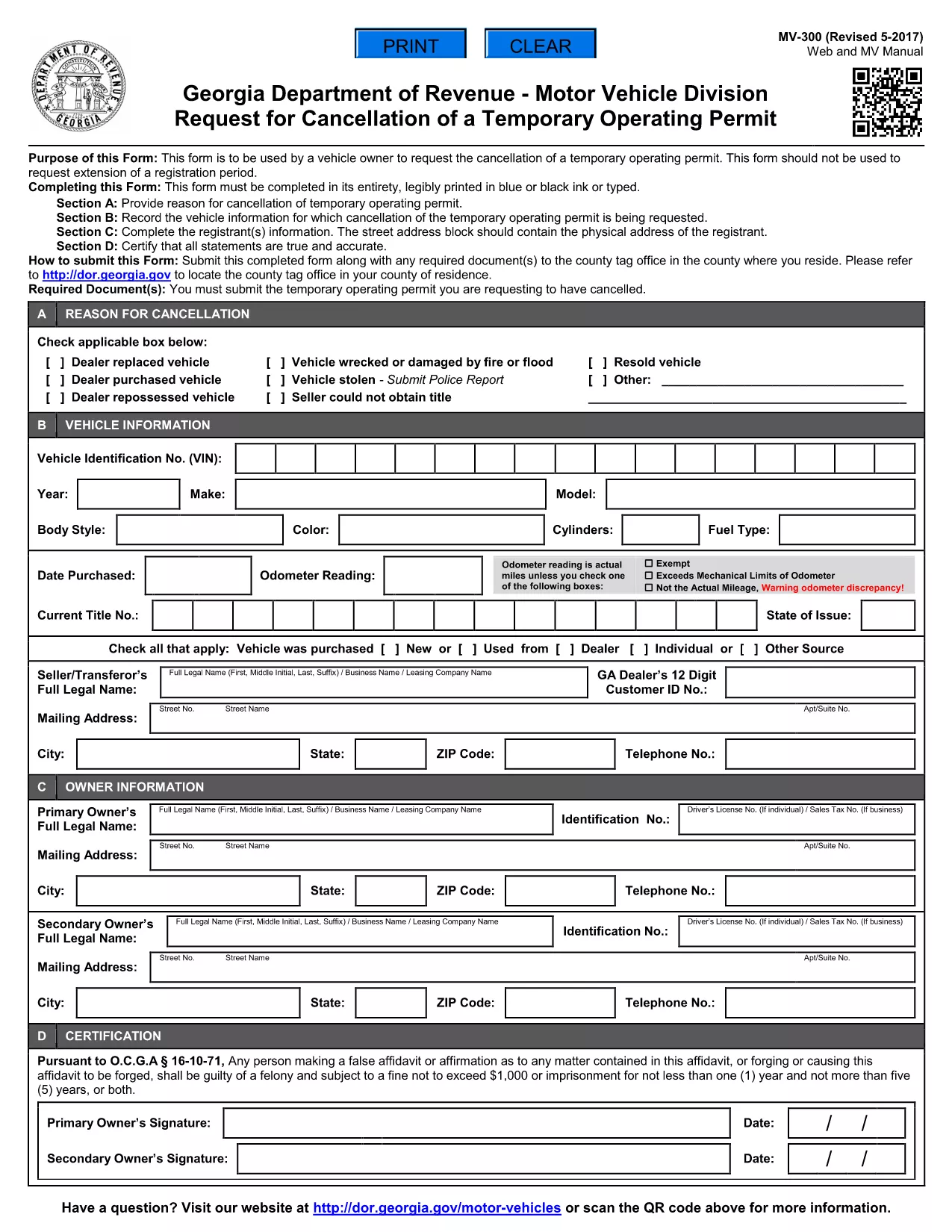
Georgia MV-300 – Request Cancellation of Temporary Operating Permit

  1. Paese Stati Uniti d'America
  2. Lingua Inglese
  3. Dipartimento Georgia Department of Revenue
  4. Attività Registrazione del veicolo
Compila questo modulo
Georgia MV-300 – Request Cancellation of Temporary Operating Permit

The MV-300 is the official Georgia Department of Revenue Motor Vehicle Division form used to request the cancellation of a temporary operating permit. Whether you’re a dealer, fleet manager, or private vehicle owner, you can now complete this form entirely online with Formize’s fillable PDF tool.

What Is the MV-300 Form?

The MV-300 serves a single purpose: to formally request the termination of a temporary operating permit issued by the Georgia Department of Revenue. It is not intended for extensions, renewals, or any other type of permit request.

How to Complete the MV-300 Online

Follow these simple steps to fill out the MV-300 without leaving your browser:

  • Click the "Fill out this form" button on this page.
  • Wait a few seconds while the Formize PDF Filler app loads the fillable version of the MV-300.
  • Enter the required information in each field (vehicle details, permit number, owner signature, etc.).
  • Review the completed form for accuracy.
  • Click Submit to download the finished PDF or to email it directly to the Motor Vehicle Division.

Common Mistakes to Avoid

  • Using the wrong form: MV-300 is only for cancellation, not for extensions.
  • Leaving required fields blank: Every field marked with an asterisk (*) must be completed.
  • Incorrect permit number: Verify the number on your temporary permit before entering it.
  • Missing signatures: Both the vehicle owner and the authorized dealer must sign.

Where to Submit the Completed Form

After you’ve filled out and saved the PDF, you have two submission options:

  • Mail: Send the printed form to the address listed on the form’s instructions.
  • Electronic: Email a scanned copy to mvforms@dor.ga.gov (if your local office accepts electronic submissions).

Need Help? Frequently Asked Questions

Below are answers to the most common questions about the MV-300.

FAQ
  • Can I use the MV-300 to extend a temporary operating permit?

    No. The MV-300 is strictly for cancellation. For extensions, you must use the appropriate renewal form.

  • Do I need a notary for the MV-300?

    A notary is not required for the MV-300, but the signatures must be legible and match the names on the permit.

  • What if I lose my temporary operating permit?

    Contact the Georgia Department of Revenue for a replacement permit number before completing the MV-300.

  • Is there a filing fee for cancelling a temporary permit?

    There is no fee to submit the MV-300 cancellation request.

  • How long does it take for the cancellation to be processed?

    Processing typically takes 5‑7 business days after the department receives the completed form.

  • Can I fill out the MV-300 on a mobile device?

    Yes. The Formize PDF Filler works on smartphones and tablets, making it easy to complete the form anywhere.

COME

Come compilare MV-300 gratuitamente, online in 4 semplici passaggi:

  1. 1
    Open the Fillable Form
    Click the "Fill out this form" button on this page. The Formize PDF Filler will open in a new window.
  2. 2
    Enter Your Information
    Type directly into each field – vehicle details, permit number, owner contact info, and signatures.
  3. 3
    Review and Save
    Check that all required fields are completed, then click "Save" to download the finished PDF to your device.
  4. 4
    Submit to the Motor Vehicle Division
    Mail or email the completed PDF according to the instructions on the form.
App Formize PDF Filler
DI

Moduli di registrazione del veicolo

Se possiedi o noleggi un veicolo a motore, un rimorchio o una barca, devi soddisfare determinati obblighi per mantenere il tuo veicolo legalmente registrato e sicuro.

MV-300 è uno dei moduli di immatricolazione dei veicoli che sono documenti utilizzati per immatricolare un veicolo a motore presso l'autorità statale o provinciale competente. Questi moduli sono in genere richiesti quando una persona acquista un veicolo nuovo o usato o quando si trasferisce in un nuovo stato o provincia con un veicolo.

I requisiti e i moduli esatti necessari per l'immatricolazione del veicolo possono variare in base alla località, ma in genere il processo prevede la fornitura di informazioni sul veicolo, sul proprietario e su eventuali privilegi sul veicolo.

Una volta presentati i moduli di registrazione e le tasse, l'autorità statale o provinciale rilascerà un certificato di registrazione o una targa al proprietario del veicolo. Questa registrazione consente al veicolo di circolare legalmente su strade pubbliche e autostrade.

CARATTERISTICHE

Compilatore PDF

Il modo più semplice per compilare moduli PDF online

  • Compila rapidamente MV-300
    Cerchi un modo per compilare rapidamente MV-300 online? Con il nostro compilatore di moduli PDF gratuito online, saprai come modificare e compilare questo documento PDF in meno di un minuto.
  • Editor PDF online facile da usare
    Stufo di stampare file PDF in modo da poterli modificare, prima di riscansionarli e rispedirli? Modifica documenti PDF gratuitamente online. Utilizza il nostro editor PDF online per risparmiare tempo e carta.
  • Grandi strumenti, tutte le piattaforme
    Ti stai chiedendo come inserire MV-300 su un Mac o forse come utilizzare un riempitivo PDF gratuito? I nostri strumenti PDF online funzionano su tutte le piattaforme.
  • Archiviazione sicura dei file
    I file "MV-300" completati vengono archiviati in un database protetto gestito dall'hosting Amazon Cloud. Puoi eliminare i tuoi file dal nostro sistema in qualsiasi momento. In ogni caso, questi file vengono automaticamente cancellati dopo 24 ore.
  • Chatta con {parola chiave}
    Chatta con "MV-300" su Chatize che è un assistente di lettura PDF gratuito. Fai domande e ottieni risposte da "MV-300". Basta fare clic sul pulsante Chatta con il documento in alto.

Elimina sessione di riempimento

Eliminare la sessione di riempimento selezionata? In questo caso, i progressi nella compilazione del modulo andranno persi.

Elimina la sessione di modifica

Eliminare la sessione di editing selezionata? In questo caso, i tuoi progressi nella creazione e modifica del modulo andranno persi.