
Seleziona la lingua

Parent‑Teen Safe‑Driving Agreement (Fillable PDF)

  1. Lingua Inglese
  2. Paese Stati Uniti d'America
  3. Attività Driving Safety
  4. Dipartimento Health
Compila questo modulo
Parent‑Teen Safe‑Driving Agreement (Fillable PDF)

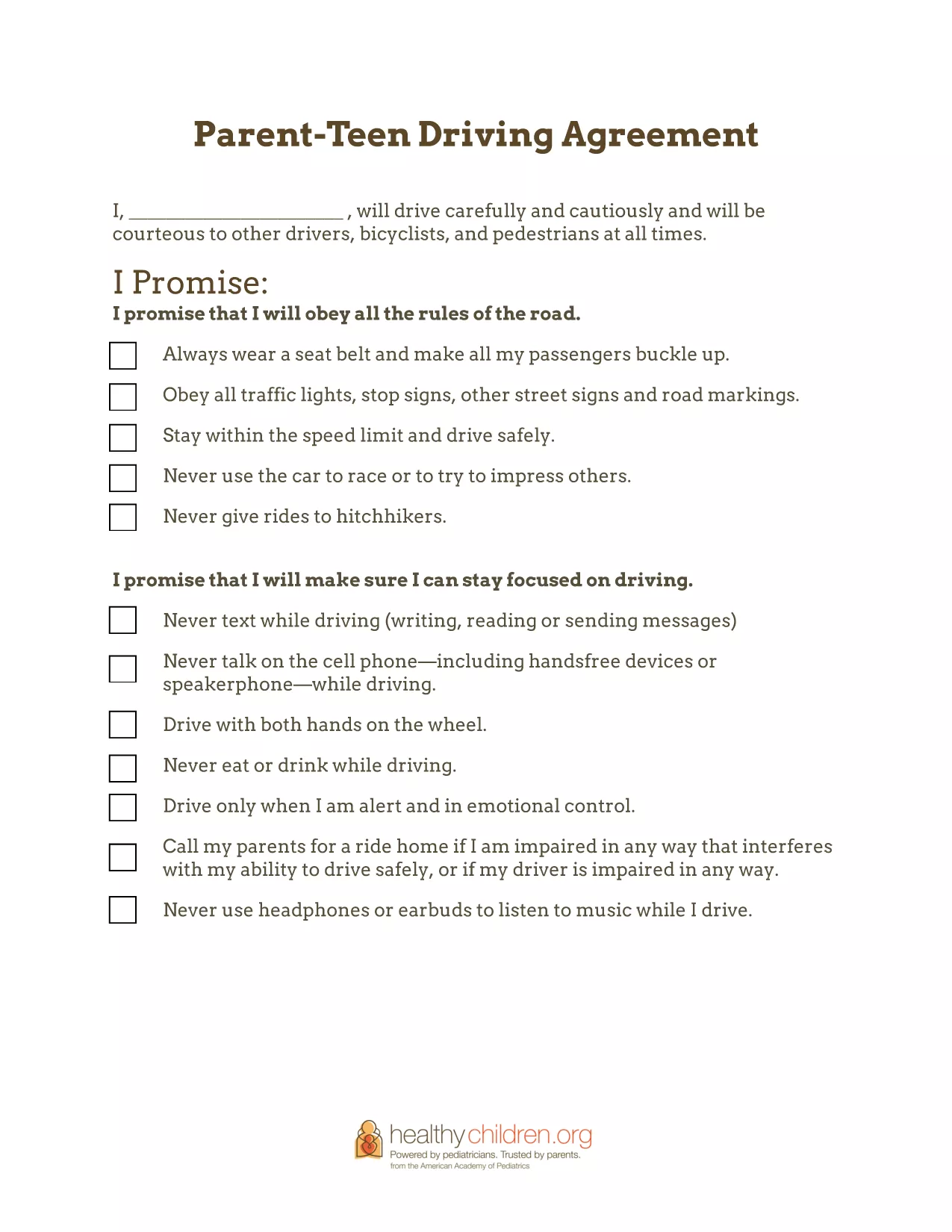
Getting your teenager behind the wheel is a major milestone, but it also brings new responsibilities for both parents and teens. The Parent‑Teen Safe‑Driving Agreement gives families a clear, written contract that outlines expectations, limits, and consequences for safe driving.

Why a Safe‑Driving Agreement Matters

Studies show that teens who sign a written driving contract are less likely to text while driving, exceed speed limits, or drive under the influence. A signed agreement creates accountability, opens ongoing dialogue, and helps parents monitor progress as driving skills improve.

Key Sections of the Agreement

  • Driver Pledge: A teen‑signed promise to obey traffic laws, avoid distractions, and stay sober.
  • Parental Rules: Curfew times, passenger limits, and restrictions on high‑risk driving conditions.
  • Financial Contributions: How the teen will share costs for gas, insurance, and maintenance.
  • Penalties: Clear consequences for breaking the agreement, such as loss of driving privileges.

How to Fill Out the Form Online

Instead of downloading and editing the PDF in a separate program, simply click the Fill out this form button on this page. The Formize PDF Filler app will load the fillable fields directly in your browser. Follow the on‑screen prompts, save your changes, and download a completed copy when you’re done.

Tips for Enforcing the Rules

  • Review the agreement together every month and adjust rules as driving experience grows.
  • Keep a printed copy in the car so both driver and passengers can see the expectations.
  • Use a shared calendar or app to track curfew compliance and mileage.

Common Mistakes to Avoid

  • Leaving sections blank – every field should be completed to avoid ambiguity.
  • Skipping the teen’s signature – the pledge is only binding when the teen signs.
  • Setting unrealistic penalties that the teen cannot meet.

Download the fillable PDF below, complete it online, and start the conversation that keeps your teen safe on the road.

FAQ
  • Is the Parent‑Teen Safe‑Driving Agreement legally binding?

    The agreement is not a legal contract, but it creates a clear, written understanding between parent and teen that can be enforced within the family.

  • Can I customize the agreement for my state’s driving laws?

    Yes. The fillable PDF lets you edit any section, so you can add state‑specific curfew times, passenger limits, or other local regulations.

  • Do I need a PDF editor to fill out the form?

    No. Use the Formize PDF Filler on this page – it works in any modern browser without additional software.

  • How often should we revisit the agreement?

    We recommend reviewing the agreement monthly for the first six months, then every six months or after any major driving milestone.

  • What if my teen breaks the rules?

    The agreement includes a “Penalties” section. Discuss the consequence, enforce it consistently, and then reset expectations together.

  • Can I share the completed agreement with my insurance company?

    Yes. A signed copy can be uploaded to your insurer to demonstrate responsible driving practices and may help lower premiums.

COME

Come compilare parent teen driving agreement gratuitamente, online in 5 semplici passaggi:

  1. 1
    Open the Fillable Form
    Click the “Fill out this form” button on this page. The Formize PDF Filler app will open in a new tab.
  2. 2
    Enter the Required Information
    Type directly into each field—parent details, teen details, rules, and penalties. Use the tab key to move quickly between sections.
  3. 3
    Save and Review
    When all fields are completed, click the “Save” button. Review the agreement with your teen to ensure every point is clear.
  4. 4
    Sign the Agreement
    Both parent and teen can add a digital signature using the built‑in signature tool, then click “Apply”.
  5. 5
    Download or Print
    After signing, click “Download PDF” to save a copy or “Print” to place a hard copy in the car.
App Formize PDF Filler
DI

modello parent teen driving agreement

Con il tradizionale set di funzionalità per la visualizzazione e la compilazione di un documento PDF, combinato con i vantaggi di un'applicazione Web e un layout reattivo, puoi completare parent teen driving agreement in pochi minuti.

CARATTERISTICHE

Compilatore PDF

Il modo più semplice per compilare moduli PDF online

  • Compila rapidamente parent teen driving agreement
    Cerchi un modo per compilare rapidamente parent teen driving agreement online? Con il nostro compilatore di moduli PDF gratuito online, saprai come modificare e compilare questo documento PDF in meno di un minuto.
  • Editor PDF online facile da usare
    Stufo di stampare file PDF in modo da poterli modificare, prima di riscansionarli e rispedirli? Modifica documenti PDF gratuitamente online. Utilizza il nostro editor PDF online per risparmiare tempo e carta.
  • Grandi strumenti, tutte le piattaforme
    Ti stai chiedendo come inserire parent teen driving agreement su un Mac o forse come utilizzare un riempitivo PDF gratuito? I nostri strumenti PDF online funzionano su tutte le piattaforme.
  • Archiviazione sicura dei file
    I file "parent teen driving agreement" completati vengono archiviati in un database protetto gestito dall'hosting Amazon Cloud. Puoi eliminare i tuoi file dal nostro sistema in qualsiasi momento. In ogni caso, questi file vengono automaticamente cancellati dopo 24 ore.
  • Chatta con {parola chiave}
    Chatta con "parent teen driving agreement" su Chatize che è un assistente di lettura PDF gratuito. Fai domande e ottieni risposte da "parent teen driving agreement". Basta fare clic sul pulsante Chatta con il documento in alto.

Elimina sessione di riempimento

Eliminare la sessione di riempimento selezionata? In questo caso, i progressi nella compilazione del modulo andranno persi.

Elimina la sessione di modifica

Eliminare la sessione di editing selezionata? In questo caso, i tuoi progressi nella creazione e modifica del modulo andranno persi.