
Seleziona la lingua

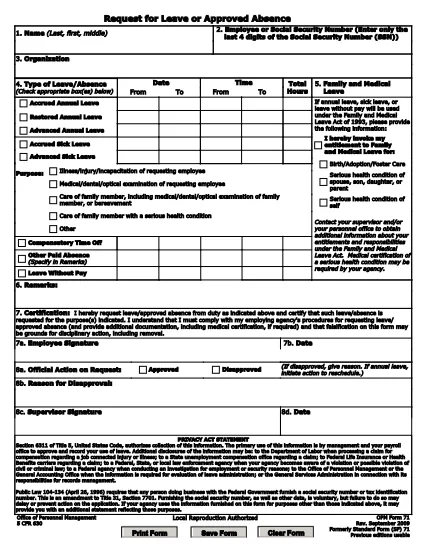
Application for Yesterday Absent – Fillable PDF Form

  1. Lingua Inglese
  2. Paese Stati Uniti d'America
  3. Dipartimento Human Resources
  4. Attività Employee Management
Compila questo modulo
Application for Yesterday Absent – Fillable PDF Form

When you missed work or school yesterday and need official documentation, the Application for Yesterday Absent is the right tool. This fillable PDF lets you quickly request a one‑day absence, provide a reason, and obtain the necessary approvals—all without printing or scanning.

Why You Need a Yesterday Absence Application

Employers and educational institutions often require a written request for any unplanned absence. Submitting a completed form demonstrates professionalism, helps payroll process correctly, and keeps HR records accurate.

How to Fill Out the Yesterday Absence Form Online

With Formize’s built‑in PDF filler, you can complete the form in seconds:

  1. Click the "Fill out this form" button on the page.
  2. Wait for the Formize PDF Filler app to load.
  3. Enter your personal information (name, employee ID, department).
  4. Select the date of absence – the form defaults to yesterday’s date.
  5. Provide a brief reason (e.g., medical, family emergency).
  6. Add your electronic signature and, if required, your supervisor’s signature.
  7. Submit the form directly from the app or download a copy for your records.

Common Mistakes to Avoid

  • Leaving fields blank: Every required field must be filled, otherwise the form will be rejected.
  • Incorrect date: Double‑check that the date shown is indeed yesterday’s date.
  • Unclear reason: Use concise language and, if needed, attach supporting documentation.
  • Missing signature: Both employee and supervisor signatures are mandatory for approval.

Download the Fillable PDF

If you prefer to work offline, you can download the original fillable PDF from the link below and open it with any PDF editor that supports form fields.

Download Yesterday Absence Application (PDF)

Frequently Asked Questions

Find quick answers to the most common queries about this form below.

FAQ
  • Do I need a manager’s signature for a one‑day absence?

    Yes. Most organizations require both the employee’s and the manager’s signatures to approve any unplanned leave.

  • Can I edit the form after I submit it?

    Once submitted, the form is locked. If you need changes, request a new form and follow the same steps.

  • Is the PDF truly fillable on any device?

    The form is built with standard PDF form fields, so it works on desktop, tablet, and mobile browsers via Formize.

  • What if I don’t have an internet connection?

    Download the PDF from the link provided, fill it out offline with a PDF editor, then email or upload it once you’re back online.

  • How long does it take for HR to process the request?

    Processing time varies by organization, but most HR departments acknowledge receipt within 24 hours.

  • Can I attach supporting documents (e.g., doctor’s note)?

    Yes. After completing the form, use the upload feature in the Formize app or attach files when you email the PDF.

COME

Come compilare yesterday absent application gratuitamente, online in 7 semplici passaggi:

  1. 1
    Click the Fill Out Button
    Press the "Fill out this form" button on the page to launch Formize’s online PDF editor.
  2. 2
    Wait for the Filler to Load
    The Formize PDF Filler app loads in a few seconds – you’ll see the form fields become editable.
  3. 3
    Enter Your Information
    Fill in your name, employee ID, department, and any other required personal details.
  4. 4
    Select Yesterday’s Date
    The date field defaults to yesterday; verify it’s correct before proceeding.
  5. 5
    Provide a Reason
    Write a brief, clear explanation for the absence (e.g., medical appointment, family emergency).
  6. 6
    Add Your Signature
    Use the e‑signature field to sign electronically, then have your supervisor sign if required.
  7. 7
    Submit or Download
    Click "Submit" to send the form directly to your HR portal, or download a copy for your records.
App Formize PDF Filler
DI

modello yesterday absent application

Con il tradizionale set di funzionalità per la visualizzazione e la compilazione di un documento PDF, combinato con i vantaggi di un'applicazione Web e un layout reattivo, puoi completare yesterday absent application in pochi minuti.

CARATTERISTICHE

Compilatore PDF

Il modo più semplice per compilare moduli PDF online

  • Compila rapidamente yesterday absent application
    Cerchi un modo per compilare rapidamente yesterday absent application online? Con il nostro compilatore di moduli PDF gratuito online, saprai come modificare e compilare questo documento PDF in meno di un minuto.
  • Editor PDF online facile da usare
    Stufo di stampare file PDF in modo da poterli modificare, prima di riscansionarli e rispedirli? Modifica documenti PDF gratuitamente online. Utilizza il nostro editor PDF online per risparmiare tempo e carta.
  • Grandi strumenti, tutte le piattaforme
    Ti stai chiedendo come inserire yesterday absent application su un Mac o forse come utilizzare un riempitivo PDF gratuito? I nostri strumenti PDF online funzionano su tutte le piattaforme.
  • Archiviazione sicura dei file
    I file "yesterday absent application" completati vengono archiviati in un database protetto gestito dall'hosting Amazon Cloud. Puoi eliminare i tuoi file dal nostro sistema in qualsiasi momento. In ogni caso, questi file vengono automaticamente cancellati dopo 24 ore.
  • Chatta con {parola chiave}
    Chatta con "yesterday absent application" su Chatize che è un assistente di lettura PDF gratuito. Fai domande e ottieni risposte da "yesterday absent application". Basta fare clic sul pulsante Chatta con il documento in alto.

Elimina sessione di riempimento

Eliminare la sessione di riempimento selezionata? In questo caso, i progressi nella compilazione del modulo andranno persi.

Elimina la sessione di modifica

Eliminare la sessione di editing selezionata? In questo caso, i tuoi progressi nella creazione e modifica del modulo andranno persi.