
Seleziona la lingua

IRS Form W‑7 – Application for an Individual Taxpayer Identification Number (ITIN)

  1. Paese Stati Uniti d'America
  2. Lingua Inglese
  3. Attività Le tasse
  4. Dipartimento IRS
Compila questo modulo
IRS Form W‑7 – Application for an Individual Taxpayer Identification Number (ITIN)

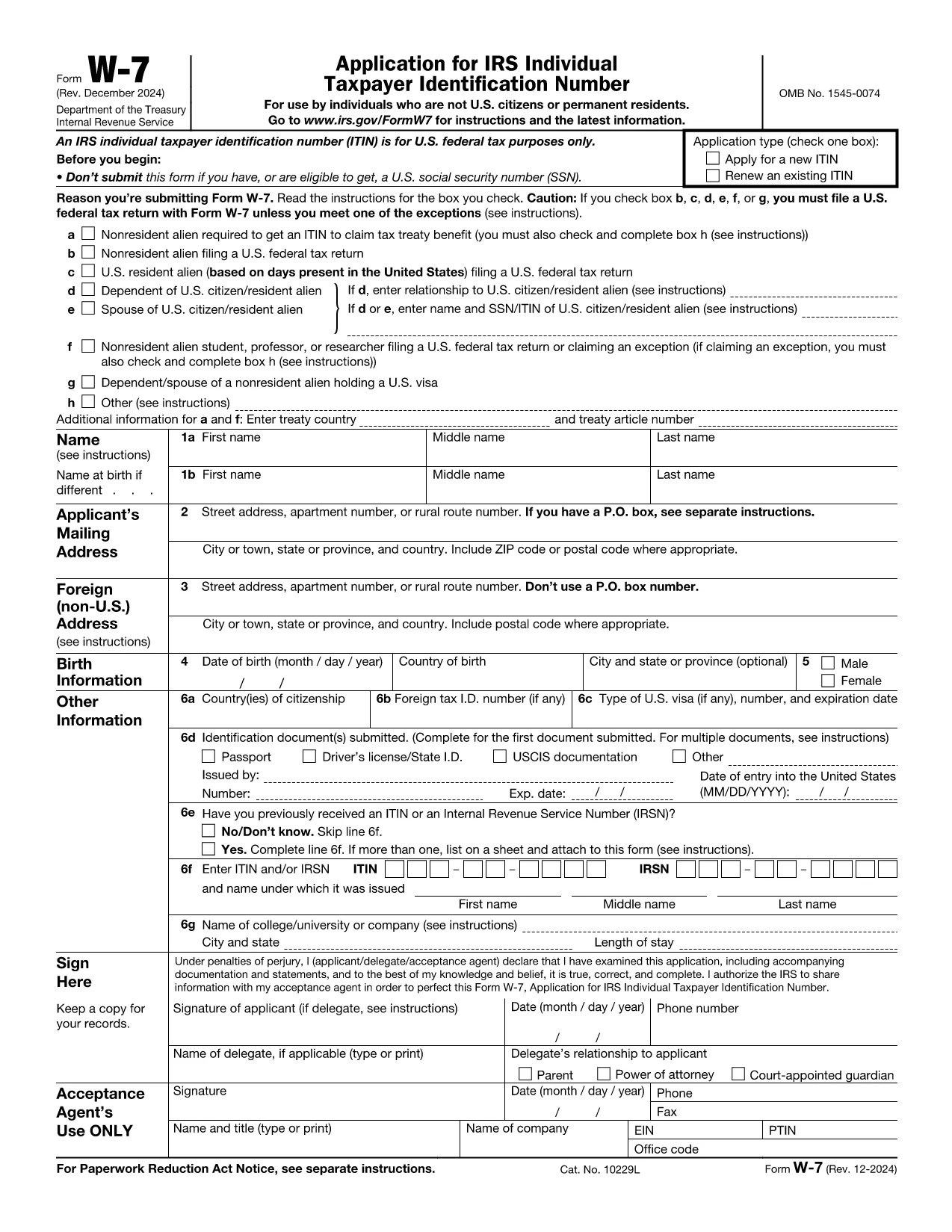
Form W‑7 is the official Application for an Individual Taxpayer Identification Number (ITIN) issued by the United States Internal Revenue Service (IRS). Taxpayers who are not eligible for a Social Security Number but need a federal tax identification number use this form.

What Is IRS Form W‑7?

The W‑7 form allows foreign individuals, residents, and certain dependents to obtain an ITIN so they can file U.S. tax returns, claim treaty benefits, or be listed on a tax return. The PDF is fully fillable, but editing it locally can be cumbersome.

Why Use Formize’s Fillable PDF?

  • Instant online filling – No need to download, install a PDF editor, or print the form.
  • Secure cloud processing – Your data stays encrypted while the Formize PDF Filler loads.
  • Auto‑save and review – Make changes, preview the completed document, and download a final PDF ready for mailing.

Step‑by‑Step Guide to Complete the Form Online

Follow the simple steps below to fill out Form W‑7 directly on this page.

Common Mistakes & Tips for a Successful Submission

Avoid these pitfalls to prevent delays:

  • Do not leave any required field blank – the online filler will highlight missing items.
  • Ensure the name on the form matches the identification document exactly.
  • Attach a clear, legible copy of the supporting document (passport, national ID, etc.).
  • Sign the form electronically if your PDF viewer allows it; otherwise, print, sign, and scan.

Where to Send Your Completed Form

After you download the finished PDF, mail it with the required documentation to:

Internal Revenue Service
ITIN Operation
P.O. Box 149342
Austin, TX 78714-9342
USA

Or submit through an IRS-authorized Acceptance Agent.

FAQ
  • Who needs an ITIN?

    Non‑U.S. residents, foreign nationals, and dependents who are not eligible for a Social Security Number but must file a U.S. tax return or be listed on one.

  • Can I submit Form W‑7 electronically?

    The IRS currently requires a paper submission. You can fill it out online with Formize, then download and mail the completed PDF.

  • What documents must I attach?

    A valid, original passport is the most common. If you don’t have a passport, you can provide a combination of a national ID, birth certificate, and a US visa.

  • How long does the IRS take to process an ITIN?

    Processing usually takes 6‑10 weeks after the IRS receives a complete application.

  • Do I need to renew my ITIN?

    ITINs that have not been used on a tax return for three consecutive years will expire. Renewal is done using the same Form W‑7.

  • Is there a fee to apply for an ITIN?

    There is no fee to the IRS, but if you use an Acceptance Agent, they may charge a service fee.

  • Can I correct a mistake after mailing?

    If you discover an error, you must submit a new, complete Form W‑7 with the correct information.

  • What if I lose my ITIN?

    You can request a copy of your ITIN by calling the IRS at 1‑800‑829‑1040 or by submitting a new Form W‑7.

  • Is Form W‑7 the same as a Social Security Number?

    No. An ITIN is for tax purposes only and does not provide work authorization or Social Security benefits.

  • Will Formize store my personal data?

    Formize processes the PDF in a secure, temporary session and does not retain any personal information after you download the completed form.

COME

Come compilare IRS Form W-7 gratuitamente, online in 5 semplici passaggi:

  1. 1
    Click the "Fill out this form" button
    Locate the bright orange "Fill out this form" button on the page and click it. The Formize PDF Filler app will open in a new tab.
  2. 2
    Wait for the Formize PDF Filler to load
    The online filler loads the IRS Form W‑7 automatically. This usually takes a few seconds.
  3. 3
    Enter your information
    Complete each required field. The filler will highlight any missing or incorrect entries.
  4. 4
    Upload supporting documents
    Use the "Attach File" option to add a scanned copy of your passport or other ID as required by the IRS.
  5. 5
    Review and download
    When you’re satisfied, click "Save & Download" to get a PDF ready for mailing to the IRS.
App Formize PDF Filler
DI

Moduli fiscali

IRS Form W-7 è uno dei moduli fiscali che sono documenti utilizzati per segnalare informazioni relative alle imposte all'autorità fiscale competente. Esistono vari tipi di moduli fiscali, inclusi moduli fiscali federali, statali e locali, che possono variare a seconda delle circostanze e dell'ubicazione del contribuente.

CARATTERISTICHE

Compilatore PDF

Il modo più semplice per compilare moduli PDF online

  • Compila rapidamente IRS Form W-7
    Cerchi un modo per compilare rapidamente IRS Form W-7 online? Con il nostro compilatore di moduli PDF gratuito online, saprai come modificare e compilare questo documento PDF in meno di un minuto.
  • Editor PDF online facile da usare
    Stufo di stampare file PDF in modo da poterli modificare, prima di riscansionarli e rispedirli? Modifica documenti PDF gratuitamente online. Utilizza il nostro editor PDF online per risparmiare tempo e carta.
  • Grandi strumenti, tutte le piattaforme
    Ti stai chiedendo come inserire IRS Form W-7 su un Mac o forse come utilizzare un riempitivo PDF gratuito? I nostri strumenti PDF online funzionano su tutte le piattaforme.
  • Archiviazione sicura dei file
    I file "IRS Form W-7" completati vengono archiviati in un database protetto gestito dall'hosting Amazon Cloud. Puoi eliminare i tuoi file dal nostro sistema in qualsiasi momento. In ogni caso, questi file vengono automaticamente cancellati dopo 24 ore.
  • Chatta con {parola chiave}
    Chatta con "IRS Form W-7" su Chatize che è un assistente di lettura PDF gratuito. Fai domande e ottieni risposte da "IRS Form W-7". Basta fare clic sul pulsante Chatta con il documento in alto.

Elimina sessione di riempimento

Eliminare la sessione di riempimento selezionata? In questo caso, i progressi nella compilazione del modulo andranno persi.

Elimina la sessione di modifica

Eliminare la sessione di editing selezionata? In questo caso, i tuoi progressi nella creazione e modifica del modulo andranno persi.