
Seleziona la lingua

Disability Plate – Second Set Questionnaire (MVR‑37) Fillable PDF

  1. Lingua Inglese
  2. Paese Stati Uniti d'America
  3. Attività Registrazione del veicolo
  4. Dipartimento Motor Vehicle Department
Compila questo modulo
Disability Plate – Second Set Questionnaire (MVR‑37) Fillable PDF

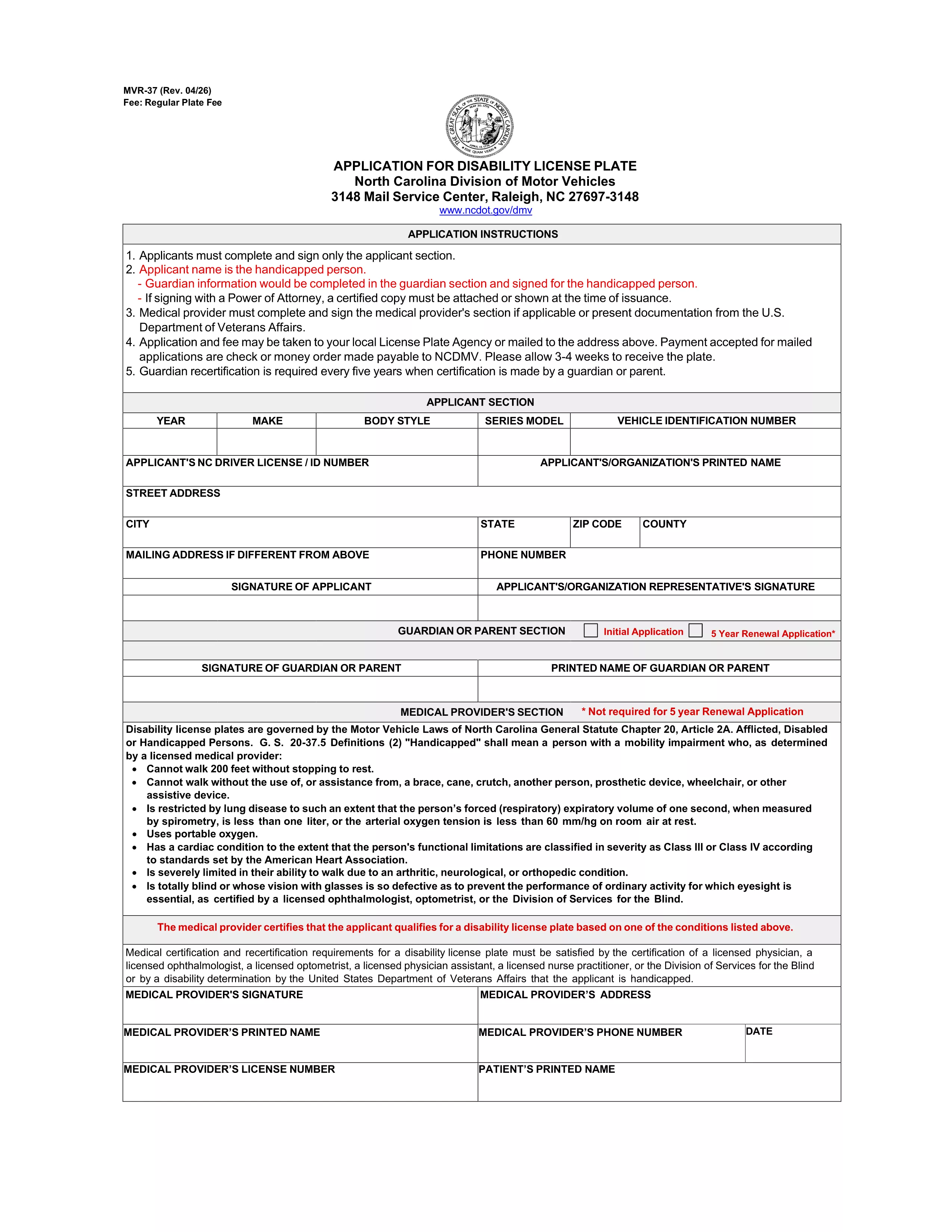
If you already have a set of disability license plates and need a replacement or an additional set, North Carolina requires the MVR‑37 – the Disability Plate Second Set Questionnaire. This official PDF form collects the medical and vehicle information needed to issue a second set of plates with the International Symbol of Access.

Unlike a paper‑only application, Formize lets you open the PDF directly in your browser, fill every field, and submit it electronically. No printing, scanning, or PDF editor downloads are required.

What Is the Disability Plate – Second Set Questionnaire?

The MVR‑37 is a two‑page questionnaire used by the North Carolina Division of Motor Vehicles (DMV). It asks for:

  • Applicant’s personal details and disability verification
  • Physician’s certification and signature
  • Vehicle information (VIN, registration, current plate numbers)
  • Reason for requesting a second set (lost, damaged, additional vehicle, etc.)

Submitting a complete, accurate MVR‑37 speeds up the issuance of your new plates.

How to Complete the MVR‑37 Form with Formize PDF Filler

Follow these simple steps to fill out the questionnaire online:

  1. Click the "Fill out this form" button on this page.
  2. Wait a few seconds while the Formize PDF Filler app loads the MVR‑37 document.
  3. Enter your information in each highlighted field. The app automatically saves your progress.
  4. When you reach the physician’s section, have the doctor sign electronically or upload a scanned signature.
  5. Review the entire form, then click "Submit" to download the completed PDF.

You can now email the PDF to the DMV or bring a printed copy to your local office.

Common Mistakes to Avoid When Applying for a Second Set

  • Missing physician signature: The form is rejected without a valid signature or notarization.
  • Incorrect VIN or plate numbers: Double‑check the vehicle identification number and current plate numbers.
  • Leaving optional fields blank: Even optional sections help the DMV verify eligibility.
  • Outdated contact information: Ensure phone numbers and email addresses are current for follow‑up.

Where to Submit Your Completed Questionnaire

After downloading the filled PDF, you have two options:

  • Mail: Send the form to North Carolina Division of Motor Vehicles, Mail Service Center, Raleigh, NC 27697‑3148.
  • In‑person: Bring the printed form to any NC DMV office. Bring a valid ID and proof of vehicle registration.

Processing usually takes 7‑10 business days.

Frequently Asked Questions

Below are the most common queries about the second‑set questionnaire.

FAQ
  • Do I need a new physician certification for a second set of plates?

    Yes. The MVR‑37 requires a current physician’s signature confirming that your disability still meets eligibility criteria.

  • Can I use the same form for a replacement plate?

    The MVR‑37 is specifically for a second set or additional plates. For a lost or damaged single set, use the standard replacement form (MVR‑37R).

  • Is there a fee for a second set of disability plates?

    North Carolina charges a nominal fee for the additional set, usually $5‑$10, payable at the DMV when you submit the form.

  • How long does the DMV take to process the questionnaire?

    Processing typically takes 7‑10 business days after the DMV receives a complete and signed form.

  • Can I submit the form electronically?

    The DMV still requires a printed copy with original signatures. However, you can email the completed PDF to request a review before mailing.

  • What if I lose the second set after it’s issued?

    You must submit a new MVR‑37 questionnaire and pay the applicable fee for another replacement.

  • Do I need to provide proof of vehicle ownership?

    Yes. Include a copy of your current vehicle registration and the VIN on the form.

  • Is the MVR‑37 fillable on mobile devices?

    Formize’s PDF filler works on most smartphones and tablets, allowing you to complete the form on the go.

COME

Come compilare disability plate questionnaire gratuitamente, online in 4 semplici passaggi:

  1. 1
    Open the Form
    Click the "Fill out this form" button on this page. The Formize PDF Filler app will load the MVR‑37 questionnaire directly in your browser.
  2. 2
    Enter Your Information
    Type your personal, medical, and vehicle details into each highlighted field. The app auto‑saves as you go.
  3. 3
    Add Physician Signature
    Upload a scanned signature or have the doctor sign electronically in the designated section.
  4. 4
    Review and Submit
    Double‑check all entries, then click "Submit" to download the completed PDF ready for mailing or in‑person delivery.
App Formize PDF Filler
DI

Moduli di registrazione del veicolo

Se possiedi o noleggi un veicolo a motore, un rimorchio o una barca, devi soddisfare determinati obblighi per mantenere il tuo veicolo legalmente registrato e sicuro.

disability plate questionnaire è uno dei moduli di immatricolazione dei veicoli che sono documenti utilizzati per immatricolare un veicolo a motore presso l'autorità statale o provinciale competente. Questi moduli sono in genere richiesti quando una persona acquista un veicolo nuovo o usato o quando si trasferisce in un nuovo stato o provincia con un veicolo.

I requisiti e i moduli esatti necessari per l'immatricolazione del veicolo possono variare in base alla località, ma in genere il processo prevede la fornitura di informazioni sul veicolo, sul proprietario e su eventuali privilegi sul veicolo.

Una volta presentati i moduli di registrazione e le tasse, l'autorità statale o provinciale rilascerà un certificato di registrazione o una targa al proprietario del veicolo. Questa registrazione consente al veicolo di circolare legalmente su strade pubbliche e autostrade.

CARATTERISTICHE

Compilatore PDF

Il modo più semplice per compilare moduli PDF online

  • Compila rapidamente disability plate questionnaire
    Cerchi un modo per compilare rapidamente disability plate questionnaire online? Con il nostro compilatore di moduli PDF gratuito online, saprai come modificare e compilare questo documento PDF in meno di un minuto.
  • Editor PDF online facile da usare
    Stufo di stampare file PDF in modo da poterli modificare, prima di riscansionarli e rispedirli? Modifica documenti PDF gratuitamente online. Utilizza il nostro editor PDF online per risparmiare tempo e carta.
  • Grandi strumenti, tutte le piattaforme
    Ti stai chiedendo come inserire disability plate questionnaire su un Mac o forse come utilizzare un riempitivo PDF gratuito? I nostri strumenti PDF online funzionano su tutte le piattaforme.
  • Archiviazione sicura dei file
    I file "disability plate questionnaire" completati vengono archiviati in un database protetto gestito dall'hosting Amazon Cloud. Puoi eliminare i tuoi file dal nostro sistema in qualsiasi momento. In ogni caso, questi file vengono automaticamente cancellati dopo 24 ore.
  • Chatta con {parola chiave}
    Chatta con "disability plate questionnaire" su Chatize che è un assistente di lettura PDF gratuito. Fai domande e ottieni risposte da "disability plate questionnaire". Basta fare clic sul pulsante Chatta con il documento in alto.

Elimina sessione di riempimento

Eliminare la sessione di riempimento selezionata? In questo caso, i progressi nella compilazione del modulo andranno persi.

Elimina la sessione di modifica

Eliminare la sessione di editing selezionata? In questo caso, i tuoi progressi nella creazione e modifica del modulo andranno persi.