
Seleziona la lingua

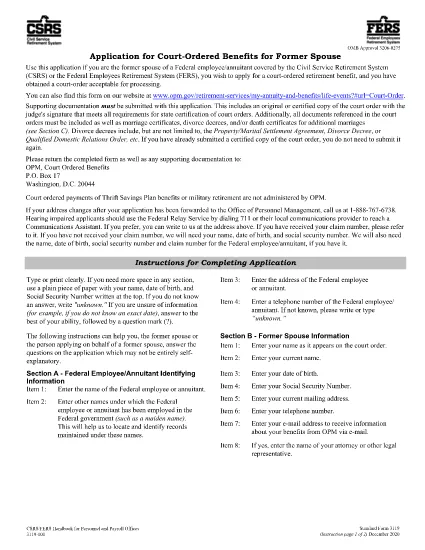
Form 3119 (SF3119) – Application for Court‑Ordered Benefits for Former Spouses

  1. Paese Stati Uniti d'America
  2. Dipartimento Ufficio di gestione del personale
  3. Settore Forme standard
Compila questo modulo
Form 3119 (SF3119) – Application for Court‑Ordered Benefits for Former Spouses

The Standard Form 3119 (SF3119) is the official application used by former spouses of federal employees or annuitants to request court‑ordered retirement benefits. This form is required when a court order directs the Federal Employees’ Retirement System (FERS) or the Civil Service Retirement System (CSRS) to provide a benefit to a former spouse.

On this page you can instantly access a fillable PDF version of Form 3119, complete it in your browser, and download a saved copy for your records. No extra software is needed – the Formize PDF Filler loads directly in the page.

What Is Form 3119?

Form 3119, titled “Application for Court‑Ordered Benefits for Former Spouses,” collects personal information, details of the court order, and the type of benefit being requested. The Office of Personnel Management (OPM) processes the form and forwards it to the appropriate retirement system.

Who Must Use Form 3119?

  • Former spouses of current or former federal employees covered by CSRS or FERS.
  • Anyone who has a valid court order that mandates a retirement benefit.
  • Beneficiaries who need to specify the type of benefit (e.g., survivor annuity, health benefits).

How to Complete the Fillable PDF Online

Follow the simple steps below – you won’t need to download the file first.

Common Mistakes to Avoid

  • Leaving the "Court Order Number" blank – the exact number from the judgment must be entered.
  • Using an outdated form version – always use the latest PDF provided here.
  • Signing the form before all required fields are filled – OPM will reject incomplete applications.

Where to Submit Your Completed Form

After you finish the online fillable form, download the completed PDF and mail it to the address listed in the form’s instructions, or fax it if you have a fax number on file. Keep a copy for your records.

Need help? Review the official instructions PDF for detailed guidance.

FAQ
  • What is the purpose of Form 3119?

    Form 3119 is used to request court‑ordered retirement benefits for former spouses of federal employees covered by CSRS or FERS.

  • Can I fill out Form 3119 on a mobile device?

    Yes. The Formize fillable PDF works on all modern browsers, including mobile Safari and Chrome.

  • Do I need a PDF editor to complete the form?

    No. The online Formize PDF Filler lets you complete the form directly in your browser without any additional software.

  • How do I know which version of Form 3119 is current?

    The PDF linked on this page is the latest version published by OPM. Always use this link to ensure you have the current form.

  • What should I do if I make a mistake after submitting?

    Contact OPM’s Retirement Services office immediately. They may require a corrected form or an addendum, depending on the error.

  • Is there a filing fee for Form 3119?

    No. Filing Form 3119 is free; however, any associated benefit payments may be subject to standard tax withholdings.

  • How long does OPM take to process the application?

    Processing typically takes 30‑45 days after receipt, but timeframes can vary based on the complexity of the court order.

COME

Come compilare Form 3119 gratuitamente, online in 4 semplici passaggi:

  1. 1
    Click the Fill‑Out Button
    Press the blue “Fill out this form” button on the page. The Formize PDF Filler will open directly in your browser.
  2. 2
    Enter Your Information
    Complete each field in the fillable PDF. The interface saves your progress automatically, so you won’t lose data.
  3. 3
    Review, Sign, and Download
    After all required sections are filled, add your electronic signature, review the summary, and click “Download” to save a copy for your records.
  4. 4
    Submit to OPM
    Mail or fax the downloaded PDF to the address provided in the form’s instructions. Keep the confirmation email from Formize as proof of completion.
App Formize PDF Filler
DI

Moduli dell'Ufficio di gestione del personale (OPM).

Form 3119 è uno dei moduli ufficiali utilizzati dall'Office of Personnel Management degli Stati Uniti, un'agenzia indipendente del governo federale responsabile della gestione della forza lavoro del servizio civile e dei benefici per i dipendenti federali. L'OPM stabilisce politiche e regolamenti relativi all'occupazione federale, amministra vari programmi per il personale e fornisce servizi a dipendenti federali, pensionati e candidati al lavoro.

Ecco alcuni esempi di modulistica dell'Ufficio Gestione del Personale:

Modulo standard 86 (SF-86) : questo modulo viene utilizzato per il processo di indagine dei precedenti per le persone che richiedono un nulla osta di sicurezza. Raccoglie informazioni personali, lavorative, educative e finanziarie complete, nonché dettagli su contatti e attività estere.

Modulo standard 2809 (SF-2809) : questo modulo viene utilizzato per iscriversi al programma FEHB (Federal Employees Health Benefits), che fornisce copertura assicurativa sanitaria a dipendenti federali, pensionati e ai loro familiari aventi diritto.

Modulo standard 2817 (SF-2817): questo modulo viene utilizzato per richiedere la continuazione della copertura nell'ambito del Programma di assicurazione dentale e oculistica per i dipendenti federali (FEDVIP) dopo il pensionamento o la separazione dal servizio federale.

Modulo standard 3107 (SF-3107) : Questo modulo viene utilizzato per richiedere le prestazioni pensionistiche nell'ambito del sistema pensionistico della funzione pubblica (CSRS).

Modulo standard 2801 (SF-2801) : Questo modulo viene utilizzato per richiedere le prestazioni pensionistiche nell'ambito del Federal Employees Retirement System (FERS).

Modulo standard 15 (SF-15) : questo modulo viene utilizzato per richiedere la preferenza del veterano nell'impiego federale. Viene presentato da veterani o dai loro familiari aventi diritto in cerca di opportunità di lavoro nel governo federale.

Questi esempi rappresentano alcune forme OPM comuni utilizzate nel contesto dell'occupazione federale e dei benefici per i dipendenti. Tuttavia, l'OPM dispone di una serie di altri moduli relativi a vari programmi per il personale, pensionamento, assicurazione e altri aspetti dell'occupazione federale. I moduli specifici richiesti possono variare a seconda della natura della transazione, del programma o del vantaggio ricercato. Si consiglia di consultare il sito web ufficiale dell'Ufficio statunitense per la gestione del personale (www.opm.gov) o chiedere indicazioni all'OPM o al personale competente delle risorse umane per ottenere informazioni accurate e aggiornate informazioni aggiornate riguardanti i moduli OPM specifici rilevanti per le vostre esigenze di impiego federale o relative ai benefici.

CARATTERISTICHE

Compilatore PDF

Il modo più semplice per compilare moduli PDF online

  • Compila rapidamente Form 3119
    Cerchi un modo per compilare rapidamente Form 3119 online? Con il nostro compilatore di moduli PDF gratuito online, saprai come modificare e compilare questo documento PDF in meno di un minuto.
  • Editor PDF online facile da usare
    Stufo di stampare file PDF in modo da poterli modificare, prima di riscansionarli e rispedirli? Modifica documenti PDF gratuitamente online. Utilizza il nostro editor PDF online per risparmiare tempo e carta.
  • Grandi strumenti, tutte le piattaforme
    Ti stai chiedendo come inserire Form 3119 su un Mac o forse come utilizzare un riempitivo PDF gratuito? I nostri strumenti PDF online funzionano su tutte le piattaforme.
  • Archiviazione sicura dei file
    I file "Form 3119" completati vengono archiviati in un database protetto gestito dall'hosting Amazon Cloud. Puoi eliminare i tuoi file dal nostro sistema in qualsiasi momento. In ogni caso, questi file vengono automaticamente cancellati dopo 24 ore.
  • Chatta con {parola chiave}
    Chatta con "Form 3119" su Chatize che è un assistente di lettura PDF gratuito. Fai domande e ottieni risposte da "Form 3119". Basta fare clic sul pulsante Chatta con il documento in alto.

Elimina sessione di riempimento

Eliminare la sessione di riempimento selezionata? In questo caso, i progressi nella compilazione del modulo andranno persi.

Elimina la sessione di modifica

Eliminare la sessione di editing selezionata? In questo caso, i tuoi progressi nella creazione e modifica del modulo andranno persi.