
Seleziona la lingua

DS-11 U.S. Passport Application – Fillable PDF

  1. Lingua Inglese
  2. Paese Stati Uniti d'America
  3. Attività Passaporto
Compila questo modulo
DS-11 U.S. Passport Application – Fillable PDF

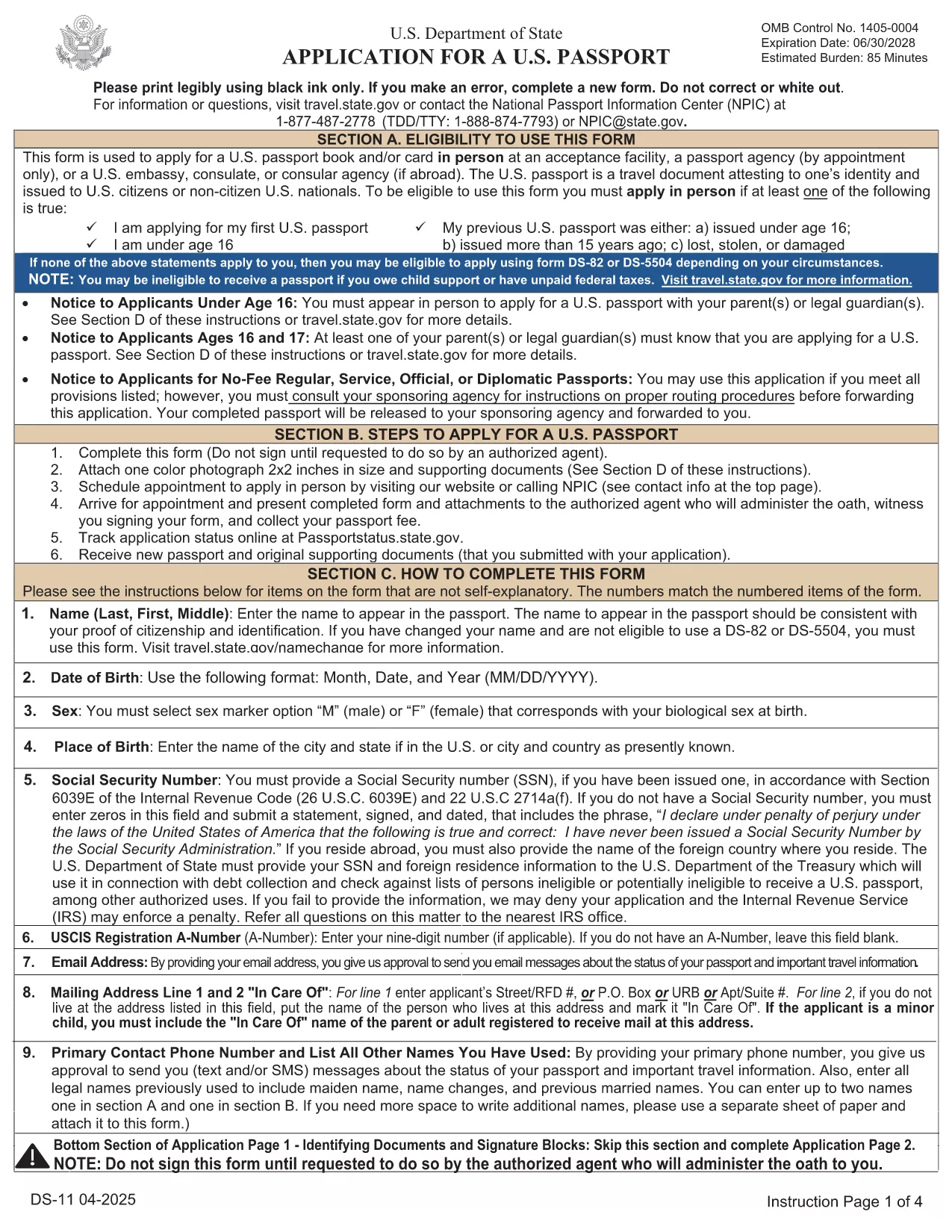
The DS-11 is the official application for first‑time U.S. passports, passports for minors, and replacement of lost or damaged passports. Using Formize’s built‑in PDF filler, you can complete the form online, avoid manual errors, and print a clean, one‑sided copy ready for submission.

What Is the DS-11 Form?

DS-11 is issued by the U.S. Department of State. It collects personal information, citizenship proof, and travel details. You must present the unsigned, completed form at a passport acceptance facility along with supporting documents.

How to Complete the DS-11 with Formize

Follow these simple steps to fill the form directly in your browser—no PDF editor required.

  • Click “Fill out this form” on the page.
  • Wait a few seconds while the Formize PDF Filler loads the official DS-11.
  • Enter your information in each field using the on‑screen keyboard.
  • Use the navigation arrows to move between pages.
  • When finished, click Print to produce a one‑sided copy.

Common Mistakes to Avoid

  • Using colored ink – print in black ink only.
  • Leaving any required box empty – the filler will highlight missing fields.
  • Signing the form before you reach the acceptance facility – sign only on the printed copy.
  • Altering a printed form by hand – any corrections require a new form.

Where to Submit Your Completed Form

Take the printed, unsigned DS-11, your proof of citizenship, a government‑issued photo ID, and a passport‑size photo to any passport acceptance facility (post offices, libraries, or designated clerks). If you need expedited service, schedule an appointment at a regional passport agency.

Download the Official Fillable PDF

For offline use, you can download the original PDF from the U.S. Department of State. The online filler provides the same official form, but the download link is included for reference.

Download DS-11 PDF (official)

FAQ
  • Who must use the DS-11 form?

    First‑time applicants, minors under 16, and anyone replacing a lost, stolen, or damaged passport that is more than 5 years old must use DS‑11.

  • Can I submit a signed DS-11 online?

    No. The DS‑11 must be presented unsigned to a passport acceptance agent, who will witness your signature.

  • Do I need a passport photo?

    Yes. Provide one recent, 2×2 inch color photo that meets State Department requirements.

  • How long does processing take?

    Standard processing is 4‑6 weeks after the acceptance facility receives your application. Expedited service reduces this to 2‑3 weeks.

  • Is the Formize filler free?

    Formize offers a free online filler for the DS‑11. No download or software installation is required.

  • What documents accompany the DS‑11?

    You need proof of U.S. citizenship (birth certificate or naturalization certificate), a government‑issued photo ID, a passport‑size photo, and the applicable fee.

  • Can I correct errors after printing?

    If you discover an error, you must fill out a new DS‑11. Hand‑written corrections are not accepted.

COME

Come compilare DS-11 gratuitamente, online in 5 semplici passaggi:

  1. 1
    Open the Formizer Fillable DS-11
    Click the “Fill out this form” button on the page. The Formize PDF Filler will load the official DS-11 automatically.
  2. 2
    Enter Your Information
    Use the on‑screen fields to type your name, date of birth, address, and other required details. The filler validates each entry.
  3. 3
    Review and Print
    After completing all pages, click the Print button. Print a single‑sided copy on white paper using black ink.
  4. 4
    Sign at the Acceptance Facility
    Do NOT sign the printed form until you are in front of a passport acceptance agent.
  5. 5
    Submit Your Package
    Take the printed DS-11, your supporting documents, and payment to the nearest passport acceptance facility.
App Formize PDF Filler
DI

Moduli Passaporto

DS-11 è uno dei moduli del passaporto che sono documenti utilizzati per richiedere un passaporto, che è un documento di viaggio che certifica l'identità e la nazionalità del titolare e consente loro di viaggiare a livello internazionale. I moduli per il passaporto possono variare a seconda del paese che rilascia il passaporto, ma in genere contengono informazioni personali sul richiedente, come nome, data di nascita e luogo di nascita, nonché informazioni sui genitori del richiedente ed eventuali precedenti passaporti o documenti di viaggio .

Negli Stati Uniti, i due moduli di passaporto più comuni sono il DS-11 e il DS-82. Il modulo DS-11 viene utilizzato per i richiedenti per la prima volta, i minori o le persone che non sono idonee a utilizzare il modulo DS-82. Il modulo DS-82 viene utilizzato per i rinnovi del passaporto per posta per i richiedenti idonei. Entrambi i moduli richiedono al richiedente di fornire informazioni personali e documentazione di supporto, come una fototessera e una prova di cittadinanza.

Altri paesi possono avere moduli e requisiti di passaporto diversi, ma il processo di base in genere prevede il completamento di una domanda di passaporto, la fornitura di documentazione di supporto e la partecipazione a un colloquio con un funzionario del passaporto presso una struttura governativa o un'ambasciata. È importante notare che il processo di richiesta del passaporto può richiedere diverse settimane o addirittura mesi, quindi si consiglia di fare domanda con largo anticipo rispetto a qualsiasi viaggio programmato.

CARATTERISTICHE

Compilatore PDF

Il modo più semplice per compilare moduli PDF online

  • Compila rapidamente DS-11
    Cerchi un modo per compilare rapidamente DS-11 online? Con il nostro compilatore di moduli PDF gratuito online, saprai come modificare e compilare questo documento PDF in meno di un minuto.
  • Editor PDF online facile da usare
    Stufo di stampare file PDF in modo da poterli modificare, prima di riscansionarli e rispedirli? Modifica documenti PDF gratuitamente online. Utilizza il nostro editor PDF online per risparmiare tempo e carta.
  • Grandi strumenti, tutte le piattaforme
    Ti stai chiedendo come inserire DS-11 su un Mac o forse come utilizzare un riempitivo PDF gratuito? I nostri strumenti PDF online funzionano su tutte le piattaforme.
  • Archiviazione sicura dei file
    I file "DS-11" completati vengono archiviati in un database protetto gestito dall'hosting Amazon Cloud. Puoi eliminare i tuoi file dal nostro sistema in qualsiasi momento. In ogni caso, questi file vengono automaticamente cancellati dopo 24 ore.
  • Chatta con {parola chiave}
    Chatta con "DS-11" su Chatize che è un assistente di lettura PDF gratuito. Fai domande e ottieni risposte da "DS-11". Basta fare clic sul pulsante Chatta con il documento in alto.

Elimina sessione di riempimento

Eliminare la sessione di riempimento selezionata? In questo caso, i progressi nella compilazione del modulo andranno persi.

Elimina la sessione di modifica

Eliminare la sessione di editing selezionata? In questo caso, i tuoi progressi nella creazione e modifica del modulo andranno persi.