
Seleziona la lingua

DS-64 Statement Regarding a Lost or Stolen U.S. Passport (Fillable PDF)

  1. Lingua Inglese
  2. Paese Stati Uniti d'America
  3. Attività Passaporto
Compila questo modulo
DS-64 Statement Regarding a Lost or Stolen U.S. Passport (Fillable PDF)

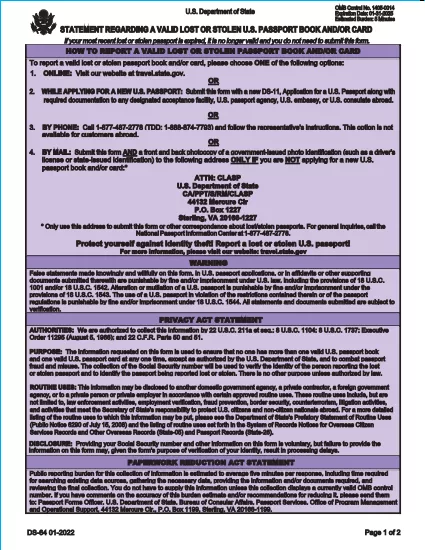
The DS-64 is the official U.S. Department of State form used to report a lost or stolen passport. Once submitted, the passport is immediately invalidated, preventing fraud and protecting your identity.

What Is the DS-64 Form?

DS-64, titled Statement Regarding a Lost or Stolen Passport, collects personal details, passport information, and a description of how the passport was lost or stolen. It is required whether you plan to request a replacement (DS‑11) or simply need the record of loss.

Why Use Formize’s Fillable PDF Filler?

  • Instant online filling: No need to download, print, and hand‑write.
  • Auto‑save: Your progress is saved in the browser, so you never lose data.
  • Error‑checking: Real‑time validation reduces mistakes.
  • Secure: All data stays on your device; Formize never stores personal information.

Step‑by‑Step Guide to Complete DS-64

Follow the simple steps below to fill, sign, and download the form.

Common Mistakes to Avoid

  • Leaving the passport number blank when you know it – the number is essential for cancellation.
  • Using colored ink or handwritten corrections – Formize requires black‑ink digital entry.
  • Forgetting to indicate whether you are submitting a replacement application (DS‑11).

Where to Submit Your Completed Form

After you download the completed DS‑64 PDF, you can:

  • Mail it to the address printed on the form if you are not applying for a new passport.
  • Include it with your DS‑11 application when requesting a replacement.
  • Submit it in person at a regional passport agency.

There is no fee to submit DS‑64 alone; fees apply only when you request a replacement passport.

FAQ
  • Can I submit DS‑64 online?

    No. The DS‑64 must be printed, signed, and submitted by mail or in person. Formize only provides a fillable PDF to simplify completion.

  • Is there a fee to file DS‑64?

    There is no fee to report a lost or stolen passport with DS‑64. Fees apply only when you request a replacement passport.

  • What if I don’t know my passport number?

    Enter ‘Unknown’ in the passport number field and provide as much other identifying information as possible.

  • Do I need a notary for DS‑64?

    No. The form only requires your signature; notarization is not required.

  • How long does it take for the passport to be invalidated?

    Once the State Department receives the DS‑64, the passport is typically canceled within a few business days.

  • Can a parent fill out DS‑64 for a minor?

    Yes. A parent or legal guardian may complete the form on behalf of a minor, signing in the appropriate section.

  • What should I do if my passport was expired when it was lost?

    You do not need to submit DS‑64 for an expired passport, but you may still do so to have a record of the loss.

  • Will I receive confirmation that my passport is canceled?

    The State Department does not send a formal confirmation, but the passport will be marked as invalid in their system.

COME

Come compilare DS-64 gratuitamente, online in 5 semplici passaggi:

  1. 1
    Open the Fillable Form
    Click the **Fill out this form** button on the page. The Formize PDF Filler app will load instantly in your browser.
  2. 2
    Enter Your Information
    Type your personal details, passport number, and loss description directly into the fields. All required fields are highlighted.
  3. 3
    Review & Sign
    Use the built‑in signature tool to sign the form digitally, then review each section for accuracy.
  4. 4
    Download or Print
    When you’re satisfied, click **Download PDF** to save a copy or **Print** to produce a hard copy for mailing.
  5. 5
    Submit the Form
    Mail or bring the completed DS‑64 to the address shown on the form, or attach it to your DS‑11 replacement application.
App Formize PDF Filler
DI

Moduli Passaporto

DS-64 è uno dei moduli del passaporto che sono documenti utilizzati per richiedere un passaporto, che è un documento di viaggio che certifica l'identità e la nazionalità del titolare e consente loro di viaggiare a livello internazionale. I moduli per il passaporto possono variare a seconda del paese che rilascia il passaporto, ma in genere contengono informazioni personali sul richiedente, come nome, data di nascita e luogo di nascita, nonché informazioni sui genitori del richiedente ed eventuali precedenti passaporti o documenti di viaggio .

Negli Stati Uniti, i due moduli di passaporto più comuni sono il DS-11 e il DS-82. Il modulo DS-11 viene utilizzato per i richiedenti per la prima volta, i minori o le persone che non sono idonee a utilizzare il modulo DS-82. Il modulo DS-82 viene utilizzato per i rinnovi del passaporto per posta per i richiedenti idonei. Entrambi i moduli richiedono al richiedente di fornire informazioni personali e documentazione di supporto, come una fototessera e una prova di cittadinanza.

Altri paesi possono avere moduli e requisiti di passaporto diversi, ma il processo di base in genere prevede il completamento di una domanda di passaporto, la fornitura di documentazione di supporto e la partecipazione a un colloquio con un funzionario del passaporto presso una struttura governativa o un'ambasciata. È importante notare che il processo di richiesta del passaporto può richiedere diverse settimane o addirittura mesi, quindi si consiglia di fare domanda con largo anticipo rispetto a qualsiasi viaggio programmato.

CARATTERISTICHE

Compilatore PDF

Il modo più semplice per compilare moduli PDF online

  • Compila rapidamente DS-64
    Cerchi un modo per compilare rapidamente DS-64 online? Con il nostro compilatore di moduli PDF gratuito online, saprai come modificare e compilare questo documento PDF in meno di un minuto.
  • Editor PDF online facile da usare
    Stufo di stampare file PDF in modo da poterli modificare, prima di riscansionarli e rispedirli? Modifica documenti PDF gratuitamente online. Utilizza il nostro editor PDF online per risparmiare tempo e carta.
  • Grandi strumenti, tutte le piattaforme
    Ti stai chiedendo come inserire DS-64 su un Mac o forse come utilizzare un riempitivo PDF gratuito? I nostri strumenti PDF online funzionano su tutte le piattaforme.
  • Archiviazione sicura dei file
    I file "DS-64" completati vengono archiviati in un database protetto gestito dall'hosting Amazon Cloud. Puoi eliminare i tuoi file dal nostro sistema in qualsiasi momento. In ogni caso, questi file vengono automaticamente cancellati dopo 24 ore.
  • Chatta con {parola chiave}
    Chatta con "DS-64" su Chatize che è un assistente di lettura PDF gratuito. Fai domande e ottieni risposte da "DS-64". Basta fare clic sul pulsante Chatta con il documento in alto.

Elimina sessione di riempimento

Eliminare la sessione di riempimento selezionata? In questo caso, i progressi nella compilazione del modulo andranno persi.

Elimina la sessione di modifica

Eliminare la sessione di editing selezionata? In questo caso, i tuoi progressi nella creazione e modifica del modulo andranno persi.