
Seleziona la lingua

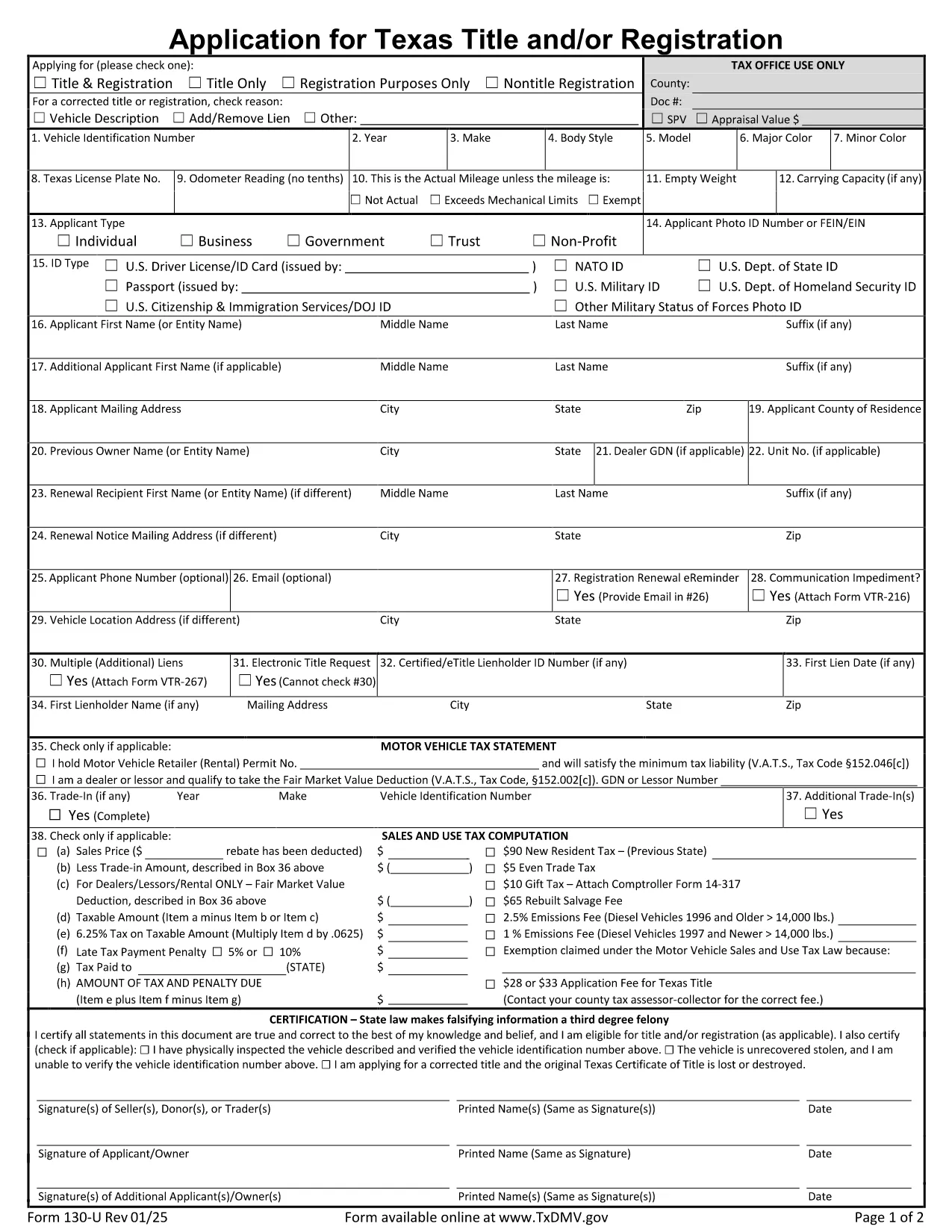
Texas Application Form Registration (Form 130‑U) – Fillable PDF

  1. Lingua Inglese
  2. Paese Stati Uniti d'America
  3. Dipartimento Texas Department of Motor Vehicles
  4. Attività Registrazione del veicolo
Compila questo modulo
Texas Application Form Registration (Form 130‑U) – Fillable PDF

The Texas Application Form Registration (Form 130‑U) is the official document used to request a new title, registration, or both for a vehicle in Texas. Whether you’re buying a car, transferring ownership, or need to register a newly built vehicle, this fillable PDF lets you complete the process quickly without printing or handwriting.

Key benefits of using Formize’s online PDF filler:

  • Instantly editable fields – no PDF editor required.
  • Auto‑save so you never lose your progress.
  • Secure data handling with SSL encryption.
  • Easy download of a completed copy for your records.

What Is Form 130‑U?

Form 130‑U is issued by the Texas Department of Motor Vehicles (TxDMV) and the county tax assessor‑collector. It collects essential information such as vehicle details, owner identification, lienholder data, and the type of registration requested.

How to Fill Out the Texas Registration Form Online

Follow these simple steps to complete the form directly on our page:

  1. Click the “Fill out this form” button below.
  2. Wait for the Formize PDF Filler app to load (usually a few seconds).
  3. Enter the required information in each highlighted field.
  4. Use the built‑in validation to correct any errors before submitting.
  5. When finished, click “Submit” to generate a PDF copy you can print or email.

Common Mistakes to Avoid

  • Incorrect VIN: Double‑check the Vehicle Identification Number; a single digit error can delay processing.
  • Missing signatures: The form requires the owner’s signature and, if applicable, the lienholder’s signature.
  • Wrong address: Use the mailing address registered with the county tax assessor‑collector.

Where to Submit Your Completed Form

After you download the completed PDF, mail it to your local county tax assessor‑collector office or bring it in person. For faster service, you can also submit the form online through the TxDMV portal if your county supports electronic filing.

FAQs About the Texas Registration Application

Below are answers to the most common questions users have about Form 130‑U.

FAQ
  • Do I need to print the PDF after filling it out?

    No. You can keep the digital copy for your records, but many counties require a printed version for submission.

  • Can I edit the form after I’ve submitted it?

    Once you click “Submit,” the PDF is locked. To make changes, reopen the original fillable PDF and start over.

  • What fees are associated with Form 130‑U?

    Fees vary by county and vehicle type. Check your local tax assessor‑collector’s website for the exact amount.

  • Is a signature required on the digital form?

    Yes. Use the built‑in signature field to draw or type your signature before submitting.

  • How long does processing take after I mail the form?

    Processing typically takes 7‑10 business days, but it can be faster if you submit electronically.

  • Can I use this form for a vehicle purchased out of state?

    Yes, but you must also provide proof of out‑of‑state inspection and any applicable emissions testing.

COME

Come compilare Texas registration form gratuitamente, online in 5 semplici passaggi:

  1. 1
    Click the Fill‑out Button
    Press the “Fill out this form” button on the page to launch the Formize PDF Filler.
  2. 2
    Wait for the Filler to Load
    A short loading screen appears while the secure filler app prepares the document.
  3. 3
    Enter Your Information
    Complete each highlighted field—VIN, owner details, vehicle description, and registration type.
  4. 4
    Validate and Review
    The filler checks for missing data and format errors; correct any highlighted issues.
  5. 5
    Generate and Save
    Click “Submit” to create a final PDF. Download, print, or email the completed form as needed.
App Formize PDF Filler
DI

Moduli di registrazione del veicolo

Se possiedi o noleggi un veicolo a motore, un rimorchio o una barca, devi soddisfare determinati obblighi per mantenere il tuo veicolo legalmente registrato e sicuro.

Texas registration form è uno dei moduli di immatricolazione dei veicoli che sono documenti utilizzati per immatricolare un veicolo a motore presso l'autorità statale o provinciale competente. Questi moduli sono in genere richiesti quando una persona acquista un veicolo nuovo o usato o quando si trasferisce in un nuovo stato o provincia con un veicolo.

I requisiti e i moduli esatti necessari per l'immatricolazione del veicolo possono variare in base alla località, ma in genere il processo prevede la fornitura di informazioni sul veicolo, sul proprietario e su eventuali privilegi sul veicolo.

Una volta presentati i moduli di registrazione e le tasse, l'autorità statale o provinciale rilascerà un certificato di registrazione o una targa al proprietario del veicolo. Questa registrazione consente al veicolo di circolare legalmente su strade pubbliche e autostrade.

CARATTERISTICHE

Compilatore PDF

Il modo più semplice per compilare moduli PDF online

  • Compila rapidamente Texas registration form
    Cerchi un modo per compilare rapidamente Texas registration form online? Con il nostro compilatore di moduli PDF gratuito online, saprai come modificare e compilare questo documento PDF in meno di un minuto.
  • Editor PDF online facile da usare
    Stufo di stampare file PDF in modo da poterli modificare, prima di riscansionarli e rispedirli? Modifica documenti PDF gratuitamente online. Utilizza il nostro editor PDF online per risparmiare tempo e carta.
  • Grandi strumenti, tutte le piattaforme
    Ti stai chiedendo come inserire Texas registration form su un Mac o forse come utilizzare un riempitivo PDF gratuito? I nostri strumenti PDF online funzionano su tutte le piattaforme.
  • Archiviazione sicura dei file
    I file "Texas registration form" completati vengono archiviati in un database protetto gestito dall'hosting Amazon Cloud. Puoi eliminare i tuoi file dal nostro sistema in qualsiasi momento. In ogni caso, questi file vengono automaticamente cancellati dopo 24 ore.
  • Chatta con {parola chiave}
    Chatta con "Texas registration form" su Chatize che è un assistente di lettura PDF gratuito. Fai domande e ottieni risposte da "Texas registration form". Basta fare clic sul pulsante Chatta con il documento in alto.

Elimina sessione di riempimento

Eliminare la sessione di riempimento selezionata? In questo caso, i progressi nella compilazione del modulo andranno persi.

Elimina la sessione di modifica

Eliminare la sessione di editing selezionata? In questo caso, i tuoi progressi nella creazione e modifica del modulo andranno persi.