
Seleziona la lingua

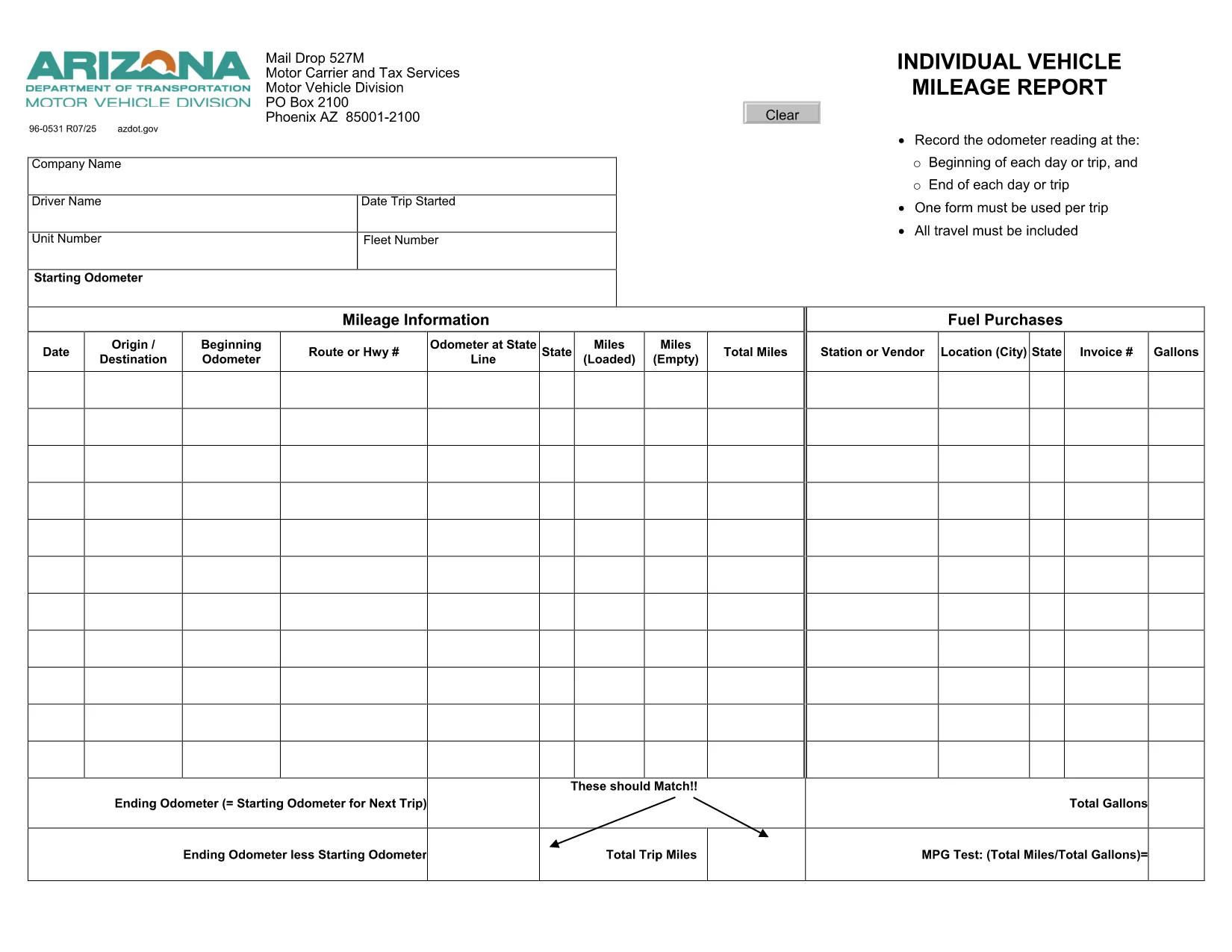
Arizona Form 96‑0531 – Fillable Vehicle Mileage Report

  1. Lingua Inglese
  2. Paese Stati Uniti d'America
  3. Attività Registrazione del veicolo
  4. Stato Arizona
Compila questo modulo
Arizona Form 96‑0531 – Fillable Vehicle Mileage Report

Form 96‑0531, also known as the Individual Vehicle Mileage Report, is required by the Arizona Motor Vehicle Division (MVD) for every qualified vehicle trip. Whether you’re a commercial driver, a fleet manager, or an individual tracking business mileage, this fillable PDF lets you record odometer readings, dates, and purpose of travel quickly and accurately.

What Is Form 96‑0531 Used For?

The form serves as an official trip record that helps the Arizona Department of Transportation (ADOT) verify mileage for tax deductions, reimbursement, and compliance audits. Each trip must have its own completed form, and the information is used for:

  • Calculating fuel tax credits
  • Supporting expense reports for businesses
  • Maintaining a legal record of vehicle use

How to Complete the Fillable PDF Online

Instead of printing and handwriting, use our integrated Formize PDF Filler to fill the form directly in your browser:

  1. Click the "Fill out this form" button below.
  2. Wait a few seconds while the Formize PDF Filler app loads.
  3. Enter the required data – date, driver name, odometer start/end, and trip purpose.
  4. Use the navigation tabs to move between pages; the form auto‑saves as you type.
  5. When finished, click Save & Download to get a completed PDF or email it directly to your supervisor.

Common Mistakes to Avoid

  • Leaving fields blank: Every field marked with an asterisk (*) is mandatory.
  • Incorrect odometer readings: Record the exact start and end readings; rounding can trigger audit flags.
  • Mismatched dates: The trip date must match the calendar day the vehicle was used.
  • Using the wrong form version: This page links to the current 2024 version of Form 96‑0531.

Where to Submit Your Completed Form

After saving the filled PDF, you can:

  • Upload it to the Arizona MVD portal under Vehicle Records → Trip Reports.
  • Email it to your company’s compliance officer.
  • Print a hard copy for on‑site submission at any MVD office.

Need more help? Review the official form instructions provided by ADOT.

FAQ
  • What is the purpose of Form 96‑0531?

    It records individual vehicle mileage for each trip, supporting tax deductions, reimbursements, and compliance with Arizona MVD regulations.

  • Can I fill out Form 96‑0531 on a mobile device?

    Yes. The Formize PDF Filler works on most modern smartphones and tablets with a web browser.

  • Do I need Adobe Acrobat to use the fillable PDF?

    No. The form is fully editable directly in the browser via Formize, so no extra software is required.

  • How many trips can I record in one PDF?

    Each trip requires its own completed Form 96‑0531. Create a separate PDF for every journey.

  • Is the online filler secure?

    Formize uses SSL encryption, and your data is stored locally in your browser until you download or email the completed document.

  • Where do I submit the finished form?

    Upload it to the Arizona MVD portal, email it to your employer’s compliance officer, or submit a printed copy at any MVD office.

COME

Come compilare Form 96-0531 gratuitamente, online in 5 semplici passaggi:

  1. 1
    Click the Fill‑out Button
    Press the "Fill out this form" button on the page to launch the Formize PDF Filler.
  2. 2
    Wait for the Filler to Load
    A short loading screen appears while the fillable PDF is prepared in your browser.
  3. 3
    Enter Trip Details
    Complete each required field – date, driver name, odometer start/end, and purpose of travel.
  4. 4
    Review and Save
    Double‑check the information, then click "Save & Download" to get the finished PDF.
  5. 5
    Submit or Print
    Email, upload, or print the completed form according to your organization’s procedures.
App Formize PDF Filler
DI

Moduli di registrazione del veicolo

Se possiedi o noleggi un veicolo a motore, un rimorchio o una barca, devi soddisfare determinati obblighi per mantenere il tuo veicolo legalmente registrato e sicuro.

Form 96-0531 è uno dei moduli di immatricolazione dei veicoli che sono documenti utilizzati per immatricolare un veicolo a motore presso l'autorità statale o provinciale competente. Questi moduli sono in genere richiesti quando una persona acquista un veicolo nuovo o usato o quando si trasferisce in un nuovo stato o provincia con un veicolo.

I requisiti e i moduli esatti necessari per l'immatricolazione del veicolo possono variare in base alla località, ma in genere il processo prevede la fornitura di informazioni sul veicolo, sul proprietario e su eventuali privilegi sul veicolo.

Una volta presentati i moduli di registrazione e le tasse, l'autorità statale o provinciale rilascerà un certificato di registrazione o una targa al proprietario del veicolo. Questa registrazione consente al veicolo di circolare legalmente su strade pubbliche e autostrade.

CARATTERISTICHE

Compilatore PDF

Il modo più semplice per compilare moduli PDF online

  • Compila rapidamente Form 96-0531
    Cerchi un modo per compilare rapidamente Form 96-0531 online? Con il nostro compilatore di moduli PDF gratuito online, saprai come modificare e compilare questo documento PDF in meno di un minuto.
  • Editor PDF online facile da usare
    Stufo di stampare file PDF in modo da poterli modificare, prima di riscansionarli e rispedirli? Modifica documenti PDF gratuitamente online. Utilizza il nostro editor PDF online per risparmiare tempo e carta.
  • Grandi strumenti, tutte le piattaforme
    Ti stai chiedendo come inserire Form 96-0531 su un Mac o forse come utilizzare un riempitivo PDF gratuito? I nostri strumenti PDF online funzionano su tutte le piattaforme.
  • Archiviazione sicura dei file
    I file "Form 96-0531" completati vengono archiviati in un database protetto gestito dall'hosting Amazon Cloud. Puoi eliminare i tuoi file dal nostro sistema in qualsiasi momento. In ogni caso, questi file vengono automaticamente cancellati dopo 24 ore.
  • Chatta con {parola chiave}
    Chatta con "Form 96-0531" su Chatize che è un assistente di lettura PDF gratuito. Fai domande e ottieni risposte da "Form 96-0531". Basta fare clic sul pulsante Chatta con il documento in alto.

Elimina sessione di riempimento

Eliminare la sessione di riempimento selezionata? In questo caso, i progressi nella compilazione del modulo andranno persi.

Elimina la sessione di modifica

Eliminare la sessione di editing selezionata? In questo caso, i tuoi progressi nella creazione e modifica del modulo andranno persi.