
Seleziona la lingua

Missouri Form 1576 – Application for Replacement Plates & Tabs (Fillable PDF)

  1. Lingua Inglese
  2. Paese Stati Uniti d'America
  3. Attività Registrazione del veicolo
  4. Stato Missouri
Compila questo modulo
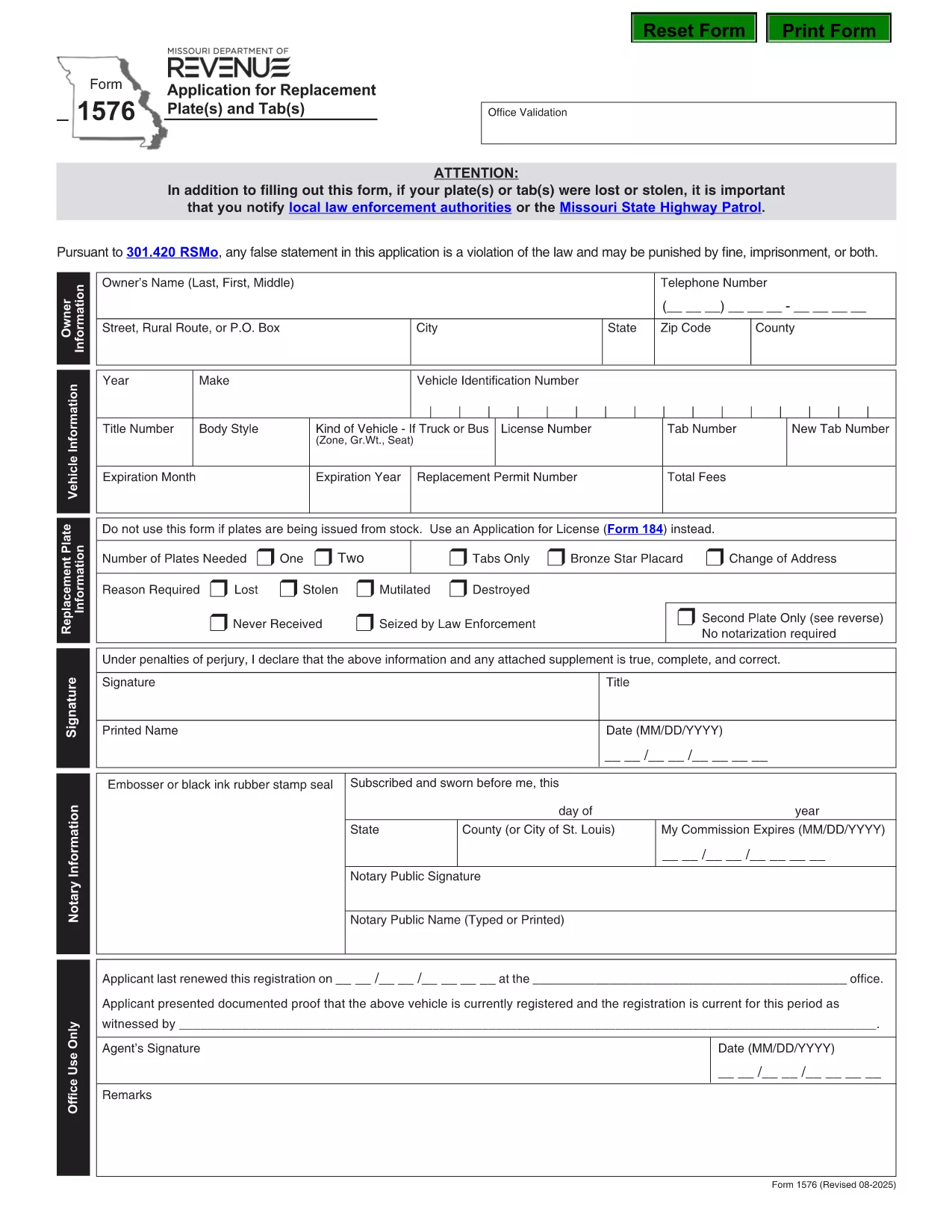
Missouri Form 1576 – Application for Replacement Plates & Tabs (Fillable PDF)

Form 1576 is the official Missouri Department of Revenue (DOR) application used when you need a replacement for lost, stolen, mutilated, destroyed, or never‑received license plates or registration tabs. The form must be notarized before submission, and it includes sections for vehicle details, owner information, and payment.

What Is Form 1576 and When Is It Required?

Missouri drivers file Form 1576 whenever any of the following occurs:

  • License plates are lost or stolen.
  • Registration tabs are missing, damaged, or never received.
  • Plates are mutilated, destroyed by fire, flood, or other accident.
  • You need a duplicate set because the original was never delivered.

The form is processed by the Missouri DOR and must be accompanied by the appropriate fee and a notarized signature.

How to Complete the Fillable PDF with Formize

Instead of printing, scanning, or editing the PDF manually, use the Formize PDF Filler – a fast, browser‑based solution that keeps the document fully fillable.

  1. Click the “Fill out this form” button on this page.
  2. The Formize PDF Filler app loads directly in your browser.
  3. Enter your information field‑by‑field: owner name, address, vehicle VIN, make, model, and year.
  4. Upload a digital notarization if you have a remote notary, or print the completed form for a traditional notary.
  5. Review the completed form, then click “Download” or “Print” to submit to your local DOR office.

Common Mistakes & Tips for a Successful Submission

  • Missing notarization: The DOR will reject the form without a notarized signature.
  • \n
  • Incorrect VIN: Double‑check the Vehicle Identification Number; a typo can delay processing.
  • Fee amount: Verify the current replacement fee on the DOR website before paying.
  • Incomplete sections: Leave no required field blank; use “N/A” only when the form explicitly allows it.

Following these tips helps ensure a quick turnaround and avoids unnecessary trips to the DOR office.

FAQ
  • Do I need a notarized signature on Form 1576?

    Yes. Missouri law requires a notarized signature on Form 1576 before the DOR will process your replacement request.

  • Can I submit Form 1576 electronically?

    The DOR currently accepts only paper submissions. Use the fillable PDF to avoid errors, then print and have it notarized before mailing or delivering it in person.

  • How much does a replacement plate or tab cost?

    Fees vary by vehicle type and plate style. Check the latest fee schedule on the Missouri DOR website before paying.

  • What if my VIN is incorrect on the form?

    An incorrect VIN will delay processing. Verify the VIN on your registration or title and correct any typos before submitting.

  • Do I need to provide proof of ownership?

    A copy of your current registration or title is recommended, but not mandatory if the DOR can verify ownership through the VIN and your personal information.

  • How long does it take to receive replacement plates?

    Processing time is typically 7–10 business days after the DOR receives a complete, notarized Form 1576 and the required fee.

  • Can I use Form 1576 for a personalized plate replacement?

    Yes, Form 1576 covers all standard, personalized, and specialty plates as long as the reason is loss, theft, or damage.

COME

Come compilare Form 1576 gratuitamente, online in 5 semplici passaggi:

  1. 1
    Open the Fillable Form
    Click the “Fill out this form” button on the page. The Formize PDF Filler loads instantly in your browser.
  2. 2
    Enter Your Information
    Complete each field – owner details, vehicle VIN, make, model, year, and reason for replacement.
  3. 3
    Add Notarization
    If you have a digital notarization, upload it now. Otherwise, print the completed form for a traditional notary signature.
  4. 4
    Review and Save
    Double‑check all entries, then click “Download” or “Print” to obtain a final copy for submission.
  5. 5
    Submit to the DOR
    Take the printed, notarized form (or submit the digital copy if accepted) to your local Missouri Department of Revenue office along with the required fee.
App Formize PDF Filler
DI

Moduli di registrazione del veicolo

Se possiedi o noleggi un veicolo a motore, un rimorchio o una barca, devi soddisfare determinati obblighi per mantenere il tuo veicolo legalmente registrato e sicuro.

Form 1576 è uno dei moduli di immatricolazione dei veicoli che sono documenti utilizzati per immatricolare un veicolo a motore presso l'autorità statale o provinciale competente. Questi moduli sono in genere richiesti quando una persona acquista un veicolo nuovo o usato o quando si trasferisce in un nuovo stato o provincia con un veicolo.

I requisiti e i moduli esatti necessari per l'immatricolazione del veicolo possono variare in base alla località, ma in genere il processo prevede la fornitura di informazioni sul veicolo, sul proprietario e su eventuali privilegi sul veicolo.

Una volta presentati i moduli di registrazione e le tasse, l'autorità statale o provinciale rilascerà un certificato di registrazione o una targa al proprietario del veicolo. Questa registrazione consente al veicolo di circolare legalmente su strade pubbliche e autostrade.

CARATTERISTICHE

Compilatore PDF

Il modo più semplice per compilare moduli PDF online

  • Compila rapidamente Form 1576
    Cerchi un modo per compilare rapidamente Form 1576 online? Con il nostro compilatore di moduli PDF gratuito online, saprai come modificare e compilare questo documento PDF in meno di un minuto.
  • Editor PDF online facile da usare
    Stufo di stampare file PDF in modo da poterli modificare, prima di riscansionarli e rispedirli? Modifica documenti PDF gratuitamente online. Utilizza il nostro editor PDF online per risparmiare tempo e carta.
  • Grandi strumenti, tutte le piattaforme
    Ti stai chiedendo come inserire Form 1576 su un Mac o forse come utilizzare un riempitivo PDF gratuito? I nostri strumenti PDF online funzionano su tutte le piattaforme.
  • Archiviazione sicura dei file
    I file "Form 1576" completati vengono archiviati in un database protetto gestito dall'hosting Amazon Cloud. Puoi eliminare i tuoi file dal nostro sistema in qualsiasi momento. In ogni caso, questi file vengono automaticamente cancellati dopo 24 ore.
  • Chatta con {parola chiave}
    Chatta con "Form 1576" su Chatize che è un assistente di lettura PDF gratuito. Fai domande e ottieni risposte da "Form 1576". Basta fare clic sul pulsante Chatta con il documento in alto.

Elimina sessione di riempimento

Eliminare la sessione di riempimento selezionata? In questo caso, i progressi nella compilazione del modulo andranno persi.

Elimina la sessione di modifica

Eliminare la sessione di editing selezionata? In questo caso, i tuoi progressi nella creazione e modifica del modulo andranno persi.