
Seleziona la lingua

Fillable Missouri Form 4803 – Request for Information

  1. Lingua Inglese
  2. Paese Stati Uniti d'America
  3. Attività Registrazione del veicolo
  4. Stato Missouri
Compila questo modulo
Fillable Missouri Form 4803 – Request for Information

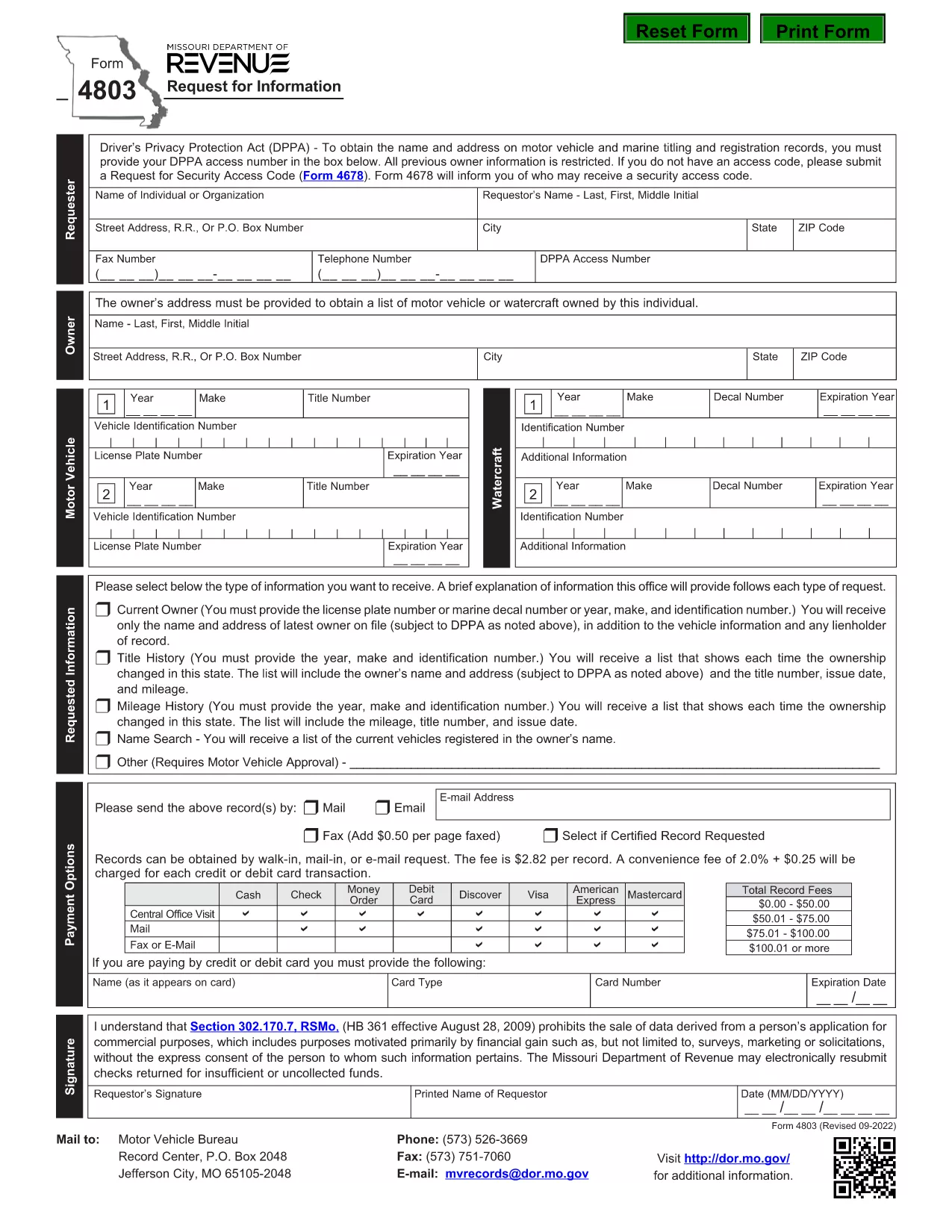
Missouri Form 4803 is the official “Request for Information” used by the Missouri Department of Revenue. Whether you need tax records, payment history, or other revenue‑related data, this form lets you request the details in writing.

What Is Missouri Form 4803?

The form is a simple one‑page request that asks for your identifying information, the type of data you need, and a brief justification. It is commonly used by individuals, businesses, and professionals who need official records for audits, legal matters, or personal review.

How to Complete the Fillable PDF

Instead of printing and manually filling the form, you can fill it directly in your browser using Formize’s online PDF filler. Follow the steps below for a smooth experience.

Common Mistakes to Avoid

  • Leaving required fields blank – the filler will highlight missing information.
  • Using an outdated address – double‑check your mailing address before submitting.
  • Submitting the wrong request type – each checkbox corresponds to a specific information category.

Where to Submit the Completed Form

After filling out the form, you can either download the completed PDF and mail it to the address listed on the form, or submit it electronically if the Department of Revenue provides an online portal.

Why Use Formize PDF Filler?

Formize loads the official PDF instantly, preserves all formatting, and saves your entries securely. No extra software is required, and you can download the finished document in seconds.

FAQ
  • Do I need a PDF reader to fill Form 4803?

    No. Formize’s online filler works in any modern browser, so you don’t need Adobe Acrobat or any other software.

  • Is the fillable version the same as the official paper form?

    Yes. The PDF is the exact official form from the Missouri Department of Revenue; only the input method changes.

  • Can I edit the form after I download it?

    Once you download the completed PDF, you can reopen it in any PDF editor, but all required fields must already be filled for the Department to accept it.

  • How long does it take for the Department to respond?

    Response times vary, but the Department typically replies within 15‑30 business days after receiving a complete Form 4803.

  • What if I make a mistake while filling the form?

    Simply use the “Clear” button in the filler to reset a field, or click “Reset Form” to start over before saving.

  • Is there a fee to submit Form 4803?

    There is no fee to request information using Form 4803, but the Department may charge for copying or certified copies of records.

  • Can I submit Form 4803 electronically?

    If the Missouri Department of Revenue offers an e‑submission portal, you can upload the completed PDF there. Otherwise, mail the printed form to the address on the document.

COME

Come compilare Form 4803 gratuitamente, online in 5 semplici passaggi:

  1. 1
    Click the Fill Out This Form Button
    On the Formize page, locate the bright “Fill out this form” button and click it. The PDF loads directly in the browser.
  2. 2
    Wait for the Formize PDF Filler to Load
    A loading bar appears while the secure PDF filler initializes. This usually takes only a few seconds.
  3. 3
    Enter Your Information
    Type directly into each field. Required fields are marked with a red asterisk and will be highlighted if left empty.
  4. 4
    Review and Save
    Use the preview button to double‑check your entries. When satisfied, click “Save” to download the completed PDF to your device.
  5. 5
    Submit the Form
    Print and mail the saved PDF to the address on the form, or follow any electronic submission instructions provided by the Missouri Department of Revenue.
App Formize PDF Filler
DI

Moduli di registrazione del veicolo

Form 4803 è uno dei moduli di immatricolazione dei veicoli che sono documenti utilizzati per immatricolare un veicolo a motore presso l'autorità governativa pertinente, in genere il Dipartimento dei veicoli a motore (DMV) o un'agenzia equivalente. Questi moduli sono richiesti quando una persona acquista un veicolo nuovo o usato, trasferisce la proprietà di un veicolo o si trasferisce in una nuova giurisdizione con un veicolo.

I moduli di immatricolazione specifici del veicolo possono variare in base alla giurisdizione, ma generalmente richiedono le seguenti informazioni:

Informazioni sul veicolo: includono dettagli sul veicolo, come marca, modello, anno, numero di identificazione del veicolo (VIN) e lettura del contachilometri.

Informazioni sul proprietario: il modulo richiederà informazioni sul proprietario del veicolo, inclusi nome, indirizzo, informazioni di contatto e numero di patente di guida.

Prova di proprietà: a seconda delle circostanze, potrebbe essere richiesta una prova di proprietà, come un certificato di proprietà, un atto di vendita o un certificato di origine del produttore (per i veicoli nuovi).

Informazioni sull'assicurazione: in genere è richiesta la prova della copertura assicurativa del veicolo valida. Ciò può includere la fornitura del numero di polizza assicurativa, delle date di copertura e dei dettagli della compagnia assicurativa.

Pagamento delle tariffe: la registrazione del veicolo comporta il pagamento di varie tariffe, come tasse di registrazione, tasse ed eventualmente altri oneri specifici della giurisdizione.

Oltre a questi requisiti di base, alcune giurisdizioni potrebbero avere moduli aggiuntivi o requisiti di documentazione. Ad esempio, in alcune aree potrebbero essere necessari i risultati dei test sulle emissioni, le ispezioni di sicurezza o la prova di residenza.

Una volta completati e inviati i moduli di immatricolazione del veicolo, l'autorità governativa rilascerà un certificato di immatricolazione, targhe e adesivi di immatricolazione. Questi documenti indicano che il veicolo è legalmente immatricolato e autorizzato a circolare su strade pubbliche.

È importante notare che i requisiti di immatricolazione dei veicoli possono variare in modo significativo a seconda della giurisdizione. Pertanto, si consiglia di consultare il DMV locale o un'agenzia equivalente per i moduli e le procedure specifiche applicabili alla propria località.

CARATTERISTICHE

Compilatore PDF

Il modo più semplice per compilare moduli PDF online

  • Compila rapidamente Form 4803
    Cerchi un modo per compilare rapidamente Form 4803 online? Con il nostro compilatore di moduli PDF gratuito online, saprai come modificare e compilare questo documento PDF in meno di un minuto.
  • Editor PDF online facile da usare
    Stufo di stampare file PDF in modo da poterli modificare, prima di riscansionarli e rispedirli? Modifica documenti PDF gratuitamente online. Utilizza il nostro editor PDF online per risparmiare tempo e carta.
  • Grandi strumenti, tutte le piattaforme
    Ti stai chiedendo come inserire Form 4803 su un Mac o forse come utilizzare un riempitivo PDF gratuito? I nostri strumenti PDF online funzionano su tutte le piattaforme.
  • Archiviazione sicura dei file
    I file "Form 4803" completati vengono archiviati in un database protetto gestito dall'hosting Amazon Cloud. Puoi eliminare i tuoi file dal nostro sistema in qualsiasi momento. In ogni caso, questi file vengono automaticamente cancellati dopo 24 ore.
  • Chatta con {parola chiave}
    Chatta con "Form 4803" su Chatize che è un assistente di lettura PDF gratuito. Fai domande e ottieni risposte da "Form 4803". Basta fare clic sul pulsante Chatta con il documento in alto.

Elimina sessione di riempimento

Eliminare la sessione di riempimento selezionata? In questo caso, i progressi nella compilazione del modulo andranno persi.

Elimina la sessione di modifica

Eliminare la sessione di editing selezionata? In questo caso, i tuoi progressi nella creazione e modifica del modulo andranno persi.