
Seleziona la lingua

Nevada DMV VP-193 Registration Services Transmittal Form (Fillable PDF)

  1. Lingua Inglese
  2. Paese Stati Uniti d'America
  3. Attività Registrazione del veicolo
  4. Stato Nevada
Compila questo modulo
Nevada DMV VP-193 Registration Services Transmittal Form (Fillable PDF)

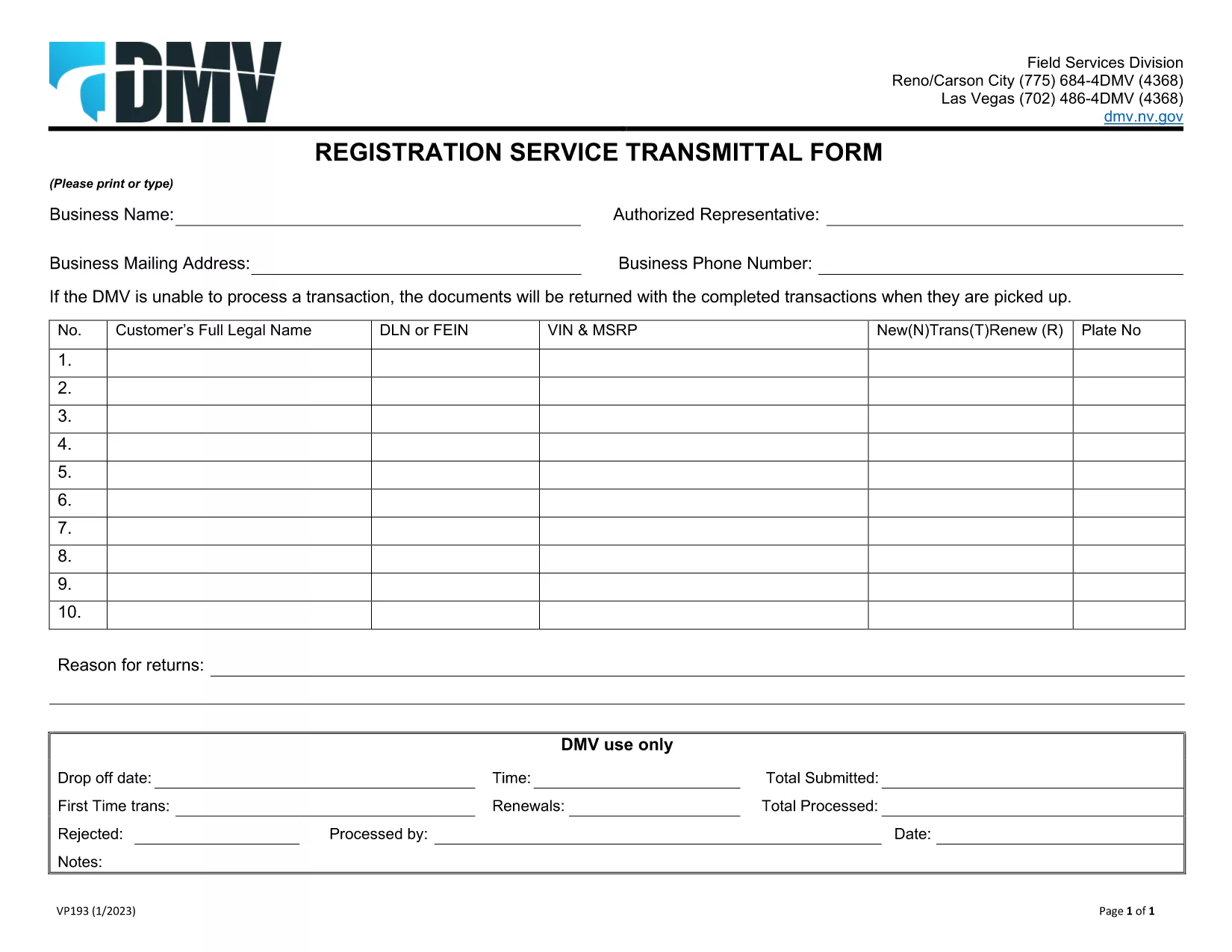
The VP-193 Registration Services Transmittal Form is the official Nevada DMV document used to transmit registration‑related information between dealers, lenders, and the Department of Motor Vehicles. Whether you are a vehicle dealer, a lien holder, or an individual preparing a registration packet, this fillable PDF saves you time and ensures compliance.

What Is the VP-193 Form?

VP-193 serves as a cover sheet for registration packages. It captures essential data such as the business name, authorized representative, mailing address, and the specific registration services requested. The form must be printed or typed, signed in person, and submitted with the supporting registration documents.

How to Complete the VP-193 Online

With Formize’s integrated PDF filler you can fill out the VP-193 directly in your browser—no download‑and‑install needed. Follow the simple steps below:

  • Click the Fill out this form button on this page.
  • Wait a few seconds while the Formize PDF Filler app loads.
  • Enter the required information in each field. Required fields are highlighted in red.
  • Review the completed form for accuracy.
  • Save a copy to your computer or cloud storage, then print and sign in person.

Common Mistakes to Avoid

  • Leaving required fields blank – the DMV will reject the package.
  • Using a digital signature – the form must be signed with a wet ink signature.
  • Incorrect business address – double‑check mailing address formats.
  • Mismatched VIN or plate numbers – ensure the numbers match the accompanying registration documents.

Where to Submit the Completed Form

After printing and signing, include the VP-193 with your registration packet and mail it to the address listed on the form, or deliver it in person to any Nevada DMV office. For expedited processing, you may also submit the package at a DMV “Express” window.

Need a printable version? Download the official VP-193 PDF and start filling it out now.

FAQ
  • Do I need a digital signature on the VP‑193?

    No. The Nevada DMV requires a wet‑ink signature. Use the online filler for data entry, then print and sign manually.

  • Can I submit the VP‑193 electronically?

    The form must be printed and signed before submission. Electronic submission is not accepted for this transmittal form.

  • What if I make a mistake after printing?

    Cross out the error with a single line, initial it, and write the correct information. For major errors, re‑fill the form using Formize and print a new copy.

  • Is the VP‑193 required for every vehicle registration?

    Only when a dealer, lender, or third party is transmitting registration services on behalf of the vehicle owner.

  • How long does it take for the DMV to process a VP‑193 package?

    Standard processing usually takes 7‑10 business days after receipt. Expedited services are available at select DMV locations.

  • Do I need to include supporting documents with the VP‑193?

    Yes. Attach the vehicle title, registration application, proof of insurance, and any lien release documents required for your transaction.

COME

Come compilare VP-193 gratuitamente, online in 5 semplici passaggi:

  1. 1
    Click the Fill‑out Button
    Press the “Fill out this form” button on this page to launch the Formize PDF Filler.
  2. 2
    Wait for the Filler to Load
    A few seconds later the fillable PDF will appear in the browser window.
  3. 3
    Enter All Required Information
    Complete each highlighted field with accurate business and registration details.
  4. 4
    Review, Save, and Print
    Check your entries, save a digital copy, then print the form for a wet‑ink signature.
  5. 5
    Submit to the Nevada DMV
    Attach the signed VP‑193 to your registration packet and mail or deliver it to the DMV.
App Formize PDF Filler
DI

Moduli di registrazione del veicolo

Se possiedi o noleggi un veicolo a motore, un rimorchio o una barca, devi soddisfare determinati obblighi per mantenere il tuo veicolo legalmente registrato e sicuro.

VP-193 è uno dei moduli di immatricolazione dei veicoli che sono documenti utilizzati per immatricolare un veicolo a motore presso l'autorità statale o provinciale competente. Questi moduli sono in genere richiesti quando una persona acquista un veicolo nuovo o usato o quando si trasferisce in un nuovo stato o provincia con un veicolo.

I requisiti e i moduli esatti necessari per l'immatricolazione del veicolo possono variare in base alla località, ma in genere il processo prevede la fornitura di informazioni sul veicolo, sul proprietario e su eventuali privilegi sul veicolo.

Una volta presentati i moduli di registrazione e le tasse, l'autorità statale o provinciale rilascerà un certificato di registrazione o una targa al proprietario del veicolo. Questa registrazione consente al veicolo di circolare legalmente su strade pubbliche e autostrade.

CARATTERISTICHE

Compilatore PDF

Il modo più semplice per compilare moduli PDF online

  • Compila rapidamente VP-193
    Cerchi un modo per compilare rapidamente VP-193 online? Con il nostro compilatore di moduli PDF gratuito online, saprai come modificare e compilare questo documento PDF in meno di un minuto.
  • Editor PDF online facile da usare
    Stufo di stampare file PDF in modo da poterli modificare, prima di riscansionarli e rispedirli? Modifica documenti PDF gratuitamente online. Utilizza il nostro editor PDF online per risparmiare tempo e carta.
  • Grandi strumenti, tutte le piattaforme
    Ti stai chiedendo come inserire VP-193 su un Mac o forse come utilizzare un riempitivo PDF gratuito? I nostri strumenti PDF online funzionano su tutte le piattaforme.
  • Archiviazione sicura dei file
    I file "VP-193" completati vengono archiviati in un database protetto gestito dall'hosting Amazon Cloud. Puoi eliminare i tuoi file dal nostro sistema in qualsiasi momento. In ogni caso, questi file vengono automaticamente cancellati dopo 24 ore.
  • Chatta con {parola chiave}
    Chatta con "VP-193" su Chatize che è un assistente di lettura PDF gratuito. Fai domande e ottieni risposte da "VP-193". Basta fare clic sul pulsante Chatta con il documento in alto.

Elimina sessione di riempimento

Eliminare la sessione di riempimento selezionata? In questo caso, i progressi nella compilazione del modulo andranno persi.

Elimina la sessione di modifica

Eliminare la sessione di editing selezionata? In questo caso, i tuoi progressi nella creazione e modifica del modulo andranno persi.