
Seleziona la lingua

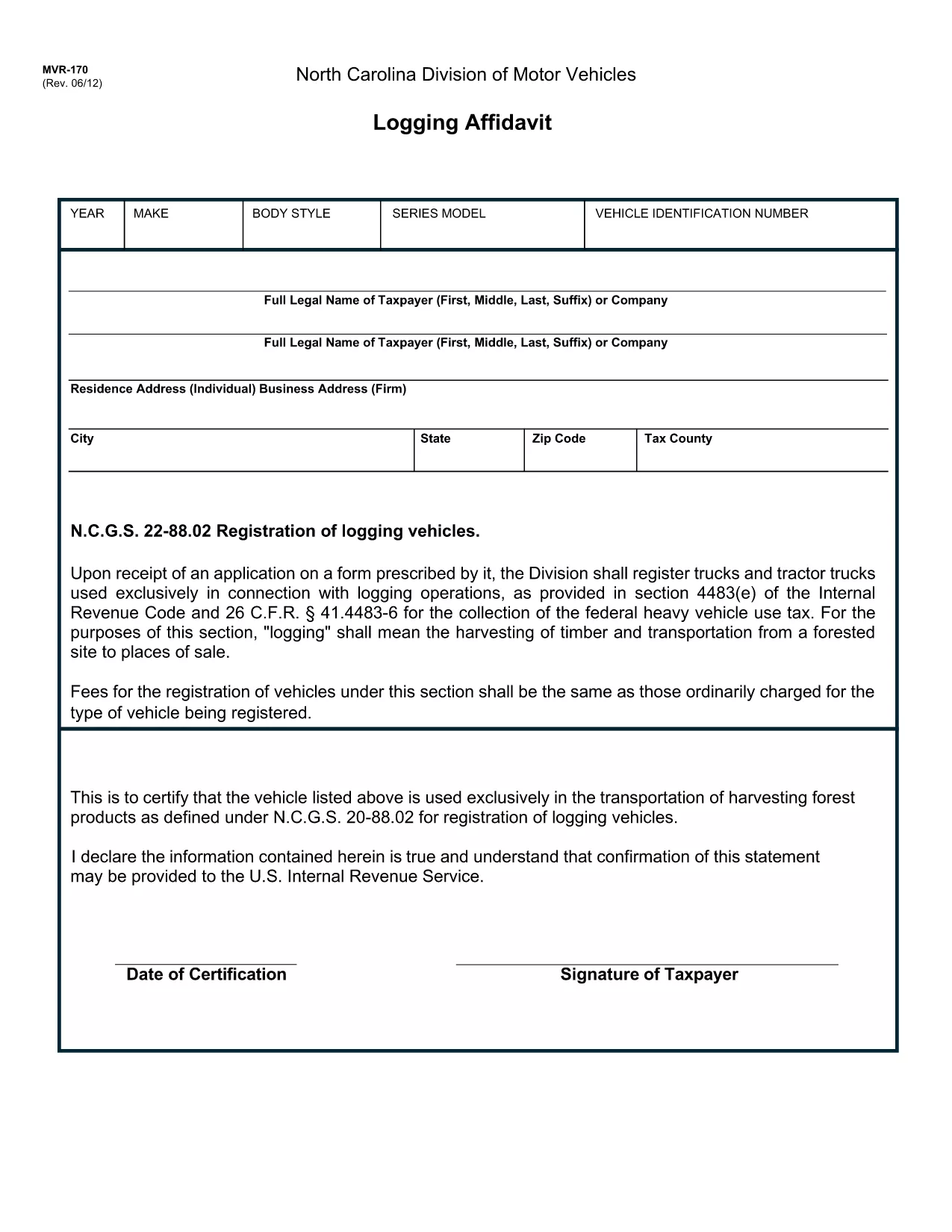
MVR-170 Logging Affidavit – Fillable PDF Form

  1. Lingua Inglese
  2. Paese Stati Uniti d'America
  3. Attività Registrazione del veicolo
  4. Stato Carolina del Nord
Compila questo modulo
MVR-170 Logging Affidavit – Fillable PDF Form

The MVR-170 Logging Affidavit is a North Carolina Department of Motor Vehicles (NC DMV) form used to record vehicle mileage for tax, insurance, and regulatory purposes. With Formize’s fillable PDF, you can complete the affidavit directly in your browser—no printer or PDF editor required.

What is the MVR-170 Logging Affidavit?

This form documents the mileage of a vehicle over a specific period. It is commonly required by businesses, government agencies, and individuals who need to prove vehicle usage for reimbursement or compliance.

How to Complete the MVR-170 Online

Follow the simple steps below to fill out the MVR-170 quickly and accurately using our online PDF filler.

Common Mistakes to Avoid

  • Leaving required fields blank (date, vehicle identification number, or mileage).
  • Using illegible handwriting when printing the form later.
  • Forgetting to sign the affidavit before submission.
  • Mismatching the mileage totals with supporting documents.

Where to Submit the Completed Form

After saving your completed PDF, you can either print and mail it to your local NC DMV office or upload it through the DMV’s online portal if electronic filing is available.

Need help? The Formize PDF Filler provides real‑time validation, so you’ll know instantly if any fields are missing or incorrectly formatted.

FAQ
  • What is the purpose of the MVR-170 form?

    The MVR-170 Logging Affidavit records vehicle mileage for tax, insurance, and regulatory compliance in North Carolina.

  • Can I fill out MVR-170 on a mobile device?

    Yes. Formize’s PDF filler works on smartphones, tablets, and desktops, allowing you to complete the form anywhere.

  • Do I need to print the form after filling it online?

    Printing is optional. If the DMV accepts electronic submissions, you can upload the completed PDF directly.

  • Is there a fee to use the Formize PDF filler?

    No. The fillable PDF service is free for all users.

  • What should I do if I make a mistake after saving?

    Open the saved PDF again with Formize, correct the fields, and re‑save the document before submitting.

  • Where can I submit the completed MVR-170?

    Submit it to your local NC DMV office by mail, in person, or via the DMV’s online portal if electronic filing is offered.

COME

Come compilare MVR-170 gratuitamente, online in 4 semplici passaggi:

  1. 1
    Open the Form
    Click the “Fill out this form” button on this page. The Formize PDF Filler will load directly in your browser.
  2. 2
    Enter Your Information
    Type directly into each field—date, vehicle details, mileage, and signatures—just as you would on a paper form.
  3. 3
    Validate and Save
    Review all entries, correct any errors highlighted by the filler, then click “Save” to download the completed PDF to your device.
  4. 4
    Submit to the DMV
    Print the saved PDF or upload it through the NC DMV portal according to the submission instructions on the form.
App Formize PDF Filler
DI

Moduli di registrazione del veicolo

Se possiedi o noleggi un veicolo a motore, un rimorchio o una barca, devi soddisfare determinati obblighi per mantenere il tuo veicolo legalmente registrato e sicuro.

MVR-170 è uno dei moduli di immatricolazione dei veicoli che sono documenti utilizzati per immatricolare un veicolo a motore presso l'autorità statale o provinciale competente. Questi moduli sono in genere richiesti quando una persona acquista un veicolo nuovo o usato o quando si trasferisce in un nuovo stato o provincia con un veicolo.

I requisiti e i moduli esatti necessari per l'immatricolazione del veicolo possono variare in base alla località, ma in genere il processo prevede la fornitura di informazioni sul veicolo, sul proprietario e su eventuali privilegi sul veicolo.

Una volta presentati i moduli di registrazione e le tasse, l'autorità statale o provinciale rilascerà un certificato di registrazione o una targa al proprietario del veicolo. Questa registrazione consente al veicolo di circolare legalmente su strade pubbliche e autostrade.

CARATTERISTICHE

Compilatore PDF

Il modo più semplice per compilare moduli PDF online

  • Compila rapidamente MVR-170
    Cerchi un modo per compilare rapidamente MVR-170 online? Con il nostro compilatore di moduli PDF gratuito online, saprai come modificare e compilare questo documento PDF in meno di un minuto.
  • Editor PDF online facile da usare
    Stufo di stampare file PDF in modo da poterli modificare, prima di riscansionarli e rispedirli? Modifica documenti PDF gratuitamente online. Utilizza il nostro editor PDF online per risparmiare tempo e carta.
  • Grandi strumenti, tutte le piattaforme
    Ti stai chiedendo come inserire MVR-170 su un Mac o forse come utilizzare un riempitivo PDF gratuito? I nostri strumenti PDF online funzionano su tutte le piattaforme.
  • Archiviazione sicura dei file
    I file "MVR-170" completati vengono archiviati in un database protetto gestito dall'hosting Amazon Cloud. Puoi eliminare i tuoi file dal nostro sistema in qualsiasi momento. In ogni caso, questi file vengono automaticamente cancellati dopo 24 ore.
  • Chatta con {parola chiave}
    Chatta con "MVR-170" su Chatize che è un assistente di lettura PDF gratuito. Fai domande e ottieni risposte da "MVR-170". Basta fare clic sul pulsante Chatta con il documento in alto.

Elimina sessione di riempimento

Eliminare la sessione di riempimento selezionata? In questo caso, i progressi nella compilazione del modulo andranno persi.

Elimina la sessione di modifica

Eliminare la sessione di editing selezionata? In questo caso, i tuoi progressi nella creazione e modifica del modulo andranno persi.