
Seleziona la lingua

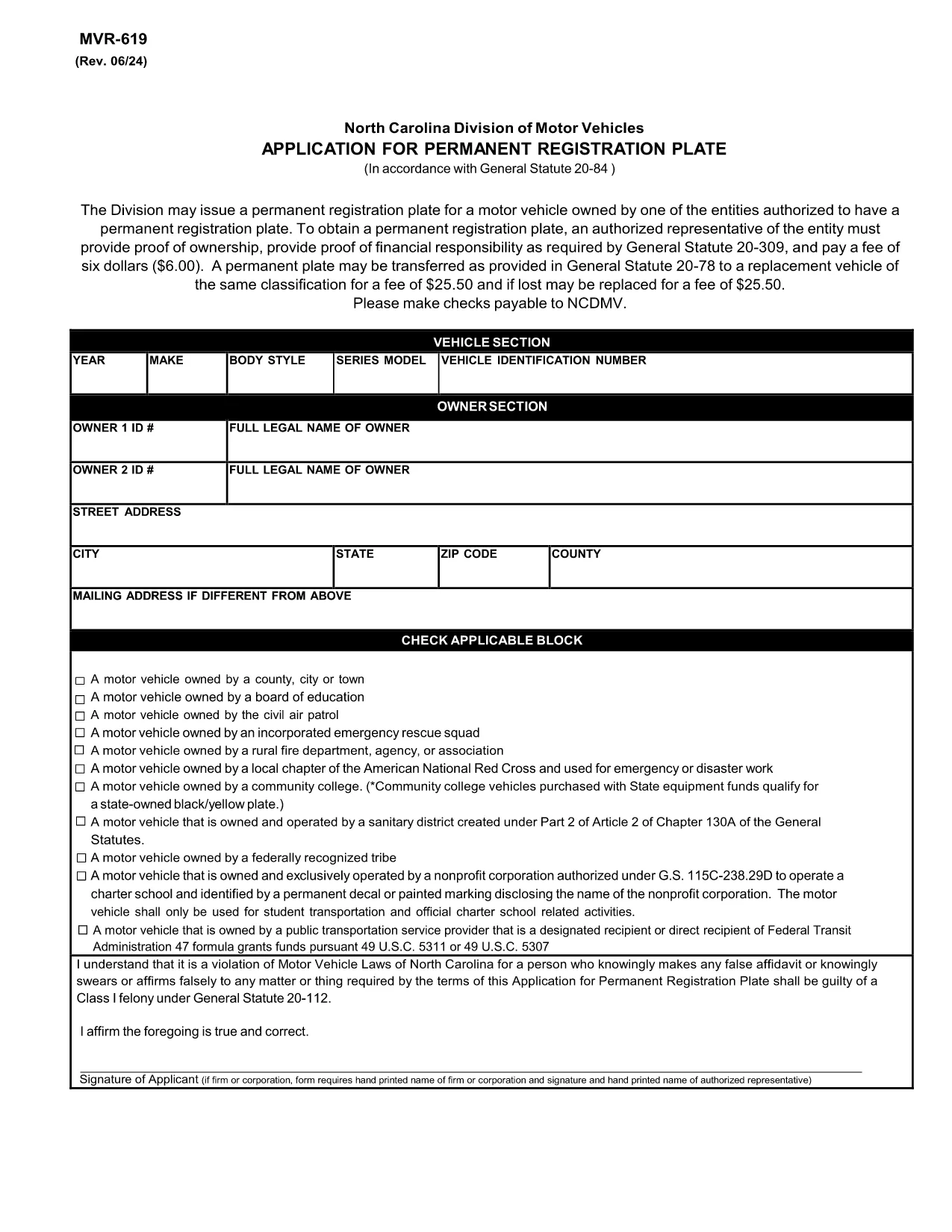
MVR-619 Application for Permanent Registration Plate (North Carolina)

  1. Lingua Inglese
  2. Paese Stati Uniti d'America
  3. Attività Registrazione del veicolo
  4. Stato Carolina del Nord
Compila questo modulo
MVR-619 Application for Permanent Registration Plate (North Carolina)

The MVR-619 is the official North Carolina Department of Transportation (NCDOT) application for a permanent vehicle registration plate. This fillable PDF lets eligible entities request a custom plate without paper‑by‑paper hassle.

What is Form MVR‑619?

MVR‑619, titled “Application for Permanent Registration Plate,” is used by corporations, government agencies, and other authorized entities to obtain a permanent license plate for a motor vehicle they own. The form captures ownership proof, financial responsibility, and the required $6.00 fee.

Who Must Use MVR‑619?

  • Corporations, partnerships, or LLCs that own a vehicle.
  • State or local government agencies.
  • Non‑profit organizations with a qualifying vehicle.

If you are an individual driver, this form does not apply – you’ll need the standard registration renewal form instead.

How to Complete the MVR‑619 Online

Instead of downloading, opening, and editing the PDF manually, simply click the “Fill out this form” button on this page. The Formize PDF Filler app will load the fillable MVR‑619 directly in your browser:

  1. Click Fill out this form and wait for the Formize PDF Filler to appear.
  2. Enter the required information: entity name, vehicle VIN, proof of ownership, and financial responsibility details.
  3. Review each field for accuracy; the filler highlights any missing mandatory fields.
  4. When finished, click Submit to download a completed PDF you can print or save.
  5. Print the completed form, attach the $6.00 fee payment proof, and submit as instructed.

Common Mistakes to Avoid

  • Leaving required fields blank: The filler will prevent submission if a mandatory field is empty.
  • Incorrect VIN format: Double‑check the 17‑character Vehicle Identification Number.
  • Missing proof of ownership: Attach a copy of the title or bill of sale with the completed form.
  • Wrong fee amount: The fee is exactly $6.00; overpayments may cause processing delays.

Where to Submit the Completed Form

After printing, mail the signed MVR‑619, proof of ownership, and the $6.00 fee receipt to:

North Carolina Division of Motor Vehicles
3001 Mail Service Center
Raleigh, NC 27699-3001

Alternatively, you may deliver the documents in person to any NCDOT DMV office that handles specialty plates.

Need a quick reference? Download the original PDF for offline use.

FAQ
  • Who is eligible to use MVR‑619?

    Only corporations, government agencies, non‑profit organizations, and other entities authorized by North Carolina law can request a permanent registration plate using MVR‑619.

  • What is the filing fee for a permanent plate?

    The fee is a flat $6.00, payable by check, money order, or cash when you submit the completed form.

  • Do I need to submit the form electronically?

    No. The form must be printed, signed, and mailed or delivered in person with the required supporting documents and fee.

  • How long does processing take?

    After the DMV receives a complete application, permanent plates are typically produced and mailed within 7‑10 business days.

  • Can I request a custom plate design on the same form?

    MVR‑619 only authorizes permanent standard plates. For specialty or personalized plates, use the appropriate NC DMV specialty‑plate application.

  • What if I make a mistake on the form?

    Correct any errors before printing. If you discover a mistake after submission, contact the DMV office where you mailed the form to request a replacement.

  • Is the MVR‑619 available in a non‑fillable PDF?

    Yes, the original static PDF is available via the download link, but the fillable version provided by Formize is recommended for accuracy.

  • Where can I find proof of ownership?

    Attach a copy of the vehicle title, bill of sale, or a certified registration document that shows your entity as the legal owner.

  • Do I need a separate proof of insurance?

    Proof of financial responsibility (insurance) is required and must be included with the application as stipulated by General Statute 20‑309.

  • Can I get assistance filling out MVR‑619?

    While there is no live chat on Formize, the online filler provides field‑by‑field guidance, and the DMV website offers detailed instructions.

COME

Come compilare MVR-619 gratuitamente, online in 5 semplici passaggi:

  1. 1
    Open the Fillable Form
    Click the “Fill out this form” button on the page. The Formize PDF Filler app loads the MVR‑619 directly in your browser.
  2. 2
    Enter Required Information
    Complete fields for entity name, vehicle VIN, proof of ownership, and financial responsibility. The filler highlights any missing required data.
  3. 3
    Review and Save
    Double‑check all entries, then click “Submit” to generate a completed PDF. Save it to your computer or print it immediately.
  4. 4
    Add Supporting Documents
    Attach a copy of the vehicle title (or bill of sale) and proof of the $6.00 fee payment to the printed form.
  5. 5
    Submit to NCDOT
    Mail or deliver the completed form and attachments to the address listed on the form or to any NC DMV office.
App Formize PDF Filler
DI

Moduli di registrazione del veicolo

MVR-619 è uno dei moduli DMV, noti anche come moduli del Dipartimento dei veicoli a motore, che sono documenti utilizzati in varie transazioni e processi relativi ai veicoli a motore. Il DMV è un'agenzia governativa responsabile della patente di guida, dell'immatricolazione dei veicoli e dell'applicazione delle leggi sui veicoli a motore. I moduli DMV specifici disponibili possono variare in base alla giurisdizione, ma ecco alcuni esempi comuni:

Moduli patente di guida: questi moduli vengono utilizzati per richiedere la patente di guida o per richiedere modifiche o rinnovi. In genere richiedono informazioni personali, prova di identità e possono includere sezioni per informazioni mediche o cronologia di guida.

Moduli di registrazione del veicolo: questi moduli vengono utilizzati per registrare un veicolo a motore presso il DMV. Richiedono informazioni sul veicolo, dettagli sulla proprietà e prova di assicurazione.

Moduli di trasferimento di proprietà: quando si acquista o vende un veicolo, questi moduli vengono utilizzati per trasferire la proprietà da una parte a un'altra. Richiedono informazioni sull'acquirente, sul venditore, sui dettagli del veicolo e possono includere una fattura di vendita.

Moduli di esonero di responsabilità del veicolo: quando si vende o si trasferisce la proprietà di un veicolo, questi moduli notificano al DMV che il venditore non è più responsabile del veicolo. Aiuta a proteggere il venditore dalla responsabilità per incidenti o inconvenienti che coinvolgono il veicolo dopo la vendita.

Moduli di rinnovo targa e immatricolazione: questi moduli vengono utilizzati per rinnovare l'immatricolazione del veicolo o richiedere nuove targhe. In genere richiedono informazioni sul proprietario registrato, dettagli di registrazione attuali e pagamento delle tariffe applicabili.

Moduli di richiesta di documenti di guida: questi moduli consentono alle persone di richiedere i propri documenti di guida al DMV, che forniscono informazioni su violazioni di guida, stato della patente e altri dettagli rilevanti.

Moduli per targhe speciali o personalizzate: questi moduli vengono utilizzati per richiedere targhe personalizzate o speciali, che consentono alle persone di personalizzare la propria targa con caratteri o disegni specifici.

Questi sono solo alcuni esempi dei numerosi moduli che possono essere disponibili tramite il DMV. I moduli e i requisiti specifici possono variare in base alla giurisdizione, quindi è importante consultare il sito Web DMV locale o visitare un ufficio DMV per ottenere i moduli corretti per le proprie esigenze particolari.

CARATTERISTICHE

Compilatore PDF

Il modo più semplice per compilare moduli PDF online

  • Compila rapidamente MVR-619
    Cerchi un modo per compilare rapidamente MVR-619 online? Con il nostro compilatore di moduli PDF gratuito online, saprai come modificare e compilare questo documento PDF in meno di un minuto.
  • Editor PDF online facile da usare
    Stufo di stampare file PDF in modo da poterli modificare, prima di riscansionarli e rispedirli? Modifica documenti PDF gratuitamente online. Utilizza il nostro editor PDF online per risparmiare tempo e carta.
  • Grandi strumenti, tutte le piattaforme
    Ti stai chiedendo come inserire MVR-619 su un Mac o forse come utilizzare un riempitivo PDF gratuito? I nostri strumenti PDF online funzionano su tutte le piattaforme.
  • Archiviazione sicura dei file
    I file "MVR-619" completati vengono archiviati in un database protetto gestito dall'hosting Amazon Cloud. Puoi eliminare i tuoi file dal nostro sistema in qualsiasi momento. In ogni caso, questi file vengono automaticamente cancellati dopo 24 ore.
  • Chatta con {parola chiave}
    Chatta con "MVR-619" su Chatize che è un assistente di lettura PDF gratuito. Fai domande e ottieni risposte da "MVR-619". Basta fare clic sul pulsante Chatta con il documento in alto.

Elimina sessione di riempimento

Eliminare la sessione di riempimento selezionata? In questo caso, i progressi nella compilazione del modulo andranno persi.

Elimina la sessione di modifica

Eliminare la sessione di editing selezionata? In questo caso, i tuoi progressi nella creazione e modifica del modulo andranno persi.