
Seleziona la lingua

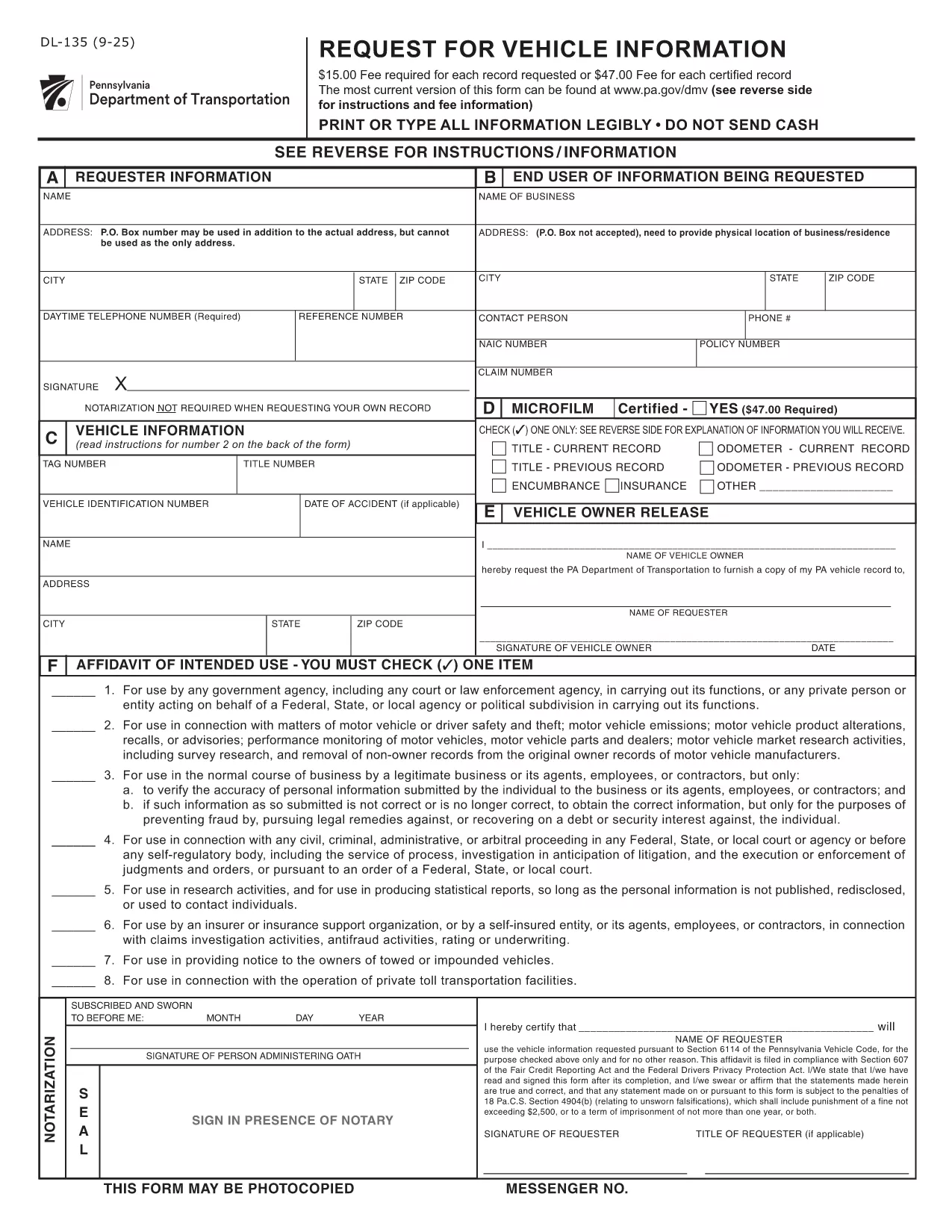
DL-135 – Pennsylvania Request for Vehicle Information (Fillable PDF)

  1. Lingua Inglese
  2. Paese Stati Uniti d'America
  3. Attività Registrazione del veicolo
  4. Stato Pennsylvania
Compila questo modulo
DL-135 – Pennsylvania Request for Vehicle Information (Fillable PDF)

What Is the DL-135 Form?

The DL‑135, also known as the “Request for Vehicle Information” form, is issued by the Pennsylvania Department of Transportation (PennDOT). It allows individuals, businesses, and law‑enforcement agencies to request detailed records about a vehicle registered in Pennsylvania, such as ownership history, title status, and lien information.

Why Use a Fillable PDF with Formize?

Formize turns the static DL‑135 PDF into an interactive, fillable document that you can complete directly in your browser. No Adobe Acrobat or other PDF editor is required. Your data is saved automatically, and you can download a completed copy for printing or e‑submission.

Step‑by‑Step Guide to Complete DL‑135

Follow these simple steps to finish your request in minutes:

  1. Click the “Fill out this form” button on the page.
  2. Wait for the Formize PDF Filler app to load (usually a few seconds).
  3. Enter the required information: vehicle VIN or plate number, your name, address, and the purpose of the request.
  4. Review the entered data for accuracy.
  5. Click “Submit” to generate a completed PDF you can download or print.

Common Mistakes to Avoid

  • Leaving fields blank: The PennDOT system rejects incomplete requests.
  • Incorrect VIN or plate number: Double‑check the characters; a single typo can delay the search.
  • Using the wrong purpose code: Choose the option that best matches your need (e.g., “Legal/Insurance” vs. “Personal Inquiry”).

Where to Submit Your Request

After completing the form, you can either:

  • Print the filled PDF and mail it to the PennDOT Vehicle Information Services Center.
  • Submit the PDF electronically through the PennDOT online portal if you have an account.

For the most up‑to‑date submission address, refer to the official PennDOT website.

FAQ
  • What information do I need to fill out DL‑135?

    You’ll need the vehicle’s VIN or license plate number, your full name, mailing address, and the reason you’re requesting the records.

  • Can I submit the DL‑135 form electronically?

    Yes. After completing the fillable PDF, you can upload it to the PennDOT online portal if you have an account, or email it to the designated address.

  • Is there a fee to request vehicle information with DL‑135?

    PennDOT may charge a processing fee depending on the type of request. Check the latest fee schedule on the PennDOT website.

  • How long does it take to receive the vehicle information?

    Processing time varies, but most standard requests are fulfilled within 5‑10 business days after PennDOT receives the completed form.

  • Can I use the DL‑135 form for out‑of‑state vehicles?

    The DL‑135 is specific to Pennsylvania‑registered vehicles. For out‑of‑state requests, contact the corresponding state’s DMV.

  • What should I do if I make a mistake on the form?

    Simply edit the field in the fillable PDF before submitting. If you have already submitted, you’ll need to complete a new form with the correct information.

  • Do I need a signature on the DL‑135?

    Yes. The form requires a handwritten signature. After downloading the completed PDF, print it, sign, and then mail or upload as instructed.

COME

Come compilare DL-135 gratuitamente, online in 3 semplici passaggi:

  1. 1
    Open the Fillable Form
    Click the “Fill out this form” button on the page. The Formize PDF Filler will open in a new tab.
  2. 2
    Enter Your Information
    Type the required details (VIN, name, address, purpose) into the interactive fields. The app saves your entries automatically.
  3. 3
    Review and Download
    Check all fields for accuracy, then click “Submit” to generate a completed PDF. Download it for printing or email submission.
App Formize PDF Filler
DI

Moduli di registrazione del veicolo

DL-135 è uno dei moduli DMV, noti anche come moduli del Dipartimento dei veicoli a motore, che sono documenti utilizzati in varie transazioni e processi relativi ai veicoli a motore. Il DMV è un'agenzia governativa responsabile della patente di guida, dell'immatricolazione dei veicoli e dell'applicazione delle leggi sui veicoli a motore. I moduli DMV specifici disponibili possono variare in base alla giurisdizione, ma ecco alcuni esempi comuni:

Moduli patente di guida: questi moduli vengono utilizzati per richiedere la patente di guida o per richiedere modifiche o rinnovi. In genere richiedono informazioni personali, prova di identità e possono includere sezioni per informazioni mediche o cronologia di guida.

Moduli di registrazione del veicolo: questi moduli vengono utilizzati per registrare un veicolo a motore presso il DMV. Richiedono informazioni sul veicolo, dettagli sulla proprietà e prova di assicurazione.

Moduli di trasferimento di proprietà: quando si acquista o vende un veicolo, questi moduli vengono utilizzati per trasferire la proprietà da una parte a un'altra. Richiedono informazioni sull'acquirente, sul venditore, sui dettagli del veicolo e possono includere una fattura di vendita.

Moduli di esonero di responsabilità del veicolo: quando si vende o si trasferisce la proprietà di un veicolo, questi moduli notificano al DMV che il venditore non è più responsabile del veicolo. Aiuta a proteggere il venditore dalla responsabilità per incidenti o inconvenienti che coinvolgono il veicolo dopo la vendita.

Moduli di rinnovo targa e immatricolazione: questi moduli vengono utilizzati per rinnovare l'immatricolazione del veicolo o richiedere nuove targhe. In genere richiedono informazioni sul proprietario registrato, dettagli di registrazione attuali e pagamento delle tariffe applicabili.

Moduli di richiesta di documenti di guida: questi moduli consentono alle persone di richiedere i propri documenti di guida al DMV, che forniscono informazioni su violazioni di guida, stato della patente e altri dettagli rilevanti.

Moduli per targhe speciali o personalizzate: questi moduli vengono utilizzati per richiedere targhe personalizzate o speciali, che consentono alle persone di personalizzare la propria targa con caratteri o disegni specifici.

Questi sono solo alcuni esempi dei numerosi moduli che possono essere disponibili tramite il DMV. I moduli e i requisiti specifici possono variare in base alla giurisdizione, quindi è importante consultare il sito Web DMV locale o visitare un ufficio DMV per ottenere i moduli corretti per le proprie esigenze particolari.

CARATTERISTICHE

Compilatore PDF

Il modo più semplice per compilare moduli PDF online

  • Compila rapidamente DL-135
    Cerchi un modo per compilare rapidamente DL-135 online? Con il nostro compilatore di moduli PDF gratuito online, saprai come modificare e compilare questo documento PDF in meno di un minuto.
  • Editor PDF online facile da usare
    Stufo di stampare file PDF in modo da poterli modificare, prima di riscansionarli e rispedirli? Modifica documenti PDF gratuitamente online. Utilizza il nostro editor PDF online per risparmiare tempo e carta.
  • Grandi strumenti, tutte le piattaforme
    Ti stai chiedendo come inserire DL-135 su un Mac o forse come utilizzare un riempitivo PDF gratuito? I nostri strumenti PDF online funzionano su tutte le piattaforme.
  • Archiviazione sicura dei file
    I file "DL-135" completati vengono archiviati in un database protetto gestito dall'hosting Amazon Cloud. Puoi eliminare i tuoi file dal nostro sistema in qualsiasi momento. In ogni caso, questi file vengono automaticamente cancellati dopo 24 ore.
  • Chatta con {parola chiave}
    Chatta con "DL-135" su Chatize che è un assistente di lettura PDF gratuito. Fai domande e ottieni risposte da "DL-135". Basta fare clic sul pulsante Chatta con il documento in alto.

Elimina sessione di riempimento

Eliminare la sessione di riempimento selezionata? In questo caso, i progressi nella compilazione del modulo andranno persi.

Elimina la sessione di modifica

Eliminare la sessione di editing selezionata? In questo caso, i tuoi progressi nella creazione e modifica del modulo andranno persi.