
Seleziona la lingua

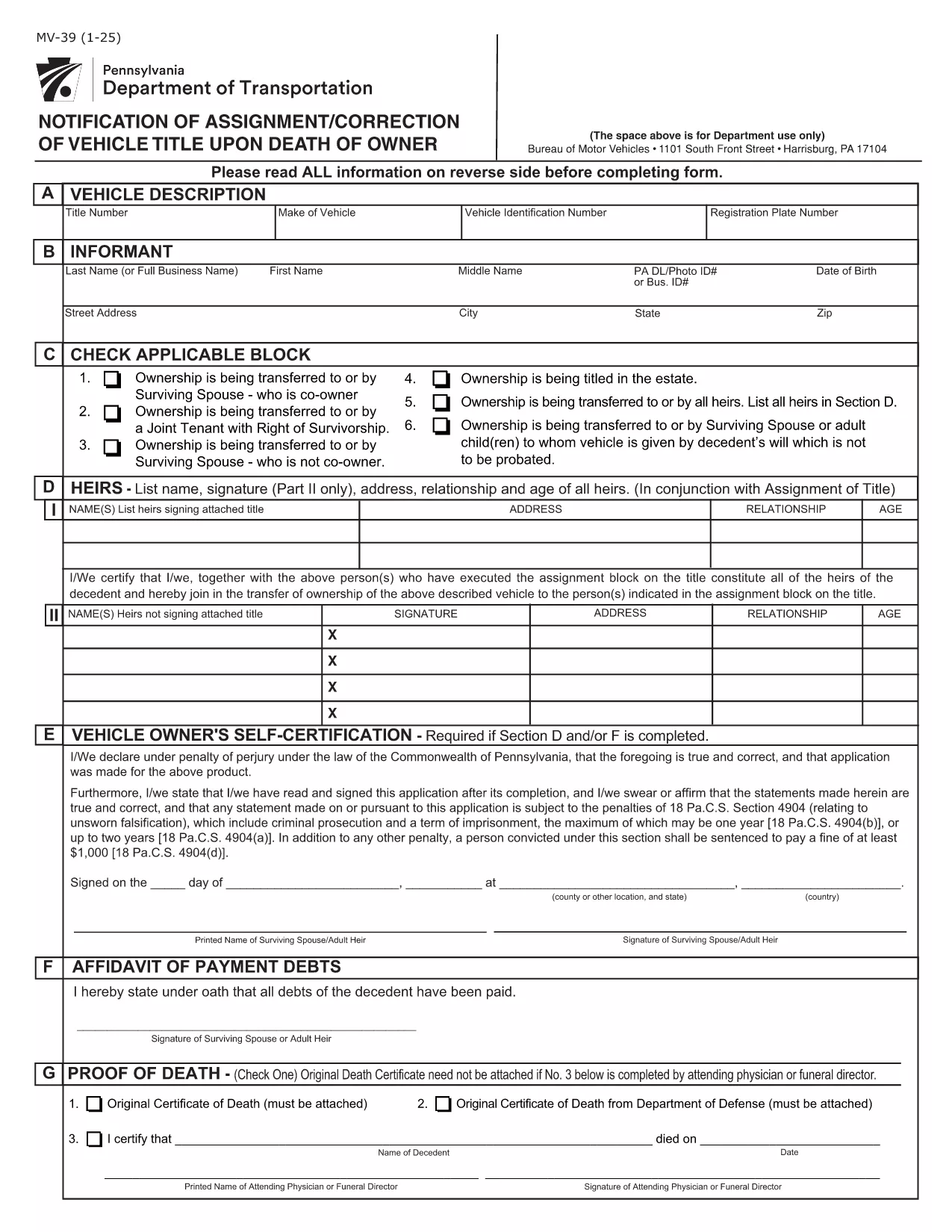
Pennsylvania Form MV-39 – Notification of Assignment/Correction of Vehicle Title

  1. Lingua Inglese
  2. Paese Stati Uniti d'America
  3. Attività Registrazione del veicolo
  4. Stato Pennsylvania
Compila questo modulo
Pennsylvania Form MV-39 – Notification of Assignment/Correction of Vehicle Title

Form MV-39, titled “Notification of Assignment/Correction of Vehicle Title upon Death of Owner,” is required by the Pennsylvania Department of Transportation (PennDOT) whenever a vehicle title must be transferred after the owner’s death.

Our online fillable PDF lets you complete the form quickly without printing or using a separate PDF editor. Simply click the “Fill out this form” button, edit the fields, and download the finished document to submit to your local BMV office.

What Is Form MV-39?

This form notifies PennDOT of a change in ownership caused by the death of the original vehicle owner. It is used to assign the title to a surviving spouse, heir, or other qualified party and to correct any errors on the original title.

How to Complete Form MV-39 Online

Follow the step‑by‑step guide below to fill out the form directly in your browser using Formize’s PDF Filler.

  • Section A – Vehicle Information: Enter VIN, make, model, and year.
  • Section B – Owner’s Details: Provide the deceased owner’s name, Social Security Number, and date of death.
  • Section C – New Owner: List the name(s) of the surviving spouse, heir, or purchaser, along with their contact information.
  • Section G & H – Registration Intent: Indicate whether the vehicle will be re‑registered.
  • Section I – Signature: The new owner must sign and date the form.

Common Mistakes to Avoid

  • Leaving any required field blank – every section marked with an asterisk (*) is mandatory.
  • Using an illegible or mismatched VIN – copy it exactly as it appears on the current title.
  • Forgetting to attach a certified copy of the death certificate when required.
  • Signing the form with a pen before the PDF is fully completed – sign only after all information is entered.

Where to Submit the Completed Form

After saving the filled PDF, mail or deliver it to your nearest PennDOT Driver & Vehicle Services (DVS) office along with any supporting documents (e.g., death certificate, proof of relationship). Some offices also accept electronic submissions; check your local BMV’s website for details.

Frequently Asked Questions

Below are answers to the most common queries about Form MV-39.

FAQ
  • Do I need to print Form MV-39 after filling it online?

    Most PennDOT offices require a hard copy with an original signature, so print the completed PDF, sign it, and mail or deliver it as instructed.

  • Can I submit Form MV-39 electronically?

    Some DVS locations accept electronic submissions. Check your local office’s website for specific instructions and accepted file formats.

  • What supporting documents are required?

    You’ll need a certified copy of the owner’s death certificate, proof of relationship (e.g., marriage certificate), and any existing title documents.

  • Is there a fee for filing Form MV-39?

    PennDOT does not charge a fee for the MV-39 notification itself, but standard title transfer fees may apply when the new title is issued.

  • What if I make a mistake after submitting?

    Contact your local PennDOT office immediately. They may require you to submit a corrected MV-39 or an additional affidavit.

  • How long does it take to process the form?

    Processing times vary by office, but expect 7‑10 business days from receipt of the completed form and required documents.

COME

Come compilare MV-39 gratuitamente, online in 4 semplici passaggi:

  1. 1
    Open the Fillable Form
    Click the “Fill out this form” button on the page. The Formize PDF Filler app will load the MV-39 document directly in your browser.
  2. 2
    Enter Required Information
    Complete each highlighted field (Sections A, B, C, G, H, and I). The filler validates entries in real time, so you’ll know immediately if something is missing.
  3. 3
    Review and Sign
    Double‑check all data for accuracy, then add your electronic signature in the designated signature box.
  4. 4
    Save and Submit
    Click “Save PDF” to download the completed form. Print it (if required) and submit it to your local PennDOT office with any supporting documents.
App Formize PDF Filler
DI

Moduli di registrazione del veicolo

Se possiedi o noleggi un veicolo a motore, un rimorchio o una barca, devi soddisfare determinati obblighi per mantenere il tuo veicolo legalmente registrato e sicuro.

MV-39 è uno dei moduli di immatricolazione dei veicoli che sono documenti utilizzati per immatricolare un veicolo a motore presso l'autorità statale o provinciale competente. Questi moduli sono in genere richiesti quando una persona acquista un veicolo nuovo o usato o quando si trasferisce in un nuovo stato o provincia con un veicolo.

I requisiti e i moduli esatti necessari per l'immatricolazione del veicolo possono variare in base alla località, ma in genere il processo prevede la fornitura di informazioni sul veicolo, sul proprietario e su eventuali privilegi sul veicolo.

Una volta presentati i moduli di registrazione e le tasse, l'autorità statale o provinciale rilascerà un certificato di registrazione o una targa al proprietario del veicolo. Questa registrazione consente al veicolo di circolare legalmente su strade pubbliche e autostrade.

CARATTERISTICHE

Compilatore PDF

Il modo più semplice per compilare moduli PDF online

  • Compila rapidamente MV-39
    Cerchi un modo per compilare rapidamente MV-39 online? Con il nostro compilatore di moduli PDF gratuito online, saprai come modificare e compilare questo documento PDF in meno di un minuto.
  • Editor PDF online facile da usare
    Stufo di stampare file PDF in modo da poterli modificare, prima di riscansionarli e rispedirli? Modifica documenti PDF gratuitamente online. Utilizza il nostro editor PDF online per risparmiare tempo e carta.
  • Grandi strumenti, tutte le piattaforme
    Ti stai chiedendo come inserire MV-39 su un Mac o forse come utilizzare un riempitivo PDF gratuito? I nostri strumenti PDF online funzionano su tutte le piattaforme.
  • Archiviazione sicura dei file
    I file "MV-39" completati vengono archiviati in un database protetto gestito dall'hosting Amazon Cloud. Puoi eliminare i tuoi file dal nostro sistema in qualsiasi momento. In ogni caso, questi file vengono automaticamente cancellati dopo 24 ore.
  • Chatta con {parola chiave}
    Chatta con "MV-39" su Chatize che è un assistente di lettura PDF gratuito. Fai domande e ottieni risposte da "MV-39". Basta fare clic sul pulsante Chatta con il documento in alto.

Elimina sessione di riempimento

Eliminare la sessione di riempimento selezionata? In questo caso, i progressi nella compilazione del modulo andranno persi.

Elimina la sessione di modifica

Eliminare la sessione di editing selezionata? In questo caso, i tuoi progressi nella creazione e modifica del modulo andranno persi.