
Seleziona la lingua

Form VTR-902 – Export‑Only Sales Record (Texas)

  1. Lingua Inglese
  2. Paese Stati Uniti d'America
  3. Attività Registrazione del veicolo
  4. Stato Texas
Compila questo modulo
Form VTR-902 – Export‑Only Sales Record (Texas)

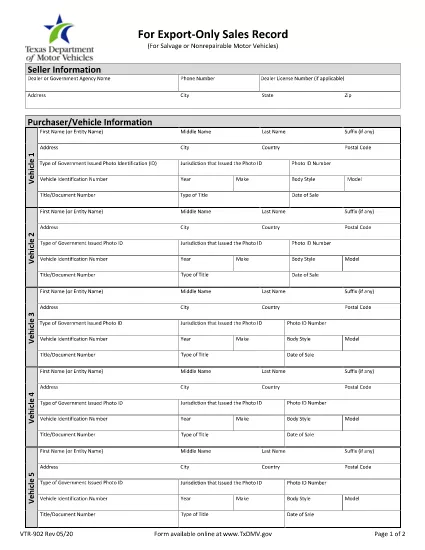
The VTR-902 is the Texas Department of Motor Vehicles (TxDMV) Export‑Only Sales Record. It certifies that a motor vehicle was sold for export and documents the purchaser’s statement, photo ID, and any supporting paperwork. This form is required for dealers and private sellers who transfer a vehicle out of the United States.

What Is the VTR-902 Form?

VTR-902 captures:

  • The purchaser’s certified statement that the vehicle will be exported.
  • A copy of the purchaser’s photo identification.
  • Any additional documents that prove the sale was export‑only.

Submitting a correctly completed VTR-902 helps the TxDMV release the title and prevents future liability for the seller.

How to Fill Out VTR-902 Online with Formize

Instead of printing, scanning, or editing the PDF manually, use Formize’s built‑in fillable PDF feature. Follow these simple steps:

  1. Click “Fill out this form” on this page. The Formize PDF Filler app will load instantly.
  2. Enter the required information in each field – the form is fully interactive.
  3. Upload a clear image of the purchaser’s photo ID and any supporting documents.
  4. Review the completed form for accuracy.
  5. Click Submit to download the finished PDF or print it directly for the TxDMV.

Common Mistakes & Tips for a Successful Submission

  • Missing ID copy: The TxDMV will reject the form if the purchaser’s photo ID is not attached.
  • Illegible signatures: Use a stylus or mouse to sign clearly; avoid cursive that can’t be read.
  • Incorrect vehicle details: Double‑check VIN, make, model, and year against the title.
  • Incomplete certification statement: Ensure the purchaser checks the box confirming the vehicle will be exported.

By following the guide above, you’ll complete VTR-902 quickly and avoid delays at the DMV.

FAQ
  • Who needs to complete the VTR-902 form?

    Any seller—dealer or private—who transfers a motor vehicle out of Texas for export must complete VTR-902.

  • Can I submit the VTR-902 electronically?

    The TxDMV still requires a printed copy for the title office, but you can fill it out electronically with Formize and print the final PDF.

  • What identification is required from the purchaser?

    A legible copy of a government‑issued photo ID (driver’s license, passport, or state ID) must be attached to the form.

  • How long does the TxDMV keep the VTR-902 on file?

    The form is retained for the life of the vehicle’s title record to prove the export transaction.

  • What if I make a mistake after submitting?

    Correct the error on a new VTR-902, sign it, and submit the revised form to the DMV. Keep a copy for your records.

  • Is there a fee to file VTR-902?

    No separate filing fee exists for VTR-902, but standard title transfer fees may apply.

COME

Come compilare VTR-902 gratuitamente, online in 4 semplici passaggi:

  1. 1
    Open the Fillable Form
    Click the “Fill out this form” button on the page. The Formize PDF Filler loads the VTR-902 directly in your browser.
  2. 2
    Enter Required Information
    Complete each field – purchaser’s name, address, VIN, and export certification statement. Use the on‑screen keyboard or your device’s keyboard.
  3. 3
    Attach Supporting Documents
    Upload a clear photo of the purchaser’s ID and any additional export documents using the ‘Attach File’ button.
  4. 4
    Review & Submit
    Check all entries for accuracy, then click “Submit” to generate a completed PDF you can download or print.
App Formize PDF Filler
DI

Moduli di registrazione del veicolo

Se possiedi o noleggi un veicolo a motore, un rimorchio o una barca, devi soddisfare determinati obblighi per mantenere il tuo veicolo legalmente registrato e sicuro.

VTR-902 è uno dei moduli di immatricolazione dei veicoli che sono documenti utilizzati per immatricolare un veicolo a motore presso l'autorità statale o provinciale competente. Questi moduli sono in genere richiesti quando una persona acquista un veicolo nuovo o usato o quando si trasferisce in un nuovo stato o provincia con un veicolo.

I requisiti e i moduli esatti necessari per l'immatricolazione del veicolo possono variare in base alla località, ma in genere il processo prevede la fornitura di informazioni sul veicolo, sul proprietario e su eventuali privilegi sul veicolo.

Una volta presentati i moduli di registrazione e le tasse, l'autorità statale o provinciale rilascerà un certificato di registrazione o una targa al proprietario del veicolo. Questa registrazione consente al veicolo di circolare legalmente su strade pubbliche e autostrade.

CARATTERISTICHE

Compilatore PDF

Il modo più semplice per compilare moduli PDF online

  • Compila rapidamente VTR-902
    Cerchi un modo per compilare rapidamente VTR-902 online? Con il nostro compilatore di moduli PDF gratuito online, saprai come modificare e compilare questo documento PDF in meno di un minuto.
  • Editor PDF online facile da usare
    Stufo di stampare file PDF in modo da poterli modificare, prima di riscansionarli e rispedirli? Modifica documenti PDF gratuitamente online. Utilizza il nostro editor PDF online per risparmiare tempo e carta.
  • Grandi strumenti, tutte le piattaforme
    Ti stai chiedendo come inserire VTR-902 su un Mac o forse come utilizzare un riempitivo PDF gratuito? I nostri strumenti PDF online funzionano su tutte le piattaforme.
  • Archiviazione sicura dei file
    I file "VTR-902" completati vengono archiviati in un database protetto gestito dall'hosting Amazon Cloud. Puoi eliminare i tuoi file dal nostro sistema in qualsiasi momento. In ogni caso, questi file vengono automaticamente cancellati dopo 24 ore.
  • Chatta con {parola chiave}
    Chatta con "VTR-902" su Chatize che è un assistente di lettura PDF gratuito. Fai domande e ottieni risposte da "VTR-902". Basta fare clic sul pulsante Chatta con il documento in alto.

Elimina sessione di riempimento

Eliminare la sessione di riempimento selezionata? In questo caso, i progressi nella compilazione del modulo andranno persi.

Elimina la sessione di modifica

Eliminare la sessione di editing selezionata? In questo caso, i tuoi progressi nella creazione e modifica del modulo andranno persi.