
Seleziona la lingua

Virginia DSD 27 – Permit to Use Dealer License Plates (Fillable PDF)

  1. Lingua Inglese
  2. Paese Stati Uniti d'America
  3. Attività Registrazione del veicolo
  4. Stato Virginia
Compila questo modulo
Virginia DSD 27 – Permit to Use Dealer License Plates (Fillable PDF)

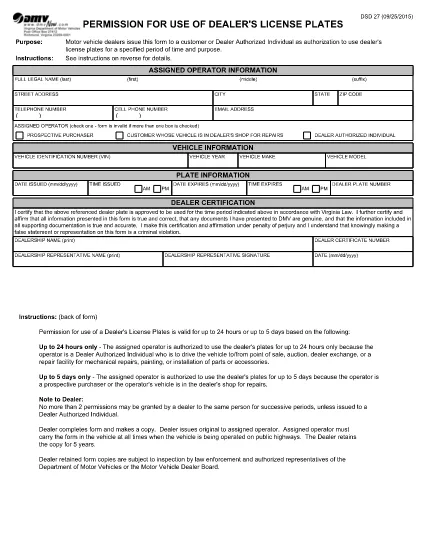
The DSD 27 form is the official Virginia Department of Motor Vehicles (DMV) document that grants a dealer‑authorized individual permission to operate a vehicle with the dealer’s license plates for a limited period—usually up to 24 hours. This permit is essential for test drives, vehicle repairs, auctions, and transfers.

What Is the DSD 27 Form?

DSD 27 is titled “Permission for Use of Dealer’s License Plates.” It records the operator’s details, vehicle information, the plate issuance and expiration times, and the dealer’s certification. The form ensures the DMV tracks temporary plate usage and protects both the dealer and the public.

When and Who Can Use the Permit

  • Dealers: Any licensed motor‑vehicle dealer in Virginia.
  • Authorized Individuals: Prospective buyers, service technicians, or transport agents who need to drive the vehicle.
  • Time Limit: Up to 24 hours or the mileage limit stated on the form.

Step‑by‑Step: Fill Out DSD 27 Online

Instead of downloading, printing, and scanning, use Formize’s built‑in PDF filler:

  1. Click “Fill out this form” on this page.
  2. Wait for the Formize PDF Filler app to load (a few seconds).
  3. Enter the operator’s full name, address, phone, and email.
  4. Provide vehicle details: VIN, year, make, model, and mileage at issuance.
  5. Set the plate issue date/time and the expiration date/time.
  6. Dealer certification: enter the dealer plate number and sign electronically.
  7. Review for accuracy, then click **Save & Download** or **Print** for your records.

Common Mistakes to Avoid

  • Leaving the expiration time blank – the DMV requires a specific end time.
  • Mismatching the VIN with the vehicle year/make.
  • Using the form for more than 24 hours without a new permit.
  • Missing the dealer’s signature or title.

Where to Submit the Completed Form

After saving, you can:

  • Print and hand it to the DMV during a visit.
  • Email the PDF to the dealership’s compliance officer.
  • Mail the form to the Virginia DMV address listed on the form.

Using the electronic version speeds up processing and reduces paper waste.

FAQ
  • What is the purpose of the DSD 27 form?

    It authorizes a dealer‑authorized individual to use the dealer’s license plates for a limited time, typically for test drives, repairs, or transfers.

  • Who can complete the DSD 27 permit?

    Only licensed motor‑vehicle dealers in Virginia and their authorized representatives (buyers, technicians, transport agents).

  • How long is the permit valid?

    The permit is valid for up to 24 hours or the mileage limit stated on the form. Exceeding this requires a new DSD 27.

  • Can the DSD 27 be used for trucks or tractor‑trucks?

    Yes. The form includes a section for “temporary transport plate on trucks or tractor‑trucks” and allows those vehicles to be driven under the permit.

  • Do I need to submit the form to the DMV after filling it out?

    A printed copy should be presented to the DMV during a visit or mailed to the address on the form. An electronic copy can also be kept for the dealer’s records.

  • What common errors cause the DMV to reject a DSD 27?

    Missing expiration time, incorrect VIN, no dealer signature, or using the permit beyond 24 hours are typical reasons for rejection.

  • Is there a fee for filing DSD 27?

    Virginia does not charge a separate fee for the DSD 27 itself; any applicable plate or registration fees are handled through the standard dealer processes.

  • Can I fill out DSD 27 on a mobile device?

    Yes. The Formize PDF filler works on smartphones and tablets, allowing you to complete the form anywhere with an internet connection.

COME

Come compilare DSD 27 gratuitamente, online in 5 semplici passaggi:

  1. 1
    Open the Fillable Form
    Click the “Fill out this form” button on the page. The Formize PDF Filler loads directly in your browser.
  2. 2
    Enter Required Information
    Type the operator’s name, address, vehicle VIN, make, model, and mileage into the highlighted fields.
  3. 3
    Set Permit Dates
    Select the date and time the dealer plates are issued and the exact expiration time (max 24 hours).
  4. 4
    Dealer Certification & Signature
    Enter the dealer’s plate number, choose your role (Dealer Authorized Individual), and sign electronically.
  5. 5
    Save, Download, or Print
    Review the completed form, then click “Save & Download” to store a copy or “Print” to submit to the DMV.
App Formize PDF Filler
DI

Moduli di registrazione del veicolo

DSD 27 è uno dei moduli di immatricolazione dei veicoli che sono documenti utilizzati per immatricolare un veicolo a motore presso l'autorità governativa pertinente, in genere il Dipartimento dei veicoli a motore (DMV) o un'agenzia equivalente. Questi moduli sono richiesti quando una persona acquista un veicolo nuovo o usato, trasferisce la proprietà di un veicolo o si trasferisce in una nuova giurisdizione con un veicolo.

I moduli di immatricolazione specifici del veicolo possono variare in base alla giurisdizione, ma generalmente richiedono le seguenti informazioni:

Informazioni sul veicolo: includono dettagli sul veicolo, come marca, modello, anno, numero di identificazione del veicolo (VIN) e lettura del contachilometri.

Informazioni sul proprietario: il modulo richiederà informazioni sul proprietario del veicolo, inclusi nome, indirizzo, informazioni di contatto e numero di patente di guida.

Prova di proprietà: a seconda delle circostanze, potrebbe essere richiesta una prova di proprietà, come un certificato di proprietà, un atto di vendita o un certificato di origine del produttore (per i veicoli nuovi).

Informazioni sull'assicurazione: in genere è richiesta la prova della copertura assicurativa del veicolo valida. Ciò può includere la fornitura del numero di polizza assicurativa, delle date di copertura e dei dettagli della compagnia assicurativa.

Pagamento delle tariffe: la registrazione del veicolo comporta il pagamento di varie tariffe, come tasse di registrazione, tasse ed eventualmente altri oneri specifici della giurisdizione.

Oltre a questi requisiti di base, alcune giurisdizioni potrebbero avere moduli aggiuntivi o requisiti di documentazione. Ad esempio, in alcune aree potrebbero essere necessari i risultati dei test sulle emissioni, le ispezioni di sicurezza o la prova di residenza.

Una volta completati e inviati i moduli di immatricolazione del veicolo, l'autorità governativa rilascerà un certificato di immatricolazione, targhe e adesivi di immatricolazione. Questi documenti indicano che il veicolo è legalmente immatricolato e autorizzato a circolare su strade pubbliche.

È importante notare che i requisiti di immatricolazione dei veicoli possono variare in modo significativo a seconda della giurisdizione. Pertanto, si consiglia di consultare il DMV locale o un'agenzia equivalente per i moduli e le procedure specifiche applicabili alla propria località.

CARATTERISTICHE

Compilatore PDF

Il modo più semplice per compilare moduli PDF online

  • Compila rapidamente DSD 27
    Cerchi un modo per compilare rapidamente DSD 27 online? Con il nostro compilatore di moduli PDF gratuito online, saprai come modificare e compilare questo documento PDF in meno di un minuto.
  • Editor PDF online facile da usare
    Stufo di stampare file PDF in modo da poterli modificare, prima di riscansionarli e rispedirli? Modifica documenti PDF gratuitamente online. Utilizza il nostro editor PDF online per risparmiare tempo e carta.
  • Grandi strumenti, tutte le piattaforme
    Ti stai chiedendo come inserire DSD 27 su un Mac o forse come utilizzare un riempitivo PDF gratuito? I nostri strumenti PDF online funzionano su tutte le piattaforme.
  • Archiviazione sicura dei file
    I file "DSD 27" completati vengono archiviati in un database protetto gestito dall'hosting Amazon Cloud. Puoi eliminare i tuoi file dal nostro sistema in qualsiasi momento. In ogni caso, questi file vengono automaticamente cancellati dopo 24 ore.
  • Chatta con {parola chiave}
    Chatta con "DSD 27" su Chatize che è un assistente di lettura PDF gratuito. Fai domande e ottieni risposte da "DSD 27". Basta fare clic sul pulsante Chatta con il documento in alto.

Elimina sessione di riempimento

Eliminare la sessione di riempimento selezionata? In questo caso, i progressi nella compilazione del modulo andranno persi.

Elimina la sessione di modifica

Eliminare la sessione di editing selezionata? In questo caso, i tuoi progressi nella creazione e modifica del modulo andranno persi.