
Seleziona la lingua

VSA-40 Vehicle Removal Certificate – Fillable PDF

  1. Lingua Inglese
  2. Paese Stati Uniti d'America
  3. Attività Registrazione del veicolo
  4. Stato Virginia
Compila questo modulo
VSA-40 Vehicle Removal Certificate – Fillable PDF

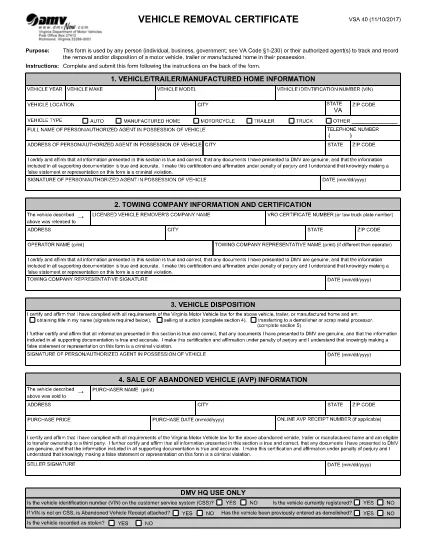
The VSA-40 Vehicle Removal Certificate is the official Virginia DMV form used to record the removal, disposal, or transfer of a motor vehicle, trailer, or manufactured home. Whether you are an individual, a business, or a government agency, this form provides a legal trail for any vehicle that leaves your possession.

Because the VSA-40 is required by Virginia Code §1‑230, completing it accurately protects you from future liability and ensures compliance with state regulations.

What Is the VSA-40 Vehicle Removal Certificate?

The VSA-40 captures essential details such as the vehicle identification number (VIN), owner information, reason for removal, and the date of disposition. It serves as proof that the vehicle was properly removed from the owner's records.

Who Must Complete the VSA-40 Form?

  • Private owners selling or disposing of a vehicle.
  • Dealerships transferring ownership to another party.
  • Government agencies handling fleet disposals.
  • Authorized agents acting on behalf of the owner.

How to Fill Out the VSA-40 Online with Formize

Instead of downloading the PDF and opening a separate editor, simply click the "Fill out this form" button on this page. The Formize PDF Filler app will load instantly, letting you complete every field directly in your browser.

Common Mistakes to Avoid

  • Leaving the VIN or license plate number blank.
  • Using an outdated address for the owner.
  • Forgetting to sign and date the form.
  • Submitting the form without attaching required supporting documents (e.g., bill of sale).

Where to Submit the Completed Form

After you finish the fillable VSA-40, you can:

  • Print and mail it to your local Virginia DMV office.
  • Upload a scanned copy through the DMV’s online portal.
  • Deliver it in person to the DMV service center.

Using the Formize filler saves time, reduces errors, and creates a clean, searchable PDF ready for submission.

FAQ
  • What is the purpose of the VSA‑40 form?

    The VSA‑40 records the removal, disposal, or transfer of a vehicle, trailer, or manufactured home, providing legal proof for the Virginia DMV.

  • Can I fill out the VSA‑40 on a mobile device?

    Yes. The Formize PDF Filler works on all major browsers, including mobile Safari and Chrome, so you can complete the form on a phone or tablet.

  • Do I need a digital signature?

    A digital signature created in the Formize filler is accepted for most DMV submissions. Check your local office if a wet signature is specifically required.

  • How long does the VSA‑40 remain valid after completion?

    Once submitted to the DMV, the certificate is considered valid indefinitely as a record of the vehicle’s removal.

  • Is there a filing fee for the VSA‑40?

    No, the VSA‑40 itself does not carry a fee. However, related DMV services (e.g., title transfer) may have separate charges.

  • What supporting documents should I attach?

    Include a bill of sale, transfer notice, or any document that proves the vehicle’s disposition, as required by the DMV.

  • Can I save my progress and finish later?

    Yes. The Formize filler lets you download a partially completed PDF, which you can reopen later to finish.

COME

Come compilare VSA 40 gratuitamente, online in 4 semplici passaggi:

  1. 1
    Open the Fillable Form
    Click the "Fill out this form" button on the page. The Formize PDF Filler loads directly in your browser.
  2. 2
    Enter All Required Information
    Complete each field—owner details, VIN, removal reason, and date—using the on‑screen keyboard or your own typing.
  3. 3
    Review and Sign
    Double‑check every entry for accuracy, then use the built‑in signature tool to sign the form.
  4. 4
    Save or Submit
    Download the completed PDF, print and mail it, or upload it to the Virginia DMV portal as instructed.
App Formize PDF Filler
DI

Moduli di registrazione del veicolo

Se possiedi o noleggi un veicolo a motore, un rimorchio o una barca, devi soddisfare determinati obblighi per mantenere il tuo veicolo legalmente registrato e sicuro.

VSA 40 è uno dei moduli di immatricolazione dei veicoli che sono documenti utilizzati per immatricolare un veicolo a motore presso l'autorità statale o provinciale competente. Questi moduli sono in genere richiesti quando una persona acquista un veicolo nuovo o usato o quando si trasferisce in un nuovo stato o provincia con un veicolo.

I requisiti e i moduli esatti necessari per l'immatricolazione del veicolo possono variare in base alla località, ma in genere il processo prevede la fornitura di informazioni sul veicolo, sul proprietario e su eventuali privilegi sul veicolo.

Una volta presentati i moduli di registrazione e le tasse, l'autorità statale o provinciale rilascerà un certificato di registrazione o una targa al proprietario del veicolo. Questa registrazione consente al veicolo di circolare legalmente su strade pubbliche e autostrade.

CARATTERISTICHE

Compilatore PDF

Il modo più semplice per compilare moduli PDF online

  • Compila rapidamente VSA 40
    Cerchi un modo per compilare rapidamente VSA 40 online? Con il nostro compilatore di moduli PDF gratuito online, saprai come modificare e compilare questo documento PDF in meno di un minuto.
  • Editor PDF online facile da usare
    Stufo di stampare file PDF in modo da poterli modificare, prima di riscansionarli e rispedirli? Modifica documenti PDF gratuitamente online. Utilizza il nostro editor PDF online per risparmiare tempo e carta.
  • Grandi strumenti, tutte le piattaforme
    Ti stai chiedendo come inserire VSA 40 su un Mac o forse come utilizzare un riempitivo PDF gratuito? I nostri strumenti PDF online funzionano su tutte le piattaforme.
  • Archiviazione sicura dei file
    I file "VSA 40" completati vengono archiviati in un database protetto gestito dall'hosting Amazon Cloud. Puoi eliminare i tuoi file dal nostro sistema in qualsiasi momento. In ogni caso, questi file vengono automaticamente cancellati dopo 24 ore.
  • Chatta con {parola chiave}
    Chatta con "VSA 40" su Chatize che è un assistente di lettura PDF gratuito. Fai domande e ottieni risposte da "VSA 40". Basta fare clic sul pulsante Chatta con il documento in alto.

Elimina sessione di riempimento

Eliminare la sessione di riempimento selezionata? In questo caso, i progressi nella compilazione del modulo andranno persi.

Elimina la sessione di modifica

Eliminare la sessione di editing selezionata? In questo caso, i tuoi progressi nella creazione e modifica del modulo andranno persi.