
Seleziona la lingua

MV2172 Disabled Veteran Parking License Plate Application

  1. Lingua Inglese
  2. Paese Stati Uniti d'America
  3. Attività Registrazione del veicolo
  4. Stato Wisconsin
Compila questo modulo
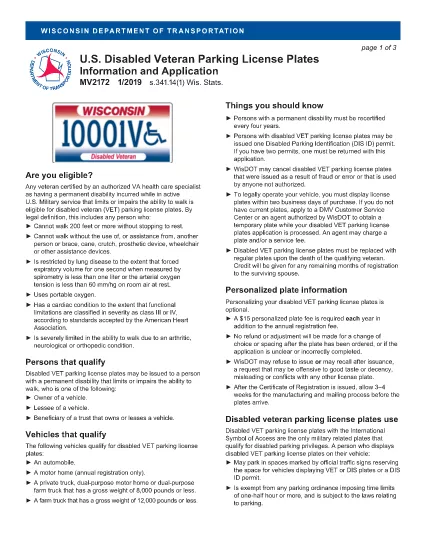
MV2172 Disabled Veteran Parking License Plate Application

The MV2172 is the official Wisconsin application for a disabled veteran parking license plate (VET). This plate grants eligible veterans special parking privileges throughout the state. Instead of printing, downloading, and editing the PDF manually, you can complete the form directly on our site with Formize’s secure fillable PDF tool.

Why use the online filler? It saves time, eliminates formatting errors, and automatically validates required fields before you submit. Once finished, you can download the completed PDF, print it, and mail it to the Wisconsin Department of Transportation.

Below you will find everything you need to know about the MV2172 form, eligibility requirements, step‑by‑step filling instructions, and tips to avoid common pitfalls.

What Is the MV2172 Form?

The MV2172 application collects veteran status information, vehicle details, and a signed authorization for the U.S. Department of Veterans Affairs to verify your disability rating. It is required for any Wisconsin resident who wants a disabled veteran parking plate.

Who Qualifies for Disabled Veteran Plates?

  • U.S. veterans with a service‑connected disability rating of 10% or higher.
  • Veterans who have received a VA disability rating letter.
  • Residents of Wisconsin who own or lease a vehicle that will display the plate.

How to Complete the MV2172 Online

Follow the simple steps in the "How to Fill the Form" section below. The process takes just a few minutes.

Common Mistakes to Avoid

  • Leaving the VA rating confirmation box unchecked.
  • Providing an incorrect VIN or license‑plate number.
  • Forgetting to sign the electronic declaration.
  • Submitting the form without attaching the required VA rating letter.

By using Formize’s fillable PDF, the system will highlight missing or incorrectly entered data before you can submit, reducing the chance of rejection.

FAQ
  • Do I need a printed copy of the MV2172 to submit it?

    Yes. After completing the form online, you must download the filled PDF, print it, and mail it (or bring it in person) to the Wisconsin Department of Transportation with any required attachments.

  • Can I submit the MV2172 electronically?

    Wisconsin currently requires a hard‑copy submission. The online filler only helps you fill out the form accurately before printing.

  • What documents must accompany the MV2172?

    You need a copy of your VA disability rating letter, proof of vehicle ownership or lease, and a valid Wisconsin driver's license or ID.

  • How long does it take to receive the veteran plate after mailing?

    Processing typically takes 2–4 weeks after the department receives your complete application.

  • Is there a fee for the disabled veteran parking plate?

    Yes. The annual registration fee for a veteran plate is reduced compared to standard plates, but you must still pay the listed fee on the form.

  • Can I apply for a plate if the vehicle is titled in someone else’s name?

    Yes, but you must also submit a title application (MV1 for private sale or MV11 for dealer sale) and the appropriate fees.

  • What should I do if I make a mistake after printing?

    Correct the error on a new copy of the form. Do not submit a partially completed or altered printed form.

COME

Come compilare MV2172 gratuitamente, online in 5 semplici passaggi:

  1. 1
    Click the "Fill out this form" button
    Locate the bright orange button on this page and click it to launch the Formize PDF filler.
  2. 2
    Wait for the Formize PDF Filler to load
    The secure filler loads in a new window. It may take a few seconds; please be patient.
  3. 3
    Enter your information
    Fill each field—personal details, vehicle data, and VA rating—exactly as it appears on your documents. Required fields are marked with an asterisk.
  4. 4
    Review and sign
    Use the built‑in review step to double‑check entries, then add your electronic signature in the declaration box.
  5. 5
    Download or print the completed PDF
    When the form is complete, click "Download PDF" to save a copy, or select "Print" to send it directly to your printer for mailing.
App Formize PDF Filler
DI

Moduli di registrazione del veicolo

MV2172 è uno dei moduli DMV, noti anche come moduli del Dipartimento dei veicoli a motore, che sono documenti utilizzati in varie transazioni e processi relativi ai veicoli a motore. Il DMV è un'agenzia governativa responsabile della patente di guida, dell'immatricolazione dei veicoli e dell'applicazione delle leggi sui veicoli a motore. I moduli DMV specifici disponibili possono variare in base alla giurisdizione, ma ecco alcuni esempi comuni:

Moduli patente di guida: questi moduli vengono utilizzati per richiedere la patente di guida o per richiedere modifiche o rinnovi. In genere richiedono informazioni personali, prova di identità e possono includere sezioni per informazioni mediche o cronologia di guida.

Moduli di registrazione del veicolo: questi moduli vengono utilizzati per registrare un veicolo a motore presso il DMV. Richiedono informazioni sul veicolo, dettagli sulla proprietà e prova di assicurazione.

Moduli di trasferimento di proprietà: quando si acquista o vende un veicolo, questi moduli vengono utilizzati per trasferire la proprietà da una parte a un'altra. Richiedono informazioni sull'acquirente, sul venditore, sui dettagli del veicolo e possono includere una fattura di vendita.

Moduli di esonero di responsabilità del veicolo: quando si vende o si trasferisce la proprietà di un veicolo, questi moduli notificano al DMV che il venditore non è più responsabile del veicolo. Aiuta a proteggere il venditore dalla responsabilità per incidenti o inconvenienti che coinvolgono il veicolo dopo la vendita.

Moduli di rinnovo targa e immatricolazione: questi moduli vengono utilizzati per rinnovare l'immatricolazione del veicolo o richiedere nuove targhe. In genere richiedono informazioni sul proprietario registrato, dettagli di registrazione attuali e pagamento delle tariffe applicabili.

Moduli di richiesta di documenti di guida: questi moduli consentono alle persone di richiedere i propri documenti di guida al DMV, che forniscono informazioni su violazioni di guida, stato della patente e altri dettagli rilevanti.

Moduli per targhe speciali o personalizzate: questi moduli vengono utilizzati per richiedere targhe personalizzate o speciali, che consentono alle persone di personalizzare la propria targa con caratteri o disegni specifici.

Questi sono solo alcuni esempi dei numerosi moduli che possono essere disponibili tramite il DMV. I moduli e i requisiti specifici possono variare in base alla giurisdizione, quindi è importante consultare il sito Web DMV locale o visitare un ufficio DMV per ottenere i moduli corretti per le proprie esigenze particolari.

CARATTERISTICHE

Compilatore PDF

Il modo più semplice per compilare moduli PDF online

  • Compila rapidamente MV2172
    Cerchi un modo per compilare rapidamente MV2172 online? Con il nostro compilatore di moduli PDF gratuito online, saprai come modificare e compilare questo documento PDF in meno di un minuto.
  • Editor PDF online facile da usare
    Stufo di stampare file PDF in modo da poterli modificare, prima di riscansionarli e rispedirli? Modifica documenti PDF gratuitamente online. Utilizza il nostro editor PDF online per risparmiare tempo e carta.
  • Grandi strumenti, tutte le piattaforme
    Ti stai chiedendo come inserire MV2172 su un Mac o forse come utilizzare un riempitivo PDF gratuito? I nostri strumenti PDF online funzionano su tutte le piattaforme.
  • Archiviazione sicura dei file
    I file "MV2172" completati vengono archiviati in un database protetto gestito dall'hosting Amazon Cloud. Puoi eliminare i tuoi file dal nostro sistema in qualsiasi momento. In ogni caso, questi file vengono automaticamente cancellati dopo 24 ore.
  • Chatta con {parola chiave}
    Chatta con "MV2172" su Chatize che è un assistente di lettura PDF gratuito. Fai domande e ottieni risposte da "MV2172". Basta fare clic sul pulsante Chatta con il documento in alto.

Elimina sessione di riempimento

Eliminare la sessione di riempimento selezionata? In questo caso, i progressi nella compilazione del modulo andranno persi.

Elimina la sessione di modifica

Eliminare la sessione di editing selezionata? In questo caso, i tuoi progressi nella creazione e modifica del modulo andranno persi.