
Seleziona la lingua

Wisconsin MV2592 Historic Military Vehicle License Plate Application

  1. Lingua Inglese
  2. Paese Stati Uniti d'America
  3. Attività Registrazione del veicolo
  4. Stato Wisconsin
Compila questo modulo
Wisconsin MV2592 Historic Military Vehicle License Plate Application

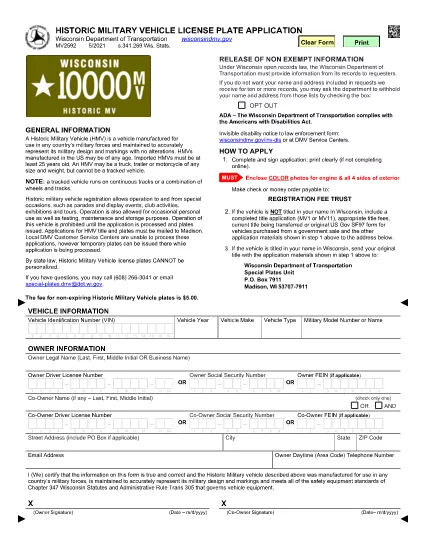
The MV2592 is Wisconsin’s official application for a historic military vehicle (HMV) license plate. This special plate allows owners to drive historic military vehicles to parades, exhibitions, club events, and limited personal use while preserving the vehicle’s historic status.

Our Formize PDF Filler lets you complete the MV2592 directly in your browser—no printing, scanning, or faxing required. Simply click the “Fill out this form” button and the fillable PDF will load instantly.

What Is the MV2592 Form?

The MV2592 collects essential information about the vehicle, its historic status, and the owner. Required sections include:

  • Vehicle identification (make, model, year, VIN)
  • Proof of historic military ownership or restoration
  • Owner’s contact details
  • Signature and date

How to Complete the MV2592 Online

Follow these three simple steps:

  1. Click the Fill out this form button below.
  2. The Formize PDF Filler loads the MV2592 automatically. Enter your information in each fillable field.
  3. When you’re finished, click Submit to download the completed PDF, then print and mail it with the required fees.

Common Mistakes & Tips

  • Do not leave required fields blank. The PDF will highlight missing data.
  • Make sure the VIN matches the title exactly.
  • Attach a copy of the vehicle’s historic military documentation (e.g., original title, acquisition paperwork).
  • Double‑check the mailing address; applications sent to the wrong office are delayed.

Where to Submit Your Application

Mail the completed MV2592, supporting documents, and the registration fee to:

Wisconsin Department of Transportation
Vehicle Services Division
P.O. Box 26712
Madison, WI 53726‑0712

Or deliver it in person to any DMV office that processes historic vehicle registrations.

Frequently Asked Questions

Below are the top questions drivers have about the MV2592. Click each question to reveal the answer.

FAQ
  • Who can apply for a historic military vehicle plate?

    Any Wisconsin resident who owns a vehicle that was originally used by the U.S. military and is at least 25 years old can apply.

  • Do I need a title in my name to use MV2592?

    Yes. The vehicle must be titled in your name, or you must include a completed title transfer application (MV1 or MV11) with the MV2592.

  • What documentation proves historic military status?

    Acceptable proof includes the original military title, a bill of sale from a government auction, or a certified historic vehicle affidavit.

  • How much is the registration fee?

    The fee varies by vehicle weight and plate type. Refer to the fee schedule on the Wisconsin DOT website or the MV2592 instructions.

  • Can I use the MV2592 for a non‑military historic vehicle?

    No. The MV2592 is specific to historic military vehicles. For other historic or classic cars, use the appropriate state forms (e.g., MV2591).

  • How long does processing take?

    Processing typically takes 7–10 business days after the Wisconsin DOT receives a complete application.

  • Is the Formize PDF filler secure?

    Yes. All data is processed locally in your browser; nothing is stored on our servers.

  • Can I save my progress and finish later?

    The Formize filler allows you to save a copy of the partially completed PDF on your computer and resume editing at any time.

COME

Come compilare MV2592 gratuitamente, online in 3 semplici passaggi:

  1. 1
    Open the Formize PDF Filler
    Click the “Fill out this form” button on this page. The MV2592 fillable PDF will open instantly in the Formize PDF Filler.
  2. 2
    Enter Your Information
    Type directly into each highlighted field—owner details, vehicle data, historic status, and signature.
  3. 3
    Download and Submit
    When you finish, click “Submit” to download the completed PDF. Print, attach required documents, and mail it to the Wisconsin DOT address listed above.
App Formize PDF Filler
DI

Moduli di registrazione del veicolo

Se possiedi o noleggi un veicolo a motore, un rimorchio o una barca, devi soddisfare determinati obblighi per mantenere il tuo veicolo legalmente registrato e sicuro.

MV2592 è uno dei moduli di immatricolazione dei veicoli che sono documenti utilizzati per immatricolare un veicolo a motore presso l'autorità statale o provinciale competente. Questi moduli sono in genere richiesti quando una persona acquista un veicolo nuovo o usato o quando si trasferisce in un nuovo stato o provincia con un veicolo.

I requisiti e i moduli esatti necessari per l'immatricolazione del veicolo possono variare in base alla località, ma in genere il processo prevede la fornitura di informazioni sul veicolo, sul proprietario e su eventuali privilegi sul veicolo.

Una volta presentati i moduli di registrazione e le tasse, l'autorità statale o provinciale rilascerà un certificato di registrazione o una targa al proprietario del veicolo. Questa registrazione consente al veicolo di circolare legalmente su strade pubbliche e autostrade.

CARATTERISTICHE

Compilatore PDF

Il modo più semplice per compilare moduli PDF online

  • Compila rapidamente MV2592
    Cerchi un modo per compilare rapidamente MV2592 online? Con il nostro compilatore di moduli PDF gratuito online, saprai come modificare e compilare questo documento PDF in meno di un minuto.
  • Editor PDF online facile da usare
    Stufo di stampare file PDF in modo da poterli modificare, prima di riscansionarli e rispedirli? Modifica documenti PDF gratuitamente online. Utilizza il nostro editor PDF online per risparmiare tempo e carta.
  • Grandi strumenti, tutte le piattaforme
    Ti stai chiedendo come inserire MV2592 su un Mac o forse come utilizzare un riempitivo PDF gratuito? I nostri strumenti PDF online funzionano su tutte le piattaforme.
  • Archiviazione sicura dei file
    I file "MV2592" completati vengono archiviati in un database protetto gestito dall'hosting Amazon Cloud. Puoi eliminare i tuoi file dal nostro sistema in qualsiasi momento. In ogni caso, questi file vengono automaticamente cancellati dopo 24 ore.
  • Chatta con {parola chiave}
    Chatta con "MV2592" su Chatize che è un assistente di lettura PDF gratuito. Fai domande e ottieni risposte da "MV2592". Basta fare clic sul pulsante Chatta con il documento in alto.

Elimina sessione di riempimento

Eliminare la sessione di riempimento selezionata? In questo caso, i progressi nella compilazione del modulo andranno persi.

Elimina la sessione di modifica

Eliminare la sessione di editing selezionata? In questo caso, i tuoi progressi nella creazione e modifica del modulo andranno persi.