Seleziona la lingua

TK02 Application Form – Fillable PDF

  1. Lingua Inglese
  2. Paese Vietnam
  3. Attività Passport Application
  4. Dipartimento Consulate General
Compila questo modulo
TK02 Application Form – Fillable PDF

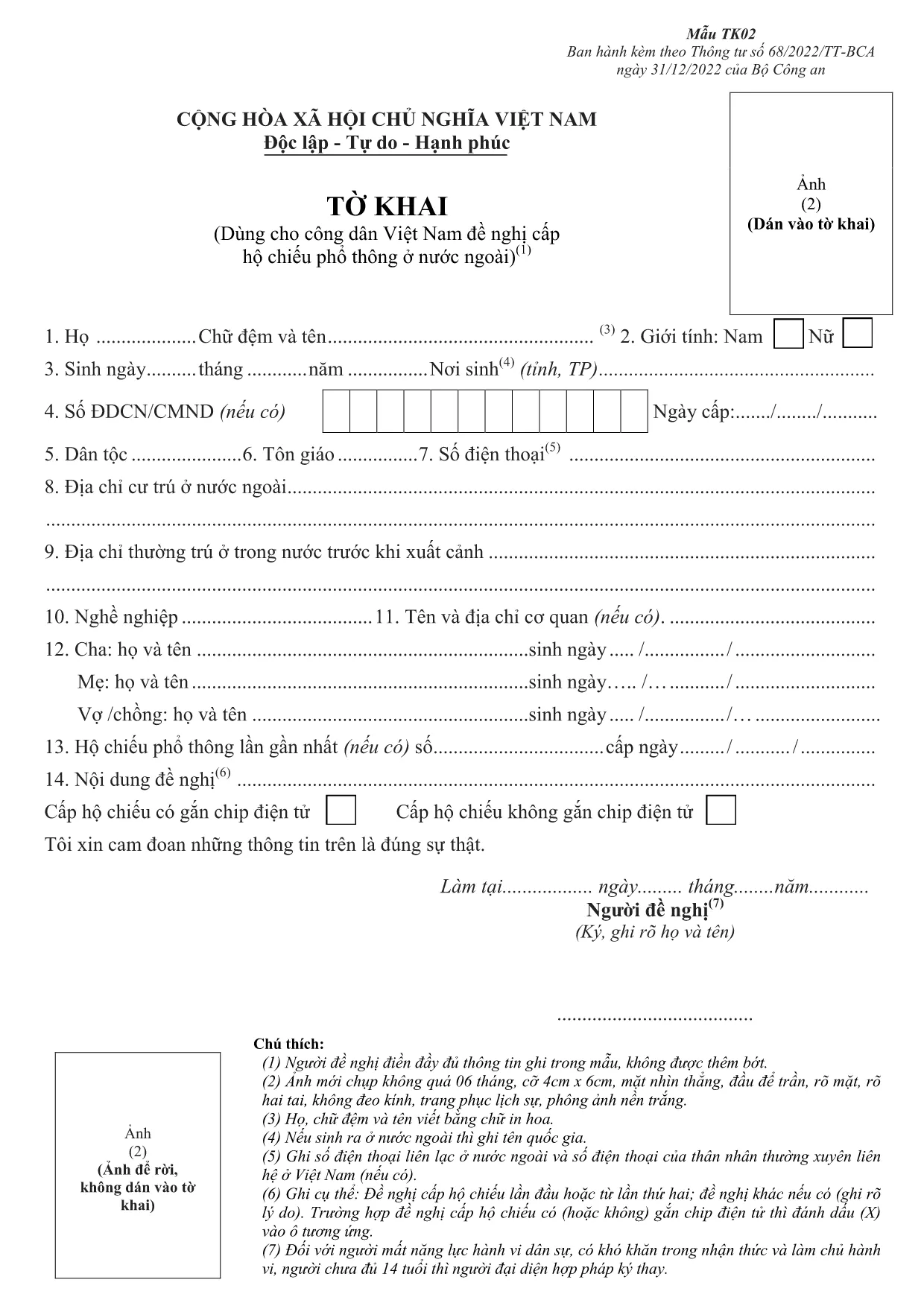
The TK02 application form is the official document used by Vietnamese citizens and residents to apply for a new passport or renew an existing one at a Vietnamese consulate abroad. This form is required by the Ministry of Public Security and must be completed accurately to avoid processing delays.

On this page you can fill out this form directly in your browser using Formize’s secure PDF Filler. No additional software is needed – just click the button, wait for the filler to load, and start entering your information.

What Is the TK02 Form?

The TK02 ("Tờ khai xin cấp hộ chiếu") collects personal details, travel history, and supporting document references. It is typically submitted alongside a passport-sized photo, a copy of your ID, and any required fees.

How to Fill the TK02 Form Online

Follow these simple steps to complete the form without downloading a separate editor:

  1. Click the "Fill out this form" button above.
  2. The Formize PDF Filler loads the fillable TK02 PDF.
  3. Enter your information in each field. The filler auto‑saves as you type.
  4. Review all entries, then click **Submit** to download the completed PDF.
  5. Print the signed PDF (if required) and attach it to your passport application package.

Common Mistakes to Avoid

  • Leaving mandatory fields blank – the filler will highlight missing data before you can submit.
  • Using an outdated passport number – verify the number on your current passport.
  • Incorrect date formats – use DD/MM/YYYY as required by the consulate.
  • Skipping the signature field – you must sign the printed copy before submission.

Where to Submit Your Completed Form

After downloading the filled PDF, attach it to your passport application and submit it to the nearest Vietnamese consulate or embassy. For the Osaka Consulate, mail or deliver the package to:

Consulate General of Vietnam in Osaka
1-2-3, Nishitenma, Kita-ku, Osaka 531-0074, Japan

Check the consulate’s website for the latest address and office hours.

Download the Fillable PDF Instantly

If you prefer to download the original fillable PDF and use another editor, you can do so here. The same document powers the Formize online filler.

FAQ
  • Is the TK02 form available in English?

    The official TK02 form is in Vietnamese. However, you can fill it using the Formize filler while referencing an English translation guide.

  • Can I save my progress and return later?

    Yes. The Formize filler automatically saves your entries locally, allowing you to close the browser and continue later.

  • Do I need to print the form after filling it online?

    Most consulates accept a digitally signed PDF, but many still require a printed, hand‑signed copy. Check the specific consulate’s instructions.

  • What fees are associated with the TK02 application?

    Passport fees vary by consulate and age of applicant. Refer to the Osaka Consulate’s fee schedule on their official website.

  • How long does processing take after I submit the TK02 form?

    Standard processing is 7‑10 business days, but it can be longer during peak travel seasons.

  • Can I submit the TK02 form electronically?

    Some Vietnamese consulates accept emailed PDFs, but the Osaka Consulate currently requires a physical submission.

  • What documents must accompany the TK02 form?

    You need a recent passport‑size photo, a copy of your current ID or passport, and proof of fee payment.

COME

Come compilare TK02 form gratuitamente, online in 4 semplici passaggi:

  1. 1
    Open the online filler
    Click the "Fill out this form" button on the page. The Formize PDF Filler will load the TK02 PDF automatically.
  2. 2
    Enter your information
    Fill each field with accurate data. Required fields are highlighted in blue.
  3. 3
    Review and download
    After completing all sections, click "Submit" to download the filled PDF. Print and sign if a physical copy is needed.
  4. 4
    Submit to the consulate
    Attach the completed PDF to your passport application and deliver it to the Vietnamese Consulate in Osaka (or your local consulate).
App Formize PDF Filler
DI

modello TK02 form

Con il tradizionale set di funzionalità per la visualizzazione e la compilazione di un documento PDF, combinato con i vantaggi di un'applicazione Web e un layout reattivo, puoi completare TK02 form in pochi minuti.

CARATTERISTICHE

Compilatore PDF

Il modo più semplice per compilare moduli PDF online

  • Compila rapidamente TK02 form
    Cerchi un modo per compilare rapidamente TK02 form online? Con il nostro compilatore di moduli PDF gratuito online, saprai come modificare e compilare questo documento PDF in meno di un minuto.
  • Editor PDF online facile da usare
    Stufo di stampare file PDF in modo da poterli modificare, prima di riscansionarli e rispedirli? Modifica documenti PDF gratuitamente online. Utilizza il nostro editor PDF online per risparmiare tempo e carta.
  • Grandi strumenti, tutte le piattaforme
    Ti stai chiedendo come inserire TK02 form su un Mac o forse come utilizzare un riempitivo PDF gratuito? I nostri strumenti PDF online funzionano su tutte le piattaforme.
  • Archiviazione sicura dei file
    I file "TK02 form" completati vengono archiviati in un database protetto gestito dall'hosting Amazon Cloud. Puoi eliminare i tuoi file dal nostro sistema in qualsiasi momento. In ogni caso, questi file vengono automaticamente cancellati dopo 24 ore.
  • Chatta con {parola chiave}
    Chatta con "TK02 form" su Chatize che è un assistente di lettura PDF gratuito. Fai domande e ottieni risposte da "TK02 form". Basta fare clic sul pulsante Chatta con il documento in alto.

Elimina sessione di riempimento

Eliminare la sessione di riempimento selezionata? In questo caso, i progressi nella compilazione del modulo andranno persi.

Elimina la sessione di modifica

Eliminare la sessione di editing selezionata? In questo caso, i tuoi progressi nella creazione e modifica del modulo andranno persi.