
言語を選択する

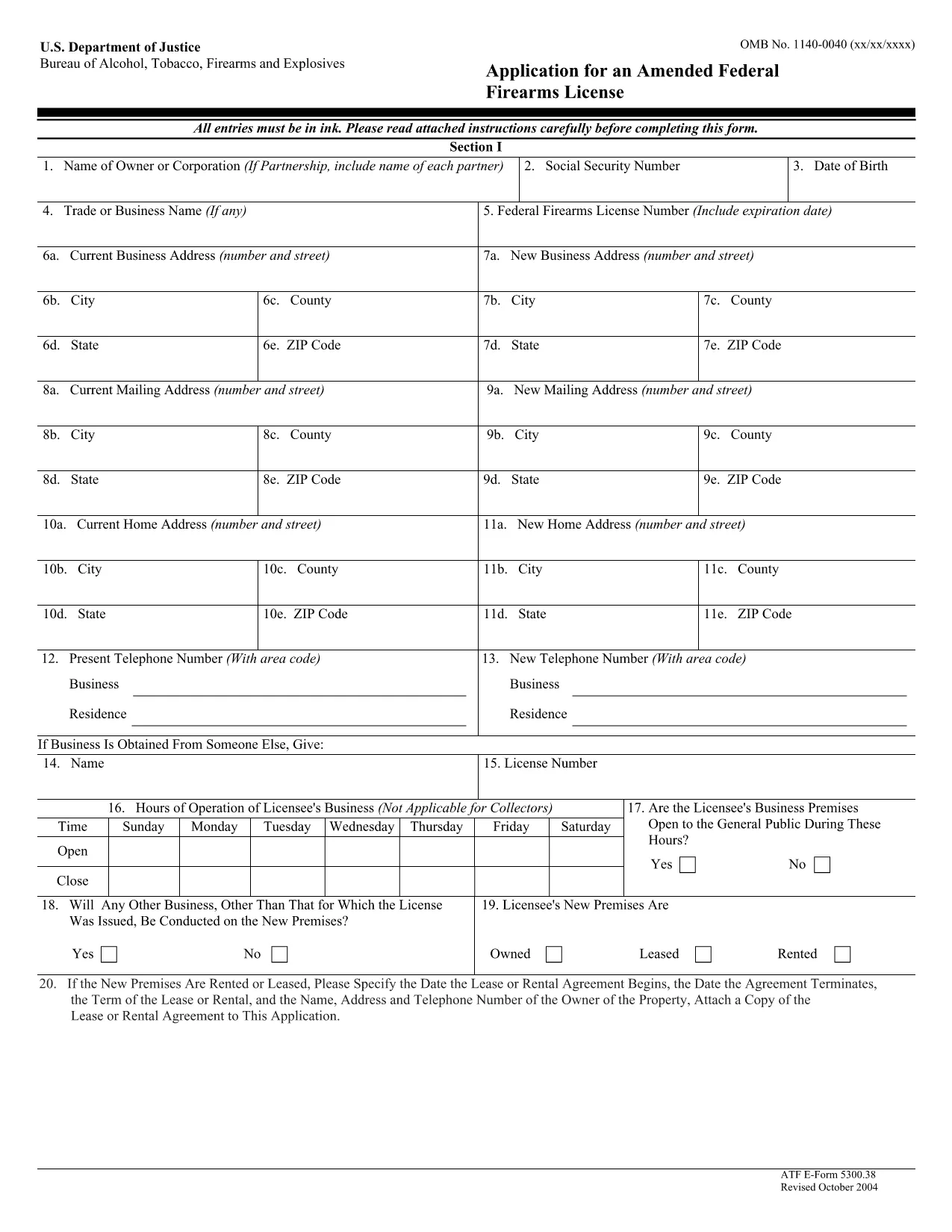
ATF Form 5300.38 – Amended Federal Firearms License Application

  1. 言語 英語
  2. アメリカ合衆国
  3. デパートメント アルコール、タバコ、火器、爆発物取締局
  4. セクタ 銃器
ATF Form 5300.38 – Amended Federal Firearms License Application

The ATF Form 5300.38 is the official application used to request an amendment to an existing Federal Firearms License (FFL). Whether you need to add a new class of firearms, change your business address, or update other license details, this form is required by the Bureau of Alcohol, Tobacco, Firearms and Explosives (ATF).

Formize.com offers a 100% fillable, searchable PDF version of the ATF Form 5300.38. You can either download the PDF to complete it offline or use our integrated online PDF filler to fill it out instantly in your browser—no extra software needed.

What is ATF Form 5300.38?

This form is titled “Application for an Amended Federal Firearms License” and is governed by 18 U.S.C. Chapter 44. It is used by existing FFL holders to request any change to their license that does not require a completely new application.

How to Fill Out the Form Online

Follow the simple steps below to complete the form securely with Formize’s PDF Filler:

  • Click the “Fill out this form” button on this page.
  • Wait a few seconds while the Formize PDF Filler loads the fillable ATF Form 5300.38.
  • Enter your information directly into each field. The filler validates dates, phone numbers, and required fields in real time.
  • Review the completed form, sign electronically if required, and click “Download” or “Print”.
  • Mail the signed form to the ATF Federal Firearms Licensing Center as instructed.

Common Mistakes to Avoid

Even a small error can delay processing. Keep these tips in mind:

  • Incorrect ATF Number: Double‑check your current FFL number.
  • Missing Signatures: All required signatures must be original or an accepted electronic signature.
  • Out‑of‑Date Addresses: Use the exact mailing address listed on your current license.
  • Incomplete Attachments: If you’re adding a new class, include the appropriate supplemental pages.

Where to Submit Your Application

After completing the form, mail it to:

Chief, Federal Firearms Licensing Center
2600 Century Parkway NE
Atlanta, GA 30345
United States

Use certified mail or a reputable courier to ensure delivery tracking.

Download the Official PDF

If you prefer to fill out the form offline, click the download button below to get the official ATF Form 5300.38 PDF directly from the government source.

Download ATF Form 5300.38 PDF

よくある質問
  • Is the ATF Form 5300.38 available as a fillable PDF?

    Yes. Formize provides a fully fillable PDF version that you can complete online or download for offline use.

  • Do I need a digital signature for this form?

    The ATF accepts electronic signatures for most sections, but the final signature line often requires a wet ink signature. Check the instructions on the form.

  • How long does it take for the ATF to process an amendment?

    Processing times vary, but most amended license requests are reviewed within 4‑6 weeks after receipt.

  • Can I submit the form electronically?

    The ATF still requires a hard‑copy submission by mail. You can, however, fill out the form electronically and print it for mailing.

  • What should I do if I make a mistake after printing?

    Cross out the error with a single line, initial the change, and complete the rest of the form. For major errors, it’s best to start a new copy.

  • Is there a fee for filing an amendment?

    Generally, there is no additional fee for amending an existing FFL unless the amendment adds a new class of firearms, which may incur a fee.

  • Where can I find the official ATF instructions for Form 5300.38?

    The official instruction sheet is included as the first page of the PDF linked above or can be accessed on the ATF website.

  • Do I need to attach any supporting documents?

    Depending on the amendment, you may need to attach a copy of your current license, a new business location map, or other relevant documentation.

方法

オンラインで 5 回の簡単なステップで ATF Form 5300.38 を無料で入力する方法:

  1. 1
    Click the Fill‑out Button
    Press the “Fill out this form” button on this page to launch the Formize PDF Filler.
  2. 2
    Wait for the Filler to Load
    The fillable ATF Form 5300.38 will appear in your browser within a few seconds.
  3. 3
    Enter Your Information
    Complete each field. The tool validates entries and highlights required sections.
  4. 4
    Review and Sign
    Check the completed form for accuracy, add an electronic signature if allowed, and save.
  5. 5
    Download or Print
    Download the finished PDF or print it to mail to the ATF Federal Firearms Licensing Center.
Formize PDF Filler アプリ
だいたい

アルコール、タバコ、銃器および爆発物 (ATF) フォームの申請書

ATF Form 5300.38 は、米国司法省内の連邦法執行機関である ATF で使用される公式フォームの 1 つです。 ATF は、アルコール、タバコ、銃器、爆発物に関連する連邦法と規制を執行する責任があります。これらのフォームは、これらの業界に関わる企業や個人の登録、ライセンス付与、規制など、さまざまな目的で使用されます。 ATF フォームの例をいくつか示します。

ATF フォーム 4473: このフォームは、連邦認可を受けた銃器販売業者から銃器を購入する際の身元調査プロセスに使用されます。購入者の身元、経歴、銃器所持資格に関する情報を収集します。

ATF フォーム 1: このフォームは銃器の製造と登録を申請するために使用されます。これは通常、個人使用のために銃器を製造したい、または既存の銃器を別の構成に変換したい個人に使用されます。

ATF フォーム 4: このフォームは、ある個人または団体から別の個人または団体への銃器の譲渡および登録に使用されます。これは、個人から銃器を購入するプロセス、または銃器を信託または企業に譲渡するプロセスで一般的に使用されます。

ATF フォーム 6: このフォームは、銃器、弾薬、および ATF によって規制されているその他の特定の品目の輸入に使用されます。このような商品を米国に輸入したい個人または企業に必要です。

ATF フォーム 7: このフォームは、連邦銃器使用許可 (FFL) の申請と更新に使用されます。銃器の製造、販売、輸入の事業に従事する個人または企業に必要です。

ATF フォーム 5320.20: このフォームは銃器の輸送の通知と承認に使用されます。または州境を越えた破壊装置。

ATF フォーム 5400.13: このフォームは、次の登録と報告に使用されます。爆発性の物質および装置。

これらは、アルコール、タバコ、銃器、爆発物を管理する連邦法の規制と執行に関連するさまざまな目的で使用される ATF フォームのほんの一例です。必要な特定のフォームは、実行される特定の活動または取引、および適用される規制によって異なります。正確かつ最新の情報については、アルコール・タバコ・銃器・爆発物局の公式 Web サイト (www.atf.gov) を参照するか、専門家の指導を求めることが重要です。あなたの状況に関連する特定の ATF フォームについて。

特徴

PDFフィラー

オンラインで PDF フォームに記入する最も簡単な方法

  • ATF Form 5300.38 をすばやく入力してください
    ATF Form 5300.38 をオンラインですばやく入力する方法をお探しですか?オンラインの無料 PDF フォーム フィラーを使用すると、この PDF ドキュメントを 1 分以内に編集して入力する方法がわかります。
  • 使いやすいオンライン PDF エディター
    再スキャンして返送する前に、編集できるように PDF ファイルを印刷することにうんざりしていませんか? PDFドキュメントをオンラインで無料で編集.当社のオンライン PDF エディターを使用して、時間と紙を節約してください。
  • 優れたツール、すべてのプラットフォーム
    Mac で ATF Form 5300.38 を入力する方法や、PDF フィラーを無料で使用する方法を知りたいですか?当社のオンライン PDF ツールは、すべてのプラットフォームで動作します。
  • 安全なファイル ストレージ
    完成した「ATF Form 5300.38」ファイルは、Amazon クラウド ホスティングが管理する安全なデータベースに保存されます。いつでもシステムからファイルを削除できます。いずれにせよ、これらのファイルは 24 時間後に自動的に削除されます。
  • {キーワード} とチャットする
    無料の PDF リーダー アシスタントである Chatize で「ATF Form 5300.38」とチャットします。質問すると、「ATF Form 5300.38」から回答が得られます。上の [ドキュメントとチャット] ボタンをクリックするだけです。

フィルセッションを削除

選択したフィルセッションを削除しますか?この場合、フォームへの記入の進捗状況は失われます。

編集セッションを削除する

選択した編集セッションを削除しますか?この場合、フォームの作成および編集の進行状況は失われます。