
言語を選択する

ATF Form 5310.12 & 5310.16 Fillable PDF – Download & Complete Online

  1. 言語 英語
  2. アメリカ合衆国
  3. デパートメント アルコール、タバコ、火器、爆発物取締局
  4. セクタ 銃器
ATF Form 5310.12 & 5310.16 Fillable PDF – Download & Complete Online

Whether you are applying for a new Federal Firearms License (FFL) or need to add a responsible person to an existing license, the ATF’s Form 5310.12 and Form 5310.16 are essential. Formize provides a secure, fillable PDF that lets you complete both forms directly in your browser – no extra software required.

What Is ATF Form 5310.12?

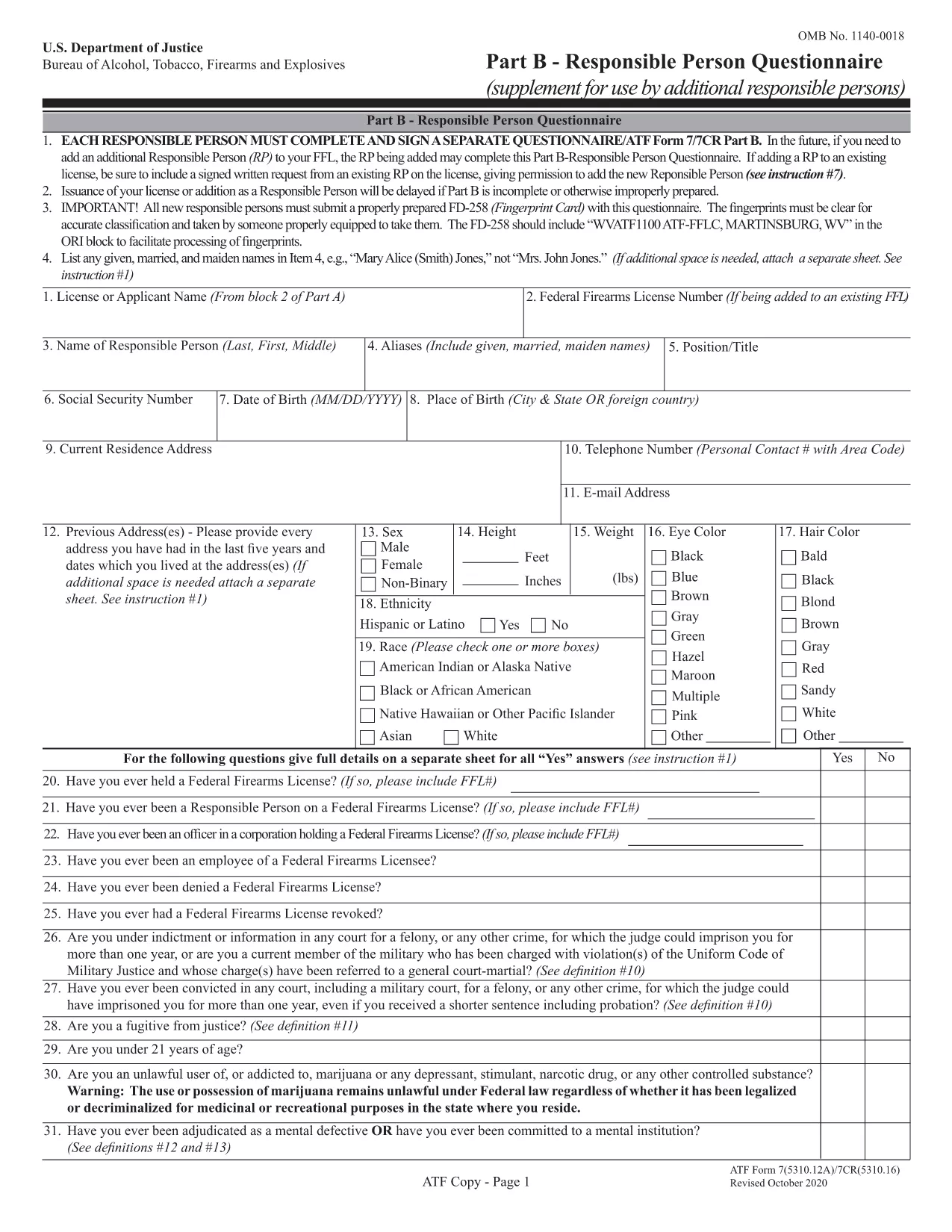
Form 5310.12 is the official application used to request any type of FFL (Dealer, Manufacturer, Importer, etc.). It collects business information, background details, and the specific license class you are seeking.

Understanding Form 5310.16 – Responsible Person Questionnaire

Form 5310.16 (also known as Part B) is a questionnaire that must be completed by every responsible person added to an FFL. It includes personal background questions, fingerprint instructions, and a photo requirement.

How to Fill Out the Forms Online with Formize

Follow the simple steps below to fill the PDF without leaving the page.

  • Click the "Fill out this form" button on the page.
  • Wait a few seconds while the Formize PDF Filler app loads.
  • Enter your information directly into the fillable fields.
  • Use the Save button to download a completed copy or Print it for mailing.
  • Mail the printed form to the ATF address shown on the form instructions.

Common Mistakes to Avoid

  • Leaving required fields blank – the filler highlights empty mandatory sections.
  • Using an outdated form version – our PDF is the latest revision (effective 2022).
  • Submitting the wrong mailing address – double‑check the address on the form’s last page.
  • Forgetting the fingerprint card for Form 5310.16 – attach it before mailing.

Where to Submit Your Completed Forms

After completing the forms, mail them to the ATF’s Federal Firearms Licensing Center (FFLC) at the address printed on the last page of each form. For expedited processing, consider using certified mail with tracking.

Need more help? Review the ATF’s official instructions linked on each form or consult a qualified firearms attorney.

よくある質問
  • Do I need to fill out both Form 5310.12 and 5310.16?

    Form 5310.12 is required for a new FFL. Form 5310.16 is only needed when adding or updating a responsible person on an existing FFL.

  • Can I submit the forms electronically?

    The ATF currently requires a hard‑copy submission for these forms. Use the online filler to complete them, then print and mail.

  • Is the PDF fillable on mobile devices?

    Yes. The Formize filler works on most modern smartphones and tablets, though a larger screen makes data entry easier.

  • What address should I use for mailing?

    The correct mailing address is printed on the last page of each form. For Form 5310.12, use the Federal Firearms Licensing Center address; for Form 5310.16, use the ATF address shown in the questionnaire instructions.

  • How long does it take the ATF to process my application?

    Processing times vary, but most FFL applications are reviewed within 60‑90 days after receipt.

  • Do I need a fingerprint card for Form 5310.16?

    Yes. Every responsible person must submit a fingerprint card (FD‑258) along with the completed questionnaire.

  • What if I make a mistake after mailing?

    Contact the ATF’s Federal Firearms Licensing Center immediately. They may allow a corrected form to be resubmitted before final approval.

方法

オンラインで 5 回の簡単なステップで ATF Form 5310.12 を無料で入力する方法:

  1. 1
    Click the Fill Out Button
    Press the "Fill out this form" button on the page to launch the Formize PDF Filler.
  2. 2
    Wait for the Filler to Load
    A short loading screen appears while the secure fillable PDF is prepared.
  3. 3
    Enter Your Information
    Type directly into each highlighted field. Use the navigation tabs to jump between sections.
  4. 4
    Save or Print Your Completed Form
    When finished, click "Save" to download a copy or "Print" to produce a hard‑copy for mailing.
  5. 5
    Mail to the ATF
    Attach any required fingerprint cards or photos and mail the form to the address shown on the last page.
Formize PDF Filler アプリ
だいたい

アルコール、タバコ、銃器および爆発物 (ATF) フォームの申請書

ATF Form 5310.12 は、米国司法省内の連邦法執行機関である ATF で使用される公式フォームの 1 つです。 ATF は、アルコール、タバコ、銃器、爆発物に関連する連邦法と規制を執行する責任があります。これらのフォームは、これらの業界に関わる企業や個人の登録、ライセンス付与、規制など、さまざまな目的で使用されます。 ATF フォームの例をいくつか示します。

ATF フォーム 4473: このフォームは、連邦認可を受けた銃器販売業者から銃器を購入する際の身元調査プロセスに使用されます。購入者の身元、経歴、銃器所持資格に関する情報を収集します。

ATF フォーム 1: このフォームは銃器の製造と登録を申請するために使用されます。これは通常、個人使用のために銃器を製造したい、または既存の銃器を別の構成に変換したい個人に使用されます。

ATF フォーム 4: このフォームは、ある個人または団体から別の個人または団体への銃器の譲渡および登録に使用されます。これは、個人から銃器を購入するプロセス、または銃器を信託または企業に譲渡するプロセスで一般的に使用されます。

ATF フォーム 6: このフォームは、銃器、弾薬、および ATF によって規制されているその他の特定の品目の輸入に使用されます。このような商品を米国に輸入したい個人または企業に必要です。

ATF フォーム 7: このフォームは、連邦銃器使用許可 (FFL) の申請と更新に使用されます。銃器の製造、販売、輸入の事業に従事する個人または企業に必要です。

ATF フォーム 5320.20: このフォームは銃器の輸送の通知と承認に使用されます。または州境を越えた破壊装置。

ATF フォーム 5400.13: このフォームは、次の登録と報告に使用されます。爆発性の物質および装置。

これらは、アルコール、タバコ、銃器、爆発物を管理する連邦法の規制と執行に関連するさまざまな目的で使用される ATF フォームのほんの一例です。必要な特定のフォームは、実行される特定の活動または取引、および適用される規制によって異なります。正確かつ最新の情報については、アルコール・タバコ・銃器・爆発物局の公式 Web サイト (www.atf.gov) を参照するか、専門家の指導を求めることが重要です。あなたの状況に関連する特定の ATF フォームについて。

特徴

PDFフィラー

オンラインで PDF フォームに記入する最も簡単な方法

  • ATF Form 5310.12 をすばやく入力してください
    ATF Form 5310.12 をオンラインですばやく入力する方法をお探しですか?オンラインの無料 PDF フォーム フィラーを使用すると、この PDF ドキュメントを 1 分以内に編集して入力する方法がわかります。
  • 使いやすいオンライン PDF エディター
    再スキャンして返送する前に、編集できるように PDF ファイルを印刷することにうんざりしていませんか? PDFドキュメントをオンラインで無料で編集.当社のオンライン PDF エディターを使用して、時間と紙を節約してください。
  • 優れたツール、すべてのプラットフォーム
    Mac で ATF Form 5310.12 を入力する方法や、PDF フィラーを無料で使用する方法を知りたいですか?当社のオンライン PDF ツールは、すべてのプラットフォームで動作します。
  • 安全なファイル ストレージ
    完成した「ATF Form 5310.12」ファイルは、Amazon クラウド ホスティングが管理する安全なデータベースに保存されます。いつでもシステムからファイルを削除できます。いずれにせよ、これらのファイルは 24 時間後に自動的に削除されます。
  • {キーワード} とチャットする
    無料の PDF リーダー アシスタントである Chatize で「ATF Form 5310.12」とチャットします。質問すると、「ATF Form 5310.12」から回答が得られます。上の [ドキュメントとチャット] ボタンをクリックするだけです。

フィルセッションを削除

選択したフィルセッションを削除しますか?この場合、フォームへの記入の進捗状況は失われます。

編集セッションを削除する

選択した編集セッションを削除しますか?この場合、フォームの作成および編集の進行状況は失われます。