
言語を選択する

ATF Form 5400.13/5400.16 – Responsible Person Questionnaire

  1. 言語 英語
  2. アメリカ合衆国
  3. デパートメント アルコール、タバコ、火器、爆発物取締局
  4. セクタ 爆発物
ATF Form 5400.13/5400.16 – Responsible Person Questionnaire

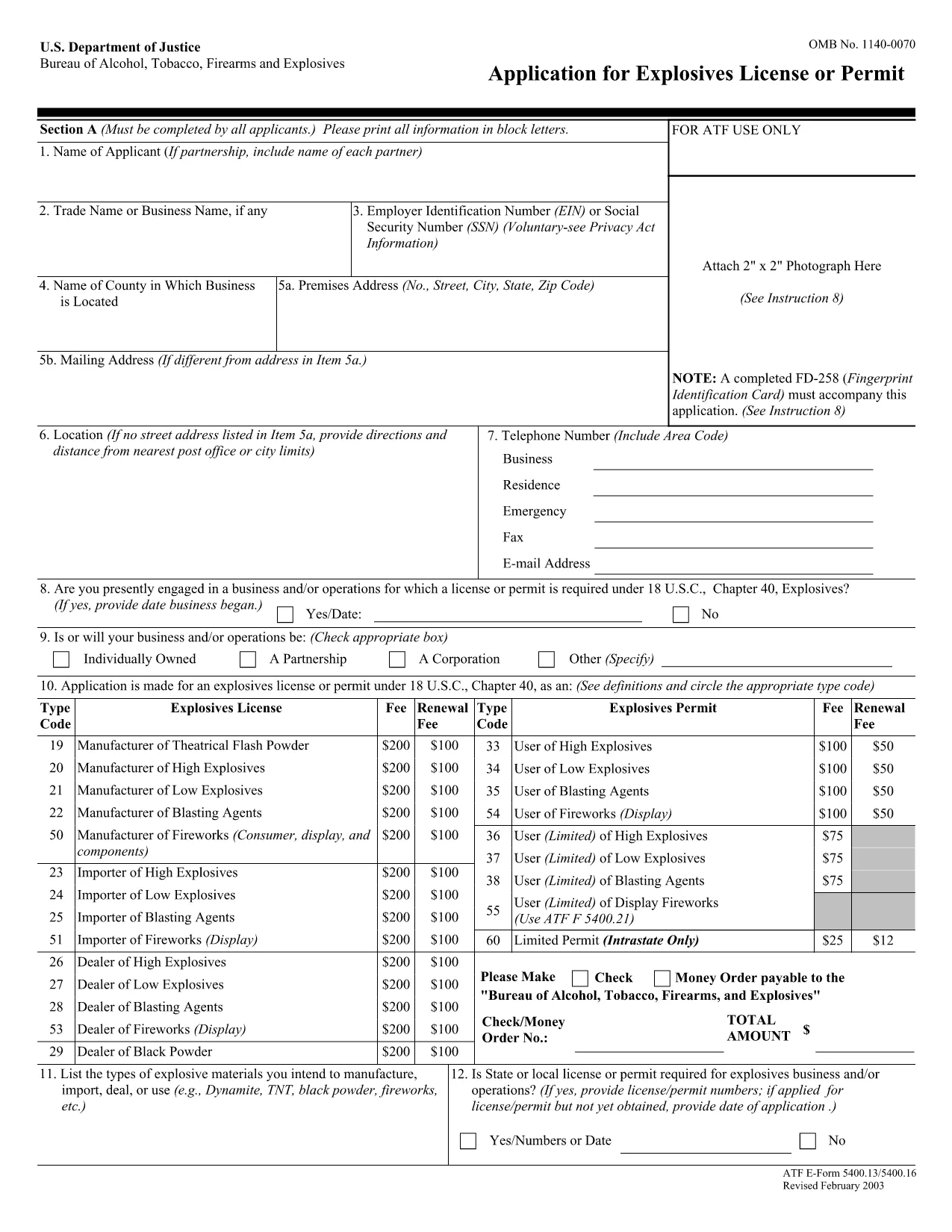
The ATF Form 5400.13 (Responsible Person Questionnaire) and its companion Form 5400.16 are required for anyone applying for an explosives license or permit. These forms collect detailed information about each responsible person associated with the business, ensuring compliance with the Bureau of Alcohol, Tobacco, Firearms and Explosives (ATF) regulations.

What Is ATF Form 5400.13/5400.16?

Form 5400.13 gathers personal, business, and background data for each responsible person, while Form 5400.16 provides additional certification and signature fields. Together, they form the core of the ATF’s Responsible Person Questionnaire, a mandatory part of every explosives license or permit application.

How to Complete the Form Online with Formize

  • Step 1: Click the "Fill out this form" button on this page.
  • Step 2: Wait a few seconds while the Formize PDF Filler app loads the fillable PDF.
  • Step 3: Enter the requested information in each field. The interface saves your progress automatically.
  • Step 4: When all sections are complete, download the finished PDF or submit it directly to the ATF portal.

Common Mistakes & Tips for a Successful Submission

Don’t leave any required fields blank. The ATF will reject applications with missing data. Use the "Add another responsible person" button if you have more than one individual to report.

Use legal names only. Include maiden names, previous married names, and any aliases exactly as they appear on official documents.

Double‑check dates. Ensure birth dates, licensing dates, and expiration dates follow the MM/DD/YYYY format.

Where to Send the Completed Form

After you download the completed PDF, mail or fax it to the ATF National Services Center, Federal Explosives Licensing Center, P.O. Box 6200‑18, Portland, OR 97228‑6200. Refer to the ATF instructions for any additional submission requirements.

Need a printable version? Use the download link below to get the original PDF.

よくある質問
  • Who must complete ATF Form 5400.13/5400.16?

    Every individual who will act as a responsible person for an explosives business – owners, partners, officers, and key employees – must complete the questionnaire.

  • Can I submit a paper copy instead of the fillable PDF?

    Yes, a printed version is accepted, but using the fillable PDF reduces errors and speeds up processing.

  • What if I have more than three responsible persons?

    Use the "Add another responsible person" button in the online filler, or attach additional sheets if you print the form.

  • How long is the form valid after I submit it?

    The information is valid for the duration of the license or permit. Any changes (e.g., new responsible person) must be reported to the ATF promptly.

  • Do I need a digital signature?

    A typed name in the signature field is acceptable for the online version. For paper submissions, sign with a pen.

  • Is there a filing fee associated with this questionnaire?

    The questionnaire itself has no fee, but it is part of the overall explosives license application, which may have associated fees.

  • What should I do if I make a mistake after saving?

    Open the saved PDF in the Formize filler again, correct the error, and re‑download the updated file.

  • Where can I find the official ATF instructions?

    The ATF publishes detailed guidance on its website under the Explosives Licensing section; a link is included on the form’s cover page.

方法

オンラインで 4 回の簡単なステップで ATF Form 5400.13 を無料で入力する方法:

  1. 1
    Click the Fill‑out Button
    Press the "Fill out this form" button on the page to launch the Formize PDF Filler.
  2. 2
    Wait for the Filler to Load
    A few seconds later the fillable PDF appears in the browser. No download or extra software is needed.
  3. 3
    Enter All Required Information
    Complete each field for every responsible person. The app auto‑saves as you type.
  4. 4
    Download or Submit
    When finished, click "Download PDF" to save a copy or follow ATF instructions to submit the form.
Formize PDF Filler アプリ
だいたい

アルコール、タバコ、銃器および爆発物 (ATF) フォームの申請書

ATF Form 5400.13 は、米国司法省内の連邦法執行機関である ATF で使用される公式フォームの 1 つです。 ATF は、アルコール、タバコ、銃器、爆発物に関連する連邦法と規制を執行する責任があります。これらのフォームは、これらの業界に関わる企業や個人の登録、ライセンス付与、規制など、さまざまな目的で使用されます。 ATF フォームの例をいくつか示します。

ATF フォーム 4473: このフォームは、連邦認可を受けた銃器販売業者から銃器を購入する際の身元調査プロセスに使用されます。購入者の身元、経歴、銃器所持資格に関する情報を収集します。

ATF フォーム 1: このフォームは銃器の製造と登録を申請するために使用されます。これは通常、個人使用のために銃器を製造したい、または既存の銃器を別の構成に変換したい個人に使用されます。

ATF フォーム 4: このフォームは、ある個人または団体から別の個人または団体への銃器の譲渡および登録に使用されます。これは、個人から銃器を購入するプロセス、または銃器を信託または企業に譲渡するプロセスで一般的に使用されます。

ATF フォーム 6: このフォームは、銃器、弾薬、および ATF によって規制されているその他の特定の品目の輸入に使用されます。このような商品を米国に輸入したい個人または企業に必要です。

ATF フォーム 7: このフォームは、連邦銃器使用許可 (FFL) の申請と更新に使用されます。銃器の製造、販売、輸入の事業に従事する個人または企業に必要です。

ATF フォーム 5320.20: このフォームは銃器の輸送の通知と承認に使用されます。または州境を越えた破壊装置。

ATF フォーム 5400.13: このフォームは、次の登録と報告に使用されます。爆発性の物質および装置。

これらは、アルコール、タバコ、銃器、爆発物を管理する連邦法の規制と執行に関連するさまざまな目的で使用される ATF フォームのほんの一例です。必要な特定のフォームは、実行される特定の活動または取引、および適用される規制によって異なります。正確かつ最新の情報については、アルコール・タバコ・銃器・爆発物局の公式 Web サイト (www.atf.gov) を参照するか、専門家の指導を求めることが重要です。あなたの状況に関連する特定の ATF フォームについて。

特徴

PDFフィラー

オンラインで PDF フォームに記入する最も簡単な方法

  • ATF Form 5400.13 をすばやく入力してください
    ATF Form 5400.13 をオンラインですばやく入力する方法をお探しですか?オンラインの無料 PDF フォーム フィラーを使用すると、この PDF ドキュメントを 1 分以内に編集して入力する方法がわかります。
  • 使いやすいオンライン PDF エディター
    再スキャンして返送する前に、編集できるように PDF ファイルを印刷することにうんざりしていませんか? PDFドキュメントをオンラインで無料で編集.当社のオンライン PDF エディターを使用して、時間と紙を節約してください。
  • 優れたツール、すべてのプラットフォーム
    Mac で ATF Form 5400.13 を入力する方法や、PDF フィラーを無料で使用する方法を知りたいですか?当社のオンライン PDF ツールは、すべてのプラットフォームで動作します。
  • 安全なファイル ストレージ
    完成した「ATF Form 5400.13」ファイルは、Amazon クラウド ホスティングが管理する安全なデータベースに保存されます。いつでもシステムからファイルを削除できます。いずれにせよ、これらのファイルは 24 時間後に自動的に削除されます。
  • {キーワード} とチャットする
    無料の PDF リーダー アシスタントである Chatize で「ATF Form 5400.13」とチャットします。質問すると、「ATF Form 5400.13」から回答が得られます。上の [ドキュメントとチャット] ボタンをクリックするだけです。

フィルセッションを削除

選択したフィルセッションを削除しますか?この場合、フォームへの記入の進捗状況は失われます。

編集セッションを削除する

選択した編集セッションを削除しますか?この場合、フォームの作成および編集の進行状況は失われます。