
言語を選択する

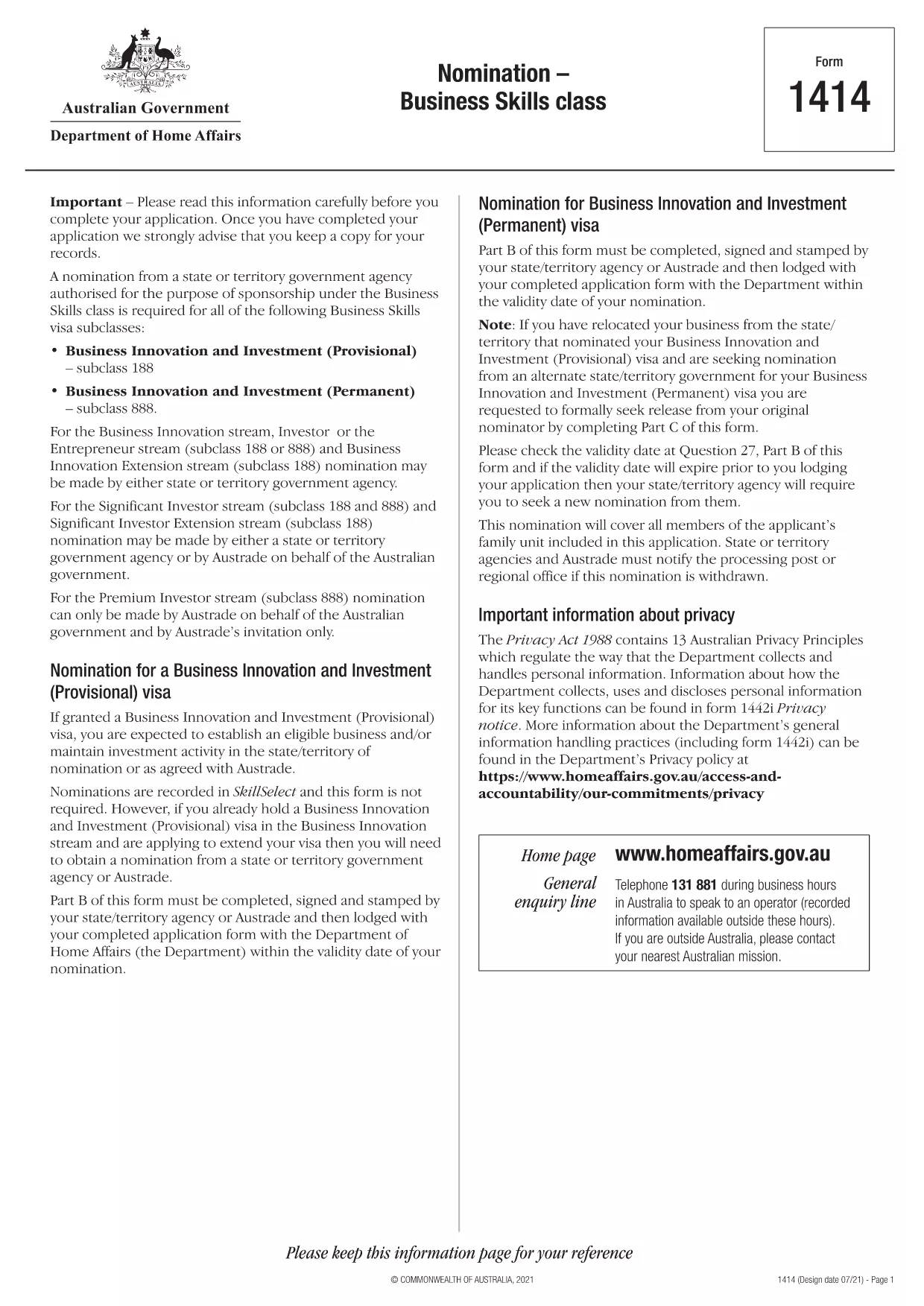
Form 1414 – Nomination Form for Business Skills Visa (Subclass 188 & 888)

  1. 言語 英語
  2. オーストラリア
  3. アクティビティ ビジネスと投資
Form 1414 – Nomination Form for Business Skills Visa (Subclass 188 & 888)

The Form 1414 is the official nomination form required by the Australian Department of Home Affairs for Business Skills visa subclasses 188 and 888. It must be completed, signed, and stamped by the nominating state or territory agency before you lodge your visa application.

What Is Form 1414 and Who Needs It?

Form 1414 is used when a state or territory government agency (or Austrade) nominates an applicant for the Business Innovation and Investment stream. If you are applying for a subclass 188 Business Innovation visa or the permanent subclass 888 Business Innovation visa, you will need a fully‑filled Form 1414 as part of your documentation.

How to Complete the Fillable Form 1414 Online

Instead of downloading the PDF and editing it with a separate editor, simply click the "Fill out this form" button on this page. The Formize PDF Filler app will load the fillable version instantly. Follow the on‑screen prompts, save your progress, and download the completed PDF ready for signing.

Common Mistakes to Avoid When Submitting Form 1414

  • Missing signatures or stamps: The nominator must sign and stamp the form before you attach it to your visa application.
  • Incorrect dates: Ensure the validity dates match the nomination offer from the state or territory.
  • Incomplete business details: Provide accurate ABN, ASIC, and ownership information; omissions can delay processing.

Once you have completed the form, review it carefully, then attach it to your visa application package along with the required supporting documents.

よくある質問
  • Do I need to print Form 1414 after filling it online?

    Yes. After completing the fillable PDF, you must print the document for the nominator’s signature and official stamp before submitting it with your visa application.

  • Can I submit a partially‑filled Form 1414?

    No. The Department of Home Affairs requires a fully completed and signed form. Incomplete forms will be returned and delay processing.

  • Is there a fee to download Form 1414?

    No. The PDF is provided free of charge by the Australian government.

  • What happens if the nominator’s stamp is missing?

    A missing stamp is considered an incomplete nomination. Your visa application will be rejected until the form is correctly stamped.

  • Can I edit the PDF after I have saved it?

    Yes, you can reopen the saved PDF in the Formize PDF Filler app to make changes, but ensure the final version is the one you print and sign.

  • Where can I find the list of supporting documents for Form 1414?

    The Department of Home Affairs provides a checklist on its website. Typical documents include ABN registration, ASIC reports, and proof of business ownership.

方法

オンラインで 4 回の簡単なステップで Form 1414 を無料で入力する方法:

  1. 1
    Open the Fillable Form
    Click the "Fill out this form" button on the page. The Formize PDF Filler app loads the fillable Form 1414 instantly.
  2. 2
    Enter Your Information
    Complete each section—business details, nominator information, and dates—using the on‑screen fields. All fields are required unless marked optional.
  3. 3
    Save and Download
    When you finish, click "Save" to download the completed PDF. Print it for the required signatures and stamp from your nominating agency.
  4. 4
    Attach to Your Visa Application
    Include the signed Form 1414 with your subclass 188 or 888 visa application package, along with all supporting documents.
Formize PDF Filler アプリ
だいたい

ビジネスと投資の形態

Form 1414 は、ビジネスの開始、管理、または投資の文脈で使用される形式の 1 つです。これらのフォームは、情報の収集、法人の設立、または事業運営や投資に関連する特定の規則や規制の遵守のために、政府機関、金融機関、または規制当局によって要求されることがよくあります。具体的な形式は、ビジネスまたは投資活動の性質に応じて異なります。 「ビジネスおよび投資」フォームの例をいくつか示します。

企業登録フォーム: これらのフォームは、適切な政府機関に企業体を登録するために使用されます。これらは、商号、法的構造 (個人事業主、パートナーシップ、法人など)、事業所の住所、所有権の詳細、および法的承認に必要なその他の必要な情報に関する情報を収集します。

設立書類: 法人または会社を設立する場合、法人を設立するためにさまざまな書類を提出する必要があります。これらの文書には通常、定款、定款、株主協定、およびその他の関連フォームが含まれます。

ビジネス ライセンスの申請: 業界や場所に応じて、特定のビジネスは合法的に運営するために特定のライセンスまたは許可を必要とします。ビジネスライセンス申請では、ビジネスの性質、所在地、所有権の詳細、関連規制の遵守に関する情報を収集します。

投資口座開設フォーム: 金融機関または証券会社に投資口座を開設しようとしている投資家は、口座開設フォームに記入する必要がある場合があります。これらのフォームは、投資家のアカウントを確立するために、個人情報、投資目的、リスク許容度、その他の関連詳細を収集します。

パートナーシップ契約: パートナーシップを締結する場合、パートナーは通常、ビジネス関係の条件を概説するパートナーシップ契約を作成します。この契約には、利益分配、意思決定、寄付、およびパートナーシップのその他の側面に関連する条項が含まれる場合があります。

機密保持契約 (NDA): NDA は、機密情報や企業秘密を保護するために商取引で一般的に使用されます。これらの契約により、ビジネスまたは投資取引に関与する当事者は、取引中に共有される特定の情報について機密性を維持することが保証されます。

ローンまたは融資申請フォーム: 金融機関からの融資または融資を求める企業は、融資申請フォームに記入する必要がある場合があります。これらのフォームは、企業の財務状況、信用履歴、担保、ローン承認プロセスに必要なその他の詳細に関する情報を収集します。

有価証券届出: 株式や債券などの有価証券の発行に関わる企業の場合、証券法や規制を遵守するためにさまざまな有価証券届出が必要になる場合があります。これらのフォームには、目論見書、登録届出書、年次報告書、その他の開示情報が含まれます。

具体的な形式や要件は、国、業界、特定のビジネスや投資活動によって異なる場合があります。特定のビジネスまたは投資関連活動に必要なフォームに関する正確かつ最新の情報を入手するには、関連する政府機関、法律専門家、または金融機関に相談することが重要です。

特徴

PDFフィラー

オンラインで PDF フォームに記入する最も簡単な方法

  • Form 1414 をすばやく入力してください
    Form 1414 をオンラインですばやく入力する方法をお探しですか?オンラインの無料 PDF フォーム フィラーを使用すると、この PDF ドキュメントを 1 分以内に編集して入力する方法がわかります。
  • 使いやすいオンライン PDF エディター
    再スキャンして返送する前に、編集できるように PDF ファイルを印刷することにうんざりしていませんか? PDFドキュメントをオンラインで無料で編集.当社のオンライン PDF エディターを使用して、時間と紙を節約してください。
  • 優れたツール、すべてのプラットフォーム
    Mac で Form 1414 を入力する方法や、PDF フィラーを無料で使用する方法を知りたいですか?当社のオンライン PDF ツールは、すべてのプラットフォームで動作します。
  • 安全なファイル ストレージ
    完成した「Form 1414」ファイルは、Amazon クラウド ホスティングが管理する安全なデータベースに保存されます。いつでもシステムからファイルを削除できます。いずれにせよ、これらのファイルは 24 時間後に自動的に削除されます。
  • {キーワード} とチャットする
    無料の PDF リーダー アシスタントである Chatize で「Form 1414」とチャットします。質問すると、「Form 1414」から回答が得られます。上の [ドキュメントとチャット] ボタンをクリックするだけです。

フィルセッションを削除

選択したフィルセッションを削除しますか?この場合、フォームへの記入の進捗状況は失われます。

編集セッションを削除する

選択した編集セッションを削除しますか?この場合、フォームの作成および編集の進行状況は失われます。