
言語を選択する

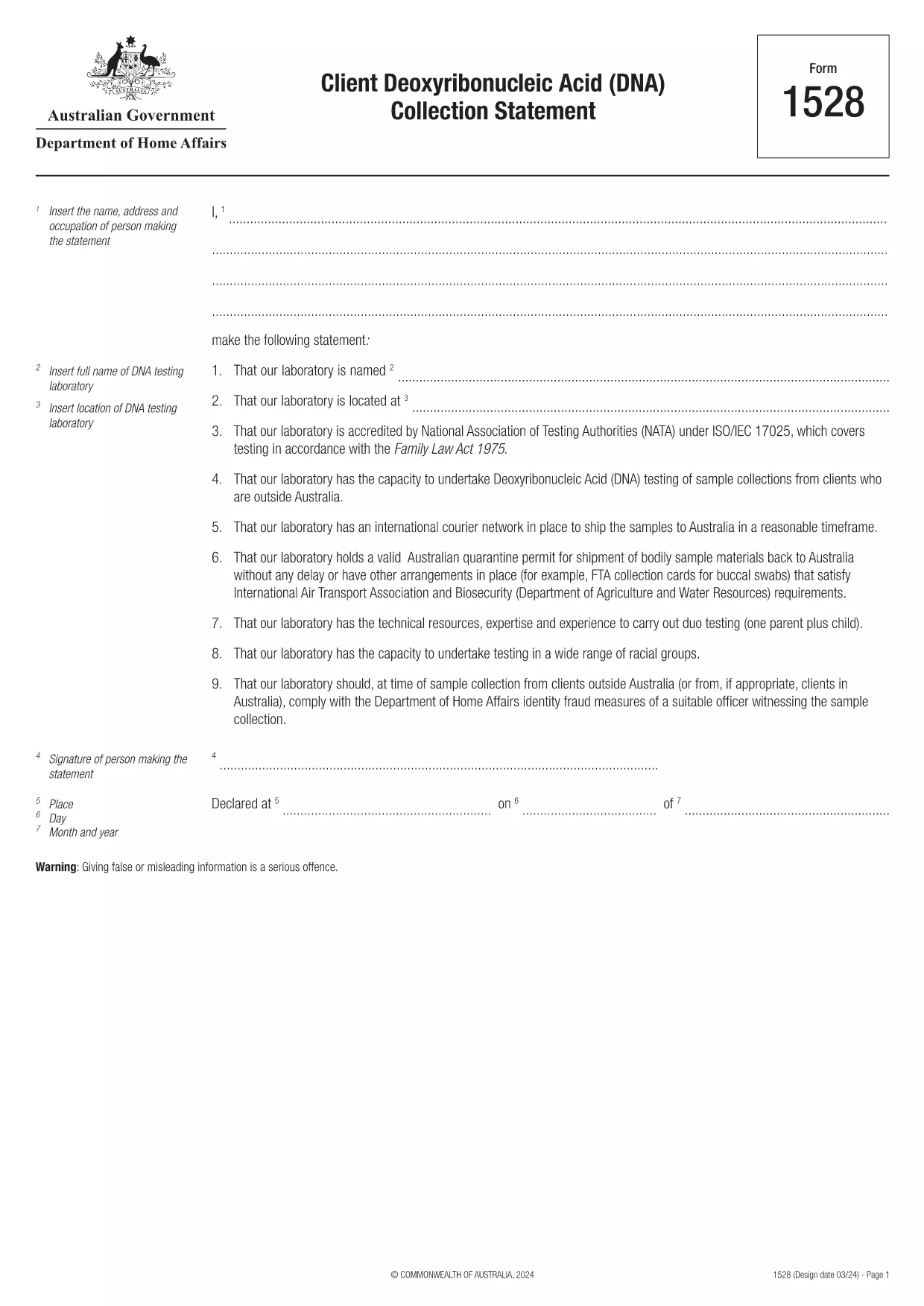
Form 1528 – Client DNA Collection Statement (Fillable PDF)

  1. オーストラリア
  2. 言語 英語
  3. アクティビティ キャラクターまたはアイデンティティ
Form 1528 – Client DNA Collection Statement (Fillable PDF)

Form 1528 is the official Client Deoxyribonucleic Acid (DNA) Collection Statement required by the Australian Department of Home Affairs. The form captures the name, address and occupation of the person making the statement, as well as details of the DNA testing laboratory.

What Is Form 1528?

This form is used when an individual must provide a DNA sample for immigration, visa, or forensic purposes. It must be completed by the person providing the sample and signed by an authorised DNA testing laboratory.

How to Fill Out Form 1528 with Formize

Instead of printing, scanning, or editing the PDF manually, simply click the “Fill out this form” button on this page. The Formize PDF Filler app will load the fillable version, letting you enter data, add signatures, and save the completed document in seconds.

Common Mistakes & Tips

  • Leave no blank fields – the Department rejects forms with empty required sections.
  • Use the exact laboratory name and address as it appears on the lab’s official letterhead.
  • Check date formats – use DD/MM/YYYY throughout.
  • Sign electronically only after all information is verified; a digital signature is accepted.

Where to Submit the Completed Form

After you download the completed PDF, you can upload it through your online visa portal, email it to the requesting officer, or deliver a printed copy to the nearest Australian Visa Application Centre.

Need More Help?

For detailed guidance, review the instructions on the Department of Home Affairs website or contact your DNA testing laboratory for clarification on laboratory‑specific fields.

よくある質問
  • Is an electronic signature accepted on Form 1528?

    Yes. The Department of Home Affairs accepts a clear electronic signature created with the Formize PDF Filler.

  • Can I print the form after filling it online?

    Absolutely. After completing the form, you can download the PDF and print a hard copy if you prefer a physical submission.

  • What if I make a mistake after saving the form?

    Open the saved PDF again in Formize, edit the incorrect fields, and re‑save. The fillable PDF allows unlimited edits before final submission.

  • Do I need to attach any supporting documents?

    Typically, the DNA laboratory will provide a separate certification letter. Attach that letter alongside the completed Form 1528 when you submit your application.

  • How long does it take to process Form 1528?

    Processing time varies by case, but the Department generally reviews the statement within 5‑10 business days after receipt.

  • Is there a fee for using Formize’s PDF filler?

    Formize offers a free basic fillable version for Form 1528. Advanced features such as bulk signing require a paid plan, but are not needed for a single submission.

  • Can I fill out Form 1528 on a mobile device?

    Yes. The Formize PDF Filler works on smartphones and tablets, allowing you to complete the form anywhere.

  • What format should I use when uploading the completed form?

    Upload the final document as a PDF file. Ensure the file size does not exceed the portal’s limit (usually 5 MB).

方法

オンラインで 5 回の簡単なステップで Form 1528 を無料で入力する方法:

  1. 1
    Open the Fillable Form
    Click the “Fill out this form” button on the page. The Formize PDF Filler app will launch in a new tab with the fillable version of Form 1528.
  2. 2
    Enter Your Information
    Type the required details – personal data, laboratory name, and address – directly into the highlighted fields.
  3. 3
    Add Electronic Signatures
    Use the signature tool to sign the statement and, if required, the laboratory representative’s signature.
  4. 4
    Review & Validate
    Double‑check every field for accuracy, especially dates and laboratory information.
  5. 5
    Download or Submit
    When you’re satisfied, click “Save & Download” to get the completed PDF, or use the built‑in “Submit” button to send it directly to the Home Affairs portal.
Formize PDF Filler アプリ
だいたい

キャラクターまたはアイデンティティの形式

Form 1528 は、個人の性格や個人的な資質に関する情報を収集するために使用される文書の 1 つです。これらのフォームは、個人の適性や信頼性を評価するために、雇用、住居、法的手続きなどのさまざまな状況で使用される場合があります。以下に、さまざまな文脈で「文字形式」とみなされる形式の例をいくつか示します。

人物参照フォーム: これらのフォームは、個人の性格、スキル、資格を保証できる個人から情報を収集するために使用されます。これらは、求職申し込み、賃貸申し込み、または法的手続きの一環として要求されることがよくあります。フォームでは通常、申請者との関係、申請者の性格についての意見、関連する経験や観察についての詳細を尋ねます。

個人的な声明フォーム: 特定の状況では、個人は、自分の性格、価値観、動機を伝えるために個人的な声明やエッセイの提供を求められる場合があります。これは、大学への入学、奨学金の申請、または専門的なライセンスのプロセスで必要となる場合があります。

人物証人の証言用紙: 法的手続きでは、個人の性格、評判、または行動に関する証言を提供するために人物証人が呼び出される場合があります。通常、事前に定義された文書の形式ではありませんが、証人が証言を構成する際に役立つフォームやテンプレートが提供される場合があります。

身元調査の開示および承認フォーム: 雇用申請などの状況によっては、個人は身元調査を承認するフォームへの記入を求められる場合があります。これらのフォームには、人物に関する言及、過去の犯罪歴、またはその他の関連する個人情報に関する質問が含まれる場合があります。

個人の性格を評価するために使用される具体的な形式は、関係する組織や機関の状況や要件に応じて異なる場合があることに注意することが重要です。したがって、求められている情報を理解し、フォームに正確に記入する方法を理解するために、関連当事者が提供する特定のフォームを参照することをお勧めします。

特徴

PDFフィラー

オンラインで PDF フォームに記入する最も簡単な方法

  • Form 1528 をすばやく入力してください
    Form 1528 をオンラインですばやく入力する方法をお探しですか?オンラインの無料 PDF フォーム フィラーを使用すると、この PDF ドキュメントを 1 分以内に編集して入力する方法がわかります。
  • 使いやすいオンライン PDF エディター
    再スキャンして返送する前に、編集できるように PDF ファイルを印刷することにうんざりしていませんか? PDFドキュメントをオンラインで無料で編集.当社のオンライン PDF エディターを使用して、時間と紙を節約してください。
  • 優れたツール、すべてのプラットフォーム
    Mac で Form 1528 を入力する方法や、PDF フィラーを無料で使用する方法を知りたいですか?当社のオンライン PDF ツールは、すべてのプラットフォームで動作します。
  • 安全なファイル ストレージ
    完成した「Form 1528」ファイルは、Amazon クラウド ホスティングが管理する安全なデータベースに保存されます。いつでもシステムからファイルを削除できます。いずれにせよ、これらのファイルは 24 時間後に自動的に削除されます。
  • {キーワード} とチャットする
    無料の PDF リーダー アシスタントである Chatize で「Form 1528」とチャットします。質問すると、「Form 1528」から回答が得られます。上の [ドキュメントとチャット] ボタンをクリックするだけです。

フィルセッションを削除

選択したフィルセッションを削除しますか?この場合、フォームへの記入の進捗状況は失われます。

編集セッションを削除する

選択した編集セッションを削除しますか?この場合、フォームの作成および編集の進行状況は失われます。