
言語を選択する

Form 43 – Request to Load Goods onto Ship (Fillable PDF)

  1. オーストラリア
  2. 言語 英語
  3. アクティビティ Import/Export
  4. デパートメント Customs
Form 43 – Request to Load Goods onto Ship (Fillable PDF)

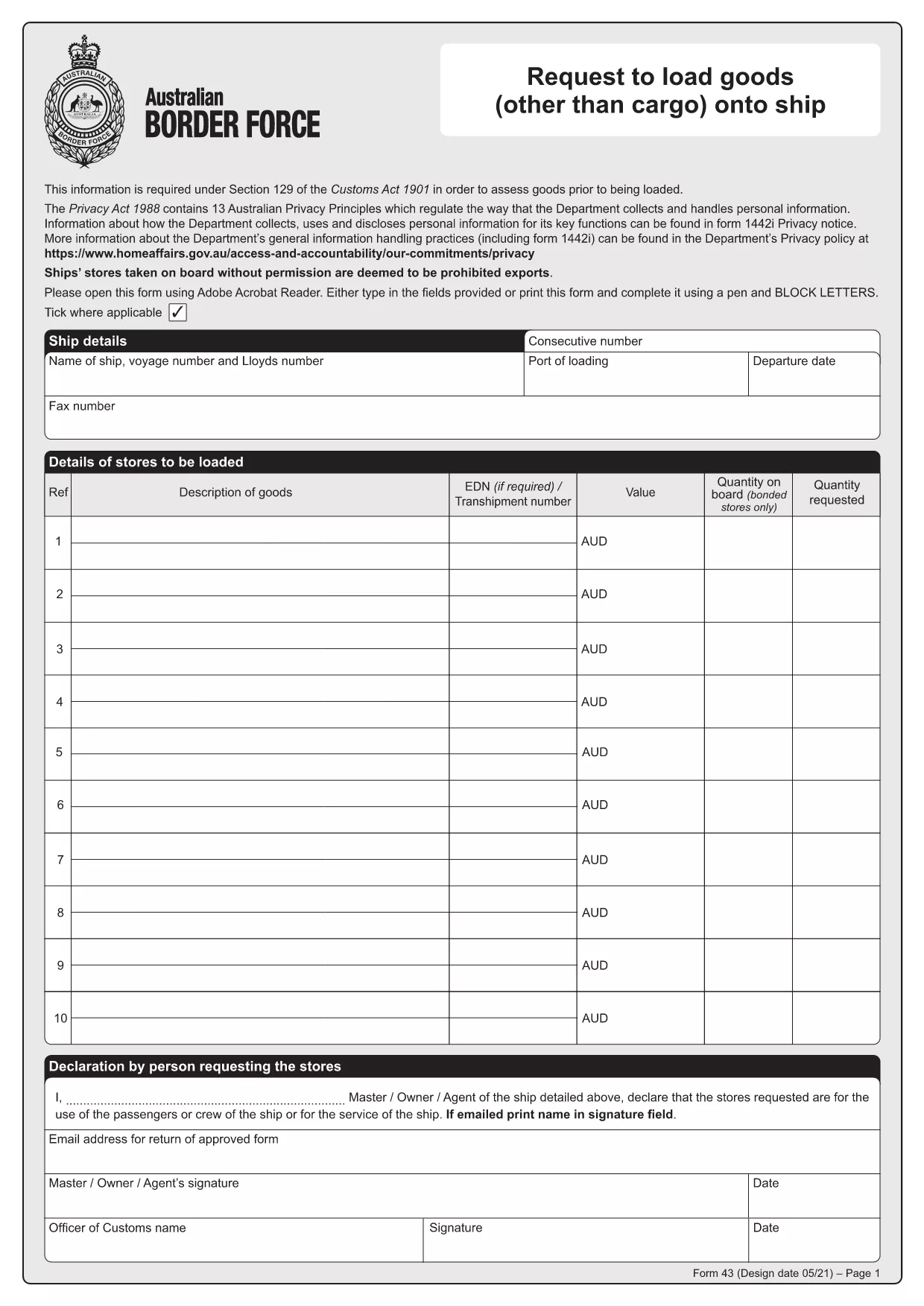
Form 43 is the Australian Border Force (ABF) customs form used when ship stores or other goods are taken on board a vessel without prior permission. It records essential details about the ship, the supplier, the goods, and the customs officer’s approval.

Whether you are a ship captain, a logistics officer, or a supplier, having a quick, fillable version of Form 43 saves time and reduces errors. With Formize’s online PDF filler, you can complete the form directly in your browser – no extra software required.

  • Instant download: Get the official PDF in seconds.
  • Online filling: Click “Fill out this form” and the Formize PDF Filler loads automatically.
  • Secure storage: Save a copy to your device or cloud storage after you submit.

Below you’ll find step‑by‑step instructions, common pitfalls, and answers to the most frequently asked questions about Form 43.

よくある質問
  • What is the purpose of Form 43?

    Form 43 records the request to load ship stores or other goods onto a vessel without prior customs permission, ensuring the goods are documented and approved.

  • Can I edit the PDF on my phone?

    Yes. The Formize PDF Filler works on all modern browsers, including mobile Safari and Chrome, so you can complete the form on a smartphone or tablet.

  • Do I need a PDF editor to fill Form 43?

    No. The online filler lets you fill, sign, and save the form without installing any PDF editor.

  • Is the downloaded PDF an official version?

    Absolutely. The file is the official Form 43 PDF provided by the Australian Border Force, unchanged and ready for submission.

  • What common mistakes should I avoid?

    Make sure all dates are in DD/MM/YYYY format, double‑check the ship’s registration number, and ensure the customs officer’s signature field is left blank for them to sign later.

  • How long is Form 43 valid after submission?

    The form remains valid for the duration of the voyage it covers. Keep a saved copy for your records in case customs request it later.

  • Can I submit Form 43 electronically to customs?

    Customs usually requires a printed copy with the officer’s signature, but you can email a PDF copy for preliminary review if your port authority allows it.

方法

オンラインで 4 回の簡単なステップで Form 43 PDF を無料で入力する方法:

  1. 1
    Step 1 – Click the Fill Button
    On this page, click the bright “Fill out this form” button. The Formize PDF Filler app will open in a new tab.
  2. 2
    Step 2 – Wait for the Filler to Load
    The online filler loads the official Form 43 PDF automatically. This usually takes only a few seconds.
  3. 3
    Step 3 – Enter the Required Information
    Type directly into each field: ship details, supplier name, description of goods, dates, and customs officer approval. All fields are searchable and auto‑save.
  4. 4
    Step 4 – Save or Print Your Completed Form
    When you finish, click “Save” to download a filled PDF to your device, or click “Print” to produce a hard copy for submission to customs.
Formize PDF Filler アプリ
だいたい

Form 43 PDF テンプレート

PDF ドキュメントを表示および入力するための従来の一連の機能に、Web アプリケーションおよびレスポンシブ レイアウトの利点を組み合わせることで、数分で Form 43 PDF を完成させることができます。
特徴

PDFフィラー

オンラインで PDF フォームに記入する最も簡単な方法

  • Form 43 PDF をすばやく入力してください
    Form 43 PDF をオンラインですばやく入力する方法をお探しですか?オンラインの無料 PDF フォーム フィラーを使用すると、この PDF ドキュメントを 1 分以内に編集して入力する方法がわかります。
  • 使いやすいオンライン PDF エディター
    再スキャンして返送する前に、編集できるように PDF ファイルを印刷することにうんざりしていませんか? PDFドキュメントをオンラインで無料で編集.当社のオンライン PDF エディターを使用して、時間と紙を節約してください。
  • 優れたツール、すべてのプラットフォーム
    Mac で Form 43 PDF を入力する方法や、PDF フィラーを無料で使用する方法を知りたいですか?当社のオンライン PDF ツールは、すべてのプラットフォームで動作します。
  • 安全なファイル ストレージ
    完成した「Form 43 PDF」ファイルは、Amazon クラウド ホスティングが管理する安全なデータベースに保存されます。いつでもシステムからファイルを削除できます。いずれにせよ、これらのファイルは 24 時間後に自動的に削除されます。
  • {キーワード} とチャットする
    無料の PDF リーダー アシスタントである Chatize で「Form 43 PDF」とチャットします。質問すると、「Form 43 PDF」から回答が得られます。上の [ドキュメントとチャット] ボタンをクリックするだけです。

フィルセッションを削除

選択したフィルセッションを削除しますか?この場合、フォームへの記入の進捗状況は失われます。

編集セッションを削除する

選択した編集セッションを削除しますか?この場合、フォームの作成および編集の進行状況は失われます。