
言語を選択する

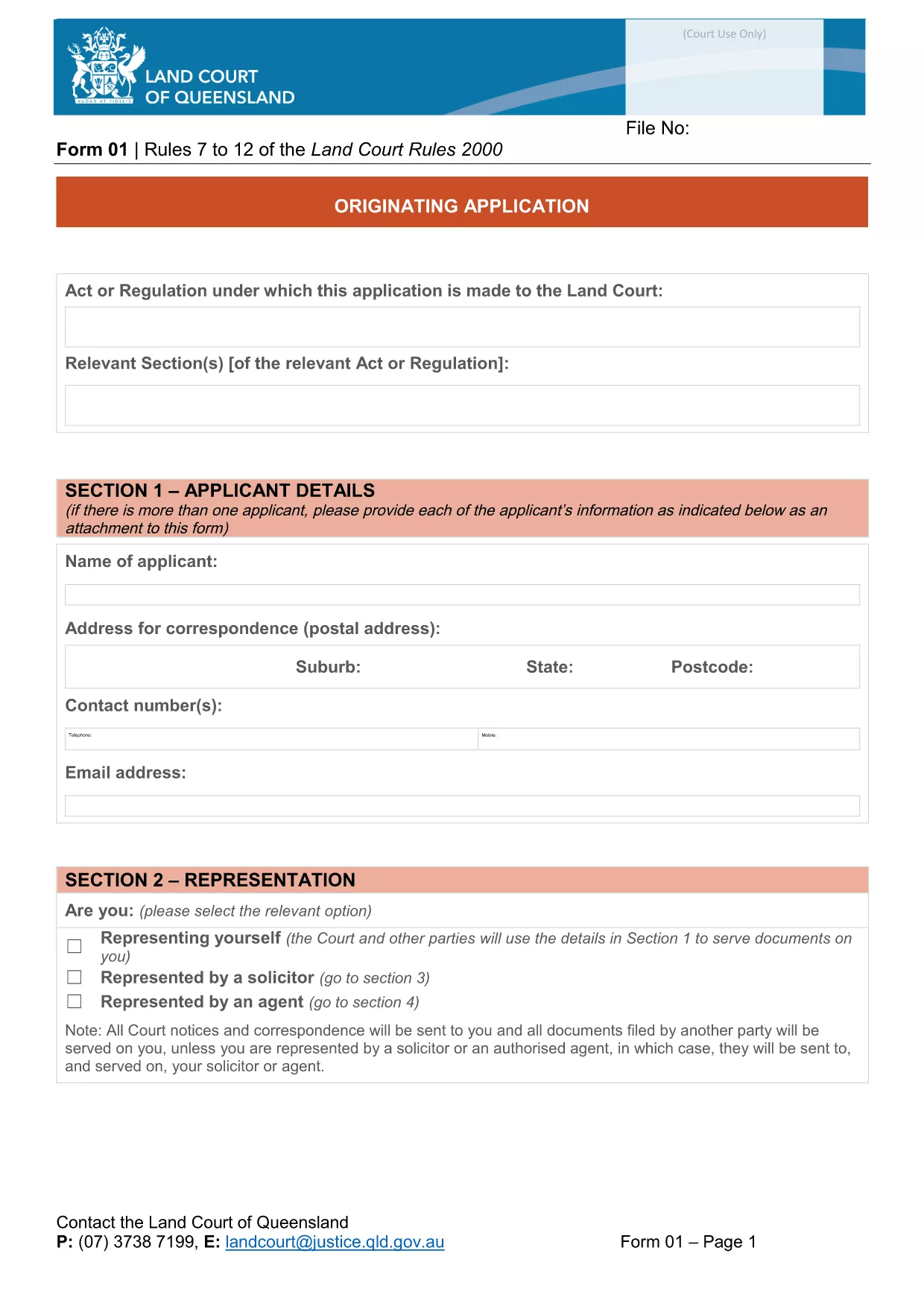
Originating Application Form Part 1 (Fillable PDF)

  1. 言語 英語
  2. オーストラリア
  3. アクティビティ Legal Forms
  4. デパートメント 司法省
Originating Application Form Part 1 (Fillable PDF)

The Originating Application Form Part 1 is the first step in initiating a matter before the Queensland Land Court. Traditionally this PDF had to be printed, filled by hand, and scanned back in – a time‑consuming process that often led to errors.

With Formize’s free Fillable PDF feature, the same form is now completely editable online. The document is not locked, meaning you can type directly into every field, add dates, and even attach supporting files without ever opening a separate PDF editor.

Why Choose a Fillable PDF?

  • Instant validation – required fields are highlighted.
  • Save time – no printing, scanning, or faxing.
  • Reduce mistakes – auto‑formatting for dates, numbers, and checkboxes.
  • Secure storage – your completed form is saved in the cloud until you download it.

How to Complete the Form Online

Simply click the "Fill out this form" button on this page. The Formize PDF Filler app will load in seconds, presenting the exact layout of the official Queensland Courts form.

Enter your details, attach any required documents, and use the navigation tabs to move between sections. When you’re finished, click Save & Download to get a completed PDF ready for submission.

Common Mistakes & Tips

  • Leaving required fields blank: The filler highlights missing information in red.
  • Incorrect date format: Use the calendar picker to avoid format errors.
  • Uploading oversized files: Keep attachments under 5 MB for faster upload.
  • Not saving frequently: The app auto‑saves every 30 seconds, but a manual save gives peace of mind.

Download vs. Online Fill – What’s Best?

If you prefer to keep a local copy, you can still download the original PDF from the link below and fill it with any PDF editor. However, the online filler guarantees that the form stays unlocked and fully editable, which many other PDF viewers lock after the first edit.

Legal Use & Submission Guidelines

Once completed, the form must be signed (electronic signatures are accepted by the Queensland Land Court) and lodged according to the court’s filing instructions. Keep a copy for your records and submit the original as directed.

Ready to start? Click the button below and let Formize handle the rest.

よくある質問
  • Do I need to download the PDF before I can fill it?

    No. Click the "Fill out this form" button and the Formize online filler will let you edit the document directly in your browser.

  • Is the form compatible with Adobe Acrobat?

    Yes. After you finish online, you can download the PDF and open it in Adobe Acrobat or any other PDF viewer.

  • Can I save my progress and return later?

    The Formize filler auto‑saves every 30 seconds. You can also manually click "Save" to download a draft and continue later.

  • Are electronic signatures accepted?

    The Queensland Land Court accepts electronic signatures on this form. Use the built‑in signature field in the filler or attach a scanned signature image.

  • What if I upload the wrong document?

    Simply delete the attachment in the filler and re‑upload the correct file. The app supports most common formats (PDF, JPG, PNG).

  • Is there a size limit for attachments?

    Each attachment must be under 5 MB to ensure quick upload and processing.

  • Do I need an account to use Formize?

    No account is required for this form. The filler works anonymously and does not store any personal data after you download the completed PDF.

  • Can I print the form after filling it online?

    Absolutely. Once you download the completed PDF, you can print it on any standard printer.

方法

オンラインで 4 回の簡単なステップで fillable PDF を無料で入力する方法:

  1. 1
    Open the Fillable Form
    Click the "Fill out this form" button on the page. The Formize PDF Filler loads instantly in your browser.
  2. 2
    Enter Your Information
    Type directly into each field, use the date picker for dates, and attach supporting documents where required.
  3. 3
    Validate & Save
    The filler highlights any missing required fields. Click "Save & Download" when all sections are complete.
  4. 4
    Download the Completed PDF
    A fully completed, unlocked PDF will be saved to your device. You can now print, sign electronically, or lodge it with the court.
Formize PDF Filler アプリ
だいたい

司法省 (DOJ) のフォーム

fillable PDF は、米国司法省とそのさまざまな部門、機関、およびコンポーネントで使用される公式フォームの 1 つです。司法省は、連邦法の施行、法的事項における米国の利益の擁護、および司法の執行を担当する連邦行政府です。

司法省のフォームの例をいくつか示します。

連邦援助申請書 (SF-424): このフォームは、司法省またはその部門が管理する連邦助成金または財政援助を申請する組織によって使用されます。組織、提案されたプロジェクト、予算に関する情報を収集します。

公民権苦情フォーム: このフォームは、人種、性別、障害、国籍に基づく差別など、公民権法違反の疑いに関して司法省の公民権部門に苦情を申し立てるために使用されます。

被害者通知リクエスト フォーム: このフォームは、司法省による犯罪被害者への情報提供と支援の一環として、犯罪被害者が連邦刑事事件の状況と手続きに関する通知をリクエストするために使用されます。

移民フォーム: 司法省の移民審査事務局 (EOIR) が移民裁判所と移民関連の手続きを管理します。入国管理裁判所の手続きでは、退去救済申請用のフォーム EOIR-42B や控訴用のフォーム EOIR-28 など、さまざまなフォームが使用されます。

ATF フォーム: 司法省の一部であるアルコール・タバコ・銃器・爆発物局 (ATF) は、以前の回答で述べたように、さまざまな目的のための独自のフォームを持っています。

麻薬取締局 (DEA) フォーム: DOJ のもう 1 つの構成要素である DEA は、登録、報告、記録保持要件の申請など、規制物質に関連する事項について独自のフォームを使用します。

これらの例では、DOJ フォームのいくつかのカテゴリーを取り上げていますが、司法省が使用する特定のフォームは、関係する部門、機関、コンポーネント、およびサービスや手続きの性質によって異なる場合があります。あなたの状況に関連する特定の司法省フォームに関する正確かつ最新の情報を入手するには、司法省内の特定の部門または機関の公式 Web サイトを参照するか、法的アドバイスを求めることをお勧めします。

特徴

PDFフィラー

オンラインで PDF フォームに記入する最も簡単な方法

  • fillable PDF をすばやく入力してください
    fillable PDF をオンラインですばやく入力する方法をお探しですか?オンラインの無料 PDF フォーム フィラーを使用すると、この PDF ドキュメントを 1 分以内に編集して入力する方法がわかります。
  • 使いやすいオンライン PDF エディター
    再スキャンして返送する前に、編集できるように PDF ファイルを印刷することにうんざりしていませんか? PDFドキュメントをオンラインで無料で編集.当社のオンライン PDF エディターを使用して、時間と紙を節約してください。
  • 優れたツール、すべてのプラットフォーム
    Mac で fillable PDF を入力する方法や、PDF フィラーを無料で使用する方法を知りたいですか?当社のオンライン PDF ツールは、すべてのプラットフォームで動作します。
  • 安全なファイル ストレージ
    完成した「fillable PDF」ファイルは、Amazon クラウド ホスティングが管理する安全なデータベースに保存されます。いつでもシステムからファイルを削除できます。いずれにせよ、これらのファイルは 24 時間後に自動的に削除されます。
  • {キーワード} とチャットする
    無料の PDF リーダー アシスタントである Chatize で「fillable PDF」とチャットします。質問すると、「fillable PDF」から回答が得られます。上の [ドキュメントとチャット] ボタンをクリックするだけです。

フィルセッションを削除

選択したフィルセッションを削除しますか?この場合、フォームへの記入の進捗状況は失われます。

編集セッションを削除する

選択した編集セッションを削除しますか?この場合、フォームの作成および編集の進行状況は失われます。