
言語を選択する

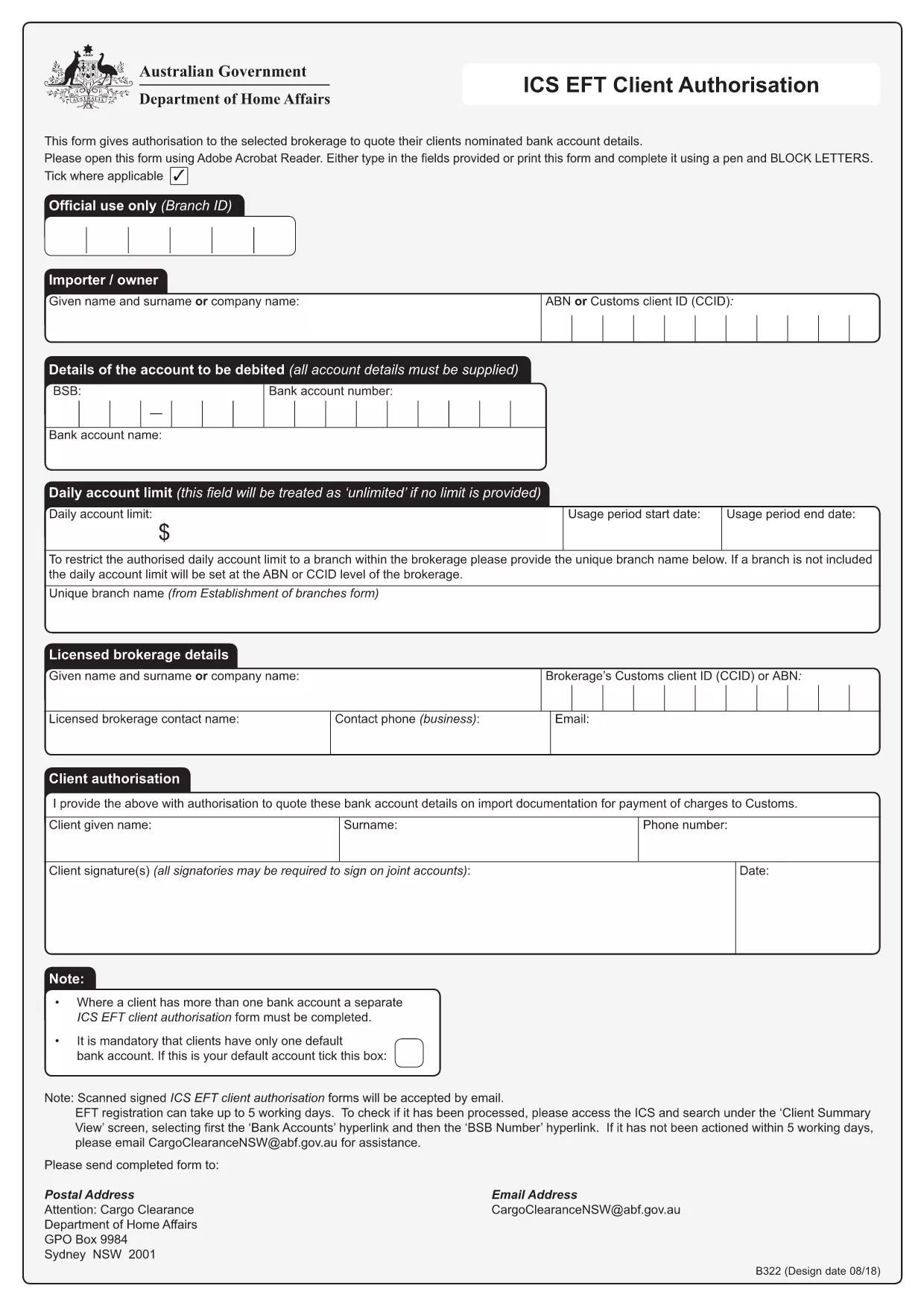
Electronic Funds Transfer (EFT) Sign‑Up Form – Fillable PDF

  1. 言語 英語
  2. オーストラリア
  3. デパートメント Financial Services
  4. アクティビティ Banking
Electronic Funds Transfer (EFT) Sign‑Up Form – Fillable PDF

Need a quick and secure way to set up Electronic Funds Transfer (EFT) for your business or personal banking? Our fillable EFT sign‑up form lets you authorize recurring payments without the hassle of paper copies.

What Is an EFT Sign‑Up Form?

An EFT sign‑up form is a standard document used by banks and financial institutions to collect the necessary banking details and consent from a customer to transfer funds electronically. It captures information such as:

  • Account holder name
  • Bank name and branch
  • BSB and account numbers
  • Signature or electronic consent

How to Complete the EFT Form Online

Instead of printing, signing, and scanning, simply click the "Fill out this form" button on this page. The Formize PDF Filler app will load the PDF directly in your browser, allowing you to type, select, and sign instantly.

Common Mistakes to Avoid

To ensure your EFT registration is processed without delay, avoid these frequent errors:

  • Entering an incorrect BSB or account number.
  • Leaving mandatory fields blank.
  • Using a handwritten signature that isn’t captured by the online filler.
  • Submitting the form before the PDF Filler finishes loading.

Where to Submit Your EFT Authorization

Once you’ve completed the form, download the completed PDF and email it to the designated address provided by your bank or upload it through the bank’s secure portal. Processing typically takes up to five business days.

FAQs About the EFT Sign‑Up Form

Below are quick answers to the most common questions users have about this form.

よくある質問
  • Do I need a PDF editor to fill out the EFT sign‑up form?

    No. The Formize PDF Filler works in your browser, so you can complete the form without any additional software.

  • Is the online filler secure?

    Yes. All data stays in your browser until you download the completed PDF. Formize does not store any personal information.

  • Can I save my progress and finish later?

    The filler allows you to download a partially completed PDF, which you can reopen later in any PDF viewer to finish.

  • What if I enter the wrong BSB or account number?

    The form will not be rejected automatically, but the bank may delay processing. Double‑check the numbers before submitting.

  • How long does it take for the bank to activate my EFT?

    Processing usually takes up to five business days after the bank receives your completed form.

  • Do I need to print the form after filling it online?

    Only if your bank specifically requires a hard copy. Most institutions accept the downloaded PDF via email or secure upload.

  • Is there a fee for using the EFT sign‑up form?

    The form itself is free. Any fees would be charged by your bank for setting up the EFT service.

方法

オンラインで 5 回の簡単なステップで EFT sign up form を無料で入力する方法:

  1. 1
    Click the Fill‑Out Button
    Press the "Fill out this form" button on the page. The Formize PDF Filler will open the EFT sign‑up PDF directly in your browser.
  2. 2
    Wait for the Filler to Load
    Give the app a few seconds to load all fields. You’ll see editable boxes appear where you can type your information.
  3. 3
    Enter Your Banking Details
    Fill in your name, BSB, account number, and any other required fields. Use the drop‑down menus where available.
  4. 4
    Add Your Electronic Signature
    Click the signature field and either type your name or draw a signature with your mouse/touchscreen.
  5. 5
    Review and Submit
    Double‑check every entry for accuracy, then click "Save" to download the completed PDF. Email or upload the file to your bank as instructed.
Formize PDF Filler アプリ
だいたい

EFT sign up form テンプレート

PDF ドキュメントを表示および入力するための従来の一連の機能に、Web アプリケーションおよびレスポンシブ レイアウトの利点を組み合わせることで、数分で EFT sign up form を完成させることができます。
特徴

PDFフィラー

オンラインで PDF フォームに記入する最も簡単な方法

  • EFT sign up form をすばやく入力してください
    EFT sign up form をオンラインですばやく入力する方法をお探しですか?オンラインの無料 PDF フォーム フィラーを使用すると、この PDF ドキュメントを 1 分以内に編集して入力する方法がわかります。
  • 使いやすいオンライン PDF エディター
    再スキャンして返送する前に、編集できるように PDF ファイルを印刷することにうんざりしていませんか? PDFドキュメントをオンラインで無料で編集.当社のオンライン PDF エディターを使用して、時間と紙を節約してください。
  • 優れたツール、すべてのプラットフォーム
    Mac で EFT sign up form を入力する方法や、PDF フィラーを無料で使用する方法を知りたいですか?当社のオンライン PDF ツールは、すべてのプラットフォームで動作します。
  • 安全なファイル ストレージ
    完成した「EFT sign up form」ファイルは、Amazon クラウド ホスティングが管理する安全なデータベースに保存されます。いつでもシステムからファイルを削除できます。いずれにせよ、これらのファイルは 24 時間後に自動的に削除されます。
  • {キーワード} とチャットする
    無料の PDF リーダー アシスタントである Chatize で「EFT sign up form」とチャットします。質問すると、「EFT sign up form」から回答が得られます。上の [ドキュメントとチャット] ボタンをクリックするだけです。

フィルセッションを削除

選択したフィルセッションを削除しますか?この場合、フォームへの記入の進捗状況は失われます。

編集セッションを削除する

選択した編集セッションを削除しますか?この場合、フォームの作成および編集の進行状況は失われます。