
言語を選択する

Application Form Part 1 – Free Fillable PDF (Not Locked)

  1. 言語 英語
  2. オーストラリア
  3. アクティビティ ビザ
  4. デパートメント Home Affairs
Application Form Part 1 – Free Fillable PDF (Not Locked)

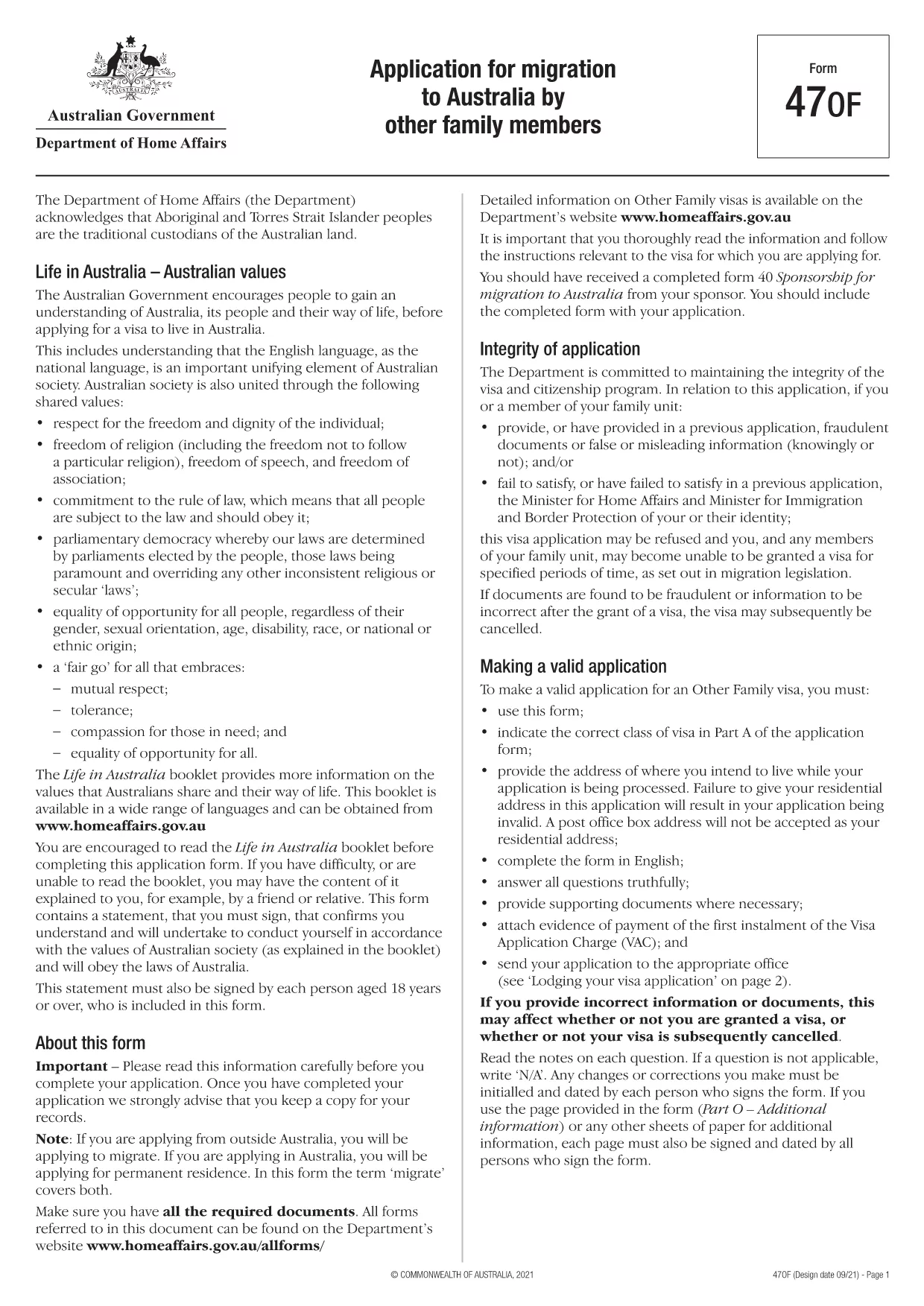
The Application Form Part 1 is the first section of the Australian migration application (Form 47OF). It collects personal details, passport information, and the intended address while your visa is processed. This version is not locked, meaning you can edit every field directly in the browser.

What Is Application Form Part 1?

Part 1 of the form asks for basic applicant information such as name, date of birth, contact details, and the visa subclass you are applying for. Because the PDF is unlocked, you can type, check boxes, and add signatures without needing a separate PDF editor.

How to Fill the Form Online with Formize

Instead of downloading the file and opening a PDF editor, simply click the "Fill out this form" button on this page. The Formize PDF Filler app will load automatically, presenting you with a clean, responsive interface.

  • Enter your information in each field.
  • Use the built‑in validation to avoid common errors.
  • Save your progress and download the completed PDF when you’re finished.

Common Mistakes to Avoid When Completing Part 1

Even though the PDF is unlocked, a few pitfalls can cause delays:

  • Using a PO Box address. The Department of Home Affairs requires a residential address.
  • Leaving mandatory fields blank. The form will not submit if required fields are empty.
  • Mismatching passport numbers. Double‑check the spelling and number sequence.

Download the PDF or Use the Online Filler

If you prefer to work offline, you can download the fillable PDF directly. For the fastest experience, use the Formize online filler described above.

Frequently Asked Questions

Below are answers to the most common queries about this form.

よくある質問
  • Is the PDF truly unlocked for editing?

    Yes. All fields are editable directly in the browser via the Formize PDF Filler.

  • Can I submit the form electronically?

    After filling it out, you must print and sign the document, then submit it according to Home Affairs instructions.

  • Do I need Adobe Acrobat to use this form?

    No. The Formize online filler works in any modern web browser without additional software.

  • What if I make a mistake?

    You can clear any field and re‑enter the information before saving the final PDF.

  • Is there a size limit for the uploaded PDF?

    Formize supports PDFs up to 10 MB, which is well above the size of this application form.

方法

オンラインで 4 回の簡単なステップで application form part 1 を無料で入力する方法:

  1. 1
    Click the Fill Button
    Press the "Fill out this form" button on this page to launch the Formize PDF Filler.
  2. 2
    Wait for the App to Load
    The Formize app loads in a few seconds. No download or installation is required.
  3. 3
    Enter Your Details
    Complete each field, using the built‑in validation to ensure accuracy.
  4. 4
    Save and Download
    When you finish, click "Save" to download the completed PDF or keep it saved in your Formize account.
Formize PDF Filler アプリ
だいたい

ビザフォーム

application form part 1 は、外国に入国するためのビザを申請するために使用される書類であるビザフォームの 1 つです。ビザとは、外国人が外国に一定期間入国し、滞在し、場合によっては就労することを許可する書類です。ビザを取得するための正確なフォームと要件は、国とビザの種類によって異なります。

ビザフォームには、通常、名前、生年月日、パスポート情報などの個人情報に加えて、旅行の目的と期間、目的地、申請者が以前にビザを拒否されたか国から強制送還されたかどうかに関する情報が必要です。フォームには、パスポート、写真、財政支援の証明などの補足書類も必要になる場合があります。

米国では、最も一般的なビザ フォームは DS-160 および DS-260 フォームです。 DS-160 フォームは非移民ビザの申請に使用され、DS-260 フォームは移民ビザの申請に使用されます。これらのフォームには、申請者の個人および旅行履歴に関する詳細な情報と、パスポート、旅行日程表、財務記録などの補足書類が必要です。

他の国ではビザのフォームと要件が異なる場合がありますが、基本的なプロセスには通常、ビザ申請の完了、補足書類の提供、米国大使館または領事館での領事官との面接が含まれます。ビザ申請プロセスは複雑で時間がかかる場合があることに注意することが重要です。ビザを求める個人は、移民弁護士またはその他の有資格の専門家に相談して、必要なすべてのフォームと要件が満たされていることを確認することをお勧めします。

特徴

PDFフィラー

オンラインで PDF フォームに記入する最も簡単な方法

  • application form part 1 をすばやく入力してください
    application form part 1 をオンラインですばやく入力する方法をお探しですか?オンラインの無料 PDF フォーム フィラーを使用すると、この PDF ドキュメントを 1 分以内に編集して入力する方法がわかります。
  • 使いやすいオンライン PDF エディター
    再スキャンして返送する前に、編集できるように PDF ファイルを印刷することにうんざりしていませんか? PDFドキュメントをオンラインで無料で編集.当社のオンライン PDF エディターを使用して、時間と紙を節約してください。
  • 優れたツール、すべてのプラットフォーム
    Mac で application form part 1 を入力する方法や、PDF フィラーを無料で使用する方法を知りたいですか?当社のオンライン PDF ツールは、すべてのプラットフォームで動作します。
  • 安全なファイル ストレージ
    完成した「application form part 1」ファイルは、Amazon クラウド ホスティングが管理する安全なデータベースに保存されます。いつでもシステムからファイルを削除できます。いずれにせよ、これらのファイルは 24 時間後に自動的に削除されます。
  • {キーワード} とチャットする
    無料の PDF リーダー アシスタントである Chatize で「application form part 1」とチャットします。質問すると、「application form part 1」から回答が得られます。上の [ドキュメントとチャット] ボタンをクリックするだけです。

フィルセッションを削除

選択したフィルセッションを削除しますか?この場合、フォームへの記入の進捗状況は失われます。

編集セッションを削除する

選択した編集セッションを削除しますか?この場合、フォームの作成および編集の進行状況は失われます。