
言語を選択する

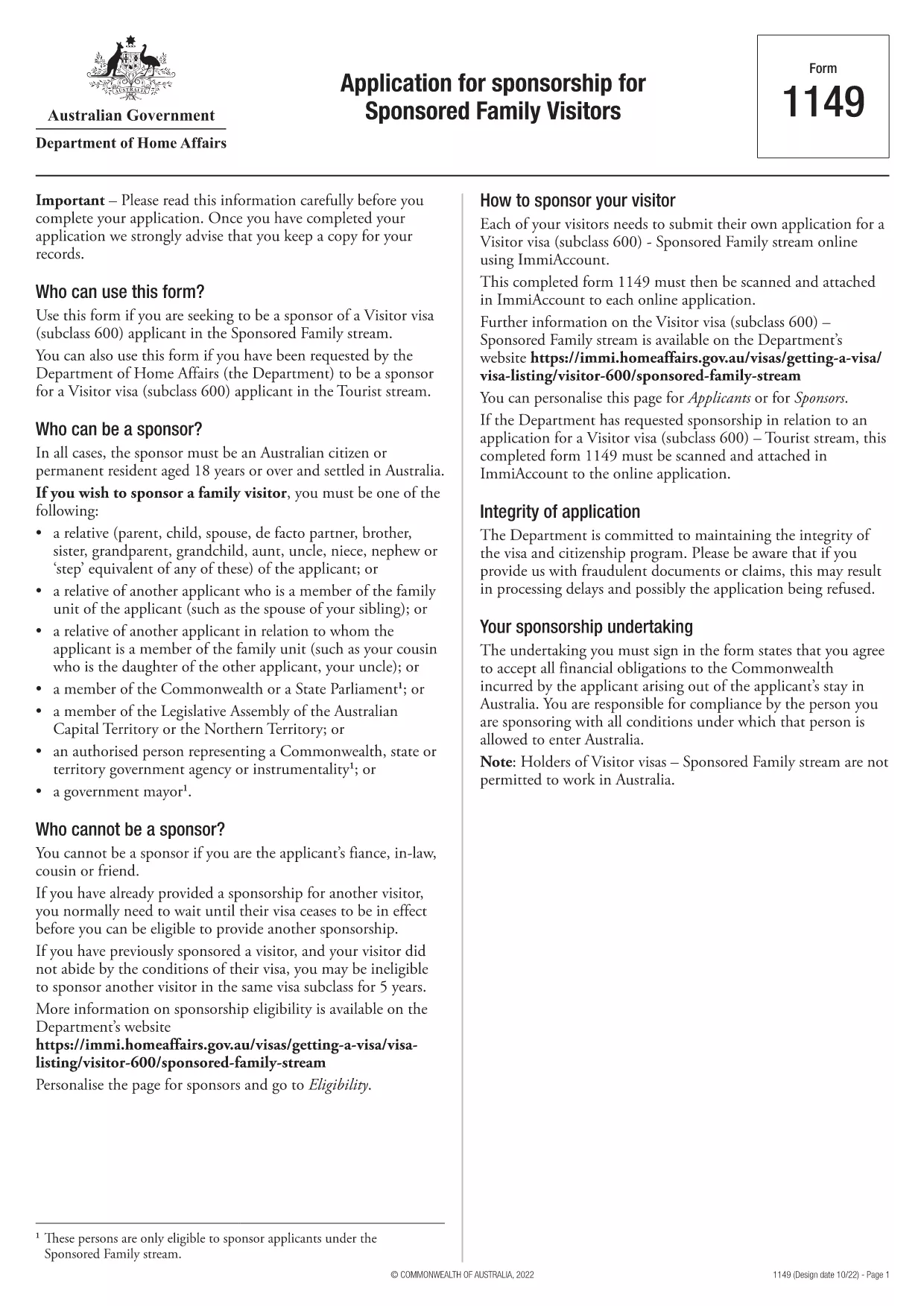
Form 1149 – Application for Sponsorship of a Family Visitor (Visitor Visa 600)

  1. オーストラリア
  2. 言語 英語
  3. アクティビティ 家族に参加または連れてくる
Form 1149 – Application for Sponsorship of a Family Visitor (Visitor Visa 600)

Form 1149 is the official Application for Sponsorship for Sponsored Family Visitors used by Australian citizens or permanent residents who wish to sponsor a relative, a member of the Commonwealth, or a state parliamentarian for a Visitor visa (subclass 600). The form outlines the sponsor’s obligations, eligibility criteria, and any security bond requirements.

Traditionally the form is a static PDF that must be printed, handwritten, and mailed. With Formize you can complete the same form entirely online – just click Fill out this form and let our secure PDF filler do the work.

What Is Form 1149?

Form 1149 collects detailed information about the sponsor (name, address, citizenship status), the invited visitor (relationship, passport details, travel dates), and the financial support the sponsor will provide. It also asks about any previous sponsorships and the sponsor’s ability to meet the visa conditions.

Who Needs to Complete This Form?

  • Australian citizens or permanent residents sponsoring a family member for a Visitor visa (subclass 600).
  • Members of the Commonwealth or state parliament who are inviting a guest for official duties.
  • Anyone required to provide a security bond for the visitor’s stay.

How to Fill Form 1149 Online with Formize

Follow these simple steps to complete the form without printing:

  1. Click the Fill out this form button on this page.
  2. Wait a few seconds while the Formize PDF Filler loads the fillable version of Form 1149.
  3. Enter all required details in the highlighted fields. The filler validates dates, passport numbers, and numeric entries in real‑time.
  4. Review the summary page, correct any highlighted errors, and click Submit to download the completed PDF.
  5. Print the signed PDF (if a physical signature is required) and attach it to your visa application package.

Common Mistakes to Avoid

  • Incorrect passport numbers: Double‑check each digit; a single typo can delay processing.
  • Missing sponsor’s financial details: Provide clear evidence of income or savings to satisfy the bond requirement.
  • Leaving optional fields blank: If a field asks for “previous sponsorships”, answer “None” rather than leaving it empty.
  • Using an outdated version: Always use the latest PDF – the link on this page points to the current 2024 version.

Where to Submit the Completed Form

After filling and printing the form, include it with the Visitor visa (subclass 600) application packet and submit to the Department of Home Affairs either online via ImmiAccount or by post to the address indicated in the visa instructions.

Using Formize’s online filler saves time, reduces errors, and ensures you are working with the most up‑to‑date version of Form 1149.

よくある質問
  • Who can act as a sponsor on Form 1149?

    Only Australian citizens or permanent residents may sponsor a family visitor for a subclass 600 visa. Commonwealth or state parliament members may also sponsor for official visits.

  • Do I need to provide a security bond?

    A bond is required if the sponsor cannot demonstrate sufficient financial capacity. The amount is determined by the Department of Home Affairs based on the visitor’s length of stay and circumstances.

  • Can I submit the form electronically?

    Yes. Fill the form online with Formize, download the completed PDF, and attach it to your ImmiAccount submission. Some cases may still require a printed, signed copy.

  • How long is Form 1149 valid?

    The form does not have an expiry date, but you should use the latest version available on the Department of Home Affairs website.

  • What common errors cause delays?

    Incorrect passport numbers, missing financial information, and leaving optional fields blank are the most frequent reasons for processing delays.

  • Is there a fee to use Formize’s PDF filler?

    Formize offers a free basic filler for most government forms, including Form 1149. Premium features are optional and not required for this form.

  • Do I need to sign the PDF digitally?

    A digital signature is accepted for most online submissions. If you submit a paper application, print the PDF and sign it with a pen.

方法

オンラインで 5 回の簡単なステップで Form 1149 を無料で入力する方法:

  1. 1
    Open the Fillable Form
    Click the "Fill out this form" button on this page. The Formize PDF Filler will open in a new tab.
  2. 2
    Enter Your Details
    Fill each highlighted field with accurate information. The tool validates entries in real time.
  3. 3
    Review and Correct Errors
    Check the summary page for any highlighted errors, correct them, and confirm the data.
  4. 4
    Download the Completed PDF
    Click "Submit" to download the fully completed PDF. Print and sign if a physical signature is required.
  5. 5
    Attach to Your Visa Application
    Include the signed PDF with your Visitor visa (subclass 600) application and submit to the Department of Home Affairs.
Formize PDF Filler アプリ
だいたい

家族のフォームに参加または持参する

Form 1149 は、個人が外国への移住や家族の再会を後援し促進するために使用する申請フォームの 1 つです。これらのフォームは、特定の国にすでに居住している個人が近親者を連れて参加できるようにする家族ベースの移民プログラムまたは政策に関連付けられていることがよくあります。具体的な形式は国や入国管理システムによって異なりますが、一般的な例をいくつか示します。

家族スポンサー申請フォーム: これは、家族の移民スポンサーを希望する個人が使用する主なフォームです。スポンサー (すでに国内に居住している人) とスポンサーの家族に関する情報 (関係、個人情報、裏付け書類など) が収集されます。

家族滞在ビザ申請フォーム: 一部の入国管理システムでは、すでにその国に居住している個人が、配偶者、子供、両親などの近親者を連れてくるために家族滞在ビザを申請できます。扶養ビザ申請フォームには、スポンサー、扶養家族、彼らの関係、および添付書類に関する情報が収集されます。

扶養宣誓供述書: 特定の国では、スポンサーは扶養宣誓供述書を提出する必要がある場合があります。これは、スポンサーとなる家族に対する経済的責任を確認する法的文書です。この文書には、スポンサーの収入、資産、家族を経済的にサポートする能力に関する詳細が含まれることがよくあります。

健康診断フォーム: 移民のスポンサーとなる家族は、目的国の健康要件を満たしていることを確認するために健康診断を受けることが求められる場合があります。健康診断書には、必要な健康情報や検査結果が収集されます。

関係書類フォーム: スポンサーとスポンサーとなる家族との家族関係を証明するために、さまざまな書類が必要になる場合があります。これらには、出生証明書、結婚証明書、養子縁組書類、または家族関係を裏付けるその他の証拠が含まれる場合があります。

特定の形式と要件は、国とその移民法と政策によって大きく異なる場合があることに注意することが重要です。特定の国への身元引受人や家族の帯同に必要な書類や手続きに関する正確かつ最新の情報を得るには、入国管理局の公式ウェブサイトを参照するか、法的アドバイスを求めることをお勧めします。

特徴

PDFフィラー

オンラインで PDF フォームに記入する最も簡単な方法

  • Form 1149 をすばやく入力してください
    Form 1149 をオンラインですばやく入力する方法をお探しですか?オンラインの無料 PDF フォーム フィラーを使用すると、この PDF ドキュメントを 1 分以内に編集して入力する方法がわかります。
  • 使いやすいオンライン PDF エディター
    再スキャンして返送する前に、編集できるように PDF ファイルを印刷することにうんざりしていませんか? PDFドキュメントをオンラインで無料で編集.当社のオンライン PDF エディターを使用して、時間と紙を節約してください。
  • 優れたツール、すべてのプラットフォーム
    Mac で Form 1149 を入力する方法や、PDF フィラーを無料で使用する方法を知りたいですか?当社のオンライン PDF ツールは、すべてのプラットフォームで動作します。
  • 安全なファイル ストレージ
    完成した「Form 1149」ファイルは、Amazon クラウド ホスティングが管理する安全なデータベースに保存されます。いつでもシステムからファイルを削除できます。いずれにせよ、これらのファイルは 24 時間後に自動的に削除されます。
  • {キーワード} とチャットする
    無料の PDF リーダー アシスタントである Chatize で「Form 1149」とチャットします。質問すると、「Form 1149」から回答が得られます。上の [ドキュメントとチャット] ボタンをクリックするだけです。

フィルセッションを削除

選択したフィルセッションを削除しますか?この場合、フォームへの記入の進捗状況は失われます。

編集セッションを削除する

選択した編集セッションを削除しますか?この場合、フォームの作成および編集の進行状況は失われます。