
言語を選択する

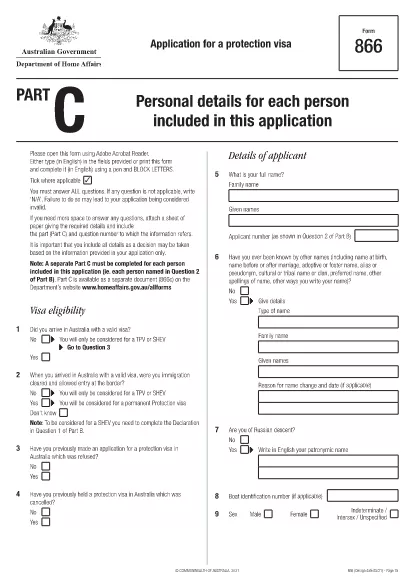
Form 866C – Application for a Protection Visa (Fillable PDF)

  1. 言語 英語
  2. オーストラリア
  3. アクティビティ 難民と人道支援
Form 866C – Application for a Protection Visa (Fillable PDF)

Form 866C is the Australian Application for a Protection Visa. It is required when you are seeking protection under the Australian Migration Act. The form must be completed in English, using block letters, and signed where indicated.

At Formize.com you can open the official Form 866C PDF directly in our secure PDF Filler – no extra software needed. The fillable version lets you type, upload a passport‑size photograph, and sign digitally.

What is Form 866C?

Form 866C gathers personal details, travel history, family connections, education, employment, and any criminal matters relevant to your protection claim. It is part of the broader protection visa (subclass 866) application package.

How to Complete Form 866C Online

Simply click the “Fill out this form” button on this page. The Formize PDF Filler app loads, presenting each field in a clear, editable format. Follow the on‑screen prompts, upload your photograph, and sign with your mouse or finger.

Common Mistakes to Avoid

  • Leaving any mandatory field blank.
  • Using cursive or non‑block letters.
  • Submitting an outdated or blurred photograph.
  • Providing inconsistent dates or travel details.
  • Forgetting to sign the declaration at the end.

Where to Submit Your Completed Form

After saving the filled PDF, print a hard copy and attach it to your complete protection‑visa application package. Submit the package to the Department of Home Affairs – either by post to the address on the Department’s website or via an authorised migration agent.

Download the Official PDF

The official, up‑to‑date Form 866C can be downloaded directly from the Australian Department of Home Affairs:

https://immi.homeaffairs.gov.au/form-listing/forms/866c.pdf

Use Formize’s online filler to avoid the hassle of printing, scanning, or re‑typing. Your completed form is ready for submission in minutes.

よくある質問
  • Is Form 866C available as a fillable PDF?

    Yes. The official form is a PDF that can be opened in Formize’s online filler, allowing you to type, upload a photo, and sign digitally.

  • Can I submit the PDF electronically?

    The Department of Home Affairs requires a printed, signed copy as part of the protection visa package. Use the online filler to create a clean, printable version.

  • What language must I use on Form 866C?

    All entries must be in English, written in block (capital) letters.

  • Do I need a passport‑size photograph?

    Yes. Attach a recent passport‑size photo in the designated area and certify it according to the form’s instructions.

  • How long does it take to fill out Form 866C?

    Using the fillable PDF typically takes 20‑30 minutes, depending on how much information you have prepared.

  • Where should I send the completed form?

    Include the printed Form 866C with the rest of your protection visa application and send it to the Department of Home Affairs address listed on their website.

  • Can I correct mistakes after saving?

    Yes. Open the saved PDF again in Formize, edit the necessary fields, and re‑save before printing.

  • Is there a fee to download Form 866C?

    No. The form is provided free of charge by the Australian Department of Home Affairs.

方法

オンラインで 5 回の簡単なステップで Form 866C を無料で入力する方法:

  1. 1
    Click the Fill button
    Press the “Fill out this form” button on the page. The Formize PDF Filler loads the official Form 866C.
  2. 2
    Enter your information
    Type your personal details, travel history, and other required data directly into the fillable fields. Use block letters.
  3. 3
    Upload your photograph
    Click the photo placeholder and upload a recent passport‑size image that meets the Department’s specifications.
  4. 4
    Sign digitally
    Use your mouse, trackpad, or finger to add a digital signature in the designated area.
  5. 5
    Save and download
    When all fields are completed, click “Save”. Download the filled PDF, print a hard copy, and include it with your visa application.
Formize PDF Filler アプリ
だいたい

難民および人道支援フォーム

Form 866C は、難民認定や人道的保護を求める手続きで使用される申請書の 1 つです。これらのフォームは、迫害、紛争、またはその他の生命を脅かす状況から逃れ、国際的な保護と援助を求めている個人によって利用されます。具体的な形式とプロセスは、国とその移民政策、難民と人道保護を管理する国際条約や協定によって異なります。 「難民および人道支援」フォームの例をいくつか示します。

難民申請フォーム: これは、難民の地位を求める個人が使用する主なフォームです。個人情報、個人の状況や保護を求める理由の詳細、裏付けとなる文書や証拠を収集します。

亡命申請書: 迫害から逃れてきた個人に提供される法的保護を指すために「亡命」という用語が使用されている国では、亡命申請書に記入します。これには、申請者の身元、背景、亡命を求める理由に関する情報、および関連する裏付け文書が含まれます。

第三国定住申請書: 一部の個人、特に難民キャンプや不安定な状況に住んでいる人は、第三国への第三国定住を申請することがあります。再定住申請書には、申請者の個人および家族の詳細、背景、再定住を求める理由に関する情報が収集されます。

家族再会フォーム: 特定の国で難民または人道的立場を認められた個人の場合、家族の合流を申請するためのフォームとプロセスが存在する場合があります。これらのフォームには通常、スポンサー(すでに保護が認められている人)とスポンサーとなる家族に関する情報、さらに家族関係を確立するための裏付け文書が必要です。

渡航書類申請フォーム: 海外旅行する必要がある難民または人道的保護を受けている個人は、渡航書類の申請を求められる場合があります。申し込みフォームでは個人情報と旅行計画に関する詳細を収集します。

一時保護申請書: 場合によっては、難民認定の基準を満たしていないものの、紛争やその他の例外的な状況により母国に帰国できない個人に対して、各国が一時保護を提供する場合があります。一時保護申請書には、申請者の状況や一時保護を求める理由に関する情報が収集されます。

難民および人道保護の具体的な形式やプロセスは、国やその移民政策、国際協定や条約によって大きく異なる可能性があることに注意することが重要です。特定の国で難民または人道的保護を求めるために必要なフォームやプロセスに関する正確かつ最新の情報については、関連する政府機関、難民支援機関、または法律専門家に相談することをお勧めします。

特徴

PDFフィラー

オンラインで PDF フォームに記入する最も簡単な方法

  • Form 866C をすばやく入力してください
    Form 866C をオンラインですばやく入力する方法をお探しですか?オンラインの無料 PDF フォーム フィラーを使用すると、この PDF ドキュメントを 1 分以内に編集して入力する方法がわかります。
  • 使いやすいオンライン PDF エディター
    再スキャンして返送する前に、編集できるように PDF ファイルを印刷することにうんざりしていませんか? PDFドキュメントをオンラインで無料で編集.当社のオンライン PDF エディターを使用して、時間と紙を節約してください。
  • 優れたツール、すべてのプラットフォーム
    Mac で Form 866C を入力する方法や、PDF フィラーを無料で使用する方法を知りたいですか?当社のオンライン PDF ツールは、すべてのプラットフォームで動作します。
  • 安全なファイル ストレージ
    完成した「Form 866C」ファイルは、Amazon クラウド ホスティングが管理する安全なデータベースに保存されます。いつでもシステムからファイルを削除できます。いずれにせよ、これらのファイルは 24 時間後に自動的に削除されます。
  • {キーワード} とチャットする
    無料の PDF リーダー アシスタントである Chatize で「Form 866C」とチャットします。質問すると、「Form 866C」から回答が得られます。上の [ドキュメントとチャット] ボタンをクリックするだけです。

フィルセッションを削除

選択したフィルセッションを削除しますか?この場合、フォームへの記入の進捗状況は失われます。

編集セッションを削除する

選択した編集セッションを削除しますか?この場合、フォームの作成および編集の進行状況は失われます。