言語を選択する

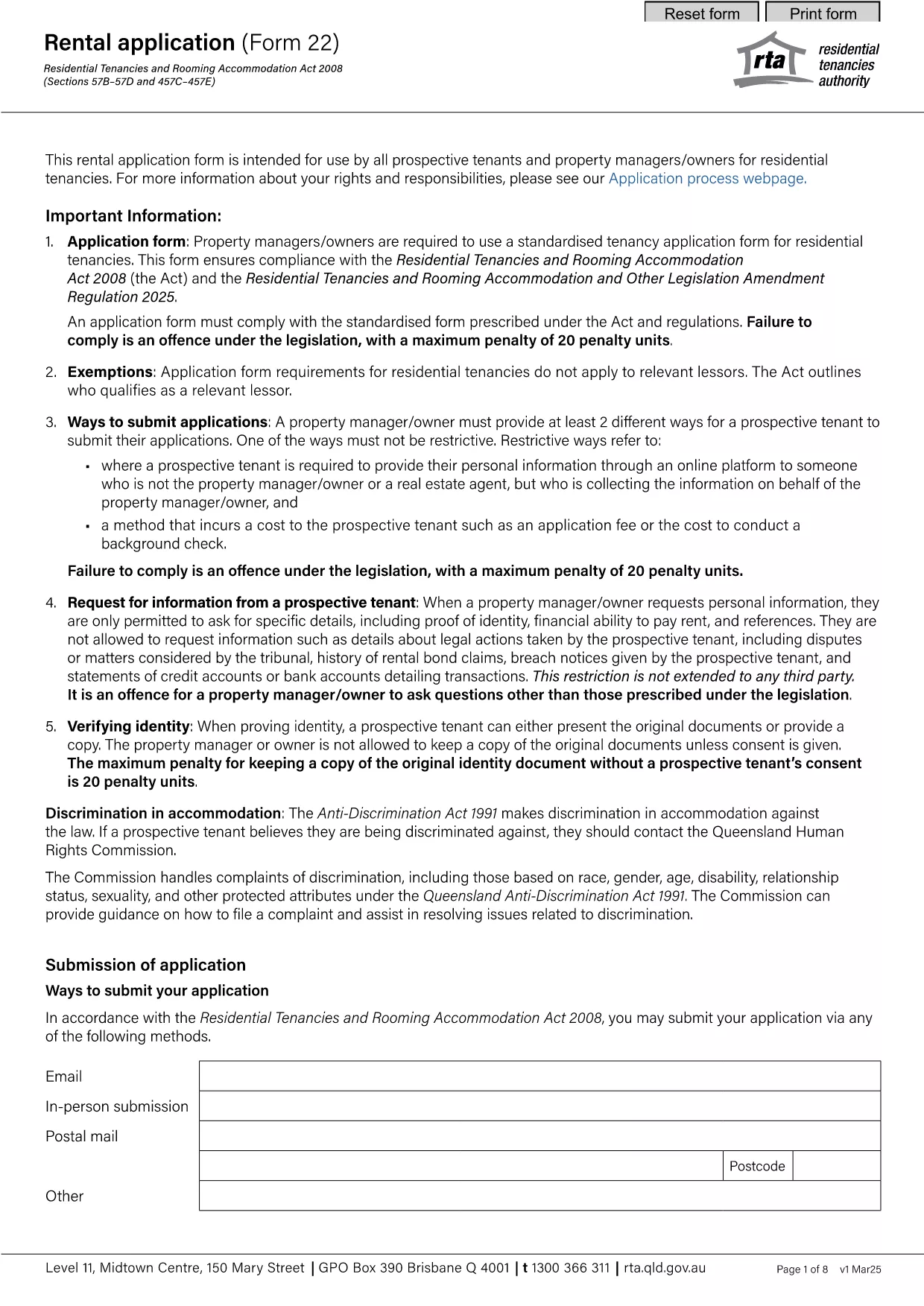
Queensland RTA Form 22 Rental Application (Fillable PDF)

  1. 言語 英語
  2. オーストラリア
  3. デパートメント Residential Tenancies Authority
  4. アクティビティ テナント
Queensland RTA Form 22 Rental Application (Fillable PDF)

The Queensland Residential Tenancies Authority (RTA) Form 22 is the standard rental application used by prospective tenants and property managers across Queensland. This fillable PDF lets you complete the form quickly, save your data, and submit it directly to landlords or agents.

What is Form 22 and Who Needs It?

Form 22 collects essential information about the applicant, including personal details, rental history, employment, and references. It is required for:

  • New tenancy agreements
  • Renewals where a new application is requested
  • Any situation where a landlord or manager needs a verified tenant profile

How to Fill Out the RTA Form 22 Online

Instead of downloading the PDF and opening it in a separate editor, simply click the "Fill out this form" button on this page. The Formize PDF Filler app will load directly in your browser, allowing you to:

  1. Enter information into each field using your keyboard or mobile device.
  2. Save progress at any time and return later.
  3. Validate entries with built‑in checks (e.g., date format, required fields).
  4. Download a completed, signed PDF or email it straight to your landlord.

Common Mistakes to Avoid

  • Leaving required fields blank: The form will not submit until all mandatory sections are completed.
  • Incorrect date format: Use DD/MM/YYYY as shown in the example fields.
  • Mismatched contact details: Double‑check phone numbers and email addresses for accuracy.
  • Skipping reference checks: Provide full contact information for previous landlords; incomplete references can delay approval.

Download the Official PDF

If you prefer the traditional method, you can download the official RTA Form 22 PDF below. The file is the same version used by the Queensland Residential Tenancies Authority.

Download Form 22 – Rental Application (PDF)

Frequently Asked Questions

For quick answers to common queries, scroll down to the FAQ section or use the search box on the page.

よくある質問
  • Is Form 22 mandatory for all rental applications in Queensland?

    Yes, the Residential Tenancies Authority requires Form 22 for most new tenancy agreements and for many renewals where a fresh application is requested.

  • Can I submit the form electronically?

    Absolutely. After completing the fillable PDF with Formize, you can download the signed version and email it directly to the landlord or agent.

  • What if I make a mistake after submitting?

    You can edit the saved PDF before sending it. If you’ve already sent it, ask the landlord to return the document for correction or submit a new completed form.

  • Do I need to provide references from previous landlords?

    Providing at least two recent rental references is standard practice and helps speed up the approval process.

  • Is there a fee to download or use Form 22?

    No, the PDF is provided free of charge by the Queensland Residential Tenancies Authority.

  • Can I fill out Form 22 on a mobile device?

    Yes, the Formize PDF Filler works on smartphones and tablets, allowing you to complete the form on the go.

  • What format should I use for dates?

    Enter dates in the DD/MM/YYYY format, as shown in the example fields on the form.

  • How long is the rental application valid?

    Typically, a completed Form 22 is valid for 30 days, after which a new application may be required.

方法

オンラインで 5 回の簡単なステップで RTA Form 22 を無料で入力する方法:

  1. 1
    Click the Fill‑out Button
    Press the "Fill out this form" button on the page to launch the Formize PDF Filler in your browser.
  2. 2
    Wait for the Filler to Load
    The app loads within a few seconds. You’ll see a familiar PDF layout with editable fields.
  3. 3
    Enter Your Information
    Complete each section—personal details, rental history, employment, and references—using the on‑screen fields.
  4. 4
    Save or Download
    When finished, click "Save" to store a copy in your browser or "Download" to get a completed PDF file.
  5. 5
    Submit to Your Landlord
    Email the saved PDF, attach it to an online portal, or hand‑deliver the printed copy to the property manager.
Formize PDF Filler アプリ
だいたい

家主および/またはテナントがテナント契約に関連するアクションを提案するためのフォーム。

RTA Form 22 は、ほとんどの民間の家主および住宅協会が使用する住宅賃貸契約のタイプです。

家主またはテナントが規則で定められた特定の規則に従わなければならない事項がいくつかあります。場合によっては、賃貸契約の相手方に影響を与える可能性のある行動を提案する「所定のフォーム」と呼ばれるフォームに記入する必要がある場合があります。

フォームは、フォームに記入する人およびフォームが提供される人が、提案されていることとそれに応じて何をすることができるかを理解できるように、その文言が慎重に起草されているため、所定のフォームと呼ばれます。正しいフォームを提供しないと、提案されているアクションが無効になる場合があります。

フォームに変更してもよいと記載されていない限り、これらのフォームの文言を変更することはできません。文言を変更すると、フォームが無効になる場合があります。また、フォームに記載されている通知期間にも従わなければなりません。

特徴

PDFフィラー

オンラインで PDF フォームに記入する最も簡単な方法

  • RTA Form 22 をすばやく入力してください
    RTA Form 22 をオンラインですばやく入力する方法をお探しですか?オンラインの無料 PDF フォーム フィラーを使用すると、この PDF ドキュメントを 1 分以内に編集して入力する方法がわかります。
  • 使いやすいオンライン PDF エディター
    再スキャンして返送する前に、編集できるように PDF ファイルを印刷することにうんざりしていませんか? PDFドキュメントをオンラインで無料で編集.当社のオンライン PDF エディターを使用して、時間と紙を節約してください。
  • 優れたツール、すべてのプラットフォーム
    Mac で RTA Form 22 を入力する方法や、PDF フィラーを無料で使用する方法を知りたいですか?当社のオンライン PDF ツールは、すべてのプラットフォームで動作します。
  • 安全なファイル ストレージ
    完成した「RTA Form 22」ファイルは、Amazon クラウド ホスティングが管理する安全なデータベースに保存されます。いつでもシステムからファイルを削除できます。いずれにせよ、これらのファイルは 24 時間後に自動的に削除されます。
  • {キーワード} とチャットする
    無料の PDF リーダー アシスタントである Chatize で「RTA Form 22」とチャットします。質問すると、「RTA Form 22」から回答が得られます。上の [ドキュメントとチャット] ボタンをクリックするだけです。

フィルセッションを削除

選択したフィルセッションを削除しますか?この場合、フォームへの記入の進捗状況は失われます。

編集セッションを削除する

選択した編集セッションを削除しますか?この場合、フォームの作成および編集の進行状況は失われます。