
言語を選択する

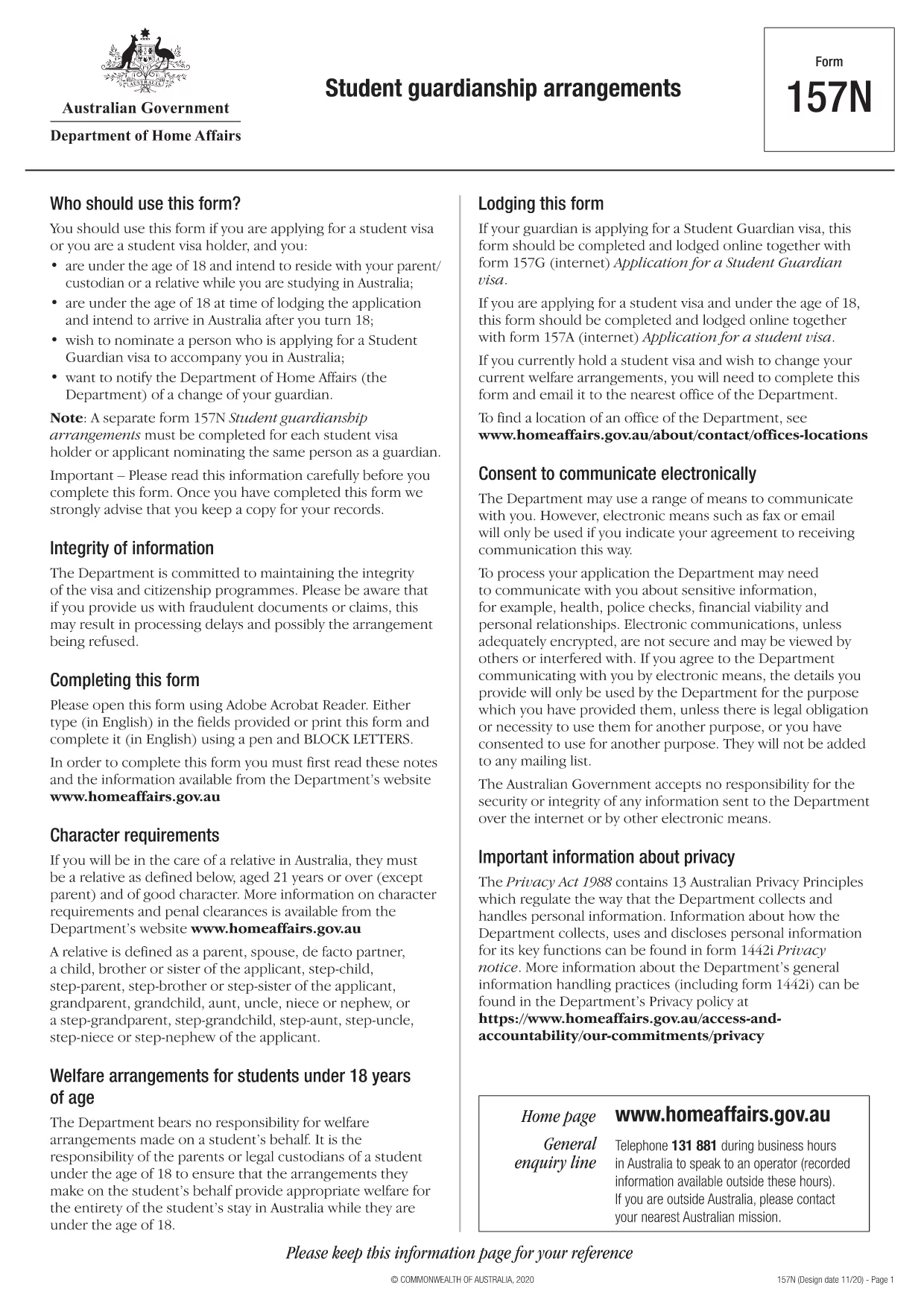
Form 157N – Student Guardian Arrangement (Fillable PDF)

  1. 言語 英語
  2. オーストラリア
  3. アクティビティ 勉強
Form 157N – Student Guardian Arrangement (Fillable PDF)

Form 157N is the official Australian document used to nominate a guardian for a student visa holder. Whether you are a parent, legal guardian, or an approved welfare provider, this form must be completed for every student who requires a guardian while studying in Australia.

What is Form 157N?

The Student Guardianship Arrangements – Form 157N captures details about the student, the proposed guardian, and the nature of the guardianship agreement. It is required by the Department of Home Affairs for visa subclasses 500, 590, and related student visas.

When and Who Must Complete Form 157N

  • Any new student visa applicant who needs a guardian in Australia.
  • Current visa holders who change their guardian or wish to add a second guardian.
  • Educational institutions acting on behalf of a student to nominate a welfare provider.

How to Fill Out Form 157N with Formize

Instead of downloading the PDF and editing it manually, use our Formize PDF Filler – a fast, secure, and fully fillable online solution.

Common Mistakes to Avoid

  • Leaving any mandatory field blank (marked with an asterisk *).
  • Submitting an outdated passport number for the guardian.
  • Providing an Australian address that does not belong to the guardian.
  • Failing to sign and date the form in the correct places.

Where to Submit the Completed Form

After you have filled the form online, download the completed PDF and attach it to your visa application through ImmiAccount, or email it to your education provider if they handle the submission.

Need help? Review our step‑by‑step guide below or check the FAQs for quick answers.

よくある質問
  • Do I need to fill out a separate Form 157N for each student?

    Yes. Every student visa holder who nominates a guardian must have an individual Form 157N, even if the same guardian is named for multiple students.

  • Can I use the same PDF for a change of guardian?

    For a change of guardian you must complete a new Form 157N (sometimes referenced as Form 157N‑N). Submit the new form together with supporting evidence of the change.

  • Is an electronic signature accepted?

    The Department of Home Affairs accepts electronic signatures made within an approved PDF filler such as Formize. Ensure the signature field is marked as signed before downloading.

  • What happens if I forget to sign the form?

    An unsigned Form 157N will be rejected, causing delays in visa processing. The Formize validator will alert you to any missing signatures.

  • Do I need to provide proof of the guardian’s relationship to the student?

    Yes. Attach supporting documents (e.g., birth certificate, adoption papers, or legal guardianship order) alongside the completed Form 157N.

  • Can I save my progress and finish later?

    Formize allows you to save a draft locally. Click **Save Draft** before closing the browser, then reopen the saved file to continue.

  • Is there a fee to use Formize’s PDF filler?

    No. Formize provides free online filling for government forms like Form 157N. There are no hidden charges.

  • What if I submit the wrong guardian’s details?

    You must submit a corrected Form 157N as soon as the error is discovered. The Department will treat the new submission as the official record.

方法

オンラインで 5 回の簡単なステップで Form 157N を無料で入力する方法:

  1. 1
    Open the Fillable Form
    Click the **Fill out this form** button on this page. The Formize PDF Filler app will load the Form 157N directly in your browser.
  2. 2
    Enter Your Details
    Complete each field—student information, guardian details, and signatures—using your keyboard. All fields are interactive and save automatically.
  3. 3
    Review and Validate
    Use the built‑in validation to check for missing or incorrectly formatted data. Correct any highlighted errors before proceeding.
  4. 4
    Download the Completed PDF
    When you’re satisfied, click **Download PDF**. The file will be saved with all your entries intact, ready for upload to ImmiAccount.
  5. 5
    Submit with Your Visa Application
    Attach the downloaded PDF to your student visa application or provide it to your education provider as instructed.
Formize PDF Filler アプリ
だいたい

調査フォーム

Form 157N は、教育または学術研究の文脈で使用される文書の 1 つです。これらのフォームは通常、学生、教育機関、または研究組織によって、研究、研究プロジェクト、または学術プロセスに関連する情報を収集および管理するために使用されます。使用される具体的な形式は、実施される研究または研究の性質によって異なる場合があります。学習フォームの例をいくつか示します。

申請フォーム: これらのフォームは、学生が教育機関または特定の学習プログラムへの入学を申請するときに使用します。入学手続きに必要な個人情報、学歴などを収集します。

コース登録フォーム: 多くの場合、学生は特定のコースまたは科目に登録するためにコース登録フォームに記入する必要があります。これらのフォームを使用すると、学生は次の学期または学年度の希望コースを選択できます。

研究提案フォーム: 研究プロジェクトを開始する際、研究者は研究提案フォームの提出を求められる場合があります。このフォームには、提案された研究に必要な目的、方法論、スケジュール、およびリソースの概要が記載されています。

インフォームド コンセント フォーム: 人間を対象とする研究では、研究の目的、リスク、利点、手順について参加者に十分な情報を確実に提供するためにインフォームド コンセント フォームが使用されます。参加者は、研究に参加する前にこれらのフォームに署名することで同意を示します。

調査またはアンケート フォーム: 研究者は多くの場合、調査参加者からデータを収集するために調査またはアンケート フォームを使用します。これらのフォームには、調査研究に関連する特定の情報を収集するために設計された一連の質問が含まれています。

学習進捗報告フォーム: 特定の教育プログラムや研究プロジェクトでは、学生や研究者は定期的な進捗レポートの提出を求められる場合があります。これらのフォームは、研究や調査の進捗状況、成果、課題、次のステップを追跡します。

論文または博士論文のフォーム: 高度な学位を取得する学生は、論文または学位論文に関連するさまざまなフォームに記入する必要がある場合があります。これらのフォームには、提案フォーム、委員会の承認フォーム、最終提出フォームなどが含まれます。

留学申請フォーム: 留学プログラムに申請する学生は、多くの場合、留学先、学業上の目標、語学力、その他の関連詳細に関する情報を収集する特定の申請フォームに記入する必要があります。

これらは、教育または研究の現場で一般的に使用される研究フォームのほんの一例です。具体的な形式と要件は、機関、プログラム、研究プロジェクトによって異なる場合があります。特定の学術または研究活動に必要な学習フォームに関する正確かつ最新の情報については、教育機関または研究組織に問い合わせることが重要です。

特徴

PDFフィラー

オンラインで PDF フォームに記入する最も簡単な方法

  • Form 157N をすばやく入力してください
    Form 157N をオンラインですばやく入力する方法をお探しですか?オンラインの無料 PDF フォーム フィラーを使用すると、この PDF ドキュメントを 1 分以内に編集して入力する方法がわかります。
  • 使いやすいオンライン PDF エディター
    再スキャンして返送する前に、編集できるように PDF ファイルを印刷することにうんざりしていませんか? PDFドキュメントをオンラインで無料で編集.当社のオンライン PDF エディターを使用して、時間と紙を節約してください。
  • 優れたツール、すべてのプラットフォーム
    Mac で Form 157N を入力する方法や、PDF フィラーを無料で使用する方法を知りたいですか?当社のオンライン PDF ツールは、すべてのプラットフォームで動作します。
  • 安全なファイル ストレージ
    完成した「Form 157N」ファイルは、Amazon クラウド ホスティングが管理する安全なデータベースに保存されます。いつでもシステムからファイルを削除できます。いずれにせよ、これらのファイルは 24 時間後に自動的に削除されます。
  • {キーワード} とチャットする
    無料の PDF リーダー アシスタントである Chatize で「Form 157N」とチャットします。質問すると、「Form 157N」から回答が得られます。上の [ドキュメントとチャット] ボタンをクリックするだけです。

フィルセッションを削除

選択したフィルセッションを削除しますか?この場合、フォームへの記入の進捗状況は失われます。

編集セッションを削除する

選択した編集セッションを削除しますか?この場合、フォームの作成および編集の進行状況は失われます。