
言語を選択する

Application Form of Registration – Fillable PDF

  1. 言語 英語
  2. オーストラリア
  3. デパートメント Transport for NSW
  4. アクティビティ 車両登録
Application Form of Registration – Fillable PDF

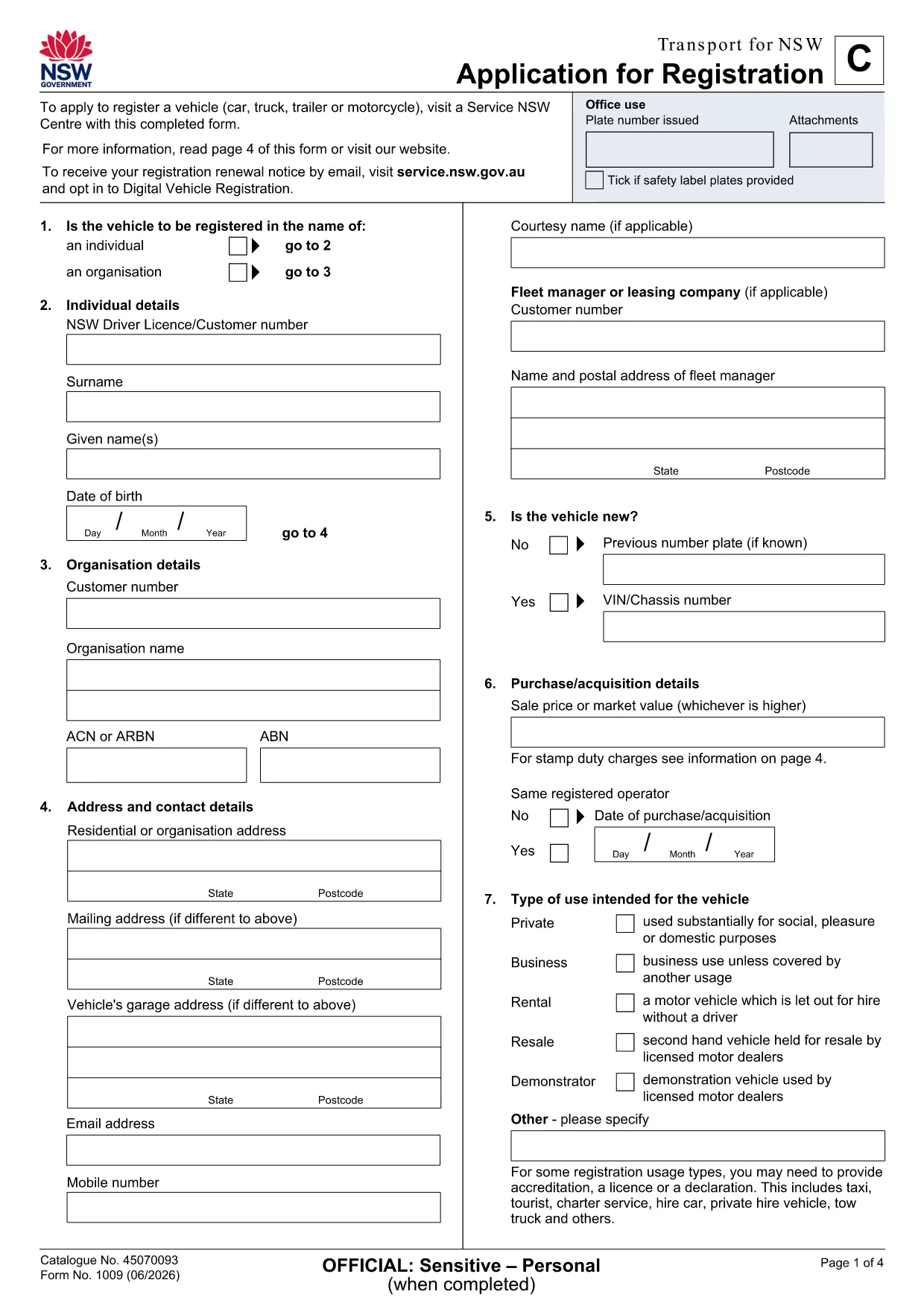
Looking for a quick, hassle‑free way to submit your application form of registration in New South Wales? The fillable PDF provided by Transport for NSW lets you enter data directly on your screen, save a draft, and print a clean copy for submission.

Our Formize PDF Filler loads the form instantly in your browser—no extra software needed. Just click the button, fill the fields, and download the completed document.

How to Fill the Application Form of Registration Online

  1. Click the Fill out this form button on the page.
  2. Wait a few seconds while the Formize PDF Filler app loads the registration PDF.
  3. Enter your personal details, vehicle information, and any supporting data in the highlighted fields.
  4. Use the built‑in validation to catch missing or incorrectly formatted entries.
  5. When you’re done, click Save & Download to get a completed PDF ready for printing or email.

Key Sections & Required Information

  • Applicant Details – full name, address, contact number, and driver licence number.
  • Vehicle Information – make, model, VIN, and registration number.
  • Supporting Documents – proof of identity, insurance, and any exemption letters.
  • Declaration & Signature – electronic signature box that complies with NSW regulations.

Common Mistakes to Avoid When Completing the Form

  • Leaving mandatory fields blank – the filler will highlight them in red.
  • Using non‑standard fonts or special characters in names – stick to alphanumeric characters.
  • Uploading outdated supporting documents – ensure PDFs are current and legible.
  • Forgetting to sign the electronic declaration – an unsigned form will be rejected.

Download & Print the PDF in One Click

After saving, you can instantly download the filled PDF, print it on plain A4 paper, and attach any required attachments before delivering it to your local Transport for NSW office.

Need a hard copy? The Formize app also offers a Print button that sends the document directly to your printer with the correct margins.

よくある質問
  • Do I need Adobe Acrobat to fill this form?

    No. The Formize PDF Filler works in any modern browser, so you can complete the form without installing additional software.

  • Can I save a draft and finish later?

    Yes. Use the **Save Draft** button in the filler to download a partially completed PDF, then reopen it later to finish.

  • Is the electronic signature legally accepted?

    Transport for NSW accepts the electronic signature generated by Formize, as it complies with NSW electronic signing standards.

  • What file format will I receive after completion?

    You will receive a standard PDF file that can be printed, emailed, or stored on your device.

  • What should I do if I encounter an error while filling the form?

    Refresh the page and reopen the form. If the problem persists, check your internet connection or try a different browser.

  • Are there any fees for using the fillable PDF?

    The PDF download and online filling are free. Any processing fees are determined by Transport for NSW, not by Formize.

方法

オンラインで 4 回の簡単なステップで application form of registration を無料で入力する方法:

  1. 1
    Open the Fillable Form
    Click the **Fill out this form** button on the page. The Formize PDF Filler app will open the registration PDF directly in your browser.
  2. 2
    Enter Your Information
    Type your details into each highlighted field. The app validates entries in real time, so you’ll know immediately if something is missing.
  3. 3
    Save and Download
    When all required sections are complete, press **Save & Download**. The completed PDF is saved to your device, ready to print or email.
  4. 4
    Print or Submit Electronically
    Print the saved PDF on A4 paper and attach any supporting documents, or email the file to the address indicated on the form.
Formize PDF Filler アプリ
だいたい

車両登録フォーム

自動車、トレーラー、またはボートを所有またはリースしている場合は、車両を合法的に登録し、安全に保つという特定の義務を果たさなければなりません。

application form of registration は、車両登録フォームの 1 つで、自動車を関連する州または地方当局に登録するために使用される書類です。これらのフォームは通常、人が新車または中古車を購入するとき、または車を持って新しい州または州に移動するときに必要です。

車両登録に必要な正確な要件とフォームは場所によって異なる場合がありますが、一般的に、プロセスには車両、所有者、および車両の先取特権に関する情報を提供することが含まれます。

登録フォームと手数料が提出されると、州または地方当局は車両の所有者に登録証明書またはナンバープレートを発行します。この登録により、車両は公道および高速道路で合法的に運転することができます。

特徴

PDFフィラー

オンラインで PDF フォームに記入する最も簡単な方法

  • application form of registration をすばやく入力してください
    application form of registration をオンラインですばやく入力する方法をお探しですか?オンラインの無料 PDF フォーム フィラーを使用すると、この PDF ドキュメントを 1 分以内に編集して入力する方法がわかります。
  • 使いやすいオンライン PDF エディター
    再スキャンして返送する前に、編集できるように PDF ファイルを印刷することにうんざりしていませんか? PDFドキュメントをオンラインで無料で編集.当社のオンライン PDF エディターを使用して、時間と紙を節約してください。
  • 優れたツール、すべてのプラットフォーム
    Mac で application form of registration を入力する方法や、PDF フィラーを無料で使用する方法を知りたいですか?当社のオンライン PDF ツールは、すべてのプラットフォームで動作します。
  • 安全なファイル ストレージ
    完成した「application form of registration」ファイルは、Amazon クラウド ホスティングが管理する安全なデータベースに保存されます。いつでもシステムからファイルを削除できます。いずれにせよ、これらのファイルは 24 時間後に自動的に削除されます。
  • {キーワード} とチャットする
    無料の PDF リーダー アシスタントである Chatize で「application form of registration」とチャットします。質問すると、「application form of registration」から回答が得られます。上の [ドキュメントとチャット] ボタンをクリックするだけです。

フィルセッションを削除

選択したフィルセッションを削除しますか?この場合、フォームへの記入の進捗状況は失われます。

編集セッションを削除する

選択した編集セッションを削除しますか?この場合、フォームの作成および編集の進行状況は失われます。