
言語を選択する

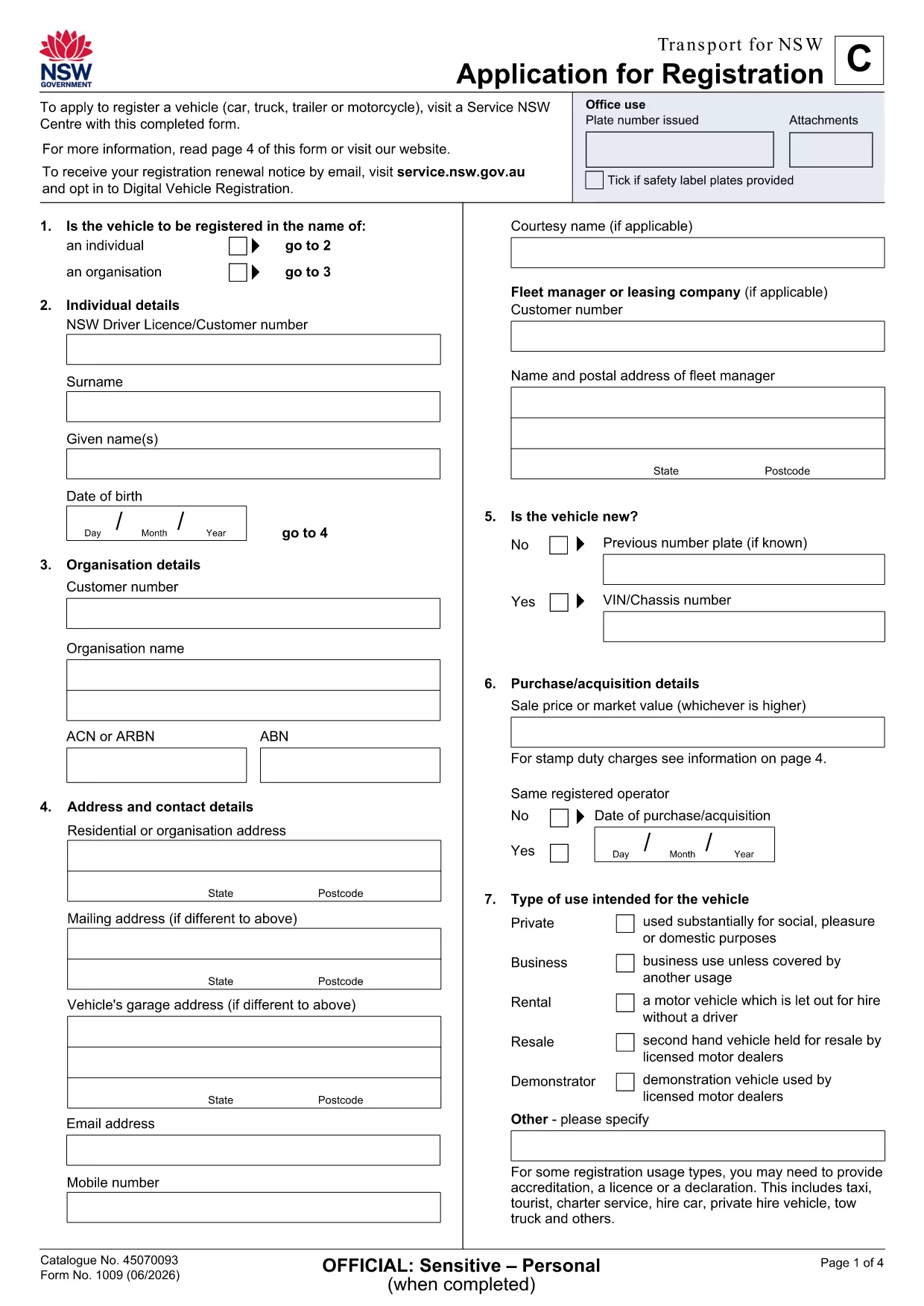
Online Registration Application Form (Fillable PDF)

  1. 国 オーストラリア
  2. 言語 英語
  3. デパートメント Transport NSW
  4. アクティビティ 車両登録
Online Registration Application Form (Fillable PDF)

Looking for a fast, secure way to submit your registration? Our online registration application form is available as a fillable PDF, so you can complete it directly in your browser without printing or scanning.

The form is hosted on Formize.com and integrates with the Formize PDF Filler app, giving you a smooth, interactive experience. Simply click the button below, fill in the required fields, and download the completed PDF ready for submission.

Why Use a Fillable PDF Form?

Fillable PDFs retain the official layout of government forms while allowing digital entry. Benefits include:

  • Instant validation of required fields
  • Automatic saving so you never lose your progress
  • Easy printing or electronic submission
  • Compliance with accessibility standards

Step‑by‑Step Guide to Complete the Form

Follow the quick steps below to finish your registration without hassle.

Common Mistakes to Avoid

Even a small error can delay processing. Watch out for:

  • Leaving mandatory fields blank
  • Using unsupported fonts or special characters
  • Signing with a colored pen instead of black (digital signatures are accepted)
  • Forgetting to attach required supporting documents

Where to Submit Your Registration

After completing the form, you can either:

  • Print and deliver it to your nearest Service NSW centre, or
  • Upload the PDF through the online portal if the service is available in your state.

Make sure to keep a copy for your records.

よくある質問
  • Do I need Adobe Acrobat to fill out this form?

    No. The Formize PDF Filler works directly in your web browser, so Adobe Acrobat is not required.

  • Can I save my progress and finish later?

    Yes. The filler automatically saves your entries locally, allowing you to return and complete the form at any time.

  • Is the form accepted if I submit it electronically?

    Most Australian states accept the completed PDF electronically. Check your local Service NSW guidelines for exact submission methods.

  • What if I make a mistake after saving?

    Open the saved PDF again with the Formize PDF Filler, edit the incorrect fields, and re‑save the document.

  • Do I need to print and sign the form with a pen?

    A digital signature is accepted for most registrations. If a handwritten signature is required, print the completed PDF and sign with a black pen.

  • Is my personal information secure?

    Formize uses SSL encryption for all data transferred between your browser and our servers, ensuring your information remains private.

方法

オンラインで 5 回の簡単なステップで online registration form を無料で入力する方法:

  1. 1
    Click the "Fill out this form" button
    Start the process by clicking the button on this page. The Formize PDF Filler app will open in a new tab.
  2. 2
    Wait for the Formize PDF Filler to load
    The fillable PDF loads automatically. No download or extra software is required.
  3. 3
    Enter your information
    Fill in all required fields using the on‑screen text boxes. The app highlights any missing data.
  4. 4
    Review and sign
    Double‑check the entered details, add a digital signature if required, and click "Save".
  5. 5
    Download or submit
    Save the completed PDF to your device or follow the on‑screen instructions to submit it electronically.
Formize PDF Filler アプリ
だいたい

車両登録フォーム

自動車、トレーラー、またはボートを所有またはリースしている場合は、車両を合法的に登録し、安全に保つという特定の義務を果たさなければなりません。

online registration form は、車両登録フォームの 1 つで、自動車を関連する州または地方当局に登録するために使用される書類です。これらのフォームは通常、人が新車または中古車を購入するとき、または車を持って新しい州または州に移動するときに必要です。

車両登録に必要な正確な要件とフォームは場所によって異なる場合がありますが、一般的に、プロセスには車両、所有者、および車両の先取特権に関する情報を提供することが含まれます。

登録フォームと手数料が提出されると、州または地方当局は車両の所有者に登録証明書またはナンバープレートを発行します。この登録により、車両は公道および高速道路で合法的に運転することができます。

特徴

PDFフィラー

オンラインで PDF フォームに記入する最も簡単な方法

  • online registration form をすばやく入力してください
    online registration form をオンラインですばやく入力する方法をお探しですか?オンラインの無料 PDF フォーム フィラーを使用すると、この PDF ドキュメントを 1 分以内に編集して入力する方法がわかります。
  • 使いやすいオンライン PDF エディター
    再スキャンして返送する前に、編集できるように PDF ファイルを印刷することにうんざりしていませんか? PDFドキュメントをオンラインで無料で編集.当社のオンライン PDF エディターを使用して、時間と紙を節約してください。
  • 優れたツール、すべてのプラットフォーム
    Mac で online registration form を入力する方法や、PDF フィラーを無料で使用する方法を知りたいですか?当社のオンライン PDF ツールは、すべてのプラットフォームで動作します。
  • 安全なファイル ストレージ
    完成した「online registration form」ファイルは、Amazon クラウド ホスティングが管理する安全なデータベースに保存されます。いつでもシステムからファイルを削除できます。いずれにせよ、これらのファイルは 24 時間後に自動的に削除されます。
  • {キーワード} とチャットする
    無料の PDF リーダー アシスタントである Chatize で「online registration form」とチャットします。質問すると、「online registration form」から回答が得られます。上の [ドキュメントとチャット] ボタンをクリックするだけです。

フィルセッションを削除

選択したフィルセッションを削除しますか?この場合、フォームへの記入の進捗状況は失われます。

編集セッションを削除する

選択した編集セッションを削除しますか?この場合、フォームの作成および編集の進行状況は失われます。