
言語を選択する

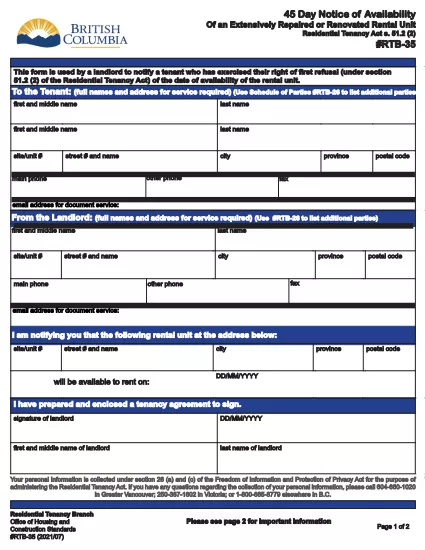
RTB‑35 45‑Day Notice of Availability (Fillable PDF)

  1. カナダ
  2. 言語 英語
  3. アクティビティ テナント
  4. デパートメント Residential Tenancy Branch
RTB‑35 45‑Day Notice of Availability (Fillable PDF)

The RTB‑35 is the official 45‑Day Notice of Availability required by British Columbia’s Residential Tenancy Act. Landlords must give tenants at least 45 days’ notice before a rental unit becomes available for a new tenancy. This form ensures the notice is clear, legally compliant, and ready to be filed.

What Is the RTB‑35 Form?

RTB‑35 is a standardized, government‑approved PDF used by landlords across the province. It captures the date the unit will be available, the reason for vacancy, and the landlord’s contact information. Because it is a fillable PDF, you can complete it directly in your browser without printing a paper copy first.

When and Why You Need This Notice

  • When you plan to end a tenancy because the unit will be re‑rented or taken off the market.
  • When you are selling the property or converting it to another use.
  • To comply with the Residential Tenancy Act and avoid disputes or penalties.

How to Complete the RTB‑35 Online

Follow the simple steps below. The Formize PDF Filler loads the fillable version instantly, so you never need to download a separate editor.

Common Mistakes to Avoid

  • Providing a date that is less than 45 days from the notice date.
  • Leaving the “Reason for Vacancy” field blank.
  • Forgetting to sign the form before submitting to the tenant.

Download the Fillable PDF

Click the button below to open the RTB‑35 form in the Formize PDF Filler. When the app loads, you can fill, save, and print the notice in minutes.

Fill out this form

よくある質問
  • What happens if I give less than 45 days’ notice?

    The notice will be considered invalid under the Residential Tenancy Act, and you may be required to continue the tenancy or face a dispute resolution claim.

  • Can I use a handwritten version of RTB‑35?

    Yes, but a fillable PDF is recommended because it reduces errors, ensures legibility, and creates a digital record.

  • Do I need to attach any supporting documents?

    Only if the reason for vacancy requires proof (e.g., a sale agreement). Otherwise, the RTB‑35 alone is sufficient.

  • Is the Formize PDF Filler free to use?

    Yes. You can fill, save, and download the form at no cost. No software installation is required.

  • Can I email the completed RTB‑35 to my tenant?

    Absolutely. Once you save the completed PDF, you can attach it to an email or upload it to a tenant portal.

  • Do I need to keep a copy of the notice?

    Keep a saved copy for your records for at least the length of the tenancy, as it may be requested during dispute resolution.

  • What if the tenant disputes the notice date?

    Provide the saved PDF with timestamps from the Formize app as evidence of when the notice was completed and sent.

方法

オンラインで 5 回の簡単なステップで RTB-35 を無料で入力する方法:

  1. 1
    Open the Form
    Click the “Fill out this form” button above. The Formize PDF Filler app will load the RTB‑35 fillable PDF in a new tab.
  2. 2
    Enter Required Information
    Type the date the unit will be available, the reason for vacancy, and your contact details. All fields are interactive and save automatically.
  3. 3
    Review and Sign
    Check each section for accuracy, then add your electronic signature using the built‑in signature field.
  4. 4
    Save or Print
    When you’re finished, click “Save” to download a copy or “Print” to give a hard copy to your tenant.
  5. 5
    Submit to Tenant
    Deliver the completed notice by hand, email, or mail within the 45‑day window required by law.
Formize PDF Filler アプリ
だいたい

家主および/またはテナントがテナント契約に関連するアクションを提案するためのフォーム。

RTB-35 は、ほとんどの民間の家主および住宅協会が使用する住宅賃貸契約のタイプです。

家主またはテナントが規則で定められた特定の規則に従わなければならない事項がいくつかあります。場合によっては、賃貸契約の相手方に影響を与える可能性のある行動を提案する「所定のフォーム」と呼ばれるフォームに記入する必要がある場合があります。

フォームは、フォームに記入する人およびフォームが提供される人が、提案されていることとそれに応じて何をすることができるかを理解できるように、その文言が慎重に起草されているため、所定のフォームと呼ばれます。正しいフォームを提供しないと、提案されているアクションが無効になる場合があります。

フォームに変更してもよいと記載されていない限り、これらのフォームの文言を変更することはできません。文言を変更すると、フォームが無効になる場合があります。また、フォームに記載されている通知期間にも従わなければなりません。

特徴

PDFフィラー

オンラインで PDF フォームに記入する最も簡単な方法

  • RTB-35 をすばやく入力してください
    RTB-35 をオンラインですばやく入力する方法をお探しですか?オンラインの無料 PDF フォーム フィラーを使用すると、この PDF ドキュメントを 1 分以内に編集して入力する方法がわかります。
  • 使いやすいオンライン PDF エディター
    再スキャンして返送する前に、編集できるように PDF ファイルを印刷することにうんざりしていませんか? PDFドキュメントをオンラインで無料で編集.当社のオンライン PDF エディターを使用して、時間と紙を節約してください。
  • 優れたツール、すべてのプラットフォーム
    Mac で RTB-35 を入力する方法や、PDF フィラーを無料で使用する方法を知りたいですか?当社のオンライン PDF ツールは、すべてのプラットフォームで動作します。
  • 安全なファイル ストレージ
    完成した「RTB-35」ファイルは、Amazon クラウド ホスティングが管理する安全なデータベースに保存されます。いつでもシステムからファイルを削除できます。いずれにせよ、これらのファイルは 24 時間後に自動的に削除されます。
  • {キーワード} とチャットする
    無料の PDF リーダー アシスタントである Chatize で「RTB-35」とチャットします。質問すると、「RTB-35」から回答が得られます。上の [ドキュメントとチャット] ボタンをクリックするだけです。

フィルセッションを削除

選択したフィルセッションを削除しますか?この場合、フォームへの記入の進捗状況は失われます。

編集セッションを削除する

選択した編集セッションを削除しますか?この場合、フォームの作成および編集の進行状況は失われます。