
言語を選択する

RTB‑12L‑DR Landlord Application for Dispute Resolution (Fillable PDF)

  1. 言語 英語
  2. カナダ
  3. アクティビティ テナント
  4. ブリティッシュコロンビア
RTB‑12L‑DR Landlord Application for Dispute Resolution (Fillable PDF)

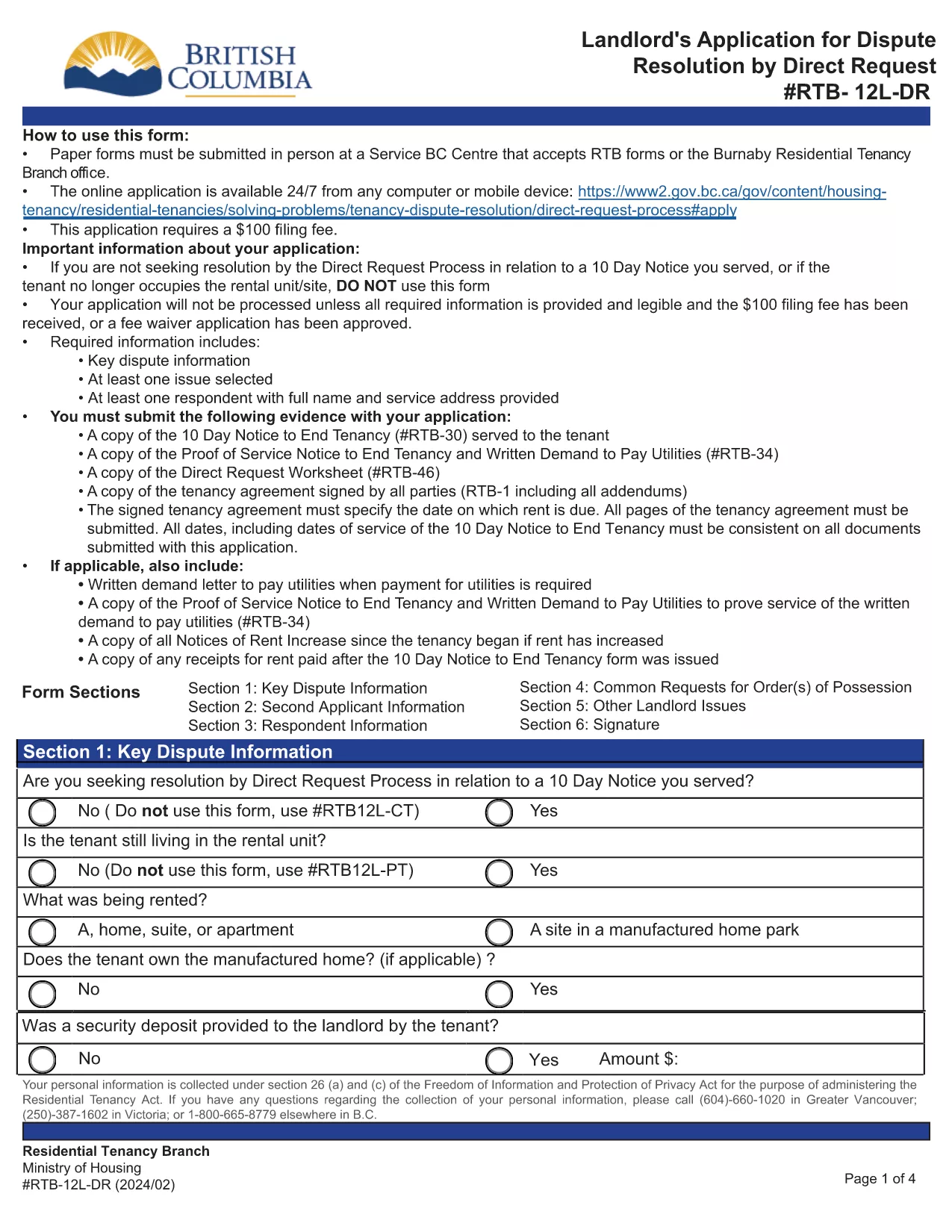
The RTB‑12L‑DR is the official British Columbia Residential Tenancy Branch (RTB) form used by landlords to request a dispute resolution hearing by Direct Request. This form starts the process for resolving issues such as unpaid rent, damage to the rental unit, or breaches of the tenancy agreement.

What Is the RTB‑12L‑DR Form?

Designed for landlords, the RTB‑12L‑DR captures essential information about the tenancy, the nature of the dispute, and the remedy sought. It is required for all direct‑request applications and must be submitted in person or by mail to a Service BC centre that accepts RTB forms.

How to Complete the RTB‑12L‑DR Online

Instead of printing and filling out a paper copy, you can use Formize’s free fillable PDF feature. Follow these simple steps:

  • Click the “Fill out this form” button on this page.
  • Wait for the Formize PDF Filler app to load (usually a few seconds).
  • Enter your information in each field – the form automatically saves your progress.
  • Review the completed form, add your electronic signature, and click “Submit”.
  • Download the finished PDF or print it for submission.

Common Mistakes to Avoid

  • Leaving sections blank: Every field marked with an asterisk (*) is mandatory.
  • Incorrect dates: Use the exact dates from the tenancy agreement and any relevant notices.
  • Mismatched signatures: The landlord or authorized agent must sign; a missing signature will delay processing.
  • Submitting the wrong form: Ensure you are using RTB‑12L‑DR (Direct Request) and not the current‑tenancy or expedited‑hearing versions.

Where to Submit Your Application

After completing the form, you have two options:

  • In‑person: Bring the printed PDF to any Service BC centre that accepts RTB forms or to the Burnaby Residential Tenancy Branch office.
  • Mail: Send the signed PDF to the Residential Tenancy Branch at the address listed on the form.

Download the Official PDF

If you prefer a paper copy, you can download the official RTB‑12L‑DR PDF directly from the Government of British Columbia:

Download RTB‑12L‑DR (Landlord Application for Dispute Resolution – Direct Request)

Using Formize’s fillable version saves time, reduces errors, and ensures your application is ready for submission.

よくある質問
  • What does RTB‑12L‑DR stand for?

    RTB‑12L‑DR is the “Landlord Application for Dispute Resolution – Direct Request” used by BC landlords to start a tenancy dispute hearing.

  • Can I submit the form electronically?

    The form itself must be printed, signed, and submitted in person or by mail. However, you can fill it out online with Formize and then print the completed PDF.

  • Do I need a lawyer to complete RTB‑12L‑DR?

    No. The form is designed for landlords to complete on their own. If you have complex legal questions, consider consulting a tenancy‑law specialist.

  • How long does it take to process the application?

    Processing time varies, but the Residential Tenancy Branch typically acknowledges receipt within 7‑10 business days.

  • What fees are associated with filing RTB‑12L‑DR?

    There is a filing fee for the dispute resolution hearing. Check the latest fee schedule on the BC Residential Tenancy Branch website.

  • Can I add additional issues not listed on the form?

    Yes. Use the “Additional Issues” section on the form to describe any other disputes you wish the tribunal to consider.

  • Is the fillable PDF version legally accepted?

    Yes, as long as you print, sign, and submit the completed form, the fillable version is considered identical to the paper version.

  • What if I make a mistake after submitting?

    Contact the Residential Tenancy Branch as soon as possible. Minor errors can often be corrected with a written amendment.

方法

オンラインで 5 回の簡単なステップで RTB-12L-DR を無料で入力する方法:

  1. 1
    Click the Fill‑out Button
    Press the “Fill out this form” button on the page to launch the Formize PDF Filler.
  2. 2
    Wait for the Filler to Load
    The fillable PDF loads in a few seconds. No download or extra software is required.
  3. 3
    Enter Your Information
    Complete each field, following the on‑screen prompts. The form saves your entries automatically.
  4. 4
    Add Your Signature
    Use the built‑in signature field to sign electronically. This satisfies the requirement for a landlord’s signature.
  5. 5
    Download or Print
    When finished, download the completed PDF or print it to submit in person or by mail.
Formize PDF Filler アプリ
だいたい

家主および/またはテナントがテナント契約に関連するアクションを提案するためのフォーム。

RTB-12L-DR は、ほとんどの民間の家主および住宅協会が使用する住宅賃貸契約のタイプです。

家主またはテナントが規則で定められた特定の規則に従わなければならない事項がいくつかあります。場合によっては、賃貸契約の相手方に影響を与える可能性のある行動を提案する「所定のフォーム」と呼ばれるフォームに記入する必要がある場合があります。

フォームは、フォームに記入する人およびフォームが提供される人が、提案されていることとそれに応じて何をすることができるかを理解できるように、その文言が慎重に起草されているため、所定のフォームと呼ばれます。正しいフォームを提供しないと、提案されているアクションが無効になる場合があります。

フォームに変更してもよいと記載されていない限り、これらのフォームの文言を変更することはできません。文言を変更すると、フォームが無効になる場合があります。また、フォームに記載されている通知期間にも従わなければなりません。

特徴

PDFフィラー

オンラインで PDF フォームに記入する最も簡単な方法

  • RTB-12L-DR をすばやく入力してください
    RTB-12L-DR をオンラインですばやく入力する方法をお探しですか?オンラインの無料 PDF フォーム フィラーを使用すると、この PDF ドキュメントを 1 分以内に編集して入力する方法がわかります。
  • 使いやすいオンライン PDF エディター
    再スキャンして返送する前に、編集できるように PDF ファイルを印刷することにうんざりしていませんか? PDFドキュメントをオンラインで無料で編集.当社のオンライン PDF エディターを使用して、時間と紙を節約してください。
  • 優れたツール、すべてのプラットフォーム
    Mac で RTB-12L-DR を入力する方法や、PDF フィラーを無料で使用する方法を知りたいですか?当社のオンライン PDF ツールは、すべてのプラットフォームで動作します。
  • 安全なファイル ストレージ
    完成した「RTB-12L-DR」ファイルは、Amazon クラウド ホスティングが管理する安全なデータベースに保存されます。いつでもシステムからファイルを削除できます。いずれにせよ、これらのファイルは 24 時間後に自動的に削除されます。
  • {キーワード} とチャットする
    無料の PDF リーダー アシスタントである Chatize で「RTB-12L-DR」とチャットします。質問すると、「RTB-12L-DR」から回答が得られます。上の [ドキュメントとチャット] ボタンをクリックするだけです。

フィルセッションを削除

選択したフィルセッションを削除しますか?この場合、フォームへの記入の進捗状況は失われます。

編集セッションを削除する

選択した編集セッションを削除しますか?この場合、フォームの作成および編集の進行状況は失われます。