
言語を選択する

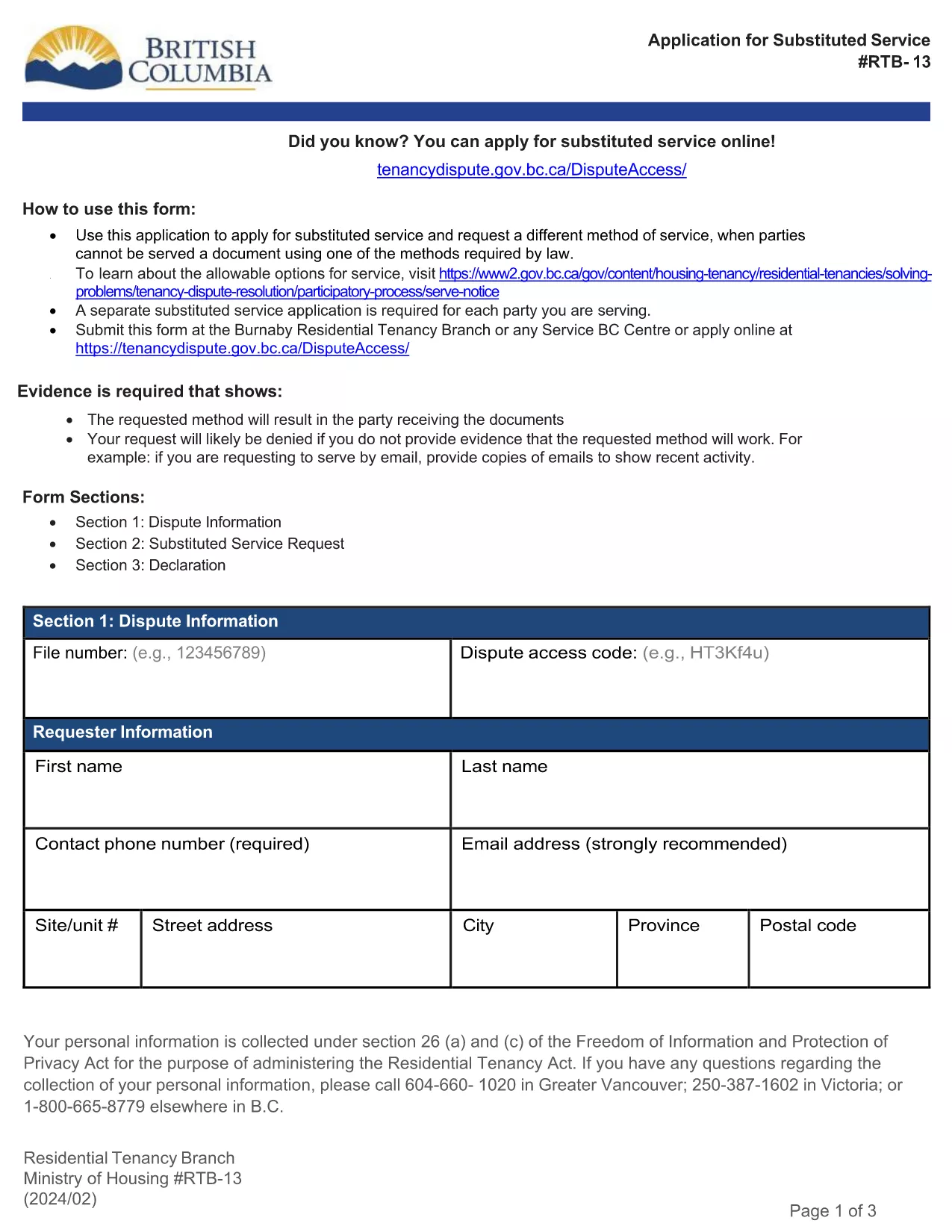
RTB‑13 Application for Substituted Service (Fillable PDF)

  1. 言語 英語
  2. カナダ
  3. アクティビティ テナント
  4. ブリティッシュコロンビア
RTB‑13 Application for Substituted Service (Fillable PDF)

The RTB‑13 Application for Substituted Service is the official form used by the British Columbia Residential Tenancy Branch when a party needs the arbitrator to order an alternative method of serving documents. This form is required when the usual service methods under the Residential Tenancy Act cannot be used.

What Is the RTB‑13 Form?

RTB‑13 is a government‑issued, fillable PDF that captures details such as:

  • Parties involved (landlord, tenant, arbitrator)
  • Reason for requesting substituted service
  • Proposed method of service (email, courier, posting, etc.)
  • Supporting evidence or affidavits

When Should You Use RTB‑13?

Use this form if you have tried the standard service methods (personal delivery, registered mail, etc.) and they have failed, or if the other party’s location makes normal service impractical. Common scenarios include:

  • Tenant has moved without leaving a forwarding address.
  • Landlord cannot locate the tenant after multiple attempts.
  • Documents need to be served to a corporate entity that only accepts electronic delivery.

How to Complete the RTB‑13 Online

Instead of downloading the PDF to a desktop editor, simply click the "Fill out this form" button below. The Formize PDF Filler app will load in your browser, allowing you to:

  1. Navigate field‑by‑field using the Tab key.
  2. Enter required information directly into each box.
  3. Attach supporting documents or affidavits.
  4. Save a copy for your records.
  5. Submit the completed form to the Residential Tenancy Branch via email or upload.

Common Mistakes & Tips

  • Missing signatures: The form is invalid without the landlord’s and tenant’s signatures.
  • Incorrect dates: Use the exact date you attempted the standard service.
  • Insufficient detail: Clearly describe why normal service failed and propose a realistic alternative.
  • File size limits: Keep attached PDFs under 5 MB to avoid upload errors.

Download the Fillable PDF

If you prefer to work offline, you can still download the official RTB‑13 PDF using the link below. Open it with the latest version of Adobe Acrobat Reader for full fillable functionality.

よくある質問
  • What is the purpose of RTB‑13?

    RTB‑13 requests that an arbitrator order a different method of serving documents when standard service methods are impossible or have failed.

  • Can I submit RTB‑13 electronically?

    Yes. After completing the fillable PDF with Formize, you can email the PDF or upload it through the Residential Tenancy Branch’s online portal.

  • Do I need a lawyer to fill out RTB‑13?

    No. The form is designed for landlords and tenants to complete themselves, though you may seek legal advice if the situation is complex.

  • How long does the arbitrator take to decide on a substituted service request?

    Processing times vary, but most decisions are issued within 10‑14 business days after the completed form is received.

  • What supporting documents should I include?

    Attach proof of attempted service (e.g., delivery receipts, correspondence), affidavits, and any relevant court orders or notices.

  • Is there a fee for filing RTB‑13?

    There is no filing fee for the RTB‑13 application itself, though other tenancy dispute fees may apply.

  • Can I save my progress and return later?

    Yes. The Formize PDF Filler lets you save a draft on your computer and continue editing at any time.

  • What if I make a mistake after submitting?

    Contact the Residential Tenancy Branch immediately. You may be asked to submit a corrected RTB‑13 with a brief explanation of the changes.

方法

オンラインで 5 回の簡単なステップで RTB-13 を無料で入力する方法:

  1. 1
    Click the Fill‑out Button
    Press the "Fill out this form" button on the page. The Formize PDF Filler loads instantly in your browser.
  2. 2
    Enter Your Information
    Tab through each fillable field, entering the required details such as party names, reasons for substituted service, and proposed method.
  3. 3
    Attach Supporting Documents
    Use the attachment field to upload affidavits, proof of attempted service, or any other evidence the arbitrator may need.
  4. 4
    Save and Review
    Click "Save" to store a copy on your device, then review all entries for accuracy before submitting.
  5. 5
    Submit to the Residential Tenancy Branch
    Follow the on‑screen instructions to email or upload the completed RTB‑13 form directly to the BC Residential Tenancy Branch.
Formize PDF Filler アプリ
だいたい

家主および/またはテナントがテナント契約に関連するアクションを提案するためのフォーム。

RTB-13 は、テナント契約の確立および管理のプロセスで使用される文書を指すテナント フォームの 1 つです。これらのフォームは通常、家主、不動産管理者、またはテナントがテナントの契約条件の概要を説明するために使用します。一般的なテナント形式をいくつか示します。

テナント契約: テナント契約は、リース契約またはレンタル契約とも呼ばれ、家主とテナントの間の法的拘束力のある契約です。これには、テナント期間、家賃金額、支払い条件、保証金、維持責任、およびテナントに特有のその他の条件を含む、両当事者の権利と責任が規定されています。

賃貸申込書: 通常、入居予定者は賃貸物件を申し込む際に賃貸申込書に記入します。このフォームは、申請者の名前、連絡先の詳細、職歴、レンタル履歴、推薦者などの個人情報を収集します。賃貸申込書は、家主がテナントの適性を評価し、情報に基づいた決定を下すのに役立ちます。

退去通知: このフォームは、家主またはテナントがテナント契約を終了する意思を通知するために使用します。必要な通知期間は、現地の法律および賃貸契約の条件によって異なる場合があります。

家賃増額通知: 家主が賃貸契約期間中に家賃を増額する場合、通常、賃料増額通知をテナントに提供します。この通知はテナントに今後の家賃調整を知らせるものであり、家賃値上げに関する法的要件に準拠しています。

メンテナンスおよび修理リクエスト フォーム: これらのフォームを使用すると、テナントはメンテナンスや修理の問題を家主または不動産管理者に報告できます。フォームには、問題の詳細、要求された修理、およびその他の関連情報の概要が記載されています。

身元調査または信用調査への同意: 家主は、テナントに身元調査または信用調査を許可する同意フォームへの記入を要求する場合があります。このフォームにより、家主はテナントの経歴、信用度、賃貸履歴を確認することができます。

在庫および状態レポート: このフォームは、賃貸契約の開始時と終了時の賃貸物件の状態を文書化するために使用されます。各部屋の状態と既存の損害について詳しく説明しており、保証金や損害賠償請求に関する紛争を解決するために、両当事者が物件の状態を記録できるようにします。

これらは、レンタルプロセスで一般的に使用されるテナントフォームの例です。具体的な形式や要件は、現地の法律や賃貸借契約の具体的な状況によって異なる場合があります。コンプライアンスを確保し、特定の賃貸契約に適切な形式を使用するには、現地の規制を調べ、専門家のアドバイスを求めることが重要です。

特徴

PDFフィラー

オンラインで PDF フォームに記入する最も簡単な方法

  • RTB-13 をすばやく入力してください
    RTB-13 をオンラインですばやく入力する方法をお探しですか?オンラインの無料 PDF フォーム フィラーを使用すると、この PDF ドキュメントを 1 分以内に編集して入力する方法がわかります。
  • 使いやすいオンライン PDF エディター
    再スキャンして返送する前に、編集できるように PDF ファイルを印刷することにうんざりしていませんか? PDFドキュメントをオンラインで無料で編集.当社のオンライン PDF エディターを使用して、時間と紙を節約してください。
  • 優れたツール、すべてのプラットフォーム
    Mac で RTB-13 を入力する方法や、PDF フィラーを無料で使用する方法を知りたいですか?当社のオンライン PDF ツールは、すべてのプラットフォームで動作します。
  • 安全なファイル ストレージ
    完成した「RTB-13」ファイルは、Amazon クラウド ホスティングが管理する安全なデータベースに保存されます。いつでもシステムからファイルを削除できます。いずれにせよ、これらのファイルは 24 時間後に自動的に削除されます。
  • {キーワード} とチャットする
    無料の PDF リーダー アシスタントである Chatize で「RTB-13」とチャットします。質問すると、「RTB-13」から回答が得られます。上の [ドキュメントとチャット] ボタンをクリックするだけです。

フィルセッションを削除

選択したフィルセッションを削除しますか?この場合、フォームへの記入の進捗状況は失われます。

編集セッションを削除する

選択した編集セッションを削除しますか?この場合、フォームの作成および編集の進行状況は失われます。