
言語を選択する

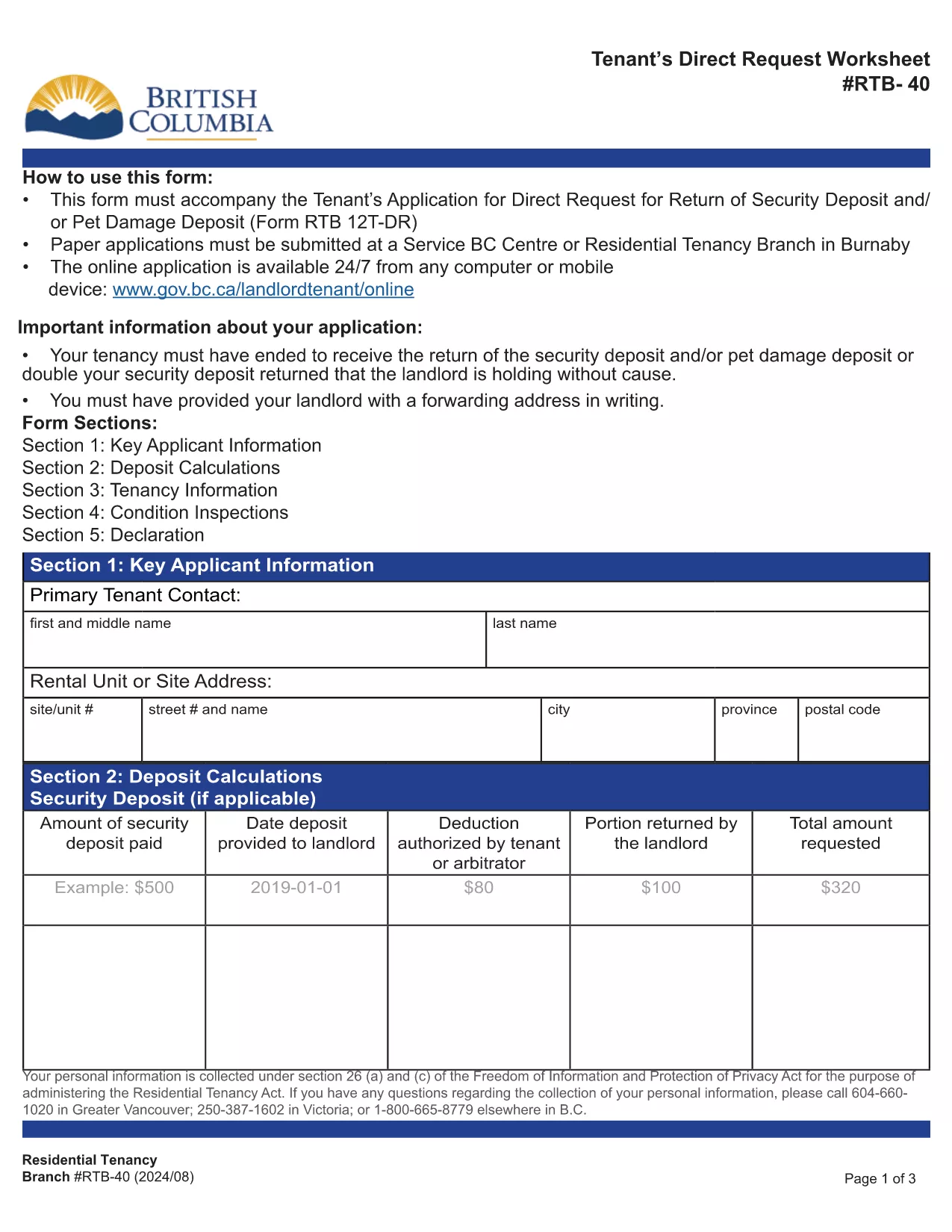
RTB-40 Tenant Direct Request Worksheet (Fillable PDF)

  1. 言語 英語
  2. カナダ
  3. アクティビティ テナント
  4. ブリティッシュコロンビア
RTB-40 Tenant Direct Request Worksheet (Fillable PDF)

The RTB-40, also known as the Tenant Direct Request Worksheet, is the official British Columbia Residential Tenancy Branch form used when a tenant requests the return of a security or pet‑damage deposit. It allows you to present evidence, list amounts owed, and provide your forwarding address.

Formize hosts a fully‑fillable, web‑based version of this PDF so you can complete the worksheet from any device without installing Adobe Reader. Your data is saved securely and the final PDF can be downloaded or emailed directly to the Residential Tenancy Branch.

Using the online filler saves time, eliminates printing errors, and ensures the form meets the latest BC tenancy regulations.

よくある質問
  • Do I need Adobe Reader to fill the RTB‑40?

    No. Formize’s online filler works in any modern browser, so you can complete the form without installing additional software.

  • Can I save my progress and finish later?

    Yes. The filler allows you to download a partially completed PDF, which you can reopen in Formize to continue editing.

  • Is the online version accepted by the Residential Tenancy Branch?

    Absolutely. The PDF generated by Formize is identical to the official government version, so it meets all submission requirements.

  • What supporting documents should I attach?

    Include copies of the original lease, receipts for any deductions, and proof of the deposit amount. List each item in the worksheet’s evidence section.

  • How do I correct a mistake after I’ve saved the PDF?

    Open the saved PDF again in Formize, make the necessary edits, and re‑save. The file remains fully editable until it is signed.

  • Is there a fee to use Formize’s PDF filler?

    No. The filler is free for all government forms, including the RTB‑40.

方法

オンラインで 4 回の簡単なステップで RTB-40 を無料で入力する方法:

  1. 1
    Open the Fillable Form
    Click the blue “Fill out this form” button on this page. The Formize PDF Filler will open in a new tab.
  2. 2
    Enter Your Information
    Type directly into each field – the worksheet includes sections for tenant details, deposit amounts, and supporting evidence.
  3. 3
    Review and Save
    Check all entries for accuracy, then click “Save PDF”. The completed RTB‑40 will be downloaded to your computer.
  4. 4
    Submit to the Residential Tenancy Branch
    Print the saved PDF or attach it to an email as instructed in your tenancy dispute package.
Formize PDF Filler アプリ
だいたい

家主および/またはテナントがテナント契約に関連するアクションを提案するためのフォーム。

RTB-40 は、ほとんどの民間の家主および住宅協会が使用する住宅賃貸契約のタイプです。

家主またはテナントが規則で定められた特定の規則に従わなければならない事項がいくつかあります。場合によっては、賃貸契約の相手方に影響を与える可能性のある行動を提案する「所定のフォーム」と呼ばれるフォームに記入する必要がある場合があります。

フォームは、フォームに記入する人およびフォームが提供される人が、提案されていることとそれに応じて何をすることができるかを理解できるように、その文言が慎重に起草されているため、所定のフォームと呼ばれます。正しいフォームを提供しないと、提案されているアクションが無効になる場合があります。

フォームに変更してもよいと記載されていない限り、これらのフォームの文言を変更することはできません。文言を変更すると、フォームが無効になる場合があります。また、フォームに記載されている通知期間にも従わなければなりません。

特徴

PDFフィラー

オンラインで PDF フォームに記入する最も簡単な方法

  • RTB-40 をすばやく入力してください
    RTB-40 をオンラインですばやく入力する方法をお探しですか?オンラインの無料 PDF フォーム フィラーを使用すると、この PDF ドキュメントを 1 分以内に編集して入力する方法がわかります。
  • 使いやすいオンライン PDF エディター
    再スキャンして返送する前に、編集できるように PDF ファイルを印刷することにうんざりしていませんか? PDFドキュメントをオンラインで無料で編集.当社のオンライン PDF エディターを使用して、時間と紙を節約してください。
  • 優れたツール、すべてのプラットフォーム
    Mac で RTB-40 を入力する方法や、PDF フィラーを無料で使用する方法を知りたいですか?当社のオンライン PDF ツールは、すべてのプラットフォームで動作します。
  • 安全なファイル ストレージ
    完成した「RTB-40」ファイルは、Amazon クラウド ホスティングが管理する安全なデータベースに保存されます。いつでもシステムからファイルを削除できます。いずれにせよ、これらのファイルは 24 時間後に自動的に削除されます。
  • {キーワード} とチャットする
    無料の PDF リーダー アシスタントである Chatize で「RTB-40」とチャットします。質問すると、「RTB-40」から回答が得られます。上の [ドキュメントとチャット] ボタンをクリックするだけです。

フィルセッションを削除

選択したフィルセッションを削除しますか?この場合、フォームへの記入の進捗状況は失われます。

編集セッションを削除する

選択した編集セッションを削除しますか?この場合、フォームの作成および編集の進行状況は失われます。