
言語を選択する

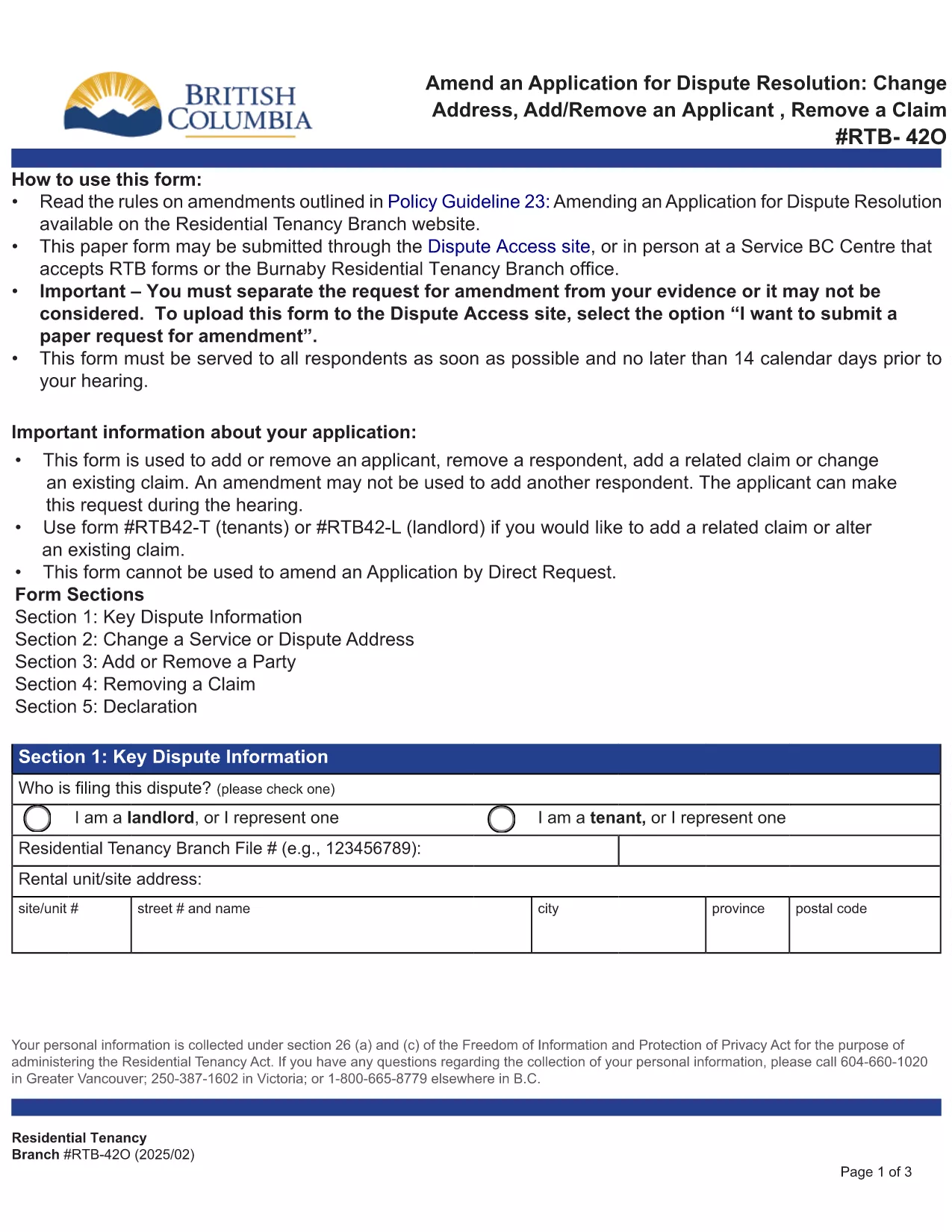
RTB‑42O – Amend an Application for Dispute Resolution (Fillable PDF)

  1. 言語 英語
  2. カナダ
  3. アクティビティ テナント
  4. ブリティッシュコロンビア
RTB‑42O – Amend an Application for Dispute Resolution (Fillable PDF)

What is the RTB‑42O Form?

The RTB‑42O is the official Residential Tenancy Branch (RTB) form used in British Columbia to request an amendment to an existing dispute‑resolution application. It allows tenants or landlords to change claims, add parties, or correct information after the original filing.

When and Who Should Use RTB‑42O?

  • Tenants or landlords who need to add, delete, or modify a claim.
  • Parties who must change an address, add a co‑tenant, or correct a mistake.
  • Anyone who has already submitted an RTB‑59 or RTB‑42T application and needs to update it before the hearing.

How to Complete the RTB‑42O Online

Instead of downloading and editing the PDF manually, simply click the "Fill out this form" button below. The Formize PDF Filler app will load the fillable version instantly.

  1. Click Fill out this form on the page.
  2. Wait a few seconds while the Formize PDF Filler loads.
  3. Enter your information in each highlighted field. Required fields are marked with an asterisk (*).
  4. Review the entered data for accuracy.
  5. Click Save & Download to get a completed PDF you can email to the RTB.

Common Mistakes to Avoid

  • Leaving required fields blank – the form will not submit.
  • Using an old case number; always copy the number from your original application.
  • Submitting the form after the RTB deadline – check the Rules of Procedure for timing.

Submit and Save Your Completed Form

After you have filled the form, download the PDF, attach it to an email addressed to rtb@gov.bc.ca, and include your original application reference number. Keep a copy for your records.

よくある質問
  • What is the purpose of the RTB‑42O form?

    The RTB‑42O allows tenants or landlords to amend an existing dispute‑resolution application – adding or removing claims, parties, or correcting details.

  • Can I fill out RTB‑42O on a mobile device?

    Yes. The Formize PDF Filler works on smartphones, tablets and desktop browsers, providing a responsive fillable experience.

  • Do I need to pay a fee to submit an amendment?

    No additional fee is required to submit an RTB‑42O amendment, but the original application fee (usually $100) still applies.

  • How long do I have to submit an amendment after filing the original application?

    Amendments must be filed before the hearing date or within the time limits set out in RTB Rule 4.0.1. Check the latest Rules of Procedure for exact deadlines.

  • What happens if I make a mistake on the RTB‑42O?

    If required fields are left blank or information is incorrect, the RTB will return the form for correction. Use the fillable version to avoid common errors.

  • Do I need a lawyer to complete the RTB‑42O?

    No. The form is designed for self‑representation. However, you may seek legal advice if the amendment is complex.

方法

オンラインで 5 回の簡単なステップで RTB-42O を無料で入力する方法:

  1. 1
    Open the Fillable Form
    Click the “Fill out this form” button on the page. The Formize PDF Filler loads the RTB‑42O automatically.
  2. 2
    Enter Your Details
    Fill every highlighted field, especially those marked with *. Use the original application number for reference.
  3. 3
    Review & Validate
    Check all entries for accuracy. The filler will highlight any missing required information.
  4. 4
    Download the Completed PDF
    When you’re satisfied, click “Save & Download”. The PDF is ready to email to the Residential Tenancy Branch.
  5. 5
    Submit to the RTB
    Attach the completed PDF to an email addressed to rt​b@gov.bc.ca, include your original case number, and keep a copy for your records.
Formize PDF Filler アプリ
だいたい

家主および/またはテナントがテナント契約に関連するアクションを提案するためのフォーム。

RTB-42O は、ほとんどの民間の家主および住宅協会が使用する住宅賃貸契約のタイプです。

家主またはテナントが規則で定められた特定の規則に従わなければならない事項がいくつかあります。場合によっては、賃貸契約の相手方に影響を与える可能性のある行動を提案する「所定のフォーム」と呼ばれるフォームに記入する必要がある場合があります。

フォームは、フォームに記入する人およびフォームが提供される人が、提案されていることとそれに応じて何をすることができるかを理解できるように、その文言が慎重に起草されているため、所定のフォームと呼ばれます。正しいフォームを提供しないと、提案されているアクションが無効になる場合があります。

フォームに変更してもよいと記載されていない限り、これらのフォームの文言を変更することはできません。文言を変更すると、フォームが無効になる場合があります。また、フォームに記載されている通知期間にも従わなければなりません。

特徴

PDFフィラー

オンラインで PDF フォームに記入する最も簡単な方法

  • RTB-42O をすばやく入力してください
    RTB-42O をオンラインですばやく入力する方法をお探しですか?オンラインの無料 PDF フォーム フィラーを使用すると、この PDF ドキュメントを 1 分以内に編集して入力する方法がわかります。
  • 使いやすいオンライン PDF エディター
    再スキャンして返送する前に、編集できるように PDF ファイルを印刷することにうんざりしていませんか? PDFドキュメントをオンラインで無料で編集.当社のオンライン PDF エディターを使用して、時間と紙を節約してください。
  • 優れたツール、すべてのプラットフォーム
    Mac で RTB-42O を入力する方法や、PDF フィラーを無料で使用する方法を知りたいですか?当社のオンライン PDF ツールは、すべてのプラットフォームで動作します。
  • 安全なファイル ストレージ
    完成した「RTB-42O」ファイルは、Amazon クラウド ホスティングが管理する安全なデータベースに保存されます。いつでもシステムからファイルを削除できます。いずれにせよ、これらのファイルは 24 時間後に自動的に削除されます。
  • {キーワード} とチャットする
    無料の PDF リーダー アシスタントである Chatize で「RTB-42O」とチャットします。質問すると、「RTB-42O」から回答が得られます。上の [ドキュメントとチャット] ボタンをクリックするだけです。

フィルセッションを削除

選択したフィルセッションを削除しますか?この場合、フォームへの記入の進捗状況は失われます。

編集セッションを削除する

選択した編集セッションを削除しますか?この場合、フォームの作成および編集の進行状況は失われます。