
言語を選択する

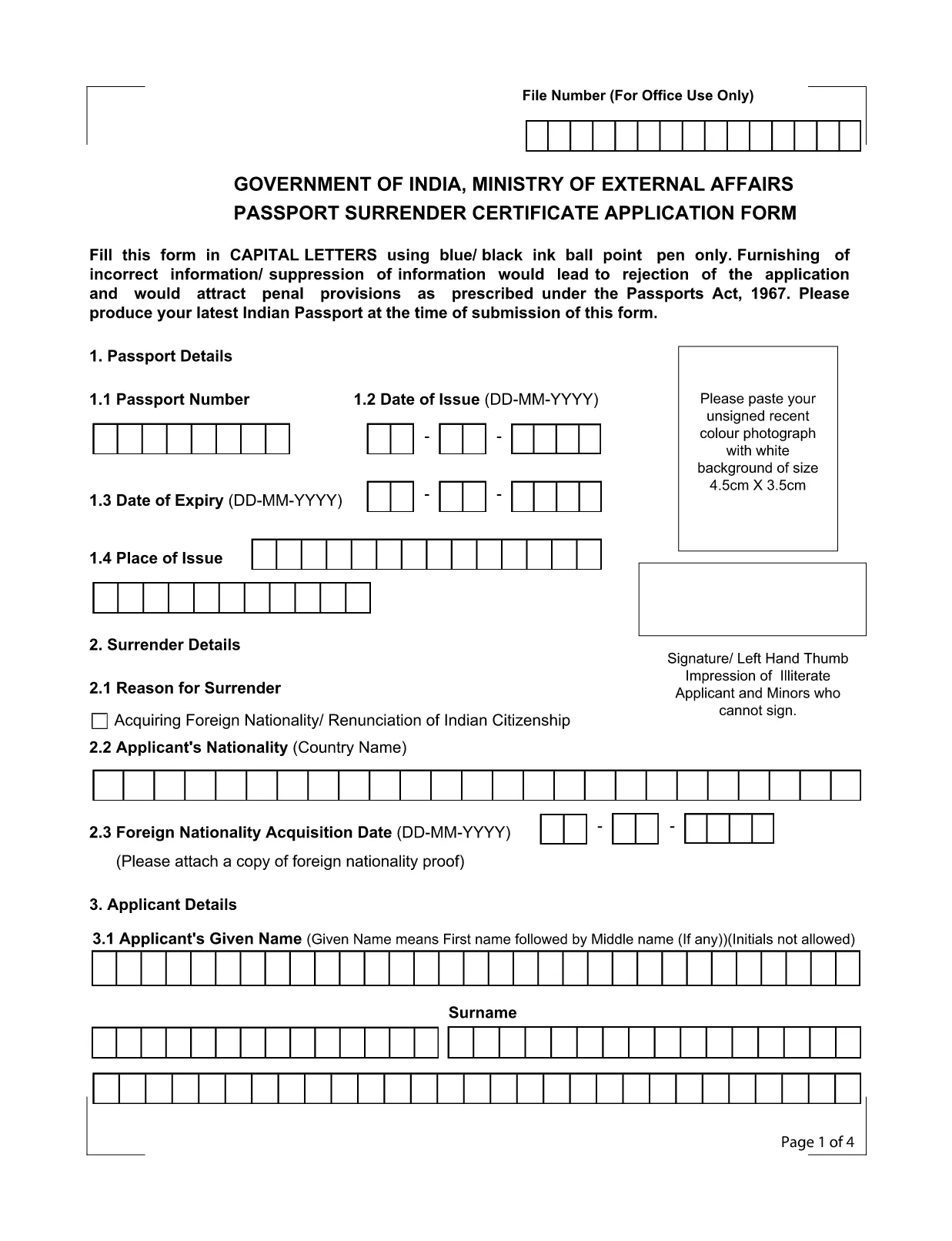
Application Form for Surrender of Indian Passport

  1. 言語 英語
  2. インド
  3. デパートメント 外務省
  4. アクティビティ Passport Surrender
Application Form for Surrender of Indian Passport

The passport surrender form is a mandatory document required by the Ministry of External Affairs when you voluntarily give up your Indian passport. Whether you have acquired foreign citizenship, are moving abroad permanently, or simply need to cancel an unused passport, this official Indian passport surrender application ensures a smooth, legal transition.

What Is the Passport Surrender Form?

This form, officially titled Passport Surrender Certificate Application Form, collects personal details, passport information, and the reason for surrender. It must be filled in capital letters with a blue or black ball‑point pen if printed, but with Formize’s online PDF filler you can type directly, saving time and eliminating illegible handwriting.

How to Fill the Surrender Certificate Online

Follow these simple steps to complete the form using our integrated Formize PDF Filler:

  • Click the "Fill out this form" button on this page.
  • Wait a few seconds while the Formize PDF Filler loads the fillable document.
  • Enter all required information exactly as it appears on your passport.
  • Review each field for accuracy, then click Submit to generate a downloadable copy.

Common Mistakes to Avoid

Even a small error can lead to rejection under the Passports Act, 1967. Keep these tips in mind:

  • Use only capital letters and avoid abbreviations.
  • Do not leave any field blank; write "N/A" where applicable.
  • Ensure the passport number matches the one printed on the document.
  • Provide a valid Indian address for correspondence.

Where to Submit the Completed Form

After completing the fillable PDF, print a clear copy and submit it to the nearest Indian Mission (Consulate or Embassy) along with your original passport. Some missions also accept a scanned copy via email—check the specific mission’s guidelines.

Download the Fillable PDF Instantly

Ready to start? Click the button below to open the official fillable PDF in the Formize PDF Filler. No extra software is required.

よくある質問
  • Do I need to pay a fee to surrender my Indian passport?

    Yes, most Indian missions charge a nominal surrender fee. Check the specific consulate’s website for the exact amount.

  • Can I surrender my passport if I have already obtained foreign citizenship?

    Absolutely. Surrendering your Indian passport is a legal requirement after acquiring another nationality.

  • Is a scanned copy of the form acceptable?

    Some Indian missions accept a scanned, signed PDF, but most require a printed original. Verify the requirements of the mission you will visit.

  • What happens to my passport after surrender?

    The passport is cancelled and returned to the Ministry of External Affairs. You will receive a surrender certificate as proof.

  • Can I fill the form on a mobile device?

    Yes, the Formize PDF Filler works on all modern browsers, including mobile phones and tablets.

  • How long does the surrender process take?

    Processing time varies by mission, typically ranging from 7 to 14 business days after submission.

方法

オンラインで 4 回の簡単なステップで passport surrender form india を無料で入力する方法:

  1. 1
    Click the Fill-out Button
    Press the "Fill out this form" button on the page to launch the Formize PDF Filler.
  2. 2
    Wait for the Filler to Load
    A few seconds later the fillable PDF will appear in the browser. No download needed.
  3. 3
    Enter All Required Details
    Complete each field using capital letters. The filler validates dates and passport numbers automatically.
  4. 4
    Submit, Download, and Print
    After reviewing, click Submit to generate a PDF copy. Print it and take it to the nearest Indian mission.
Formize PDF Filler アプリ
だいたい

郵政省申請フォーム

passport surrender form india は、インド郵便局の公式フォームの 1 つであり、さまざまなサービスにさまざまな申請フォームを提供しています。一般的な申請フォームには次のようなものがあります。

簡易生命保険: このフォームは、郵政省が提供する簡易生命保険の申し込みに使用されます。

普通預金口座: このフォームは郵便局で普通預金口座を開設するために使用されます。

為替: このフォームは、郵便サービスを通じて為替を送信するために使用されます。

書留郵便: このフォームは、書留郵便や小包を郵便サービスを通じて送信するために使用されます。

スピードポスト: このフォームは、スピードポストサービスを通じて小包や書類を送信するために使用されます。

郵便局の月収制度: このフォームは郵便局で月収制度の口座を開設するために使用されます。

特徴

PDFフィラー

オンラインで PDF フォームに記入する最も簡単な方法

  • passport surrender form india をすばやく入力してください
    passport surrender form india をオンラインですばやく入力する方法をお探しですか?オンラインの無料 PDF フォーム フィラーを使用すると、この PDF ドキュメントを 1 分以内に編集して入力する方法がわかります。
  • 使いやすいオンライン PDF エディター
    再スキャンして返送する前に、編集できるように PDF ファイルを印刷することにうんざりしていませんか? PDFドキュメントをオンラインで無料で編集.当社のオンライン PDF エディターを使用して、時間と紙を節約してください。
  • 優れたツール、すべてのプラットフォーム
    Mac で passport surrender form india を入力する方法や、PDF フィラーを無料で使用する方法を知りたいですか?当社のオンライン PDF ツールは、すべてのプラットフォームで動作します。
  • 安全なファイル ストレージ
    完成した「passport surrender form india」ファイルは、Amazon クラウド ホスティングが管理する安全なデータベースに保存されます。いつでもシステムからファイルを削除できます。いずれにせよ、これらのファイルは 24 時間後に自動的に削除されます。
  • {キーワード} とチャットする
    無料の PDF リーダー アシスタントである Chatize で「passport surrender form india」とチャットします。質問すると、「passport surrender form india」から回答が得られます。上の [ドキュメントとチャット] ボタンをクリックするだけです。

フィルセッションを削除

選択したフィルセッションを削除しますか?この場合、フォームへの記入の進捗状況は失われます。

編集セッションを削除する

選択した編集セッションを削除しますか?この場合、フォームの作成および編集の進行状況は失われます。